What Claude Cowork Is, and How to Run Parallel Sessions
Claude Cowork is not how you run multiple Claude Code sessions. Here's what Cowork actually is, plus the 3-agent parallel pipeline that ships working code.
>This covers Cowork and parallel Claude Code sessions. Claude Code: Ship 12 Real Projects in 30 Days goes deeper on subagents, the Agent SDK, and the full multi-agent contract template.
Claude Code: Ship 12 Real Projects in 30 Days
The Hands-On System for Vibe Coding & AI Agents
Summary:
- Claude Cowork is a desktop app for knowledge work, not a multi-session orchestrator.
- Run multiple Claude Code sessions in parallel yourself, in three terminal panes.
- Coordinate them with a shared CLAUDE.md, directory boundaries, and signal files.
- Copy a 3-agent Researcher/Builder/Reviewer pipeline that converges in ~20 minutes.
Claude Cowork keeps getting described as the way to run multiple Claude Code sessions at once. It isn’t. That mix-up sends people hunting for a product setting that doesn’t exist, when the thing they actually want is a technique you wire up by hand in about five minutes. Let me settle both: what Cowork is, and how real parallel Claude Code work actually happens.
What is Claude Cowork, actually?
Claude Cowork is Anthropic’s desktop app for agentic knowledge work. You hand it a task, it works on its own, and it hands back a finished deliverable. Here’s how Anthropic describes it:
Hand off a task, get a polished deliverable. Unlike Chat, Cowork lets Claude complete work on its own. Describe the outcome and cadence, and it takes action and keeps you informed. Come back to the result.
That’s from the Cowork product page. It’s aimed at analysts, ops, finance, and legal work as much as engineering, it runs on paid Claude plans, and it’s in beta. What it is not is a controller for multiple Claude Code terminal sessions. Different product, different job. If your goal is three coding agents running in parallel, Cowork is the wrong door.
So how do you run multiple Claude Code sessions in parallel?
You launch several claude sessions in the same project directory, each in its own terminal pane. Each session gets its own context window and its own focus. They share the filesystem, and that shared filesystem is the communication layer. There is nothing to install and no product to switch on.
I do it with tmux:
tmux new-session -s cowork
# Ctrl+B then %   split vertically
# Ctrl+B then "   split horizontally
# Ctrl+B then arrow keys to move between panes
VS Code’s split terminal works too (click the split button twice), as do Warp’s split panes (Cmd+D, Cmd+Shift+D). The only rule that matters: all three panes visible at once, because you are the orchestrator and you need to watch all three work. In each pane, cd into the project root and run claude.
That’s the entire setup. Three panes, three claude commands, one shared directory. The magic isn’t the setup. It’s the coordination.
The setup that works: three agents, three lanes
Coordination comes down to three things: a shared CLAUDE.md that defines each agent’s role, strict directory boundaries, and file-based handoffs. Put this in your CLAUDE.md:
## Multi-Agent Roles

### Agent 1: Researcher
- Research only. Never write to src/ or reviews/.
- Writes to: research/   Signal file: research/DONE.md

### Agent 2: Builder
- Build only. Consume research/, write to src/.
- Signal file: src/BUILD_COMPLETE.md

### Agent 3: Reviewer
- Review only. Read src/, write to reviews/.
- Signal file: reviews/REVIEW_COMPLETE.md
This is the whole pattern: shared contracts, not shared context. Agents don’t share conversation history. They share files. The Researcher scrapes competitor pricing and writes research/DONE.md. The Builder builds the REST API to spec and writes src/BUILD_COMPLETE.md. The Reviewer tests against the spec and writes reviews/REVIEW_COMPLETE.md. You watch for each signal file, then launch the next agent.
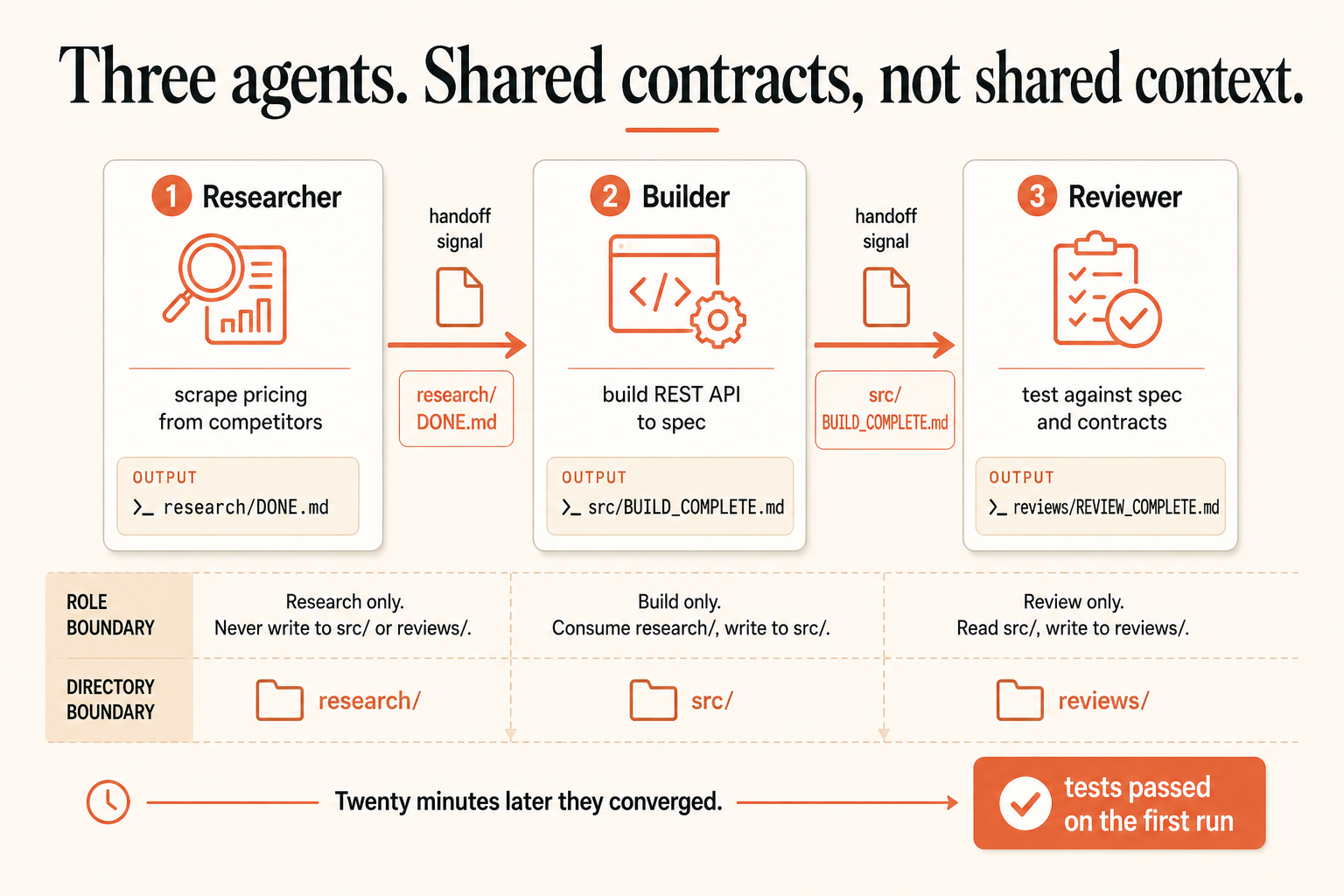
The directory boundaries are not decoration. Merge conflicts between humans are annoying. Merge conflicts between AI agents are catastrophic, because they don’t notice and write over each other. Give each agent exclusive write access to one directory. If it needs another agent’s output, it reads, never writes.
Build it: a 3-agent research-build-review pipeline
The first time I ran this, I had three sessions going: one researching competitor pricing, one building the REST API for a scheduling tool, one writing the tests. Twenty minutes later they converged. The API matched the spec. The tests passed on the first run. Here’s how to reproduce that on a small project, a CLI that checks an npm package for known vulnerabilities against the OSV database.
- Scaffold and write the contract. In a setup session:
mkdir -p vuln-checker/{contracts,research,src,tests,reviews}, then have Claude write the CLAUDE.md roles above pluscontracts/api-spec.md(input, output format, error cases, exit codes). Everybody reads the contract, nobody but you writes it. - Launch Agent 1 (Researcher) in pane two:
You are Agent 1: Researcher. Read CLAUDE.md for your role. Research the OSV API
(https://api.osv.dev/v1/query): auth, rate limits, request/response shape, quirks.
Write findings to research/. When done, create research/DONE.md with key findings
and recommendations for the Builder.- Launch Agent 2 (Builder) once
research/DONE.mdappears, in pane three:
You are Agent 2: Builder. Read CLAUDE.md for your role. Read contracts/api-spec.md
and the research in research/. Build the CLI in src/, initialize package.json,
install deps, and make it runnable. When it works, create src/BUILD_COMPLETE.md.- Launch Agent 3 (Reviewer) once
src/BUILD_COMPLETE.mdappears: tell it to read the contract, reviewsrc/cold, write tests intests/, run them, and log issues toreviews/issues.mdbeforereviews/REVIEW_COMPLETE.md.
The Reviewer reading the code cold is the point. A single agent that writes code and reviews its own work has a blind spot: it knows what it intended, so it reads intention into the code. A separate Reviewer with a clean context window catches what the Builder missed.
Subagents are different from parallel sessions
Parallel sessions are horizontal: three peers, you coordinating. Subagents are hierarchical: one agent spawns a child to handle a subtask, then collects the result. Claude Code does this through the Agent tool, not the Task tool. (The Task tools manage your session’s task list; the Agent tool spawns a subagent.) You can also predefine specialized subagents as markdown files in .claude/agents/.
Use a subagent when one agent hits a tangent that would pollute its context, like “research the best pagination library” mid-build. It spawns a child, the child writes a recommendation file, the parent reads it and keeps going, context intact. Use parallel sessions when you have genuinely separate workstreams running for 20 to 30 minutes each.
What broke: how multi-agent goes wrong
Three failures show up every time, and all three are preventable.
Two agents edit the same file. The Builder is writing src/index.js while the Reviewer “quickly fixes” the same file. One overwrites the other. Prevention is the directory boundaries above. If it still happens, an agent ignored its role; stop both, fix the file by hand, and add an explicit line: “NEVER modify files outside your directory. Document problems in your signal file instead.”
Agent 2 starts before Agent 1 is really done. You see research/DONE.md appear and launch the Builder, but the Researcher was still writing research/libraries.md. Now the Builder reads a half-written file. Prevention: check the signal file’s contents, not just its existence, or wait ten seconds after it appears.
An agent forgets its role mid-session. After fifteen minutes, the Builder starts editing test files. Context drift. The fix is one line: “Re-read CLAUDE.md. You are Agent 2: Builder. You write to src/ only.” The re-read resets its focus, and it works surprisingly well.
What should you actually do?
- If the project is under ~45 minutes of single-agent work: use one agent. A bug fix, a single-file feature, or a script under 200 lines is slower with three agents, not faster.
- If you have two clearly separable concerns (frontend + backend): run two parallel sessions against a shared contract.
- If you’re building full-stack from scratch or the bottleneck is context, not intelligence: run the 3-agent research-build-review pipeline with directory boundaries and signal files.
The bottom line
- Claude Cowork is a desktop knowledge-work app. It is not how you orchestrate Claude Code terminals. Stop looking for a setting.
- The real multi-agent pattern is shared contracts plus directory boundaries plus signal files. Design the handoff first, then launch the agents.
- Don’t spin up three agents to look sophisticated. One focused agent beats three stumbling over each other on anything small.
Frequently Asked Questions
Is Claude Cowork the same as running multiple Claude Code sessions?+
No. Cowork is Anthropic's desktop app for agentic knowledge work that completes tasks and hands back deliverables. Running multiple Claude Code sessions in parallel is a separate manual technique you set up yourself in terminal panes.
What's the difference between the Agent tool and the Task tool in Claude Code?+
The Agent tool spawns a subagent with its own clean context window. The Task tools manage the session's task list. To delegate a subtask to a child agent you use the Agent tool, and you can predefine subagents as markdown files in .claude/agents/.
When is running multiple agents overkill?+
Under about 45 minutes of single-agent work. Bug fixes, single-file features, and scripts under 200 lines are faster with one agent. Multi-agent pays off when context pressure mounts on a project that spans several systems.