How to Make Vibe-Coded Projects Production Ready
The 6-round workflow that turns a Claude Code prototype into a deployed production app with tests, CI/CD, and error handling. Copy-paste prompts included.
>This covers the production-readiness workflow. Claude Code: Ship 12 Real Projects in 30 Days goes deeper on full-stack SaaS deployment, Stripe integration, and multi-agent builds.
Claude Code: Ship 12 Real Projects in 30 Days
The Hands-On System for Vibe Coding & AI Agents
Summary:
- Close the 80/20 gap: vibe coding gets you 80% fast, the last 20% kills projects.
- Run 6 rounds of production hardening with exact Claude Code prompts for each.
- Copy the 10-item production checklist directly into your CLAUDE.md.
- Fix the 3 error scenarios (CORS, infinite loop, silent failure) that hit every first build.
Your terminal shows an error. Red text, stack trace, something about an undefined property on line 47. Good. That means the tests are running, and one of them caught a bug Claude Code introduced three prompts ago.
Vibe coding gets you to 80% fast. In a single morning you can build routes, a frontend, data flowing from an API. If you squint, it looks done. It’s not done. The last 20% is where projects die: error handling for when the API goes down, input validation so nobody injects SQL through your search bar, rate limiting, logging, environment variables so your database password isn’t hardcoded in a public repo.
None of it is glamorous. All of it is required. Here’s the thing though: Claude Code is excellent at the last 20%. If you ask for it. Most people never ask. They see the app running and call it done. It’s not done.
What are the 3 errors every first build hits?
CORS blocking your API call, an infinite render loop eating 100% CPU, and a silent failure where data fields show up empty with no console error. You will hit at least one of these in the first hour.
Error 1: The CORS Wall. The browser console shows Access to fetch has been blocked by CORS policy. Claude’s JavaScript is correct. The API works from a server. Browsers block cross-origin requests.
The API call is blocked by CORS in the browser. Either find a
CORS-friendly alternative endpoint or add a CORS proxy. Do NOT use
cors-anywhere.herokuapp.com, it's always rate-limited.
Claude will switch to an API with CORS headers or set up a proxy.
Error 2: The Infinite Render Loop. The page flickers. The browser tab’s memory climbs. CPU hits 100%. Claude wrote a setInterval or state update that triggers a re-render that triggers another state update.
There's an infinite render loop. The page is flickering and consuming
100% CPU. Check for setInterval calls that trigger state updates, or
event listeners that fire their own events. Add a guard condition.
Describing the symptom precisely matters. “It’s broken” doesn’t help. “The page is flickering and CPU is at 100%” does.
Error 3: The Silent Failure. The app loads. It looks fine. Where data should be, there’s nothing. No console error. No loading spinner. Empty cards. Claude wrapped the API call in a try-catch that swallows the error, or the JSON path is wrong.
The dashboard loads but data fields are empty. No console errors.
Add console.log statements to trace the API response and find where
the data path breaks. Make sure errors aren't being silently caught.
Here’s what swallowed exceptions look like in practice:
// Bad: swallowed exception
try { await processPayment(order) } catch (e) { /* ignore */ }

// Good: log and handle
try { await processPayment(order) } catch (e) {
  logger.error('Payment failed', { orderId: order.id, error: e.message })
  throw new AppError('Payment processing failed', 500)
}
All three share a pattern: describe the symptom, not just the desired outcome. “Fix the dashboard” tells Claude nothing. “The temperature fields are empty, no console errors” tells it exactly where to look.
What does the 6-round production workflow look like?
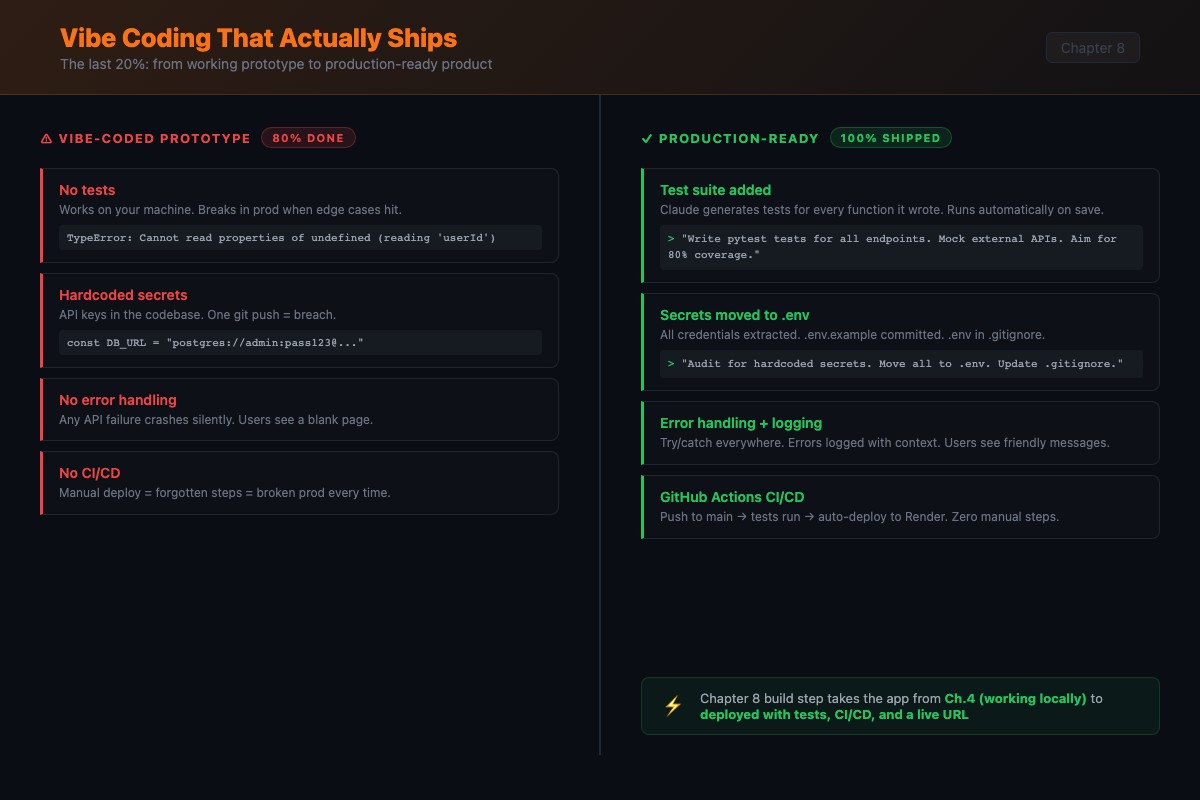
Round 1: Tests.
Add full test coverage. Use Vitest. Cover every API endpoint with
happy path, error, and edge case tests. Mock external API calls.
Run all tests and fix failures. Target: zero failing tests.
After the first pass, push deeper:
Add tests for: empty API responses, malformed JSON from external
APIs, network timeouts, and concurrent requests to the same endpoint.
Run everything.
The first pass catches obvious failures. The second catches the bugs that wake you up at 2 AM.
Round 2: Error handling and security.
Audit the entire codebase for error handling gaps. Add try-catch with
specific error types for all external calls. Add input validation for
all user-facing endpoints. Check for hardcoded secrets. Add rate
limiting middleware. Add .env.example. Don't swallow errors silently.
Then the adversarial test:
Test every endpoint with: empty strings, null values, missing fields,
extremely long strings (10,000 chars), SQL injection strings, and
script tags. Report which ones break.
If you want a structured checklist for this round, the OWASP Top 10:2025 is the industry standard. Here are the top five risks your vibe-coded app is most likely to ship with:
| # | Risk | What it means for your app |
|---|---|---|
| A01 | Broken Access Control | Users can act outside their intended permissions |
| A02 | Security Misconfiguration | Default credentials, open cloud storage, verbose errors |
| A03 | Software Supply Chain Failures | Vulnerable npm/pip packages you never audited |
| A05 | Injection | SQL, NoSQL, or OS command injection via user input |
| A10 | Mishandling of Exceptional Conditions | Failing open, swallowed errors, leaked stack traces |
A01 and A05 are exactly what the adversarial test above catches. A10 is the “silent failure” pattern from Error 3.
Round 3: CI/CD.
Set up GitHub Actions CI. On push and PR to main: install deps,
lint, test. Fail on any error. Keep it simple.
Claude generates the YAML and it’s usually correct on the first try:
name: CI
on:
  push:
    branches: [main]
  pull_request:
    branches: [main]

jobs:
  test:
    runs-on: ubuntu-latest
    steps:
      - uses: actions/checkout@v4
      - uses: actions/setup-node@v4
        with:
          node-version: 20
      - run: npm ci
      - run: npm run lint
      - run: npm test
Round 4: Environment config. Create .env.example with every variable. Create .env.test for tests. Verify .env is in .gitignore. Audit for hardcoded values.
Round 5: Deploy. Configure for your platform (Vercel, Railway, Fly.io). Add a /health endpoint. Test the deployed version with the same edge cases.
Round 6: Final audit. Run the production checklist.
What goes in the production checklist?
Copy this into your CLAUDE.md. Tell Claude: “Audit this project against the production checklist. Report pass or fail for each item.”
## Production Checklist
1. All tests pass. Not most. All.
2. No hardcoded secrets anywhere in the codebase.
3. Error handling on every external call. No silent failures.
4. Input validation on every user-facing endpoint.
5. Rate limiting is active (100 req/min per IP minimum).
6. .env.example is complete and up to date.
7. Health check endpoint exists (GET /health returns 200 JSON).
8. Logging with timestamps, context, and stack traces.
9. CI pipeline runs on every push. Failing CI blocks merge.
10. App runs in production mode, not development mode.
Claude goes through each item and tells you exactly what’s missing.
Verify each round: After each hardening round, run the test suite, check Sentry for new errors, and confirm rate limits respond correctly. Don’t move to the next round until the current one passes.
What does Claude Code get wrong with tests?
Three consistent blind spots.
Blind spot 1: Under-tests async behavior. If your code has race conditions, Claude rarely writes tests that expose timing issues. Prompt specifically: “Write a test where the second API call resolves before the first. Does the code still work?”
Blind spot 2: Over-mocks. Claude mocks everything, so tests pass even when real integration is broken. Add at least one integration test: “Write one integration test for the full request cycle, no mocks, using the test database.”
Blind spot 3: No test data cleanup. Tests that create database records but never delete them pass individually and fail together. Always prompt: “Make sure each test cleans up after itself. Use beforeEach/afterEach hooks.”
What should you actually do?
- If your app works locally but you haven’t tested edge cases: run Round 2 (error handling) and the adversarial test prompt. Those two prompts alone catch 70% of production bugs.
- If you have tests but no CI: run Round 3. Five minutes of Claude time gives you automated verification on every push.
- If you’re deployed but not confident it’s solid: copy the 10-item checklist into your CLAUDE.md and run the final audit. Fix whatever comes back red.
bottom_line
- Vibe coding is not the problem. Stopping at the vibe is the problem. The production-readiness workflow takes an hour and catches the bugs that would take days to debug in production.
- The adversarial test prompt (“test every endpoint with empty strings, null values, SQL injection strings”) is the single highest-value prompt in this workflow. It breaks things you didn’t know were breakable.
- Copy the 10-item production checklist into every project’s CLAUDE.md. Claude audits itself against it on command. That checklist is your ship-it gate.
Frequently Asked Questions
How long does it take to make a vibe-coded app production ready?+
About an hour for a small app, two hours for a full-stack project. The 6-round workflow covers tests, error handling, security, CI/CD, environment config, and deployment. Most of the time is Claude iterating on test failures.
Is vibe-coded production code as reliable as hand-written code?+
With the production-readiness workflow, yes. The tests, error handling, and security audit catch the same issues a manual code review would. The code is functionally equivalent. Without the workflow, vibe-coded apps have more silent failures and missing edge cases than hand-written code.
What's the most common production bug in vibe-coded apps?+
Silent failures from swallowed errors. Claude Code's instinct is to wrap things in try-catch and return null instead of surfacing the problem. Always include 'don't swallow errors silently' in your prompts.