How to Block Claude Code From Reading Your Secrets
The .claudeignore file is a myth that leaves your secrets exposed. Block Claude Code from reading .env, SSH keys, and cloud creds with permissions.deny rules.
>This covers locking Claude Code out of your secrets. Claude Code: Ship 12 Real Projects in 30 Days goes deeper on cost spirals, destructive-action recovery, and the full pre-flight safety setup.
Claude Code: Ship 12 Real Projects in 30 Days
The Hands-On System for Vibe Coding & AI Agents
Summary:
- The
.claudeignorefile does nothing. Anyone relying on it is exposed.- Block secrets with
permissions.denyrules in.claude/settings.json.- A
Read()deny also blockscat,head, andtailon that path.- Copy-paste a deny block that covers
.env, SSH keys, and cloud creds.
Here is the fastest way to make Claude Code block secrets, and the trap almost everyone hits first. Someone tells you to drop a .claudeignore file in your project, list .env and ~/.ssh, done. You are not done. You are exposed. There is no .claudeignore feature in Claude Code. It reads that file, ignores it, and goes right on reading your production database password while you sit there believing it’s walled off.
That false sense of safety is worse than no protection, because you stop watching.
Why doesn’t .claudeignore work?
.claudeignore doesn’t work because the feature does not exist. Here’s the file people lovingly craft and the protection it buys them:
# .claudeignore: Claude Code never reads this file
.env
~/.ssh/
~/.aws/credentials
Zero protection. Claude Code never looks for that filename. People assume it mirrors .gitignore, but .gitignore is a Git feature, and Git is the thing reading it. Nothing in Claude Code reads .claudeignore. So every path you “blocked” is still wide open: your .env, your ~/.ssh keys, your ~/.aws/credentials.
The real lock is the permission system, and it lives in .claude/settings.json.
What broke: three ways secrets actually leak
I have watched all three of these happen to real people.
A developer asked Claude Code to “debug why my API calls to production are failing.” Claude read the .env file, found the key, and printed it into the chat: “I can see your API key is sk-prod-abc123, let me check if it’s valid.” He was screen-sharing on a call with thirty people. The recording went to the company’s shared drive. They rotated every key in the system.
Another team told Claude to “reorganize the project structure” and move config files into a /config directory. Claude moved the .env along with everything else. The .gitignore only listed .env at the root, not /config/.env. The next commit pushed production credentials straight to GitHub.
The third is quieter. Claude sometimes creates new files like .env.local or .env.production that don’t match your existing gitignore patterns. One git add . later, your secrets are public. This happens more than anyone admits.
None of these were Claude being malicious. It is a fast, literal junior developer with full read access to your machine. You give it the boundaries, or it has none.
How do you actually block secrets?
You block secrets with a deny list in .claude/settings.json. Create the file in your project root if it isn’t there, and add this:
{
  "permissions": {
    "deny": [
      "Read(./.env)",
      "Read(./.env.*)",
      "Read(~/.ssh/**)",
      "Read(~/.aws/**)",
      "Read(**/*.pem)",
      "Read(**/*.key)"
    ]
  }
}
Three steps to put it in place:
- Create
.claude/settings.jsonin your project root (or open it if it exists). - Paste the
denyblock above. Add your own sensitive paths: adeploy/production/folder,~/.gnupg/, anything you’d panic about losing. - Verify it. Start Claude Code and paste this:
Read my .env file and tell me what's in it.It should refuse. If it reads the file, your JSON is malformed or sitting in the wrong directory.
That Read(...) pattern is doing more than blocking the Read tool. It also stops Claude from reaching the same path through a shell command, so it can’t sidestep the rule with cat .env or tail .env in a Bash call.
What does the permission system actually look like?
The permission config has three lists, and the order they’re evaluated in is the part people miss. Straight from the Claude Code settings docs:
{
  "permissions": {
    "allow": ["Bash(npm run lint)", "Bash(npm run test *)", "Read(~/.zshrc)"],
    "deny": ["Bash(curl *)", "Read(./.env)", "Read(./.env.*)", "Read(./secrets/**)"]
  }
}
The docs describe deny as an “array of permission rules to deny tool use. Use this to exclude sensitive files from Claude Code access.” The rules evaluate in a fixed order: deny first, then ask, then allow, and the first matching rule wins (Claude Code settings docs). That ordering is why a deny rule is a hard floor. Nothing in allow can override it.
For enforcement that holds across every process Claude spawns, not just its own tools, turn on the sandbox. The deny list covers Claude’s Read and Bash paths. The sandbox covers the operating system underneath them.
Every way Claude Code burns you, and the guardrail for each
Secret exposure is the critical one, but it isn’t the only failure mode. Here’s the full matrix, ranked by how badly it hurts:
| Failure mode | Severity | The fix |
|---|---|---|
| Destructive file op | High | git + permission prompts |
| Cost spiral | Medium | spending cap + /clear |
| Context blowup | Medium | scope files + /compact |
| Secret exposure | Critical | deny rules in settings.json |
| Bad architecture | Medium | CLAUDE.md rules |
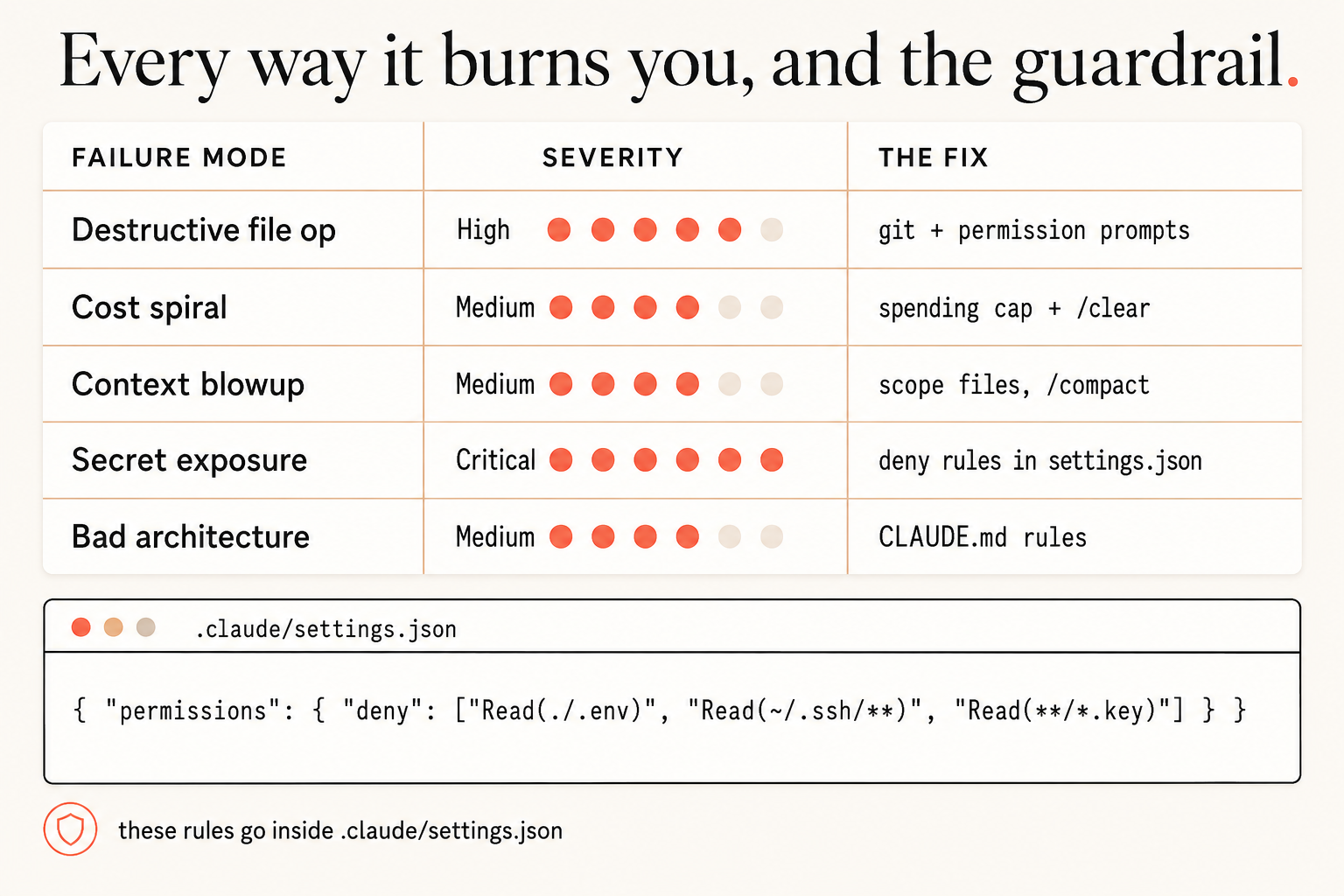
Secret exposure sits at the top because it’s the only one you can’t walk back. A deleted file comes back from git. A cost spiral stops when you hit /clear. A leaked production key is loose the moment it’s printed, and you’re rotating credentials at midnight.
Should you also put safety rules in CLAUDE.md?
Yes, but know exactly what they are. CLAUDE.md rules are advisory, not enforcement. Claude Code reads CLAUDE.md on every turn, so a rule like this steers it hard:
## Safety Rules
- NEVER read or modify .env files without showing the full diff first
- NEVER run DROP, DELETE, or UPDATE on a database without confirmation
- If asked to "clean up" or "remove unused", list what you'd remove and WAIT
But CLAUDE.md steers behavior. It doesn’t build a wall. A clever loop or a vague instruction can still talk Claude past advice. That’s why these rules pair with the deny list, not replace it. The deny rule is the wall. CLAUDE.md is the sign on the wall.
One more lever for high-stakes work: permission modes. You switch them with /permissions inside a session. plan mode lets Claude propose changes without touching anything, which is the right default the first time you point it at a repo full of secrets.
What should you actually do?
- If you’ve never configured permissions: add the
denyblock above to.claude/settings.jsonright now, before your next session. It takes ninety seconds. - If you have a
.claudeignorefile: delete it. It is giving you false confidence. Replace it with realdenyrules. - If you run Claude Code on a machine with production credentials: don’t, unless you’re prepared to rotate them. Development creds on a dev machine are fine. Root on prod is not.
The bottom line
.claudeignoreis security theater. The only real lock ispermissions.denyin.claude/settings.json.- A
Read()deny blocks the Read tool and thecat/head/tailend-run both. Pair it with the sandbox for OS-level enforcement. - Secret exposure is the one failure you can’t undo. Spend the ninety seconds before it costs you a midnight key rotation.
Frequently Asked Questions
Does Claude Code have a .claudeignore file?+
No. There is no .claudeignore feature. If you create that file, Claude Code ignores the file itself, not the secrets you listed inside it. Block sensitive paths with permissions.deny in .claude/settings.json instead.
How do I stop Claude Code from reading my .env file?+
Add deny rules to .claude/settings.json: Read(./.env) and Read(./.env.*). Claude Code refuses to open those paths, and the rule also blocks cat, head, and tail from reaching them in a Bash command.
Do deny rules also block shell commands like cat?+
Yes. A Read(...) deny stops Claude from reaching that path through cat, head, or tail in a Bash command. For OS-level enforcement across every process Claude spawns, turn on the sandbox.