Claude Code vs Claude Chat vs the API: Which to Use
Three products, one name, totally different jobs. When to use Claude Code, Claude Chat, the API, and Cursor, with current per-token pricing for each model.
>This covers picking the right Claude tool. Claude Code: Ship 12 Real Projects in 30 Days is the hands-on path for the building side, from first app to deployed SaaS.
Claude Code: Ship 12 Real Projects in 30 Days
The Hands-On System for Vibe Coding & AI Agents
Summary:
- Three products share the “Claude” name and do completely different jobs.
- Chat for thinking, Code for building, the API for embedding, Cursor for editing.
- A task-to-tool table so you stop reaching for the wrong one.
- Current per-token pricing, so cost is part of the decision.
The Claude Code vs Claude Chat question trips people up because they assume two products with the same name do the same thing. They don’t, and neither does the API or Cursor. Using the wrong one for your task is like hammering a nail with a screwdriver: technically possible, deeply painful, completely unnecessary once you know which tool is which.
I watched a developer spend three weeks pasting code between Claude Chat and his editor to build a Chrome extension. Forty-seven round trips. Someone showed him Claude Code; he described the extension in three sentences and had a working build in nine minutes. He’d been using the wrong tool the whole time.
Claude Code vs Claude Chat: what’s the actual difference?
Claude Chat is a conversation interface with no access to your files; Claude Code is an autonomous agent in your terminal that reads files, writes files, and runs commands until the job is done. That’s the whole distinction. Chat is where you think. Code is where you build.
The mental model that makes Claude Code click: stop thinking of it as a chatbot and start thinking of it as a very fast, very literal junior developer. You’re the project manager. You give direction and context, it does the execution, you review the output. People who treat it like a chatbot get chatbot results. People who treat it like a teammate get production code.
“Autonomous” means it has a loop: attempt, check, fix, attempt again. It writes the code, runs it, reads the error, fixes it, and keeps going. Claude Chat can’t do any of that. It can only talk back.
The four tools, side by side
Here’s the whole Claude toolbox in one view. Match the row to your task.
| Tool | What it does | When to use it | One real example |
|---|---|---|---|
| Claude Chat | Thinking | Reason through a problem. No file access. | Debug a WebSocket race condition |
| Claude Code | Building | Does the work end to end across your project | Add Stripe billing to a Next.js app |
| The API | Embedding | Put Claude’s brain inside your own software | Embed Claude in your own software |
| Cursor | Editing | VS Code with Claude. Fine-grained control. | Rename a variable across 30 files |
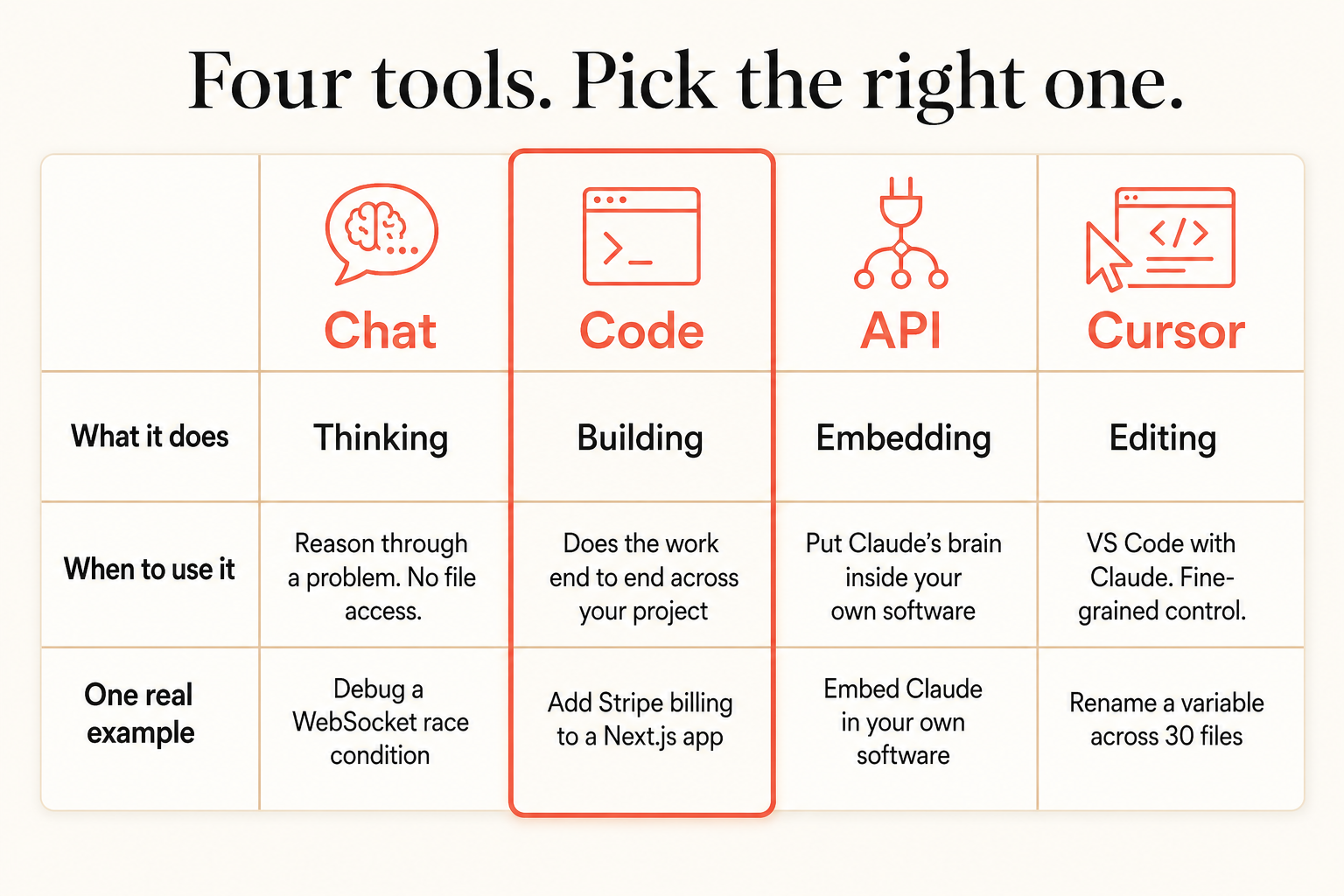
The examples are the fastest way to internalize it. A WebSocket race condition is a sit-and-think problem, so it goes to Chat. Adding Stripe billing touches six files that have to wire together, so it goes to Code. Renaming one variable across thirty files is a find-and-replace, so it goes to Cursor. Embedding Claude inside your own app is the API.
What does each tool actually feel like to use?
Claude Code takes a goal and runs. The Stripe example, in one prompt:
Add Stripe billing to this Next.js app: a pricing page, a checkout API route, a
webhook handler, a subscription-status migration, and middleware that gates
premium features. Wire it together and fix the import errors.
It builds all of it, runs the dev server, and fixes what breaks. In Cursor you’d orchestrate those six files yourself.
Claude Chat is where you go before you build, when you need to reason, not execute:
Walk me through the tradeoffs between Postgres and a document store for a
multi-tenant analytics app. Don't write code. I want to decide before I commit.
Claude Code’s daily rhythm is small, reviewable tasks. A real one: I asked it to refactor a 340-line React “god component” into smaller pieces.
Refactor src/components/UserProfile.tsx into smaller components. Extract the avatar
upload and the edit form into their own components. Keep the existing tests passing.
It read six files, wrote four, ran the tests, fixed the one mock that broke, and finished in about four minutes for roughly $0.80 in tokens. I got coffee while it worked. That’s the loop: you direct, it executes, you review.
What does it cost, so cost is part of the choice
Claude Code and the API both bill per token (Chat and Cursor are flat subscriptions). Current per-million-token pricing:
| Model | Input ($/MTok) | Output ($/MTok) |
|---|---|---|
| Claude Opus 4.7 | $5 | $25 |
| Claude Sonnet 4.6 | $3 | $15 |
| Claude Haiku 4.5 | $1 | $5 |
That’s from the Claude pricing docs. Two things worth knowing. Input tokens are cheap, output tokens cost about five times more, so a long-winded model response literally costs more than a concise one. And the old “Opus costs 5x Sonnet, always downgrade” advice is dead: Opus 4.7 runs about 1.7x Sonnet 4.6 per token now. Use Sonnet 4.6 as your default and reach for Opus 4.7 on the genuinely hard reasoning.
The honest reality check
Most people who bounce off Claude Code do it because they use it like Chat: feeding it one line at a time, reviewing every intermediate step, never letting it build momentum. That’s the screwdriver-on-a-nail mistake in the other direction. Claude Code earns its keep when you give it a clear, well-scoped task and let it run, then review the finished result. If you find yourself micromanaging every file, you either picked the wrong tool (that task wanted Cursor) or you haven’t written a good enough CLAUDE.md yet.
What should you actually do?
- If you’re thinking through a problem or a design decision: Claude Chat. No file access needed, cheaper per exchange.
- If you’re building or shipping something across multiple files: Claude Code. This is its whole reason to exist.
- If you’re putting Claude’s intelligence inside a product you sell: the API.
- If you’re making small inline edits in a file you already understand: Cursor.
The bottom line
- Three products, one name, different jobs. Chat thinks, Code builds, the API embeds, Cursor edits. Match the tool to the task and most of your friction disappears.
- Output tokens cost ~5x input, so concise beats verbose on your bill. Track it.
- Opus 4.7 is ~1.7x Sonnet 4.6 now, not 5x. The “always downgrade to Sonnet” reflex is outdated; default to Sonnet, reach for Opus when the reasoning is genuinely hard.
Frequently Asked Questions
What's the difference between Claude Code and Claude Chat?+
Claude Chat is a conversation interface with no file access; you use it to think through problems. Claude Code is an autonomous agent in your terminal that reads and writes files, runs commands, and builds end to end. Chat for thinking, Code for building.
When should I use the Claude API instead of Claude Code?+
Use the API when you're building a product that has Claude's intelligence inside it, like a support bot or a document analyzer. Use Claude Code when you're building the product itself. Claude Code uses the API under the hood, so you rarely touch it directly.
Is Claude Code or Cursor better?+
Different jobs. Cursor is best for fast inline edits in a file you already understand. Claude Code is best for building features end to end across a whole project. Many developers use Code for building and Cursor for polishing.