How to Set Up CLAUDE.md for Production Projects
The 4-layer CLAUDE.md configuration system that cut feature build time from 34 to 16 minutes. Templates, hooks, custom skills, and the 5 mistakes to avoid.
>This covers the CLAUDE.md system. Claude Code: Ship 12 Real Projects in 30 Days goes deeper on custom skills, multi-agent workflows, and MCP server integrations.
Claude Code: Ship 12 Real Projects in 30 Days
The Hands-On System for Vibe Coding & AI Agents
Summary:
- Build the 4-layer CLAUDE.md system that cuts feature time in half.
- Get a production-ready template with Tech Stack, Conventions, Known Issues, and Do NOT sections.
- Wire pre-commit hooks that catch type errors, secrets, and test failures automatically.
- Avoid the 5 mistakes that make most CLAUDE.md files useless.
Two developers. Same Claude Code subscription. One ships features in 16 minutes. The other spends 34 minutes on the same tasks, burning tokens the whole time. The difference is a text file called CLAUDE.md sitting in the project root.
I tracked this on the same project, same week. Before writing a proper CLAUDE.md: 34 minutes average per feature. After: 16 minutes. The file didn’t make me smarter. It made Claude Code smarter about my project.
How does CLAUDE.md actually work?
CLAUDE.md is a markdown file in your project root that Claude Code reads automatically at the start of every session. It tells Claude your preferences, conventions, and rules so you stop repeating yourself.
Without it, every session starts from zero. You type “remember to use TypeScript” and “put tests in the __tests__/ folder” and “use Tailwind, not vanilla CSS” over and over. That repetition burns tokens and wastes time.
With CLAUDE.md, you write it once. Claude reads it every time.
But the file alone is only one piece. The real system has four layers.
What are the 4 layers of Claude Code configuration?
Claude Code’s configuration stacks four layers, from broadest to most specific. Understanding all four is what separates casual users from productive ones.
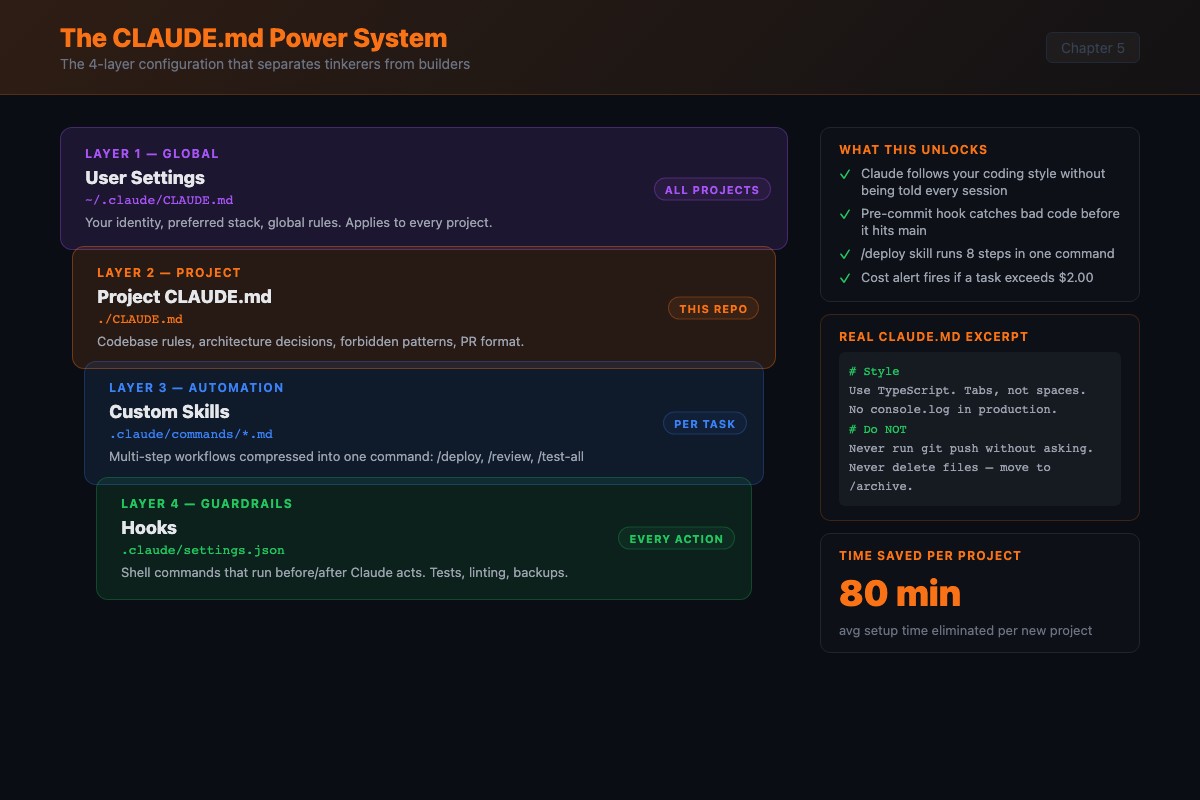
Layer 1: Global settings live in ~/.claude/settings.json. They apply to every project. Put things here that are always true about you: default permissions and allowed tools. MCP servers live separately in ~/.claude.json (global) or .mcp.json (per-project).
Token budget: CLAUDE.md loads into every exchange. A 200-line file at ~4 tokens/line burns ~800 tokens per turn before you type anything. Keep it lean.
Layer 2: Project CLAUDE.md lives at your project root. This is the big one. Coding conventions, file structure, testing patterns, known gotchas.
Layer 3: Custom skills are markdown files in .claude/commands/ that define reusable workflows. Instead of typing a five-paragraph prompt, you invoke /project:deploy and Claude executes the whole sequence.
Layer 4: Hooks are scripts that run automatically before or after Claude takes certain actions. Pre-commit hooks that lint code. Secret scanners that block credential leaks.
The layers stack. Global provides the base. CLAUDE.md overrides it. Skills add callable workflows. Hooks add automatic enforcement.
What goes in a production CLAUDE.md?
From the official Claude Code best practices: keep CLAUDE.md under 200 lines, include bash commands and code style rules, and add rules iteratively when you catch recurring mistakes. Start simple.
Here’s the skeleton I use on every project. Every instruction is concrete, not vague.
# Project: [Your Project Name]

## Tech Stack
- Language: TypeScript (strict mode, no `any` types)
- Framework: Next.js 14 with App Router
- Styling: Tailwind CSS, no custom CSS files
- Database: Supabase (PostgreSQL)
- Testing: Vitest for unit, Playwright for e2e

## File Structure
- Pages go in `app/` using App Router conventions
- API routes go in `app/api/`
- Shared components go in `components/`
- Utility functions go in `lib/`
- Tests mirror source structure in `__tests__/`

## Coding Conventions
- Named exports only, no default exports
- Functional components only, no class components
- Error handling: always use try/catch with specific error types
- No console.log in production code (use the logger in lib/logger.ts)
- Max function length: 30 lines. If longer, refactor.

## Known Issues
- The Supabase connection sometimes drops in dev mode. If you see
  ECONNREFUSED, restart the dev server. Don't try to fix the code.
- The /api/webhooks route uses raw body parsing. Don't add JSON
  middleware to it.

## Do NOT
- Modify the database schema without explicit permission
- Install new dependencies without asking first
- Change the authentication flow
- Remove any existing tests
Notice the “Known Issues” section. Without it, Claude encounters the Supabase connection drop, diagnoses it as a code problem, and spends 15 minutes (and your tokens) trying to fix something solved by restarting the dev server. Two sentences prevent that entirely.
The “Do NOT” section is just as important. I once had Claude “helpfully” upgrade my database schema during what was supposed to be a CSS fix. No warning. No prompt. Just decided the schema needed updating while I asked for a font change.
How do you wire pre-commit hooks?
CLAUDE.md tells Claude what to do. Hooks verify it actually did it. Create .claude/hooks/pre-commit.sh:
#!/bin/bash
# Run TypeScript compiler
npx tsc --noEmit
if [ $? -ne 0 ]; then
  echo "TypeScript errors found. Fix before committing."
  exit 1
fi

# Run linter
npx eslint . --ext .ts,.tsx
if [ $? -ne 0 ]; then
  echo "Lint errors found. Fix before committing."
  exit 1
fi

# Run tests
npx vitest run
if [ $? -ne 0 ]; then
  echo "Tests failed. Fix before committing."
  exit 1
fi

echo "All checks passed."
Make it executable: chmod +x .claude/hooks/pre-commit.sh
I watched Claude catch its own type error through this hook, read the compiler output, fix the type definition, and re-commit successfully. Twelve seconds. No typing from me.
Here’s a second hook that has saved me twice. A secret scanner:
#!/bin/bash
# .claude/hooks/pre-commit-secrets.sh
PATTERNS="API_KEY=|SECRET_KEY=|password=|token=.*['\"][a-zA-Z0-9]{20}"
MATCHES=$(grep -rn -E "$PATTERNS" --include="*.ts" --include="*.tsx" \
  --include="*.js" --include="*.env" . | grep -v node_modules | grep -v .env.example)

if [ -n "$MATCHES" ]; then
  echo "BLOCKED: Possible hardcoded secrets detected:"
  echo "$MATCHES"
  exit 1
fi
echo "No secrets detected."
Claude sometimes hardcodes API keys during development, especially when you paste a key into the chat. This scanner catches it before commit.
What does CLAUDE.md change in practice?
Same task: “Add a new endpoint to handle user profile updates.”
Without CLAUDE.md: Claude creates routes/userProfile.js (JavaScript, not TypeScript). Uses module.exports (CommonJS, not ES modules). No input validation. No error handling beyond a generic catch. No tests. The file works technically but matches nothing in your project. You spend 20 minutes rewriting.
With CLAUDE.md: Claude creates app/api/user-profile/route.ts (TypeScript, correct directory, kebab-case). Adds Zod validation. Wraps the handler in try/catch with specific error types. Creates __tests__/api/user-profile.test.ts with four tests. Uses your logger instead of console.log. Drops into your codebase like it was written by someone on the team for six months.
That’s not a small difference.
What broke when I got CLAUDE.md wrong?
Five mistakes I made (and found in dozens of other configs):
Mistake 1: Too vague. “Write clean, maintainable code” does nothing. Claude already tries that. Replace with specifics: “Functions must have JSDoc comments with @param and @return tags.”
Mistake 2: Too long. 2,000 lines is a novel, not a config. Every line burns tokens. Keep it under 200 lines. If you need more, split things into skills.
Mistake 3: Contradictory rules. One section says “always use default exports.” Another says “named exports only.” Claude picks one silently. Audit your file for conflicts.
Mistake 4: Rules that fight the framework. A CLAUDE.md that says “all imports must use require()” in a pure ESM project. Claude follows the rule. The code crashes on every import.
Mistake 5: No “Do NOT” section. People tell Claude what to do but never what to avoid. Without explicit guardrails, Claude occasionally installs packages, restructures directories, or modifies config files you didn’t ask it to touch.
How do you add custom skills?
Skills turn multi-step workflows into one-line commands. Create .claude/commands/new-endpoint.md:
---
description: Create a new API endpoint with full test coverage
---

Create a new API endpoint based on the user's description.

## Steps
1. Create the route file in `app/api/` following existing patterns
2. Add input validation using Zod schemas
3. Implement the handler with proper error handling
4. Write unit tests covering:
   - Happy path with valid input
   - Invalid input returns 400
   - Missing auth returns 401
   - Server error returns 500
5. Run the tests and fix any failures
6. Update the API documentation in docs/api.md
Invoke it: /project:new-endpoint POST /api/users/settings - accepts user preferences object, stores in Supabase
Claude reads the skill, follows the steps, creates the route, writes tests, runs them, updates docs. What used to be 10 minutes with multiple prompts is one line and 90 seconds. Skills compose with your CLAUDE.md: the endpoint follows your naming conventions, your error handling patterns, your test structure.
What should you actually do?
- If you have no CLAUDE.md: copy the template above, customize the Tech Stack and File Structure sections for your project, and run one task without mentioning any conventions in your prompt. Verify Claude follows the rules.
- If you have a basic CLAUDE.md but no hooks: add the pre-commit hook. Deliberately introduce a type error and verify the hook catches it.
- If you already have CLAUDE.md and hooks: add at least one custom skill for a workflow you run twice a week. Measure whether it saves time.
bottom_line
- The file is not the system. The 4-layer stack (global settings, project CLAUDE.md, skills, hooks) is the system. Most guides only cover the file.
- Specificity beats length. “No
anytypes in TypeScript” is worth more than 50 lines of “write clean code.” - Your CLAUDE.md is your product. The code Claude generates is output. The system that generates it is the asset you carry to every future project.
Frequently Asked Questions
How long should a CLAUDE.md file be?+
Under 200 lines. Every line burns tokens on every exchange. A focused 100-line file outperforms a sprawling 2,000-line one because LLMs follow fewer instructions more reliably.
Does CLAUDE.md work with Cursor or just Claude Code?+
CLAUDE.md is specific to Claude Code. Cursor uses .cursorrules for a similar purpose. The concepts transfer, but the file format and loading behavior differ.
What happens if my CLAUDE.md has contradictory rules?+
Claude Code picks one and ignores the other. You won't know which until the output is wrong. Audit your file for conflicts every two weeks. A rule that says 'always use default exports' alongside 'named exports only' will produce inconsistent code.