How to Connect Claude Code to Databases and APIs with MCP
Wire 3 MCP servers to Claude Code and trigger a cross-service workflow in one prompt. Full GitHub, SQLite, and Fetch setup with a debugging checklist.
>This covers MCP server setup. Claude Code: Ship 12 Real Projects in 30 Days goes deeper on multi-agent workflows, custom MCP servers for internal APIs, and production deployment.
Claude Code: Ship 12 Real Projects in 30 Days
The Hands-On System for Vibe Coding & AI Agents
Summary:
- Connect Claude Code to GitHub, SQLite, and a Fetch server in under 10 minutes.
- Build a cross-service workflow that queries all three in a single prompt.
- Get the debugging checklist that fixes 90% of MCP connection failures.
- Copy a 30-line custom MCP server skeleton for wrapping any internal API.
Without MCP servers, Claude Code is smart but blind. It can see your local files and nothing else. Ask it what’s happening on GitHub, or what’s in your database, or what a customer posted on Slack, and it shrugs.
MCP servers are the doors. Each one you connect punches an opening in that wall. I connected the GitHub MCP server and asked Claude to review my last five pull requests for patterns. Forty seconds later, it told me 60% of my recent bugs were in error handling code. It was right. I’d been sloppy with try/catch for months but never noticed because I reviewed PRs one at a time.
How do you set up the GitHub MCP server?
Add it to your project’s .mcp.json in the project root:
Config file: MCP servers go in
.mcp.json(project root) or~/.claude.json(global). The.claude/settings.jsonfile handles permissions only. You can also runclaude mcp add github --scope projectto generate this automatically.
{
  "mcpServers": {
    "github": {
      "command": "npx",
      "args": ["-y", "@modelcontextprotocol/server-github"],
      "env": {
        "GITHUB_PERSONAL_ACCESS_TOKEN": "your-token-here"
      }
    }
  }
}
You need a GitHub Personal Access Token. Go to github.com > Settings > Developer Settings > Personal Access Tokens > Fine-grained tokens. Create one with read access to your repositories. Add write access if you want Claude to create issues or comment on PRs. Name it claude-code-mcp so you remember what it’s for. Set expiration to 90 days.
One thing to watch: don’t nest quotes around the token. "'ghp_abc123'" with extra quotes is a 20-minute debugging session.
Restart Claude Code, then test:
List my 5 most recently updated GitHub repositories.If your repos appear, the connection works.
How do you add a database connection?
Add SQLite alongside GitHub in the same .mcp.json file. Zero server setup required.
{
  "mcpServers": {
    "github": {
      "command": "npx",
      "args": ["-y", "@modelcontextprotocol/server-github"],
      "env": {
        "GITHUB_PERSONAL_ACCESS_TOKEN": "your-token-here"
      }
    },
    "sqlite": {
      "command": "npx",
      "args": ["-y", "@modelcontextprotocol/server-sqlite", "project.db"]
    }
  }
}
The last argument (project.db) is your database file. It gets created automatically if it doesn’t exist. Restart Claude Code and test:
Create a table called 'tasks' with columns: id (integer primary key),
title (text), status (text), created_at (datetime), and github_issue_id
(integer). Insert 5 sample tasks.
For PostgreSQL in production, create a read-only user:
CREATE USER claude_readonly WITH PASSWORD 'secure-password';
GRANT CONNECT ON DATABASE mydb TO claude_readonly;
GRANT USAGE ON SCHEMA public TO claude_readonly;
GRANT SELECT ON ALL TABLES IN SCHEMA public TO claude_readonly;
Claude Code can run any query the connection string allows. If you hand it write access to production, it will DROP TABLE if you ask. Read-only is the right default.
How do you build a cross-service workflow?
Add the Fetch server for general HTTP access:
{
  "mcpServers": {
    "github": { "..." },
    "sqlite": { "..." },
    "fetch": {
      "command": "npx",
      "args": ["-y", "@anthropic/mcp-server-fetch"]
    }
  }
}
Restart Claude Code. Now you have three servers running. Here’s the prompt that makes them sing together:
Fetch the top 5 trending GitHub repos today. For each one, check if I've
already starred it (using the GitHub MCP server). For any I haven't
starred, create a task in my database with the repo name, URL, star count,
and status "to-review".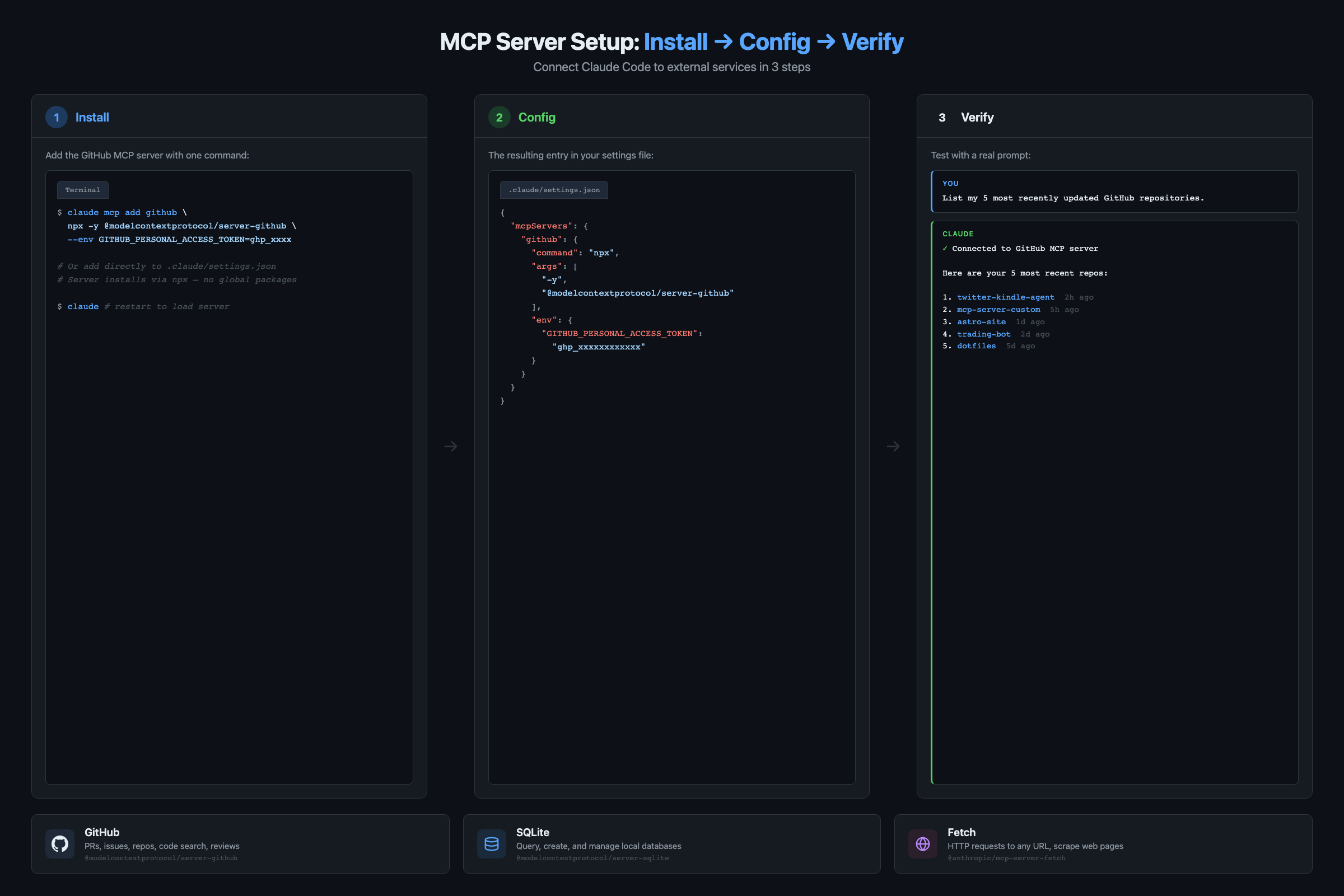
Three services. One prompt. Fifteen seconds. Claude fetches trending repos, checks your GitHub stars, writes new entries to your database. Done.
You didn’t write an integration script. You didn’t handle API authentication, pagination, or data transformation. You described the destination and Claude found the route.
The combinations are the real power. Two servers don’t give you double the value. They give you the cross-product of both. Three servers give you workflows that would take a developer hours to wire up manually.
What breaks and how do you fix it?
Here’s the diagnostic checklist I run through every time an MCP connection fails:
- Is the JSON valid? Missing commas are the #1 offender. Run your
.mcp.jsonthrough a validator. - Does the npx command work standalone? Open a terminal and run
npx -y @modelcontextprotocol/server-github. If it throws an error, the problem is the package, not Claude Code. - Are your credentials correct and not expired? GitHub tokens expire. Database passwords rotate.
- Is Node.js v18 or higher installed? MCP servers need it. Run
node --version. - Did you restart Claude Code? MCP servers only load at startup. This catches me at least once a month.
- Can you see the tools? Run
/mcpin Claude Code to check connected servers. Runclaude mcp listin a terminal for a full inventory.
Three common failure modes:
Server starts but no tools appear. Claude connects but reports no available tools. Usually means the server started in an error state. A GitHub server with an invalid token launches fine but exposes zero tools because every operation needs auth. Check your environment variables.
Authentication failures mid-session. Was working, suddenly errors. Your token expired, or you hit a rate limit. GitHub allows 5,000 requests/hour for authenticated users. Heavy PR analysis burns through that.
Context bloat. Each server adds tool descriptions to Claude’s context. Ten servers fill the window with metadata before you ask a question. Stick to three or four per session.
How do you build your own MCP server?
If you have an internal API nobody else uses, a custom MCP server is about 30 lines:
import { McpServer } from "@modelcontextprotocol/sdk/server/mcp.js";
import { StdioServerTransport } from "@modelcontextprotocol/sdk/server/stdio.js";
import { z } from "zod";

const server = new McpServer({
  name: "my-custom-server",
  version: "1.0.0"
});

server.tool(
  "get_company_data",
  "Fetches internal company metrics from our API",
  { metric: z.string(), timeRange: z.string().optional() },
  async ({ metric, timeRange }) => {
    const response = await fetch(
      `https://internal-api.company.com/metrics/${metric}?range=${timeRange || "7d"}`
    );
    const data = await response.json();
    return {
      content: [{ type: "text", text: JSON.stringify(data, null, 2) }]
    };
  }
);

const transport = new StdioServerTransport();
await server.connect(transport);
That’s a working MCP server. One tool, typed parameters, fetch logic. Add it to .mcp.json like the others and Claude can query your company metrics by name.
From the MCP Server Registry on GitHub, over 200 community servers exist covering Slack, Jira, Notion, AWS, and more. Check it before building your own.
Security warning: Third-party MCP servers run code on your machine. Review the source code before installing community servers. Anthropic’s official docs recommend treating MCP servers with the same caution as any third-party dependency.
What should you actually do?
- If you’ve never used MCP: install the GitHub server first. It’s the most immediately useful and the setup is straightforward. Test with
List my repositoriesbefore adding anything else. - If you have one server running: add SQLite and the Fetch server. Then run a cross-service prompt that hits all three. The combined workflow is where MCP stops being a feature and becomes a force multiplier.
- If you already use MCP: build a custom server for an internal API your team uses. Open-source MCP servers that solve real problems get noticed fast in the community.
bottom_line
- MCP is not about any single connection. It’s about the combinations. Each server you add multiplies useful interactions with every other server.
- Start with three servers: GitHub (code), SQLite (data), Fetch (web). That covers 90% of real development workflows.
- The debugging checklist (valid JSON, standalone npx test, credential check, Node version, restart) fixes nearly every connection failure in under 5 minutes.
Frequently Asked Questions
How many MCP servers should I run at once?+
Three or four. Each server adds startup time and token overhead because Claude needs to load all tool descriptions into context. Ten servers will fill your context window before you ask a question.
Is my data sent to Anthropic when I use MCP servers?+
MCP servers run locally on your machine. Database queries execute on your hardware. Credentials never leave your computer. The query results do enter Claude's conversation context, so don't query sensitive production data in a session you might share.
Can I use MCP servers with Cursor or just Claude Code?+
MCP is an open protocol. Cursor, VS Code with the Claude extension, and other tools are adding MCP support. The server configs in this article work across any MCP-compatible client.