How to Cut Claude Code Costs by 50% with Context Management
Real Claude Code spend data from 30 days of building a SaaS app ($98.20 total). 5 context tricks that halve your token bill plus a .claudeignore template.
>This covers cost control. Claude Code: Ship 12 Real Projects in 30 Days goes deeper on the full cost audit system, model selection strategy, and when to use Cursor instead.
Claude Code: Ship 12 Real Projects in 30 Days
The Hands-On System for Vibe Coding & AI Agents
Summary:
- See real 30-day spend data: $98.20 total for a production SaaS, broken down by task type.
- Apply 5 context management techniques that measurably cut token consumption.
- Copy the .claudeignore template that reduces context loading by 30-40%.
- Run the 10-minute weekly cost audit that catches expensive habits before they compound.
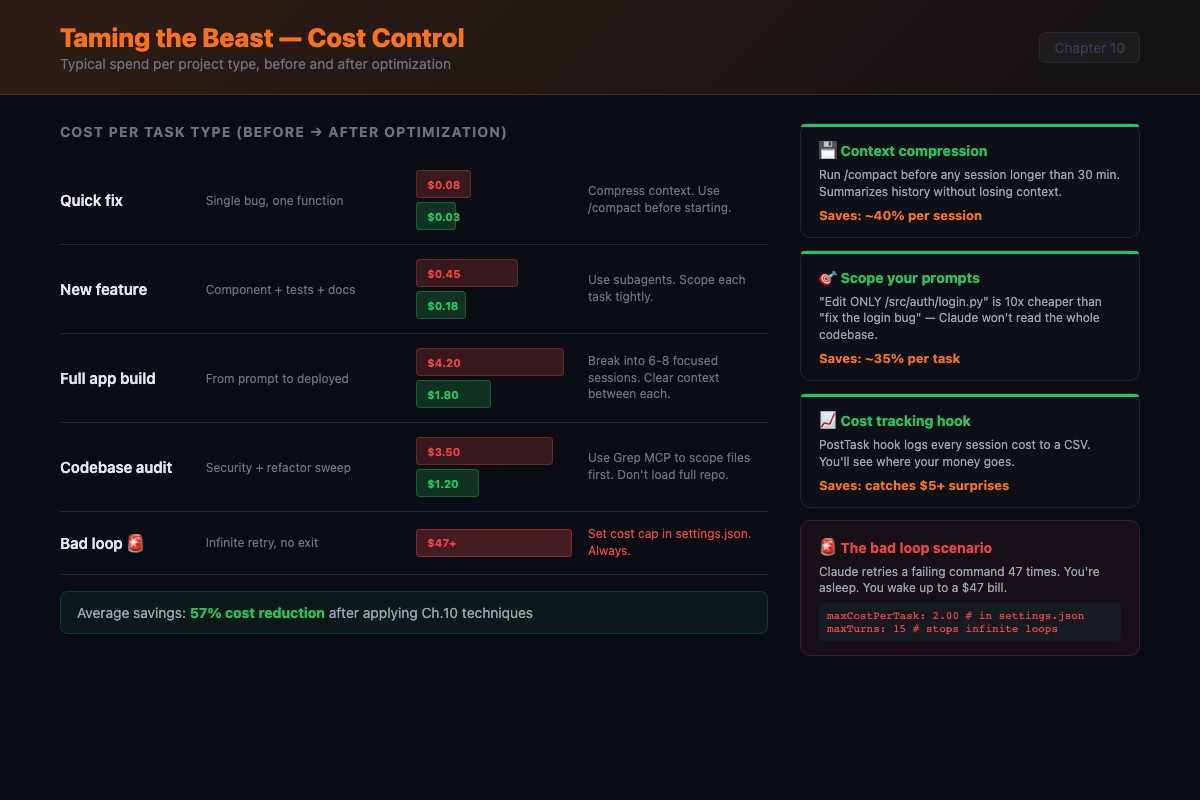
I left a Claude Code session running overnight once. It got stuck in a loop trying to fix a CSS bug. The same bug. Over and over. Each attempt consumed tokens: reading the file, proposing a fix, testing, failing, reading the file again. By morning, it had burned through $47 in API credits. The border-radius was wrong. One-line fix.
That $47 was my tuition payment. Yours will be cheaper because you’re reading this first. Good call.
How does Claude Code pricing actually work?
Input tokens are cheap, output tokens are expensive. Claude Sonnet 4 charges roughly $3 per million input tokens and $15 per million output tokens. When Claude writes a 500-line file, the output costs five times more per token than the input it consumed reading your codebase.
Here are the current API rates from Anthropic’s pricing page:
| Model | Input (per 1M tokens) | Output (per 1M tokens) |
|---|---|---|
| Haiku 4.5 | $1 | $5 |
| Sonnet 4.6 | $3 | $15 |
| Opus 4.6 | $5 | $25 |
Pricing basis: Claude Sonnet 4 at $3/M input, $15/M output. Claude Opus 4 at $15/M input, $75/M output. Check anthropic.com/pricing for current rates.
Anthropic’s own data says the average Claude Code user spends about $6 per developer per day, with 90% of users staying under $12/day. That lines up with the $98 monthly total you’ll see below. The gap between $6/day average and $47 overnight is entirely about runaway sessions.
Long-winded responses cost more. Telling Claude “only show the changed lines” or “don’t explain, just make the change” saves real money.
Here’s what a production SaaS cost over 30 days:
def monthly_cost_breakdown():
    """Real spend data from a production SaaS build"""
    weeks = {
        "Week 1 - Scaffolding":   {"cost": 38.40, "note": "Most expensive. DB, API, auth, UI from scratch"},
        "Week 2 - Features":      {"cost": 24.70, "note": "Cheaper. Adding to existing patterns"},
        "Week 3 - Testing":       {"cost": 19.30, "note": "Tests are cheap. $0.30-1.50 per session"},
        "Week 4 - Deploy+Polish": {"cost": 15.80, "note": "Small configs, edge case fixes. Avg $0.60/session"},
    }
    total = sum(w["cost"] for w in weeks.values())
    # total = $98.20
    return weeks, total
The breakdown by task type tells the real story:
| Task Type | % of Spend | Why |
|---|---|---|
| Scaffolding + new files | 35% | Heavy output generation |
| Debugging loops | 28% | Where optimization lives |
| Feature additions | 20% | Moderate, builds on existing |
| Testing | 10% | Cheap reads, small outputs |
| Config + deployment | 7% | Small files, templates |
That 28% on debugging is the target. Better prompts and knowing when to kill a stuck session would cut that number in half.
What are the 5 context management techniques?
Technique 1: The checkpoint prompt. Every 10-15 exchanges, type: “Summarize what we’ve accomplished, what’s left, and what decisions we’ve made. Then continue.” This forces Claude to compress its own context. Costs a few hundred tokens but prevents drift that happens when context gets stale.
Technique 2: File-scoped sessions. Instead of “work on the app,” say: “We’re only working on src/api/billing.ts and src/api/billing.test.ts in this session. Don’t read or modify other files unless I specifically ask.” Fewer files loaded means more room for actual work.
Technique 3: The clean handoff. Start new sessions with a one-paragraph briefing:
I'm working on a Next.js SaaS app. The auth system is complete. The billing
system is in src/api/billing.ts and uses Stripe. I need you to add a webhook
handler for subscription cancellations. The webhook secret is in .env as
STRIPE_WEBHOOK_SECRET.
That paragraph replaces an entire previous session’s conversation history.
Technique 4: Strategic /compact. Use /compact every 15-20 exchanges, or whenever Claude starts repeating itself. It summarizes the conversation and frees context space. Think of it as defragmenting your session.
Technique 5: Fresh sessions over marathon sessions. Fix the login bug in session 1. Add the API endpoint in session 2. Refactor in session 3. Each starts with a clean context window. Total cost is lower than one bloated session that degrades.
What broke when I let context rot?
I had Claude build a clean API with consistent error handling across 8 endpoints. By endpoint 9, the context was so bloated that Claude lost track of the pattern. Endpoint 9 used a different error format. Endpoints 10-12 used a third format. The code worked but the inconsistency meant I refactored all of it manually. Short-term memory loss from an LLM.
The fix: codify decisions in CLAUDE.md, not in conversation. “All input validation uses Zod schemas” in CLAUDE.md gets read fresh on every turn. The same instruction in exchange 3 gets buried by exchange 30.
How do you set up .claudeignore?
This file works like .gitignore but for Claude Code’s file access. Every file Claude doesn’t need to consider is tokens saved.
# Build output
dist/
build/
.next/
out/

# Dependencies
node_modules/
vendor/
.venv/

# Large data files
*.csv
*.json.bak
fixtures/
seed-data/

# Generated code (biggest win)
*.generated.ts
*.generated.js
prisma/generated/

# Media and binaries
*.png
*.jpg
*.mp4
*.zip

# IDE and OS files
.idea/
.vscode/settings.json
.DS_Store
The most overlooked entry: generated code. Prisma, GraphQL codegen, and OpenAPI generators produce files thousands of lines long. Claude doesn’t need to read them. It needs your schema definitions, not the generated clients. Adding generated files cut context consumption by 30-40% on projects using code generation.
How do you run the weekly cost audit?
Ten minutes every Sunday. Five steps.
def weekly_cost_audit():
    """Run every Sunday. Takes 10 minutes."""
    steps = [
        "1. Open Anthropic dashboard (console.anthropic.com > Usage)",
        "   Check: Are you using Opus when Sonnet would work?",
        "   Opus costs 5x more. Reserve for complex architecture decisions.",
        "",
        "2. Find spike days. What were you working on?",
        "   Legitimate big task, or stuck-in-a-loop session?",
        "",
        "3. Calculate per-task averages.",
        "   Quick fix: $0.05-0.50 | Feature: $1-5 | Scaffold: $5-25",
        "   If you're 2-3x above these, prompts need work.",
        "",
        "4. Find the 80/20 pattern.",
        "   80% of spend comes from 20% of sessions.",
        "   Could those expensive sessions be broken into smaller prompts?",
        "",
        "5. Set next week's budget target.",
        "   Not a hard limit. A number that makes you cost-conscious.",
    ]
    return steps
Set billing alerts: warning at $20/day, hard cap at $50/day. Monthly warning at $150, cap at $300. Having numbers in place before your next session is the single most effective cost control.
Quick benchmark recipe
Run the same 5 prompts on your repo. Record input/output tokens from the usage summary. Compare totals before and after applying context management. Five prompts is enough to see the pattern.
What should you actually do?
- If your bill surprised you last month: copy the .claudeignore template above. Run the same task before and after adding it. Measure the context difference.
- If you’re hitting rate limits on Pro: switch to Max ($100/month) or optimize by breaking big tasks into smaller prompts and starting fresh sessions between them. The optimization is often cheaper than upgrading.
- If you already track costs: run the weekly audit for 4 weeks. The 80/20 pattern will show you exactly where money is being wasted. It’s almost always debugging loops on complex refactors.
bottom_line
- 28% of spend goes to debugging loops. Setting a mental 5-exchange timer and intervening when Claude is stuck is the single highest-ROI habit.
- The .claudeignore template saves 30-40% on projects with generated code. Two minutes of setup, permanent savings.
- Specific prompts are cheap prompts. “Edit src/api/users.ts line 47” costs a tenth of “find where the user API calls are and fix them.”
Frequently Asked Questions
How much does Claude Code cost per month for real projects?+
A production SaaS build ran $98.20 over 30 days. Week 1 (scaffolding) was the most expensive at $38.40. Week 4 (polish and deploy) was cheapest at $15.80. 28% of total spend was debugging loops.
What's the difference between Claude Pro and Claude Max for Claude Code?+
Pro ($20/month) gives a token allowance that runs out fast on real projects. You'll hit rate limits within a few days of heavy use. Max ($100/month) works for daily development. The $200 Max tier is for multi-agent workflows and daily production shipping.
Does the /compact command actually save money?+
Yes. It summarizes your conversation and frees context space. The summarization costs a few hundred tokens but prevents the context bloat that makes every subsequent exchange more expensive. Use it every 15-20 exchanges.