5 Ways Claude Code Will Burn You (And How to Survive)
Five Claude Code failure modes from real builds: hallucinated APIs, bad architecture, context degradation, security gaps, and the it-works trap. Fixes for each.
>This covers where Claude Code fails. Ship It with Claude Code goes deeper on the skills, MCP, and automation that make it work when used correctly.
Ship It with Claude Code
How Developers Are Shipping SaaS Apps and Automating Their Jobs in a Weekend
Summary:
- Five specific Claude Code failure modes that burn real developers, not theoretical risks.
- Each failure comes with a concrete mitigation you can apply today.
- The “it works” trap is the most dangerous because it feels like success.
- Know the walls so you stop running into them at 2 AM on a deadline.
I asked Claude Code to build a URL monitoring SaaS. It recommended microservices. For a solo weekend project. I spent four hours scaffolding Kubernetes configs before realizing a single Express server with SQLite would have shipped by lunch. That’s the kind of mistake this article prevents. Five failure modes, each from a real build, each with a concrete fix.
Does Claude Code hallucinate APIs and libraries?
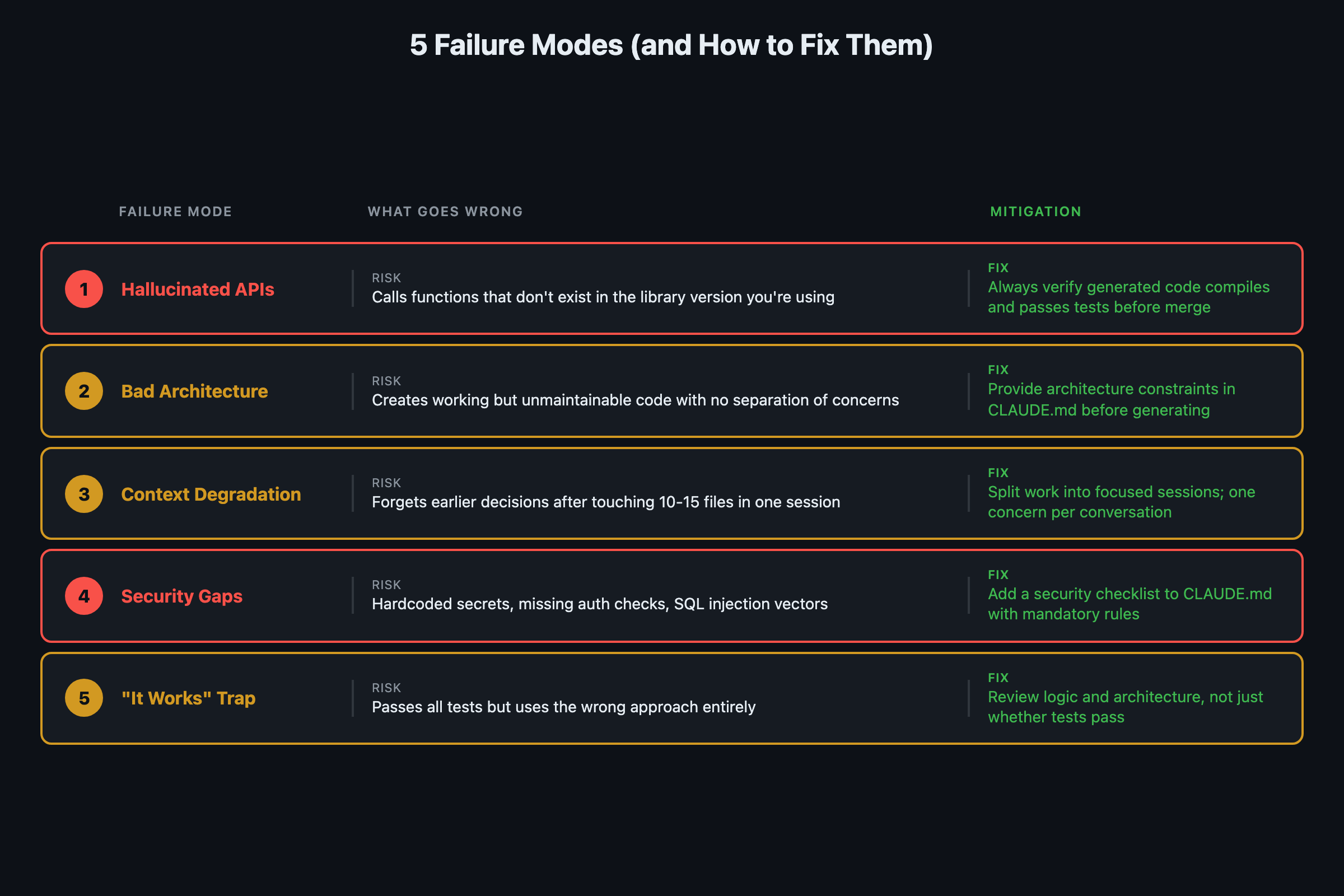
Yes. Not as often as it used to, and not as badly as earlier models. But it still happens, and you need to know when it’s most likely.
Niche libraries. If you are using a library with fewer than a thousand GitHub stars, Claude Code has limited training examples. It will invent method signatures or parameters that look plausible but don’t match the actual API.
Recent API changes. Libraries that shipped breaking changes in recent months trip up Claude Code. Its training data has a cutoff. If the API changed after that cutoff, Claude Code generates code for the old version while you are running the new one.
Cross-language confusion. Working across languages in the same session causes bleed. A Python session might suggest JavaScript-style promises. A Go session might use try/catch instead of error returns.
def verify_before_merge(code_output: str) -> dict:
    """
    The hallucination mitigation checklist.
    Run this mentally before accepting any Claude Code output.
    """
    checks = {
        "ran_the_code": False,      # Did you execute it?
        "tests_pass": False,         # Did you run the test suite?
        "imports_exist": False,      # Do all imported modules actually exist?
        "api_signatures_match": False,  # Do function calls match real docs?
        "no_copy_paste_without_run": False,  # Never merge unexecuted code
    }
    return checks
The fix is always verification. Run the code. Run the tests. The developers who report the worst experiences with AI coding tools are consistently the ones who copy-paste without executing first.
Why is Claude Code bad at architecture decisions?
Claude Code is a skilled implementer but a mediocre architect. Give it a clear architecture and it builds it beautifully. Ask it to choose the architecture and you get something that works but misses the tradeoffs that matter for your situation.
The reason: architecture decisions depend on context Claude Code does not have. How many users will this serve? What is the team’s experience level? What are the compliance requirements? What is the budget?
| Decision Type | Claude Code Quality | Why |
|---|---|---|
| Implement a feature to spec | Excellent | Clear constraints, pattern matching |
| Choose between two approaches | Decent | Can list tradeoffs if you ask |
| Design system architecture | Poor | Defaults to popular blog-post patterns |
| Pick the right scale for your team | Bad | No knowledge of your team or budget |
Claude Code recommended microservices for a weekend SaaS project. Microservices for a solo developer building a URL monitor. That is the kind of default you get when the training data skews toward large-scale architecture posts.
The mitigation: use Claude Code for architecture exploration, not architecture selection. Ask it to outline three approaches with their tradeoffs. Then make the decision yourself.
# Good: exploration prompt
claude "Outline 3 architecture approaches for a URL monitoring
SaaS that will serve under 1,000 users. For each: the stack,
the tradeoffs, and the monthly hosting cost estimate.
I will pick which one to build."

# Bad: selection prompt
claude "What is the best architecture for a URL monitoring SaaS?"
How does context window degradation work?
When Claude Code’s context window fills up, it does not crash. It degrades. The symptoms are subtle: it forgets instructions from earlier in the conversation, re-reads files it already read, makes changes that contradict decisions from twenty messages ago.
For small projects with a few files, this rarely matters. For large codebases with dozens of interconnected files, it becomes a real constraint. The practical limit: once your conversation involves more than about 10-15 files of meaningful complexity, quality starts dropping.
def should_start_new_session(
    files_touched: int,
    messages_sent: int,
    contradictions_noticed: int
) -> bool:
    """
    When to kill the conversation and start fresh.
    Your CLAUDE.md and memory files carry context forward.
    """
    if files_touched > 12:
        return True
    if messages_sent > 40:
        return True
    if contradictions_noticed > 0:
        return True  # First contradiction = time to restart
    return False
Mitigations from power users:
- Be specific about file scope (“refactor rate limiting in src/api/middleware/rate_limit.py” not “refactor the API module”)
- Use the
/compactcommand when conversations get long - Start fresh strategically. CLAUDE.md and memory files carry the important context forward
- Exclude irrelevant directories in your CLAUDE.md (node_modules, dist, pycache)
Anthropic’s own docs now confirm this is a known constraint and offer a built-in fix. From the context management documentation:
Your context window will be automatically compacted as it approaches its limit, allowing you to continue working indefinitely from where you left off. Save your current progress and state to memory before the context window refreshes.
Translation: Claude Code now auto-compacts, but “working indefinitely” is optimistic. The compaction preserves conversation flow but loses detail. If you need Claude to remember exact variable names or specific decisions from 50 messages ago, put them in CLAUDE.md. Auto-compaction is a safety net, not a strategy.
What security decisions does Claude Code get wrong?
Claude Code builds authentication, encryption, and access control. But it doesn’t audit its own security decisions, and it’s biased toward getting things working over getting things secure.
Real examples from the chapter:
- Stored API keys in configuration files rather than environment variables
- Used HTTP instead of HTTPS in example code
- Generated JWT tokens with weak or no expiration
- Skipped input validation on internal API endpoints
- Used string concatenation instead of parameterized queries
None of these will kill you in development. All of them are dangerous in production.
The rule: treat Claude Code’s security decisions the same way you’d treat a junior developer’s. Review them. Question them. Run a security linter. Don’t assume the AI thought about attack vectors you didn’t mention.
What is the “it works” trap?
This is the most dangerous one. Not specific to Claude Code. It’s a hazard of AI-assisted development in general.
Claude Code produces code that works. It passes the tests you asked it to write. It handles the cases you described. And because it works, the instinct is to move on.
Do not.
“It works” is not the same as “it’s good.” Code that passes tests can still be unmaintainable, slow under load, brittle when requirements change, using deprecated patterns, and missing edge cases you didn’t think to test.
The human skills that matter most now: reading code critically, asking “what happens when this gets 10x traffic,” and thinking about the future state of the project. Claude Code eliminates the typing. It does not eliminate the thinking.
What should you actually do?
- If you are using niche libraries: run every Claude Code output before accepting it. Check that import paths and function signatures match the actual documentation.
- If you are making architecture decisions: ask Claude Code to outline 3 approaches with tradeoffs. Pick one yourself based on your team, budget, and scale.
- If your conversation is getting long (15+ files, 40+ messages): start a new session. Let CLAUDE.md and memory files carry the context forward.
- If you are building anything that touches authentication or payments: run a security linter on Claude Code’s output. Treat it as junior developer code that needs a senior review.
- If you catch yourself moving on because “it works”: stop. Read the code. Ask what breaks under load. The “it works” trap has cost more teams more hours than any hallucination.
See How to Cut Claude Code Costs by 50% for specific token management strategies. The CLAUDE.md setup guide covers the configuration system that prevents most of these problems.
bottom_line
- Every limitation in this article will get smaller over time. Context windows are growing, hallucinations are declining, MCP connections let Claude Code verify assumptions against real APIs. But today, these walls are real.
- The “it works” trap is the most expensive failure mode because it feels like success. Reading code critically is now the core developer skill.
- The book includes a 10-item pre-session checklist that prevents these five failure modes. One page, laminate it, use it every time.
- Know the walls so you stop running into them. Then watch as the walls move.
Frequently Asked Questions
Does Claude Code hallucinate code that does not work?+
Yes, particularly with niche libraries under 1,000 GitHub stars and APIs that changed after its training cutoff. The fix is always verification: run the code, run the tests, never merge without executing first.
Should I let Claude Code make architecture decisions?+
No. Use it for architecture exploration (outline three approaches with tradeoffs) but make the decision yourself. It defaults to popular patterns from blog posts, which skew toward large-scale solutions that are wrong for most projects.
When should I close Claude Code and think for myself?+
When the problem is novel (has not appeared in training data), when architecture decisions have long-term consequences, and when you catch yourself accepting code because it works without reading it critically.