How to Run Claude Code on a Schedule (3 Automations)
Set up nightly code review, weekly dependency audit, and daily test coverage with Claude Code's -p flag and cron. Copy-paste prompt files included.
>This covers CLI automation. Ship It with Claude Code goes deeper on skills, MCP servers, code review pipelines, and building production SaaS.
Ship It with Claude Code
How Developers Are Shipping SaaS Apps and Automating Their Jobs in a Weekend
Summary:
- Set up three automated Claude Code workflows: nightly code review, weekly dependency audit, daily test coverage.
- Uses headless mode (
-pflag) with prompt files and cron for durable scheduling.- Total cost: $15-50/month for automated quality assurance that would take a human several hours per week.
- Copy-paste prompt files, shell scripts, and cron entries for all three automations.
The Reddit post hit 240 comments in two days. “Anthropic just made Claude Code run without you.” The top comment nailed it: “So it’s not a coding assistant anymore. It’s a coding employee.”
That comment captured the shift. Claude Code’s -p flag crossed the line from tool to autonomous agent. You define a task, set a schedule, walk away. It executes and reports back. No prompting, no babysitting.
Terminology: Anthropic’s docs call this “programmatic CLI usage” (the
-por
How does non-interactive automation work?
The -p flag (or --print) runs Claude Code non-interactively. One prompt in, one result out, then it exits. No session UI, no conversation state. The --bare flag skips loading CLAUDE.md and MCP servers, which is useful when your prompt is self-contained.
# Basic non-interactive execution
claude -p "Review all commits from today and flag any issues" \
  --output reports/review-$(date +%Y-%m-%d).md
For longer prompts, point Claude Code at a prompt file instead:
claude -p --prompt-file .claude/automations/nightly-review.md \
  --output reports/review-$(date +%Y-%m-%d).md
Combine that with cron and you have scheduled automation that survives reboots, runs on VPS servers, and costs pennies per execution.
How do you set up nightly code review?
Create the prompt file at .claude/automations/nightly-review.md:
# Nightly Code Review

Review all git commits from the last 24 hours. For each commit:

1. Read the diff
2. Check for:
   - Security issues (hardcoded secrets, SQL injection, XSS)
   - Performance problems (N+1 queries, unnecessary loops, missing indexes)
   - Missing error handling
   - Code that doesn't match project conventions (check CLAUDE.md)
   - Tests: were new code paths covered?

3. Rate each commit: CLEAN, MINOR ISSUES, or NEEDS ATTENTION

Output a markdown report with:
- Summary (total commits, overall health assessment)
- Per-commit findings (only for commits rated MINOR ISSUES or NEEDS ATTENTION)
- Top 3 recommendations for the team

If there are no commits in the last 24 hours, report that and exit.
Create the runner script at .claude/automations/run-nightly-review.sh:
#!/bin/bash
REPORT_DIR="./reports/code-reviews"
mkdir -p "$REPORT_DIR"
DATE=$(date +%Y-%m-%d)

claude -p \
  --prompt-file .claude/automations/nightly-review.md \
  --output "$REPORT_DIR/$DATE.md"

if [ -f "$REPORT_DIR/$DATE.md" ]; then
    echo "Code review report generated: $REPORT_DIR/$DATE.md"
fi
Schedule it with cron (runs at 6 AM daily):
# Add to crontab with: crontab -e
0 6 * * * cd /path/to/project && bash .claude/automations/run-nightly-review.sh
What broke when I first automated this?
Two things. First, the cron environment does not inherit your shell’s PATH. Claude Code was not found because /usr/local/bin was not in cron’s PATH. The fix:
# Explicit PATH in crontab
PATH=/usr/local/bin:/usr/bin:/bin
0 6 * * * cd /path/to/project && bash .claude/automations/run-nightly-review.sh
Security warning: The
-pflag with broad--allowedToolsgives Claude write access to your filesystem. Scope tools to what the task needs. For a read-only code review, use--allowedTools Read,Grep,Globto prevent any file modifications.
Second, the ANTHROPIC_API_KEY environment variable was not set in the cron context. Either export it in the script or add it to the crontab:
ANTHROPIC_API_KEY=sk-ant-your-key-here
PATH=/usr/local/bin:/usr/bin:/bin
0 6 * * * cd /path/to/project && bash .claude/automations/run-nightly-review.sh
For automated runs, restrict tools to the minimum:
# Read-only review (safest)
claude -p --allowedTools Read,Grep,Glob --prompt-file review.md

# Build + test (needs execution)
claude -p --allowedTools Read,Edit,Write,Bash --prompt-file test-coverage.md
How do you add weekly dependency audit and daily test coverage?
Same pattern, different prompt files.
Weekly dependency audit (.claude/automations/dependency-audit.md):
# Weekly Dependency Audit

1. Run the appropriate package audit command:
   - Python: pip audit and safety check
   - Node.js: npm audit
   - Go: govulncheck ./...

2. For each vulnerability found:
   - Severity (critical/high/medium/low)
   - Affected package and version
   - Is a fix available? What version?
   - Does our code actually use the vulnerable function?

3. Check for outdated dependencies:
   - List packages more than 2 major versions behind
   - Flag any deprecated or unmaintained packages

4. Generate upgrade recommendations:
   - Safe updates (patch/minor with no breaking changes)
   - Careful updates (major version bumps needing tests)
   - Deferred updates (breaking changes with no urgency)

Output a prioritized action list. Critical vulnerabilities first.
Schedule Sunday at 9 PM: 0 21 * * 0
Daily test coverage (.claude/automations/test-coverage.md):
# Daily Test Coverage Report

1. Run the full test suite with coverage
2. Report: overall %, change from yesterday, files below 60%
3. New files since yesterday that have no tests
4. Any failing tests
5. If coverage dropped, identify which recent commits caused it

Update .claude/memory.md with today's coverage numbers.
Schedule at midnight: 0 0 * * *
Here is the complete crontab for all three:
ANTHROPIC_API_KEY=sk-ant-your-key-here
PATH=/usr/local/bin:/usr/bin:/bin

# Nightly code review at 6 AM
0 6 * * * cd /path/to/project && claude -p --prompt-file .claude/automations/nightly-review.md --output ./reports/code-reviews/$(date +\%Y-\%m-\%d).md

# Daily test coverage at midnight
0 0 * * * cd /path/to/project && claude -p --prompt-file .claude/automations/test-coverage.md --output ./reports/test-coverage/$(date +\%Y-\%m-\%d).md

# Weekly dependency audit Sunday 9 PM
0 21 * * 0 cd /path/to/project && claude -p --prompt-file .claude/automations/dependency-audit.md --output ./reports/dependency-audit/$(date +\%Y-\%m-\%d).md
How much does this cost?
From Anthropic’s pricing page:
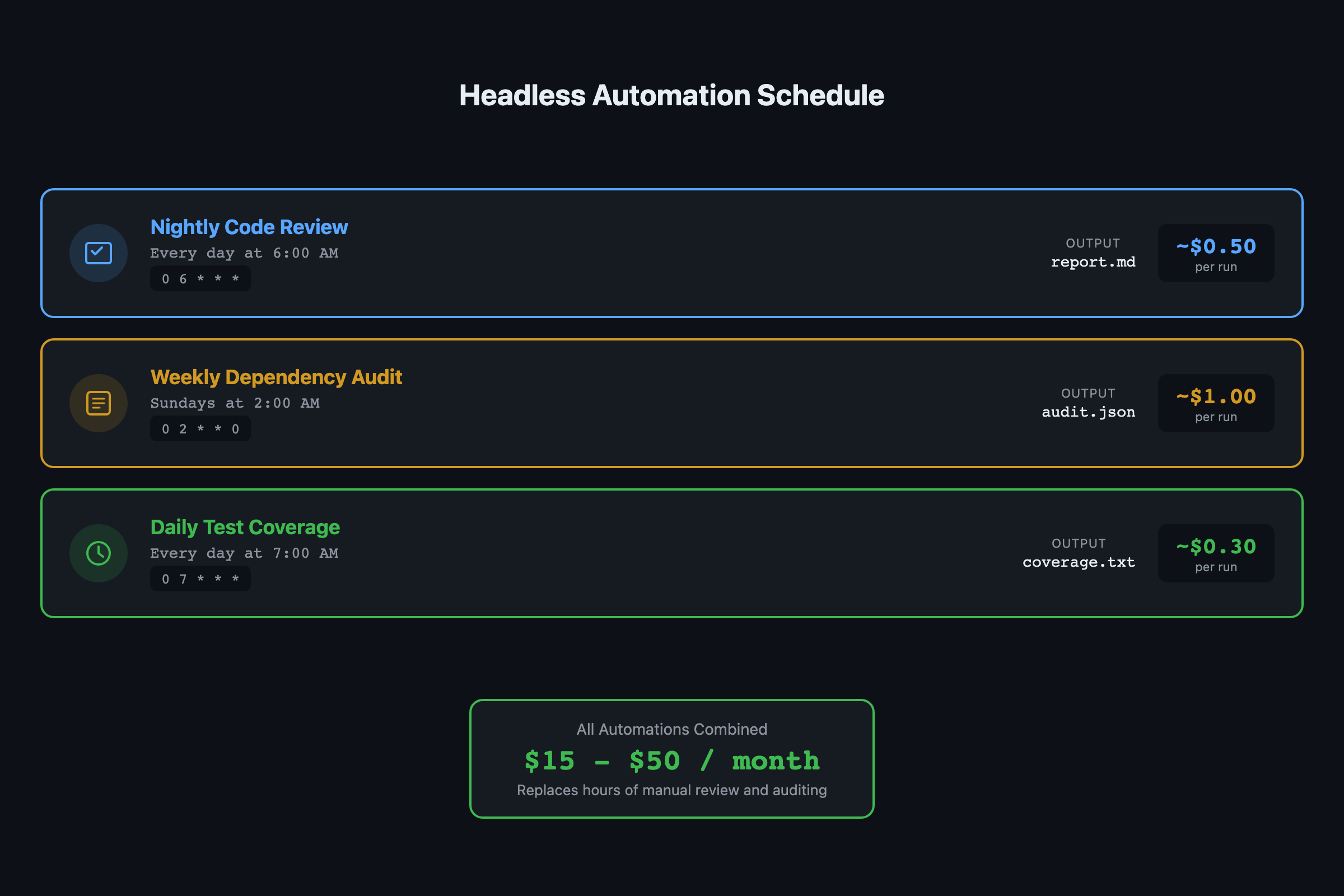
| Automation | Frequency | Cost per run | Monthly total |
|---|---|---|---|
| Code review | Daily | $0.50-2.00 | $15-60 |
| Test coverage | Daily | $0.20-0.50 | $6-15 |
| Dependency audit | Weekly | $0.30-0.80 | $1.20-3.20 |
| Total | $22-78 |
The range depends on codebase size and commit volume. A solo project with 2-3 commits per day sits at the low end. A team project with 15+ daily commits hits the high end.
Compare that to several hours of human time per week doing the same checks manually. The ROI is not close.
What should you actually do?
- If you are a solo developer: start with just the nightly code review. It catches the bugs you miss when coding at midnight. Add the other two after a week if the reports are useful.
- If you have a team: start with all three and post reports to a Slack channel. The dependency audit alone pays for itself the first time it catches a critical CVE before it hits production.
- If you want cloud execution instead of cron: wrap each automation in a GitHub Action with a
scheduletrigger. Same prompt files, clean environment per run, no local machine needed.
bottom_line
- The
-pflag (programmatic CLI) and prompt files are the foundation of all Claude Code automation. One prompt, one output, cron handles the scheduling. - The three automations here (code review, dependency audit, test coverage) cover the routine quality work that teams skip when they are busy. Automation means it happens every time.
- Start with one automation, check the reports for a week, then add more. The prompt files are easy to adjust once you see what your codebase actually needs flagged.
Frequently Asked Questions
How much does automated Claude Code cost per month?+
A nightly code review runs $0.50-2.00 per day, weekly dependency audit $0.30-0.80 per run, daily test coverage $0.20-0.50 per run. Total is roughly $15-50/month depending on codebase size.
What is the difference between the -p flag and scheduled tasks?+
The -p flag (programmatic CLI, sometimes called headless mode) runs one prompt and exits, perfect for cron jobs. Scheduled tasks via /schedule are session-scoped and expire after 7 days. For durable automation that survives restarts, use -p with cron or GitHub Actions.
Can I run Claude Code automation in GitHub Actions instead of cron?+
Yes. Replace the cron job with a GitHub Actions workflow using the schedule trigger. The advantage is a clean environment per run and no need to keep your local machine running.