How to Connect Claude Code to Your Database with MCP
Connect Claude Code to SQLite and PostgreSQL via MCP servers. Query schemas, find unused columns, and analyze data without leaving your terminal session.
>This covers MCP database connections. Ship It with Claude Code goes deeper on building full projects, automation pipelines, and advanced MCP workflows.
Ship It with Claude Code
How Developers Are Shipping SaaS Apps and Automating Their Jobs in a Weekend
Summary:
- Connect Claude Code to SQLite and PostgreSQL databases using MCP in under 5 minutes.
- Use it for schema exploration, dead column detection, and data analysis from your terminal.
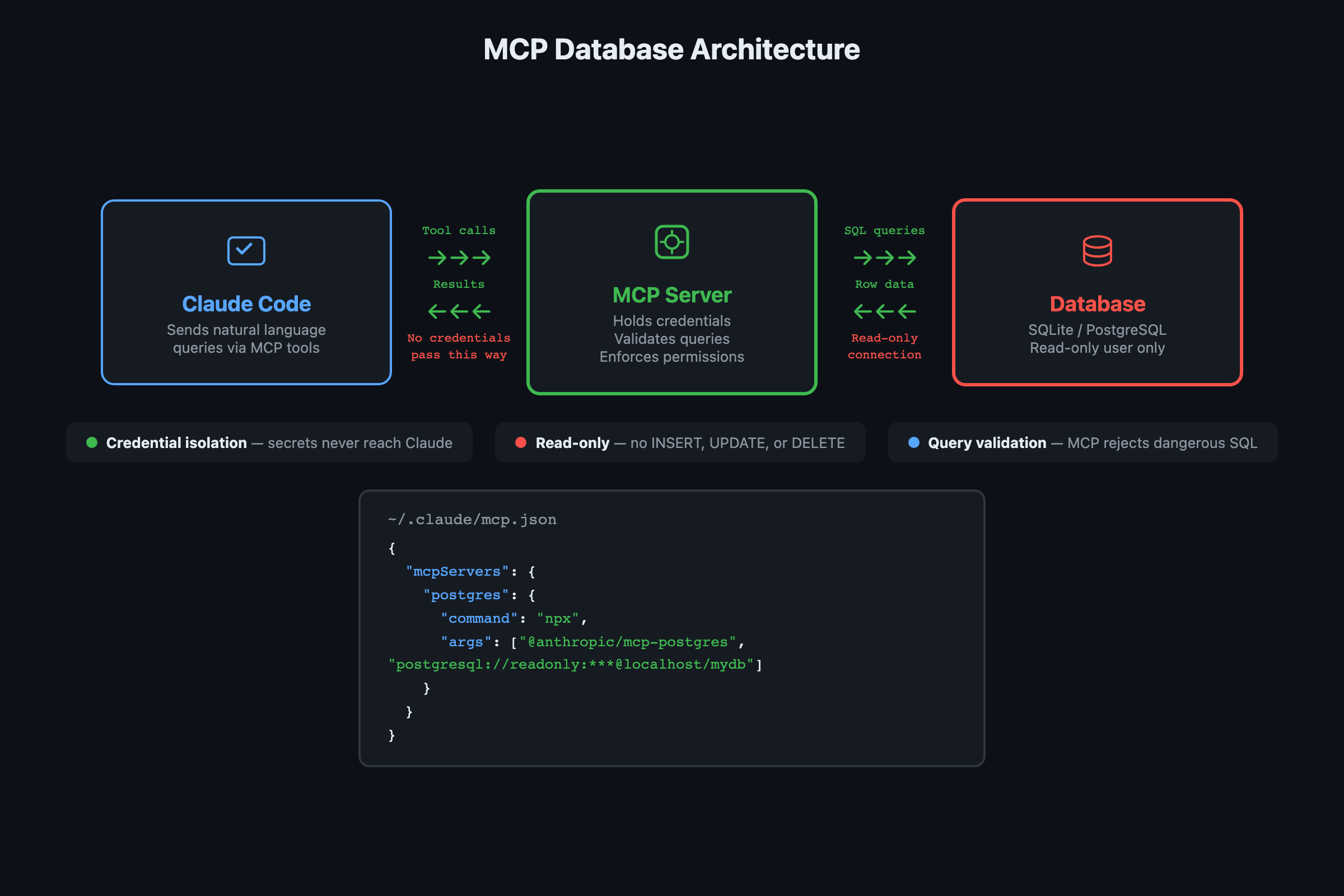
- Always connect with a read-only user. Write access in an AI tool is asking for trouble.
- Copy-paste MCP configs for SQLite and PostgreSQL, plus a cross-reference workflow.
I spent 20 minutes switching between pgAdmin, a terminal, and VS Code trying to figure out why a migration kept failing. Couldn’t tell if the column was actually referenced anywhere in the codebase. Connected the database through MCP, asked Claude Code one question, and had the answer in 8 seconds: three dead columns, two mismatched foreign keys, and a duplicate email that would have blown up the unique constraint I was about to add.
That’s what a database connection through MCP does. Claude Code sees your schema and your code in the same conversation. No tab-switching, no copy-pasting query results into chat.
How do you set up a SQLite connection?
Install the MCP server and configure it. Two commands, one config file.
# Install the SQLite MCP server
npm install -g @anthropic-ai/mcp-server-sqlite
Add the server to .mcp.json in your project root (or ~/.claude.json for global access):
{
  "mcpServers": {
    "sqlite": {
      "command": "mcp-server-sqlite",
      "args": ["--db", "/path/to/your/database.db"]
    }
  }
}
You can also run: claude mcp add sqlite --scope project
Test it immediately:
claude "What tables are in the database? Show me the schema for each one."Claude Code uses the MCP server to query the database, discover tables, and describe the schema. No manual SQL. No copy-pasting results into the chat.
How do you connect PostgreSQL?
Same pattern, different server. From Anthropic’s MCP documentation:
{
  "mcpServers": {
    "postgres": {
      "command": "mcp-server-postgres",
      "args": [
        "--connection-string",
        "postgresql://readonly_user:password@localhost:5432/mydb"
      ]
    }
  }
}
Critical rule: connect with a read-only database user. Create one if you do not have one:
-- Create a read-only user for Claude Code MCP
CREATE USER claude_readonly WITH PASSWORD 'your_secure_password';
GRANT CONNECT ON DATABASE mydb TO claude_readonly;
GRANT USAGE ON SCHEMA public TO claude_readonly;
GRANT SELECT ON ALL TABLES IN SCHEMA public TO claude_readonly;
ALTER DEFAULT PRIVILEGES IN SCHEMA public
  GRANT SELECT ON TABLES TO claude_readonly;
A write-capable connection in an AI tool is a production incident waiting to happen. Read-only means Claude Code can explore, analyze, and report, but it can’t accidentally drop a table or update the wrong rows.
Test the read-only restriction works before you move on:
-- This should succeed:
SELECT current_user;
-- This should fail with permission denied:
INSERT INTO users (email) VALUES ('test@test.com');
If the INSERT succeeds, your user has write access. Go back and fix the grants.
What can you actually do with a database connection?
Here’s the thing. The real power isn’t just running queries. It’s cross-referencing your database with your codebase in a single conversation.
Find unused database columns:
claude "Look at the database schema and the current codebase.
Are there any database columns that are not being used by any
code in the project? List them with the table name and column name."
Claude Code queries the schema through MCP, scans your source files for column references, and identifies the dead columns. This used to require manually cross-referencing your schema with grep output. Now it is one prompt.
Analyze data patterns:
claude "Show me the 10 most recent price entries for Bitcoin
from the crypto_prices table. Is the trend over the last
hour up or down? By what percentage?"
Claude Code runs the query, calculates the trend, and answers in plain English. No SQLite CLI, no pgAdmin, no copy-pasting between tools.
Generate migrations from data:
claude "Look at the users table. The email column has no unique
constraint but I can see duplicate emails in the data. Write
an Alembic migration that:
1. Identifies and resolves duplicate emails
2. Adds a unique constraint on the email column
3. Includes a rollback that removes the constraint"
This works because Claude Code can see both the actual data (through MCP) and the migration framework (through your files). It writes a migration that handles the specific duplicates in your database, not a generic template.
What broke when setting this up?
Context window management. When Claude Code queries a database, it loads the results into its context window. A SELECT * on a large table burns through context fast, leaving less room for reasoning about the actual problem you asked about.
The fix is specificity in your prompts. “Show me the schema” loads a few hundred tokens. “Show me all rows” on a 10,000-row table can burn 50,000+ tokens in a single response, eating half your context window before Claude even starts reasoning about your actual question. Always scope your queries with WHERE clauses, LIMITs, or aggregations.
# Bad: loads entire table into context
claude "Show me all the data in the users table"

# Good: focused query, minimal context usage
claude "How many users signed up in the last 7 days?
Show me the count by day."
From the MCP specification, MCP servers expose resources (data you can read) and tools (actions you can take). Well-designed servers return focused results. If you are building your own MCP server, keep responses lean. Return what was asked for, nothing more.
What should you actually do?
- If you have a SQLite project (like the crypto dashboard from earlier chapters): connect it now. Schema exploration and data analysis from your terminal is useful immediately.
- If you have a PostgreSQL production database: create the read-only user first, then connect. Start with schema exploration before running data queries.
- If you want both database and file analysis: add the filesystem MCP server alongside the database server. Claude Code can cross-reference data, code, and documentation in a single conversation.
{
  "mcpServers": {
    "sqlite": {
      "command": "mcp-server-sqlite",
      "args": ["--db", "./data/app.db"]
    },
    "filesystem": {
      "command": "mcp-server-filesystem",
      "args": ["--root", "/path/to/your/project"]
    }
  }
}
PII warning: Never query tables containing PII (emails, SSNs, payment info) in a Claude session. Query results enter the conversation context and may be included in API logs.
bottom_line
- MCP turns Claude Code from a code editor into a development platform. It can see your files, query your data, and cross-reference both in a single conversation.
- Always connect databases with a read-only user. No exceptions. Write access in an AI tool is begging for a production incident.
- The most valuable MCP workflow is not running queries. It is cross-referencing your database schema with your codebase to find inconsistencies that manual review misses.
Frequently Asked Questions
Does Claude Code see my database credentials?+
No. The MCP server handles authentication. Claude Code talks to the MCP server, which connects to your database using the credentials you configured. Claude Code never sees the connection string directly.
Can Claude Code write to my database through MCP?+
It can if you configure it that way, but you should not. Always connect with a read-only database user. A write-capable connection in an AI tool is a production incident waiting to happen.
How much context does a database query use?+
MCP servers return focused results, not entire tables. A schema query or a SELECT with a LIMIT uses minimal context. The efficiency matters because every token spent on irrelevant data is a token that cannot be used for reasoning about your problem.