Why OpenClaw Keeps Dying Overnight on Your VPS
Run OpenClaw on a VPS that's still answering at 3 a.m., so the first thing you do each morning is read what it did overnight. Docker's default restart policy is no restart at all, and one headless browser can get your gateway killed by the kernel with nothing in the OpenClaw log.
>This covers keeping the box up. Build an OpenClaw 2.0 Pipeline That Works While You Sleep goes deeper on the native path without Docker, moving your existing agent onto the box without losing state, and pinning every surface so nothing updates without you.
Build an OpenClaw 2.0 Pipeline That Works While You Sleep
Compounding Memory. Automations That Survive Updates. An Agent That Makes You Money.
Hello builders,
You can run OpenClaw on a box you own that is still answering at 3 a.m., so the first thing you do each morning is read what it did overnight. One self-hoster got his running on a small VPS, watched it die overnight, added a restart policy, watched it die again, and gave up on self-hosting two weeks later. Here’s the OpenClaw VPS setup that fixes what he was missing, and we start with the two commands that tell you why it died.
His first post said it better than I can:
“Tried to deploy openclaw on a small vps this weekend. compose plus random gists got it running once, then it died overnight. is there a setup that stays up without me sshing in every morning”
Why it dies overnight
There are two causes, and we can check each one in under a minute.
No restart policy at all. A reply in the same thread: “restart: unless-stopped in the compose file (the default is no restart at all, which matches your symptom perfectly).” The Docker docs list the four options, and the first one is the default:
no: Don’t automatically restart the container. (Default)on-failure[:max-retries]: restarts only on a non-zero exit, optionally capped, and it does not restart the container if the daemon restartsalways: always restarts it if it stopsunless-stopped: likealways, except a container you stopped stays stopped even after the daemon restarts
I use unless-stopped, because a box that does not come back after a reboot fails the only test that matters.
The kernel killed it. He had a restart policy, so why did it still die? The same reply named the likely reason: “on a small VPS the usual culprit is the headless browser, one Chromium spawned for a single task can spike a gig on its own.” Your agent reads a web page, a browser spawns, the out-of-memory killer in the kernel picks the biggest process, and your gateway is gone. The OpenClaw log stays silent, because from inside OpenClaw nothing went wrong. It just stopped existing.
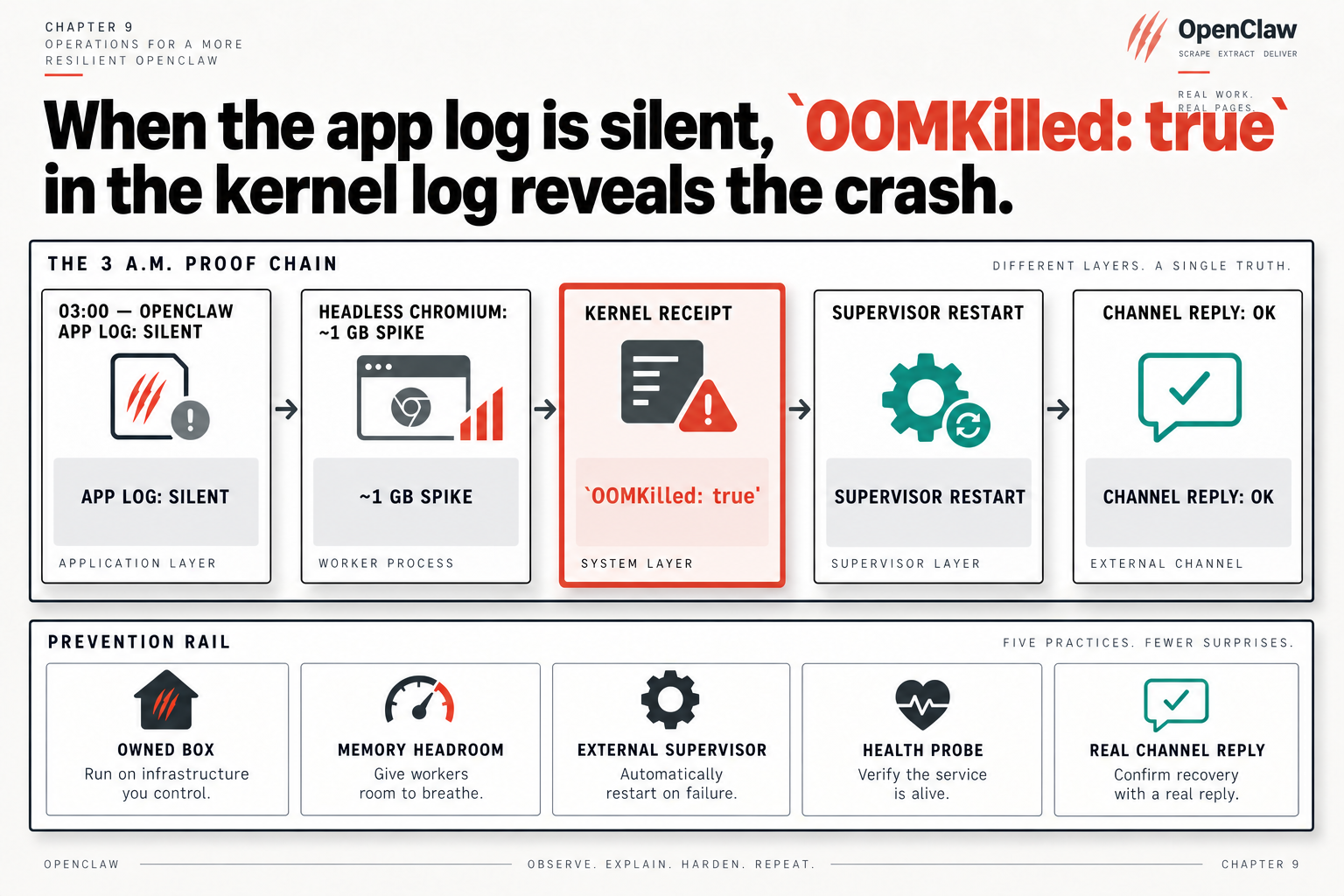
That picture is the whole chain. At 03:00 the OpenClaw app log is silent, headless Chromium spikes about 1 GB, the kernel records the kill, the supervisor restarts the gateway, and a channel reply comes back OK as if nothing happened. The kernel side is the only place the crash shows up, and these two lines check it on your box:
docker inspect -f '{{.State.OOMKilled}}' <container>
dmesg -T | grep -i -e oom -e killed
If the first prints true, stop looking at OpenClaw. You have a memory problem wearing an OpenClaw costume, and the fix is a bigger box or a smaller workload. Both lines want a Linux kernel; on a Mac, dmesg -T just prints a usage line, which isn’t a clean bill of health.
Five things that keep it up
So what keeps it up? We map the picture’s five practices onto the box one at a time.
An owned box, with memory headroom. If the agent ever touches a browser, skip the smallest tier. Budget that ~1 GB spike on top of everything else, because the smallest box is the one that kills your gateway at an hour you did not choose.
An external supervisor. That’s the restart policy above, pinned to an exact image tag. latest means the box changes version whenever something pulls, and now we are debugging a crash and a mystery version at once.
A health probe. openclaw gateway probe is built to run on a timer and fail fast. We alert on the second miss in a row, since a single miss during a restart is normal and we would learn to ignore it within a week. Read the JSON field, not the text. The CLI colors its output even into a pipe, and when I grepped for Reachable: yes the color code sat right in the middle of it, so the match never fired on a healthy gateway. This version, run every few minutes from cron, works:
MISS=~/.openclaw-probe-miss
if [ "$(openclaw gateway probe --json 2>/dev/null | jq -r .ok)" = "true" ]; then rm -f "$MISS"
elif [ -f "$MISS" ]; then echo "OpenClaw missed two probes in a row"   # swap in your alert
else touch "$MISS"; fi
A deliberate bind. The OpenClaw security page is plain about the Docker catch:
On a regular host install the Gateway binds to loopback… container images default to an exposed bind (pair that with auth - see the exposure runbook)
So the container path on a public VPS starts from the more open position. We author it with openclaw config set gateway.bind loopback and reach the box over a private network or a tunnel. If you need port 18789 reachable, it gets authentication, and you check that from a machine outside your network.
A real channel reply. This one is the test. We reboot the box, touch nothing, and wait. Then send your agent a real message on a real channel. A gateway that starts and a gateway that answers are two different things, and only the second one lets you stay in bed.
Tonight, run those two lines on your box, even if it’s up. If OOMKilled comes back true, you’ve found last month’s mystery.
Now go build something this weekend!
John Cook