How to Update OpenClaw 2.0 Without Breaking Your Agents
Take every OpenClaw release the day it ships, because you've already watched it run against a copy of your own install while the real gateway kept answering. The check most people script passes on the exact answer that should stop them, so this one reads the status.
>This covers the rehearsal. Build an OpenClaw 2.0 Pipeline That Works While You Sleep goes deeper on the runbook card for the real update, the recovery runbook for when it fails anyway, and the five defaults the releases quietly moved.
Build an OpenClaw 2.0 Pipeline That Works While You Sleep
Compounding Memory. Automations That Survive Updates. An Agent That Makes You Money.
Hello builders,
You can take every OpenClaw release the day it lands, because by the time you touch your real install you’ve already watched the update run on a copy of it. One user logged his jump to 2.0 at 25 seconds of machine time and 70 minutes of his own, while the people who lost a whole day ran it once, on the only copy they had. Here’s how to update OpenClaw by running the entire thing against a copy first, with your gateway answering messages the whole time.
The best question anybody asked about this release never got a reply. In a 59-comment thread on the 2.0 patch, Maikous2 asked: “Is there an official offline preflight command planned to validate all state migrations and plugin convergence before stopping the production Gateway?”
Half of that already ships. openclaw database preflight takes a copied database and tells you whether a release will rewrite it. The plugin half has no command at all, which is why we run the whole update on the copy and watch what breaks.
The check that passes anyway
I pointed 2026.9.5 at a copy of a database that 2026.9.2 had written:
$ openclaw database preflight ./copy.sqlite
Database preflight: migration-required (found 15, target 17).
$ echo $?
0
Exit 0, on the one answer you built the check to catch. Which releases trigger it? When I lined them up, 2026.8.1 through 2026.9.2 all target schema 15, 2026.9.3 targets 16 and 2026.9.4 targets 17. I ran 2026.9.5 against a 2026.9.4 database and it came back exact, so that one is the cheap kind. Either way, preflight && upgrade gives you a green light straight through a schema change you can’t take back, and OpenClaw’s own integrity and recovery docs are blunt about what that costs:
Downgrading the binary never downgrades the data. Use the managed recovery path or restore the verified pre-update backup with its matching release.
The database schemas page finishes the thought: “Older OpenClaw builds refuse databases written by a newer schema.” So we read the status and ignore the exit code. It’s two lines plus jq:
STATUS=$("$TMP"/node_modules/.bin/openclaw database preflight ~/oc-rehearsal/state/openclaw.sqlite --json | jq -r .status)
[ "$STATUS" = "exact" ] || { echo "schema move ahead: $STATUS"; exit 1; }
exact means a bad update can be undone by reinstalling the old version. Anything else means the snapshot you took beforehand is your only way back.
Run it on a copy
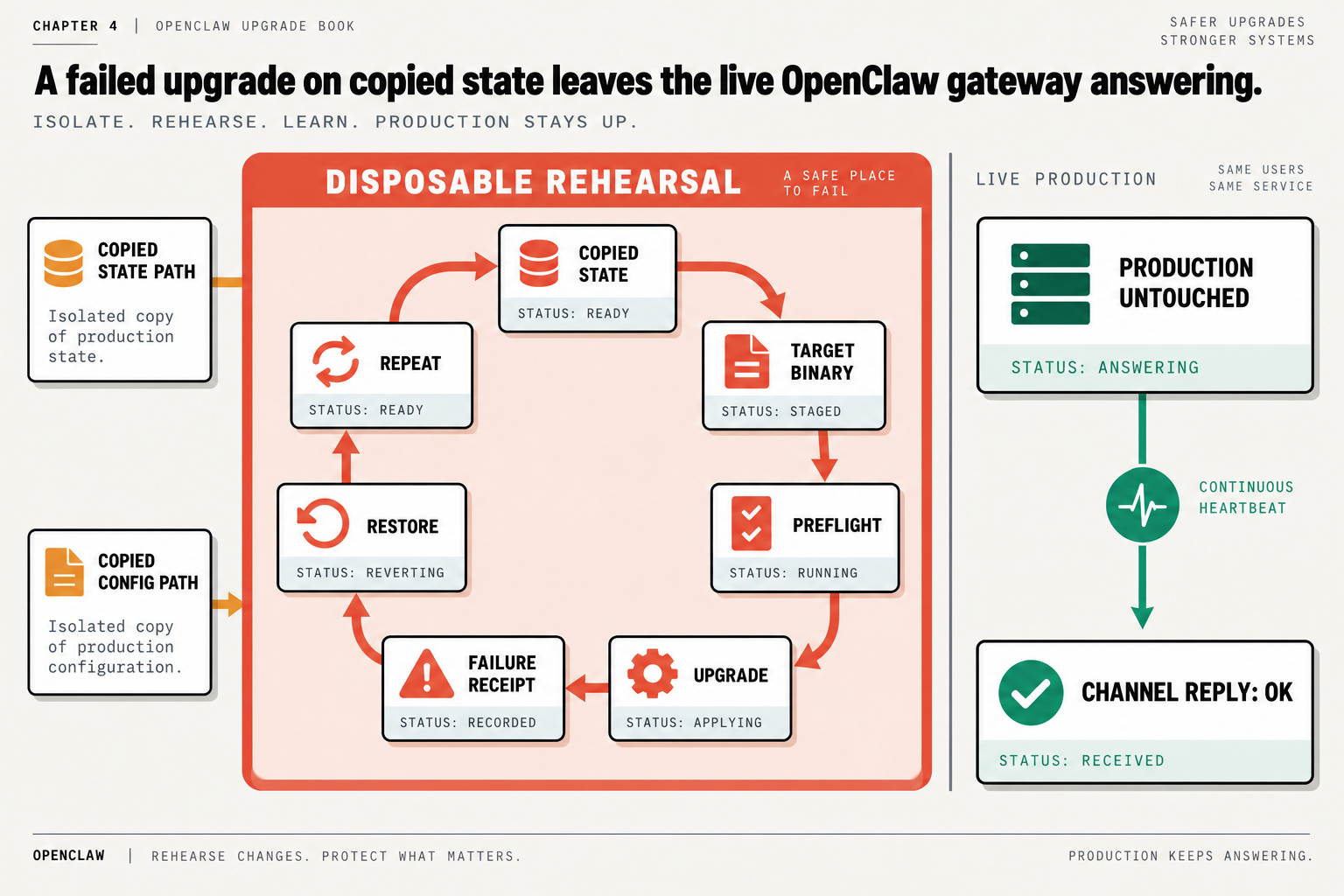
The loop has seven stops: copied state, target binary, preflight, upgrade, failure receipt, restore, repeat. Production sits outside it the entire time. Here’s my Saturday version. Those two export lines at the bottom are the copied state path and the copied config path, so run it in its own terminal:
# snapshot live state, check it, restore it somewhere you own
REPO=~/Backups/openclaw-sqlite
SNAP=$(openclaw backup sqlite create --global --repository "$REPO" --json | jq -r .snapshotPath)
openclaw backup sqlite verify "$SNAP" --json      # positional path, no --repository
mkdir -p ~/oc-rehearsal/state
openclaw backup sqlite restore "$SNAP" --target ~/oc-rehearsal/state/openclaw.sqlite --json
cp "$(openclaw config file)" ~/oc-rehearsal/openclaw.json

# the target release, in a folder you can delete
TMP=$(mktemp -d)
npm install --prefix "$TMP" --ignore-scripts openclaw@<target-version>
export OPENCLAW_STATE_DIR=~/oc-rehearsal OPENCLAW_CONFIG_PATH=~/oc-rehearsal/openclaw.json
Two of those lines exist because I got them wrong first. The older openclaw backup create hangs with the gateway running: on 2026.8.1 mine sat silent until timeout 60 killed it with exit 124, and I haven’t re-tested it on a newer release, so put a timeout in front of it if you try. backup sqlite create took three seconds with the gateway up, and my restored file’s sha256 matched the manifest. The state variable points at the folder above state/, which is why the restore lands in ~/oc-rehearsal/state. And export those two lines before you run anything else from $TMP. A 2026.9.5 command run against a schema-15 state folder with nothing redirected failed on an unrelated error, and it still left the database at schema 17. database preflight on a file path left it alone. The backup command did not.
Now run the gate. Then boot the copy on a spare port with "$TMP"/node_modules/.bin/openclaw gateway run --port 18790, and leave --force off, because it kills whatever already listens on that port. While it boots, message your agent on your normal channel. Production should answer. That reply is the proof that a failed upgrade on copied state leaves the live gateway answering.
Once the copy is up, we cover the half the preflight can’t see. Run "$TMP"/node_modules/.bin/openclaw plugins list and hold it against the same list from your live install. A plugin on one list and missing from the other is a boot failure you would otherwise meet on Sunday: one filed case had a gateway refuse to start because plugin verification kept waiting on a bundled plugin the release had removed.
Write down every error in the order it appears, word for word. WimmoX described the part nobody documents: “The migration runs in multiple crash cycles… This happened three times.” If our copy crashes twice before it comes up, twice is now normal for our install, and a fifth crash on Sunday is news. When it’s done, delete the copy (restore refuses a target that already exists), restore again, and repeat.
I don’t care how the rehearsal ends. A copy that falls over on Saturday is a failure you moved off your real install, and the numbered list it leaves behind is the script for the real update.
Tonight, run the gate against the release you’ve been avoiding and write down the one word it prints.
Now go build something this weekend!
John Cook