How to Keep Your OpenClaw Automations After Every Update
Keep every OpenClaw automation, and the reason it exists, through every update, and make each repeat failure cheaper than the last. OpenClaw stores what a cron does and never why, which is how one user's automations came back as simple records after 2.0.
>This covers keeping automations and fixes in files. Build an OpenClaw 2.0 Pipeline That Works While You Sleep goes deeper on the memory store the agent writes back into every cycle, the retention defaults that quietly age your context out, and the skill edits that happen while you sleep.
Build an OpenClaw 2.0 Pipeline That Works While You Sleep
Compounding Memory. Automations That Survive Updates. An Agent That Makes You Money.
Hello builders,
You can keep every automation you have built through every OpenClaw update, along with the reason each one exists, and make the next broken morning shorter than the last one. One user upgraded to 2.0 and found his agent remembered almost nothing about them, and a perfect backup wouldn’t have saved him either. Every thread about OpenClaw automations lost after update day tells the same story, and the fix is two files you own.
Here is his account, from a thread with 47 comments:
“When I asked it whether it remembered anything about those automations, it either remembered nothing at all or only had fragmented memories. Even worse, the fragments it did remember were nothing more than simple records—it no longer understood how the automations were actually supposed to work.”
Somebody in the same thread gave the best diagnosis I’ve read anywhere: “the fragments it kept were records without the reasoning. That’s the tell that the automations were never really state. The artifact got persisted; the intent only ever existed in the conversation where you set it up.”
That is the whole problem. You built those crons by talking to the agent, it stored the result and threw the conversation away. No backup can restore a reason that was never written down.
Put both halves in git
OpenClaw ships the first half. We use a private remote, and keep the repository outside ~/.openclaw, because OpenClaw refuses one inside the state directory:
openclaw backup git init --repository ~/Backups/openclaw-git --remote <private-git-url>
openclaw backup git create --repository ~/Backups/openclaw-git --all --push
openclaw backup enable --repository ~/Backups/openclaw-git --every 24h --push
The first push printed a line worth reading twice: “Warning: pushed backup history contains credential material; keep the Git remote private.” If that remote could ever be anything but private, backup git create takes --exclude-secrets. My second run printed Git backup: no changes and made no commit, which is exactly what the OpenClaw backup docs promise:
Unchanged database content produces no commit, so Git stores and pushes only content changes by construction.
So your commit log becomes a record of the days your state actually changed, and update days show up as spikes. The same page carries the catch on that third line: “The Gateway must be reachable while enabling or disabling the schedule. There is no local fallback scheduler.” The schedule lives inside the gateway, so when the gateway is down, so are your backups. I still take a manual create before anything risky.
Now the half no tool writes. Add automations.md to that repository, with three lines for every entry in openclaw cron list. Here is the shape, with a made-up entry:
## morning-briefing
- Does: summarizes overnight email and posts it to Telegram at 7:00
- Why: the one pass over the inbox that happens before the first meeting
- Working looks like: one message by 7:05 with at least one sender named
The third line is the one that would have saved him. The backup brings back the artifact; only you can say what “working” looks like, and that’s what he lost. We do the same for every agent and every channel binding: which agent owns which channel, and how we would notice it had gone quiet.
Then we prove it, on a copy, never on production. Delete one automation, restore it with openclaw backup git restore (it writes one database per run into a fresh file), run it, and check it against its third line. An automation restored from files survives the next release. One that lives only in runtime memory is up to whatever that release decides.
Keep the fix, too
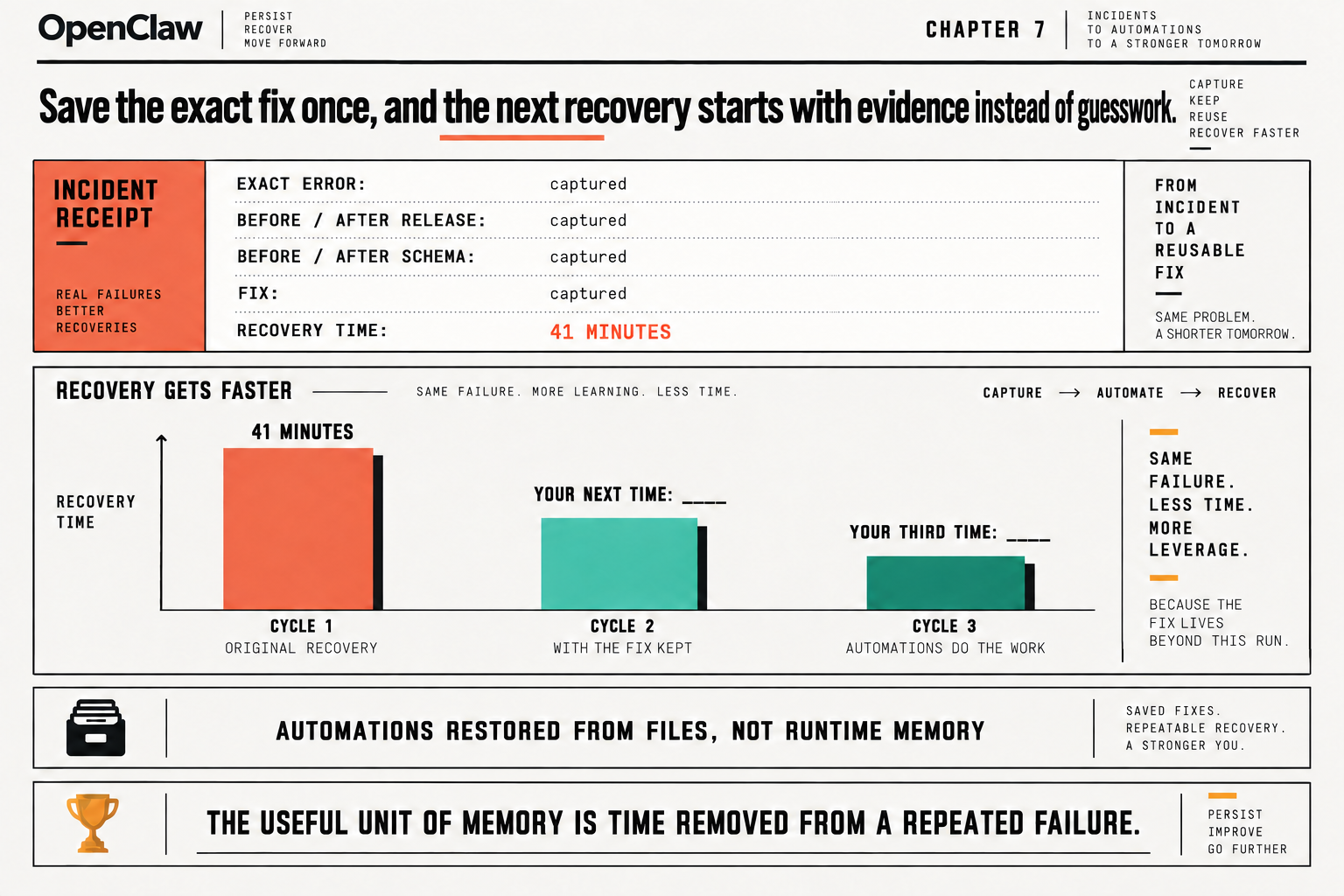
Automations are the half people lose. And the fixes? Those get relearned from scratch every time something breaks. After every update that breaks something, I write one note into the same repository, five fields, while the details are still on screen. Here is one filled in, after a gateway that wouldn’t start on 2026.9.3:
## Gateway would not start after moving to 2026.9.3
**String:** OpenClawStateDatabaseSchemaMigrationRequiredError: OpenClaw state database schema migration required (audit-events-v2)
**Fixed by:** openclaw doctor --session-sqlite import (the general doctor --fix failed twice with the identical blocker)
**Before:** openclaw 2026.9.2 · state schema 15 · node v26.5.0
**After:** openclaw 2026.9.3 · state schema 16 · node v26.5.0
**Cost:** 41 minutes, ~25 of them re-running the general repair
The exact error, the release and schema before and after, the fix, and the recovery time. Copy the error string, don’t paraphrase it, because six months from now that string is the only thing you will remember, and you will paste it into a search box. Make sure the box you paste it into is this file.
Save the exact fix once, and the next recovery starts with evidence. How do you know it’s paying off? Forty-one minutes is cycle one in the picture. Cycle two, with the fix kept, and cycle three, where the automations do the work, are blank on purpose, because those numbers are yours. We re-create the same failure on a copy and time our second run with the note in hand. For the third, let the agent do the looking: openclaw memory promote ranks what it has been recalling, and --apply appends the top entries to MEMORY.md, which lives in the same repository. If the second number isn’t smaller, one of the five fields was missing when you went looking, and that missing field is worth more than the drill. The useful unit of memory is time removed from a repeated failure.
Tonight, run openclaw cron list, pick the automation you’d miss first, and write its three lines.
Now go build something this weekend!
John Cook