What to Do When OpenClaw Doctor --fix Keeps Failing
Get a broken OpenClaw gateway answering again tonight, with its memory and config still on it. The one question that tells progress from a dead end in the doctor --fix loop, and the check that stops a rollback from locking you out of your own database.
>This covers the doctor --fix loop. Build an OpenClaw 2.0 Pipeline That Works While You Sleep goes deeper on the full recovery runbook keyed to every failure phase, and the rehearsal that finds these errors on a copy before your real update.
Build an OpenClaw 2.0 Pipeline That Works While You Sleep
Compounding Memory. Automations That Survive Updates. An Agent That Makes You Money.
Hello builders,
You can get a broken OpenClaw gateway answering again tonight and keep every month of memory and config that’s sitting on it. The people who flattened theirs paid in hours: “Took me hours of messsing around to finally bite the bullet to redo my openclaw json. Painful.” If you typed “openclaw doctor fix not working” into a search bar a few minutes ago, the way out starts with one question you ask after every pass.
Here’s the error that started the pile-on, from issue #133999:
Failed to run "openclaw doctor --fix": Legacy exec approvals exist at /home/itany/.openclaw/exec-approvals.json.
Run `openclaw doctor --fix` before using exec approvals.
The repair command telling you to run the repair command. Another user hit the same shape with a schema error and gave the only sane reply: “…which is funny because that is the command you’re running.” That exact defect is closed, and the contributor’s note is careful about it: “Fixed on main by #133773… it does not claim a new npm release has been published.” The loop it belongs to is still very much alive.
Did the blocker change?
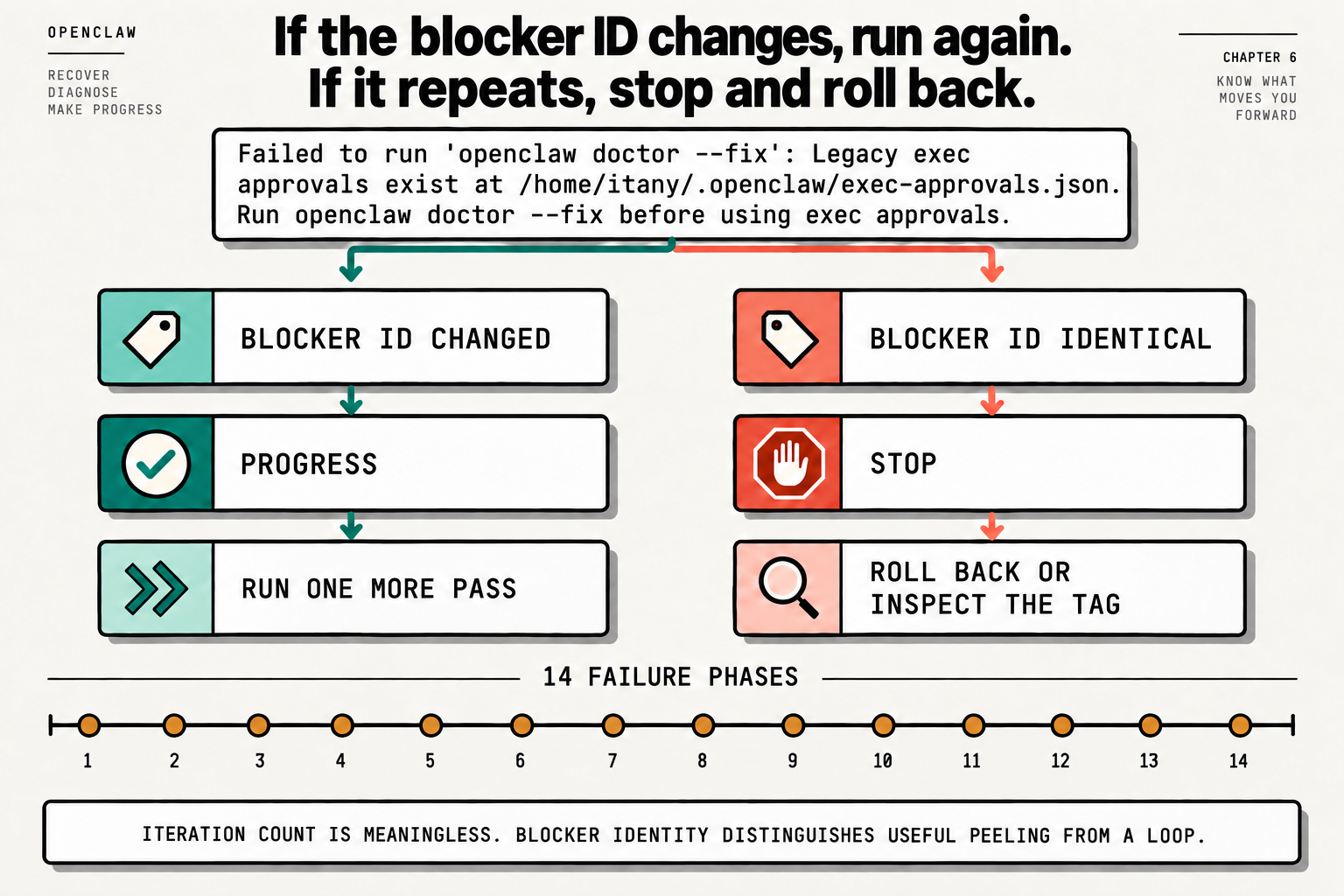
The repair finds one layer of old state per pass and can’t see past the first thing in its way. shiny-amoeba, in a comment with 36 upvotes: “doctor —repair needed ~11 iterative passes before completing cleanly (each pass reveals the next legacy-config tier).” Eleven passes wasn’t a disaster, because every one of them peeled a different layer.
So after each pass we paste the error text into a file under the last one and compare the two. A different blocker means progress, so we run one more pass. The identical blocker means stop, because a third run on the same wall won’t move it. The picture puts it better than I can: iteration count is meaningless, and blocker identity is what separates useful peeling from a loop.
We run every pass in a real terminal, which over ssh means ssh -tt. A report filed the same day, #134036, caught all three repair commands skipping their work without one: “openclaw doctor —fix, —fix —force, and —repair —non-interactive all silently skip the 2.0 doctor-owned state migrations and legacy-config fixes when stdin is not a TTY.” It was closed with a fix within the day. The same report shows the run with a terminal is the one that actually attempts the migrations, so I still give it one every time.
Don’t restart it yet
Your hands want to restart the gateway. A restart buries the first error under a fresh wall of startup messages, and after enough failed boots OpenClaw’s restart-loop breaker suppresses your channels for five minutes on purpose. One user’s six-blocker recovery ended exactly there: “Restart-loop breaker (from all the failed boots) suppressed channels/serve for 5 min → cleared after one final clean restart.”
So what do we look at first? Each of these answers “how far did it get” at a different level:
openclaw status
openclaw gateway status
openclaw doctor
openclaw logs --follow
We start at the top and stop at the first one that says something surprising. In the logs, read for the first stable error and skip the follow-on warnings. EADDRINUSE means something already holds the port, and on this software that’s usually your old gateway, still running.
Roll back only after this
The picture’s right branch says roll back or inspect the tag, and the escape posted in the thread where the audit-events-v2 schema error first showed up is openclaw update --tag 2026.7.1-2. I never do that blind. Why? The release that broke you has probably already moved your database forward, and the database schemas docs say it flatly: “Older OpenClaw builds refuse databases written by a newer schema.”
I checked what that refusal looks like. I installed 2026.9.2 into a throwaway folder and pointed it at a copy of a 2026.9.4 database:
Database preflight: incompatible (found 17, target 15).Exit 1. Roll back onto that and you’ve traded a broken install for one that won’t start at all. So we ask the older version first, on a copy, and the copy matters. A plain cp of a live database can leave the newest pages behind in its -wal file, and when I tried it the preflight read the schema as 0. The snapshot command won’t help either: on a database the new version hasn’t migrated yet, it refuses with “SQLite database cannot be snapshotted safely.” The preflight’s own error message names the fix, a WAL-aware online backup, and sqlite3 makes one (install it next to jq if your box doesn’t have it):
OLD=$(mktemp -d); npm install --prefix "$OLD" --ignore-scripts openclaw@<older-version>
sqlite3 ~/.openclaw/state/openclaw.sqlite ".backup /tmp/rollback-check.sqlite"
STATUS=$("$OLD"/node_modules/.bin/openclaw database preflight /tmp/rollback-check.sqlite --json | jq -r .status)
[ "$STATUS" = "exact" ] || { echo "do not roll back: $STATUS"; exit 1; }
exact means that version can open your data and rolling back is a real escape. Anything else and the way out goes forward, which is where inspecting the tag comes in. The integrity and recovery docs put it this way: “check npm view openclaw dist-tags before reinstalling, because the tag carrying the schema you need may be beta.” Your other exit is the snapshot you took before the update, restored alongside the version that wrote it.
One last thing from the picture, the 14 failure phases. When an update dies, OpenClaw can write a structured report whose Failed phase field takes one of 14 values. database-schema-preflight means nothing was touched yet; doctor-failed and repairing put you in this loop. Error strings get rewritten between releases and phase names don’t, so we key our notes to the phase.
Tonight, run one pass and write its blocker down. Then run another and put the two side by side.
Now go build something this weekend!
John Cook