How to Stop OpenClaw Updates From Changing Your Security Settings
Take every OpenClaw update and still be the one who decides who can read your agent's chats and how far its work can fan out. Five defaults moved across three releases, and the built-in security audit reports none of them.
>This covers the five moved defaults. Build an OpenClaw 2.0 Pipeline That Works While You Sleep goes deeper on what the audit's findings mean, the corporate CA bug behind broken egress, and the release-day routine that re-runs this sweep for you.
Build an OpenClaw 2.0 Pipeline That Works While You Sleep
Compounding Memory. Automations That Survive Updates. An Agent That Makes You Money.
Hello builders,
You can take every OpenClaw update the day it ships and still be the one who decides who reads your agent’s conversations and how far it spreads its work. One operator summed up his 2.0 move in a line I keep coming back to: “The upgrade was easy. The part that switched itself on was not.” Five OpenClaw 2.0 security settings moved across three releases, none of them in a release note you’d have read, and the way to keep them yours is to write each one down by hand.
I found them by installing six releases side by side and diffing the configuration schema each one ships, and we can all repeat that check, because the schema ships inside the package. That schema holds every setting’s default and description, so the diff is the product telling on itself.
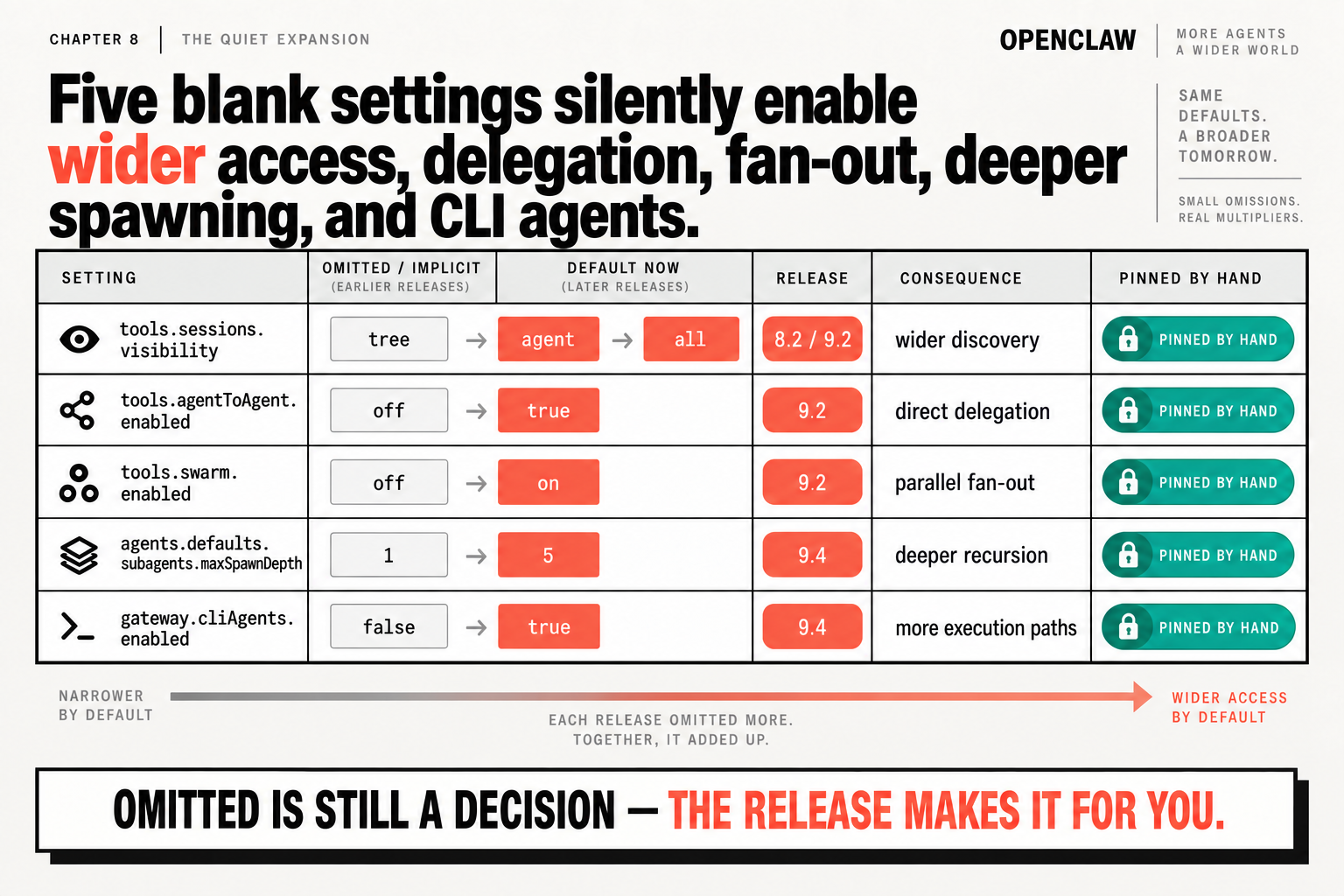
What moved, and when
tools.sessions.visibility: tree → agent at 8.2, → all at 9.2, which means wider discoverytools.agentToAgent.enabled: off → true at 9.2, direct delegation between agentstools.swarm.enabled: off → on at 9.2, parallel fan-outagents.defaults.subagents.maxSpawnDepth: 1 → 5 at 9.4, deeper recursiongateway.cliAgents.enabled: false → true at 9.4, more execution paths
The first two are the ones people noticed. The OpenClaw sessions and subagents docs spell out today’s visibility default:
Default: all (every session on the Gateway, including other agents’ and other users’ transcripts).
And on the allow list you probably never wrote: “An omitted or empty allow counts as unset: with agent-to-agent access enabled by default, every agent can reach every other agent.” Delete the last agent on that list and the docs say it falls back to allow-all.
So why has nobody written about spawn depth? I couldn’t find it in a single release note or post, and neither docs page mentions it, or swarm. The shipped schema does: 2026.9.2 described spawn depth as “1 = no nesting (default)”, and 2026.9.4 says “Default: 5; 1 makes direct children leaves.” 2026.9.5 moved none of the five.
The audit won’t tell you
The standard advice after these flips is to run openclaw security audit. Run it; it’s worth your time. Mine returned five findings, one of them critical, and not one of them mentioned sessions, visibility, swarm, spawn depth or CLI agents. The audit reports risks it can see. It has no idea which of your settings you chose and which you inherited, and that’s the whole question here, because an inherited default is one the next release is free to move. Omitted is still a decision; the release just makes it for you.
So which command does know? openclaw config get. On a setting you never wrote, it prints this to standard error and exits 1:
Config path is valid but unset: tools.sessions.visibility. The runtime default applies until you set an authored value with openclaw config set tools.sessions.visibility <value>.So here’s the part where I argue with the vendor. OpenClaw’s posture is that you run on its defaults and audit for drift, which is reasonable for a project shipping this fast. But these defaults moved at 8.2, then 9.2, then 9.4, and two of those moves widened who can see your agent’s work. We’re one operator on one box, and we need the thing to behave tomorrow the way it behaved today. All five get pinned by hand, and we keep a line next to each one saying why.
Mine, for a box nobody else touches:
openclaw config set tools.sessions.visibility self
openclaw config set tools.agentToAgent.enabled false
openclaw config set tools.swarm.enabled false
openclaw config set agents.defaults.subagents.maxSpawnDepth 1
openclaw config set gateway.cliAgents.enabled false
Pick your own values; the point is that they’re written. self is only the current session, agent is every session this agent owns, including other users. Set gateway.cliAgents.enabled to false and, per the schema, it disables “CLI agents and native CLI session creation.” Swarm and spawn depth can go back up the day you have a job that needs fan-out.
Then we prove the pin held, with a sweep we can run after every update and after every edit to the config.
for P in tools.sessions.visibility tools.agentToAgent.enabled tools.swarm.enabled \
         agents.defaults.subagents.maxSpawnDepth gateway.cliAgents.enabled; do
  openclaw config get "$P" 2>&1 | grep -q 'valid but unset' && { echo "still a default: $P"; exit 1; }
done
echo "all five authored"
The 2>&1 is the whole trick. The message lives on standard error, so without it the pipe carries nothing and the grep never matches. I ran the sweep without it on a config where I hadn’t set a single one of the five, and it printed “all five authored” anyway.
One limit worth knowing. The audit prints its own trust model: “personal assistant (one trusted operator boundary), not hostile multi-tenant on one shared gateway.” These settings narrow what happens inside one boundary. If you need two people kept apart, the supported answer is two gateways.
Tonight, run the sweep before you change anything, and count how many of the five come back as still a default.
Now go build something this weekend!
John Cook