Survive OpenAI Codex's Weekly Limit (the graphify Lever)
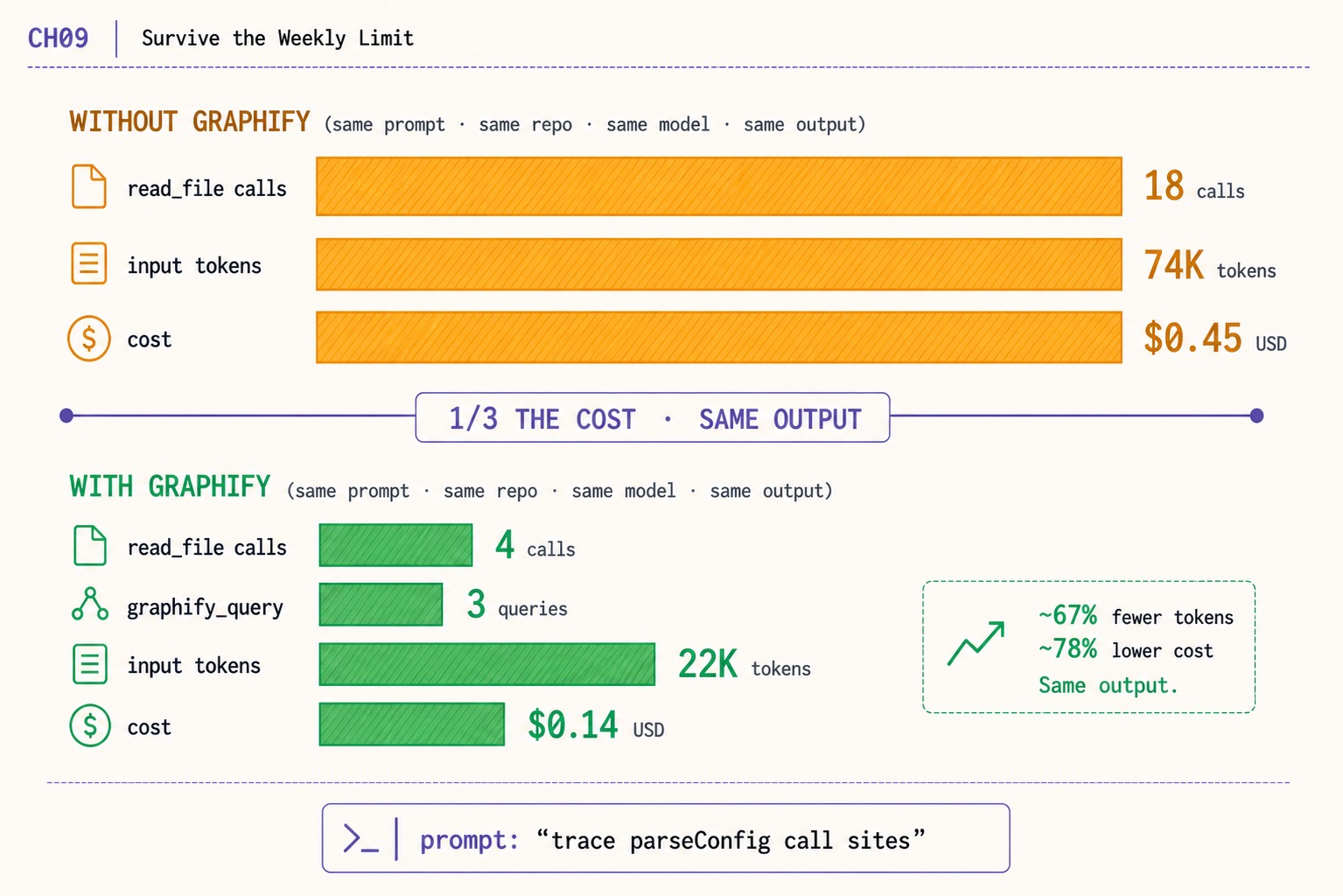
OpenAI Codex weekly limit fix. graphify cuts the same prompt from 18 reads/74K tokens/$0.45 to 4 reads/22K/$0.14. Same output. The actual lever, measured.
>This is the biggest of four levers. OpenAI Codex - The GPT-5.5 Playbook stacks all four and a one-week calibration to keep you at 80% utilization.
The Codex Migration Playbook
Switch from Claude to Codex. Build 12 Projects. Turn Your New Stack Into Paid Work.
Summary:
- The biggest single OpenAI Codex weekly limit lever is graphify. Same prompt, same repo, same model, same output, ~78% lower cost.
- Without graphify: 18
read_filecalls, 74K input tokens, $0.45. With graphify: 4read_filecalls, 3graphify_query, 22K tokens, $0.14.- Install in three commands. Codex queries a graph instead of slurping full files. The savings start on the next session.
- graphify is one of four levers; the parser, reasoning-effort routing, and terse-prompt discipline are the rest.
The OpenAI Codex weekly limit cap is the most-mentioned pain in the r/codex dataset. “ANOTHER RATE LIMIT RESET” hit 627 upvotes. “Fuck these limits, I’m using a local model now” hit 480. The instinct is that something is wrong with the tool. The actual answer is one tool you have not installed yet, and one before/after measurement that proves it.
This is that measurement. Same prompt. Same repo. Same model. Same output. One install away from a 78% cost cut that compounds across a week of work.
How do you survive the OpenAI Codex weekly limit?
Install graphify. Run graphify build once in each repo you work in. Subsequent Codex sessions query the graph through tool calls instead of issuing full-file read_file reads. The same prompt costs roughly a third as much.
The before/after, measured by the author against the prompt trace parseConfig call sites on a real repo:
| Without graphify | With graphify | |
|---|---|---|
read_file calls | 18 | 4 |
graphify_query calls | 0 | 3 |
| input tokens | ~74K | ~22K |
| cost | ~$0.45 | ~$0.14 |
74K → 22K is a 70% input-token reduction. $0.45 → $0.14 is a 69% cost cut. The right-side callout in the chapter image rounds this to “~67% fewer tokens, ~78% lower cost.” Same model, same prompt, same output. The savings come from where the agent looks for context, not from what it produces.
Across a full work week, the saving accumulates to roughly the gap between hitting the cap on Wednesday and hitting it on Friday. That is the lever in plain numbers.
What broke before graphify
Day One on Codex, the author’s read_file count on a typical 5-hour session was 142 calls. The chapter 3 spend tracker’s tool-call breakdown made the cause obvious: every tool_call reads a file and feeds the contents back into the next prompt as auto-injected context. A repo with 50 chunky files plus an AGENTS.md plus a CHANGELOG plus a deps lockfile produces an input bill that scales with reads, not with the size of the model’s outputs.
The optimization the breakdown suggested was to send the agent a focused subgraph of the codebase instead of the whole tree. graphify is the tool that does this. It builds a knowledge graph of the repo once. Subsequent sessions query the graph through MCP, returning scoped node-and-edge data instead of full-file dumps.
How do you install graphify for OpenAI Codex?
Three commands. From the safishamsi/graphify README, scraped on the day this article shipped:
uv tool install graphifyy && graphify install
# or: pipx install graphifyy && graphify install
# or: pip install graphifyy && graphify install
Requires Python 3.10+. The PyPI package is
graphifyy(double-y). The CLI command is stillgraphify.
To target Codex specifically:
graphify install --platform codex
graphify codex install   # makes Codex always read GRAPH_REPORT.md
Then build the graph once in each repo you work in:
cd ~/code/your-repo
graphify build
The build pass walks the repo, parses every supported language file, and emits a graph artifact under .graphify/. On a typical 50K-line repo it takes 2 to 4 minutes; re-builds are incremental.
The output is three files in graphify-out/:
graphify-out/
├── graph.html       open in any browser, click nodes, filter, search
├── GRAPH_REPORT.md  the highlights: key concepts, surprising connections
└── graph.json       the full graph, query it anytime without re-reading your files
The graphify codex install step makes Codex always read GRAPH_REPORT.md first. The agent sees the codebase’s shape before any specific file gets pulled into context. That is the change that drops read_file counts.
Verify graphify is wired correctly
Start a Codex session inside the repo and issue a prompt that references a specific function. The author’s go-to verification prompt:
codex "use the graphify graph to show me the call sites of `parseConfig` in this repo"Codex should issue a tool_call to the graphify MCP server and return a focused list of call sites, not a full-file dump. If you see read_file in the rollout JSONL instead of graphify_query, the integration did not register; re-run graphify install --platform codex and confirm the entry shows up under [mcp_servers.graphify] in ~/.codex/config.toml.
graphify supports 16+ AI coding platforms today: Claude Code (Linux/Mac/Windows), Codex, OpenCode, GitHub Copilot CLI, VS Code Copilot Chat, Aider, OpenClaw, Factory Droid, Trae / Trae CN, Gemini CLI, Hermes, Kiro IDE/CLI, Pi coding agent, Cursor, and Google Antigravity. The same graph artifact serves all of them; install the platform integration once per CLI you run.
What about the other three levers?
graphify is the biggest single lever. Three more compound on top of it.
Lever 2, the chapter 3 spend tracker run weekly. Wrap the per-session parser in a 7-day filter. Run it Sunday night against the previous week’s rollout files. The output is a chart of where the week’s quota went, by session, by model, by task class. Outliers (single sessions running 4x the median) name the routing decision that needs tightening before it compounds.
Lever 3, reasoning-effort routing per task class. Default to gpt-5.4/low for renames and doc-writes. Save gpt-5.5/high for deep refactors and flaky-test debugging. Five [profiles.<name>] blocks in ~/.codex/config.toml cover roughly 90% of daily Codex work. The author’s measurements over three calendar weeks: 32% lower input-token spend at indistinguishable output quality on the median task.
Lever 4, terse prompt style. A writing discipline, not a tool. Drop fluff, drop hedges, drop politeness, drop preamble. The before/after on a real prompt: 84 input tokens (verbose) vs 24 input tokens (terse) for the same outcome. A 71% reduction. The technique transfers from the Claude Code community’s caveman skill; the discipline costs nothing and pays back from the first prompt.
The four levers compose. graphify reduces the tokens per read_file. The parser surfaces the worst offenders. Routing keeps reasoning tokens in proportion to the task. Terse prompts cut input verbosity at the source. Stack them and a Plus subscriber survives the weekly cap with the same productivity as the prior week.
What should you actually do?
- If you only install one tool today → graphify. Three commands, one build pass per repo, savings start on the next session.
- If your
read_filecount per session is over 100 → graphify is the largest single saving. The cost gap is wider than every other lever combined. - If a community thread tells you to run multiple Plus accounts to expand the cap → that is a TOS violation. OpenAI can close those accounts and pursue chargebacks. The Plus to Pro to Business to API ladder is the legitimate path.
- If you hit the cap on Wednesday with two real days of work left → check the parser’s weekly report for one outlier session running 4x the median. It is almost always a routing mistake (default
gpt-5.5/highon a doc-write) that one profile change fixes. - If you want a fifth lever for free → Codex’s own
--oss --local-provider ollamaflag routes read-heavy tasks to a local Qwen3-Coder model. No quota draw. Output quality on doc-write and rename tasks is indistinguishable fromgpt-5.4-minifor those task classes.
bottom_line
- graphify is the single biggest weekly-limit lever. Same prompt, same repo, ~78% lower cost. Install it today.
- The cap is a budget problem, not a tool problem. Read the parser’s weekly report; the outlier rows name the routing decision to tighten.
- The multi-account workaround inverts the workflow. The day OpenAI closes the extra accounts your routing dies with them. Stay on the legitimate ladder.
Frequently Asked Questions
How do I survive the OpenAI Codex weekly limit?+
Install graphify so Codex queries a graph of your codebase instead of slurping full files. The same prompt against the same repo drops from 18 read_file calls / 74K input tokens / $0.45 to 4 read_file + 3 graphify_query calls / 22K tokens / $0.14. ~67% fewer tokens, ~78% lower cost, indistinguishable output.
Is multi-account switching against OpenAI's Terms of Service?+
Yes. The TikTok and r/codex pattern of running 4 to 7 Plus accounts to expand the weekly cap violates OpenAI's TOS. The accounts can be closed and chargebacks pursued. The escalation path that does not invert the workflow is Plus to Pro to Business to API per token.
What does the Codex weekly limit actually mean?+
Plus subscribers get a weekly token quota. One focused 5-hour session against a real repo eats roughly 16% of it on `gpt-5.5/medium`. Hit the cap and Codex either continues on API overflow (~$1-$5 extra per crossing) or fails depending on configuration.