Build an OpenAI Codex Cost Tracker in 60 Lines
An OpenAI Codex cost tracker that parses ~/.codex/sessions/ JSONL and turns every session into a per-task dollar ledger. 60 lines of Python on your machine.
>This builds the parser. OpenAI Codex - The GPT-5.5 Playbook wires it into a deployed SaaS, a weekly tracker, and a per-task model picker.
The Codex Migration Playbook
Switch from Claude to Codex. Build 12 Projects. Turn Your New Stack Into Paid Work.
Summary:
- Build a 60-line Python parser that reads
~/.codex/sessions/JSONL and turns every Codex session into a per-task dollar ledger.- Use
task_started,token_usage, andtask_completedevents to compute input, output, reasoning, and total cost per session.- Run the script after any Codex session and see exactly what each turn cost before the credit card statement does.
- Extend it with a tool-call breakdown to expose where input tokens actually go.
You want an OpenAI Codex cost tracker because the OpenAI usage dashboard hides the receipt. One r/codex user posted a thread titled “I did, like 6 prompts on the API and spent $15.41” and picked up 128 upvotes, the comment thread split between people who hit the same number and people who could not believe it was possible. The good news: every Codex CLI session writes a structured event log to ~/.codex/sessions/. The dashboard hides the math. Your disk does not.
This is the parser the dashboard never gave you. Sixty lines of Python. Reads the rollout JSONL files. Prints a per-session dollar ledger. You will run it after the next session you finish today.
How much does one OpenAI Codex session actually cost?
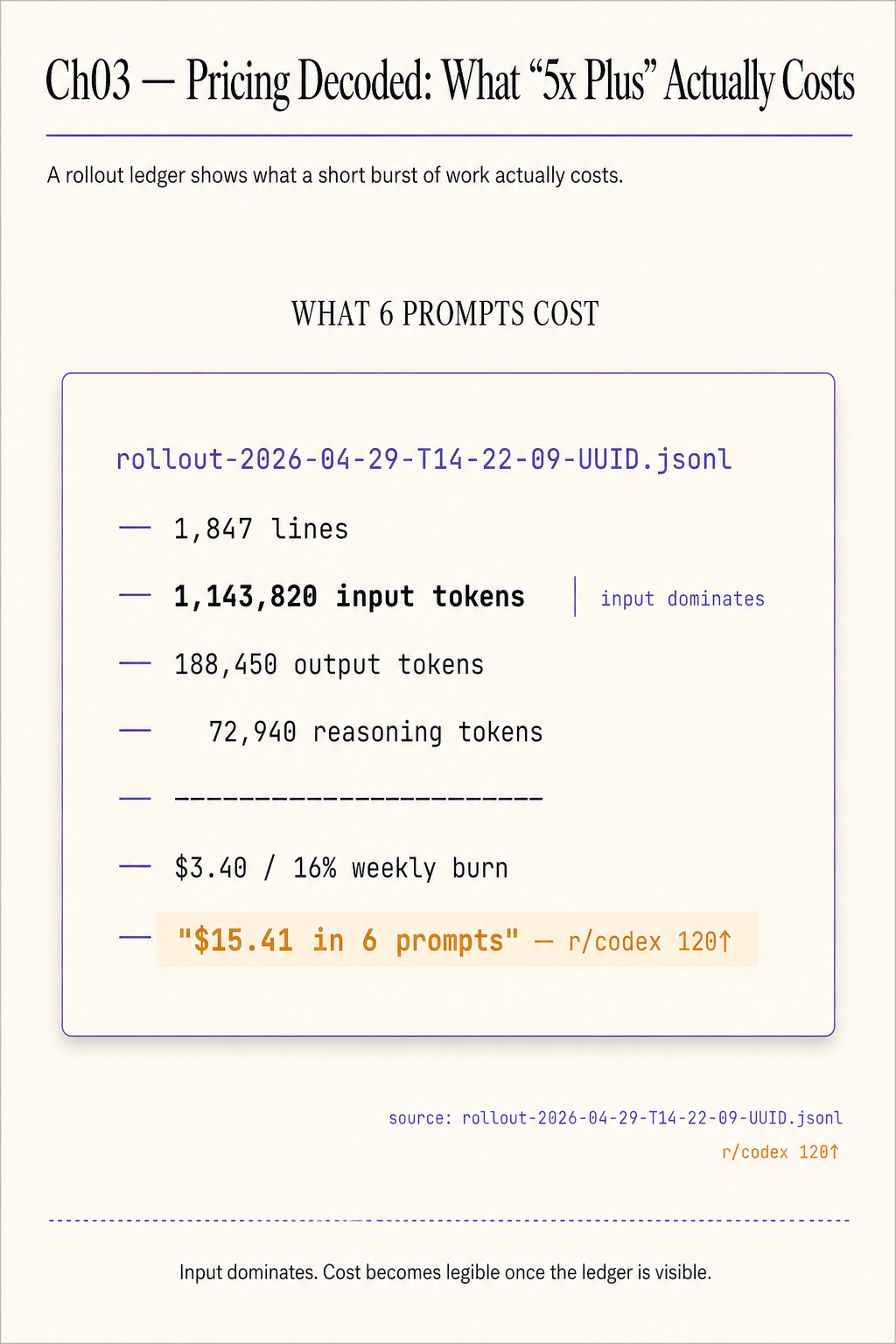
A focused 5-hour Codex Plus session against a real repo, on gpt-5.5 at medium reasoning effort, produces a 1,847-line rollout JSONL. The parser below turns that file into this row:
session: rollout-2026-04-29-T14-22-89-UUID.jsonl
  duration:        4h 51m
  model:           gpt-5.5
  reasoning:       medium
  input tokens:    1,143,820
  output tokens:   188,450
  reasoning tok:   72,940
  approx cost:     ~$3.40 against published API rates
  weekly quota:    16% of Plus weekly burn
Input dominates. The $15.41-in-6-prompts thread on r/codex (128 upvotes) is the same shape, scaled down: a few exploratory prompts that each pulled large file contents into the next request and ran up the bill on input, not output. The dashboard shows you a daily total. The JSONL shows you which session, which model, which tool calls, which line. That is what you parse.
What broke for the author on Day One
The $15.41 receipt is the public version. The author’s own Day One story: a 5-hour session at gpt-5.5/high against a 50K-line repo with an 800-line AGENTS.md auto-injected on every prompt. The session log was a 1,847-line JSONL. The OpenAI dashboard reported a chunky daily total with no per-session breakdown. The receipt that solved it was the same JSONL the dashboard ignored.
Codex writes a structured event log to disk for every CLI session at:
~/.codex/sessions/<YYYY>/<MM>/<DD>/rollout-<TIMESTAMP>-<UUID>.jsonlSix event types matter for cost work: task_started (carries model and model_context_window), prompt_input, tool_call, approval_request/approval_decision, token_usage (per-call input/output/reasoning counts), and task_completed. Every prompt is on the line. Every model response is on the line. Every tool call Codex made on your behalf is on the line. The OpenAI maintainer thread on issue openai/codex#19319 confirms the live task_started event format:
{"type":"task_started","model_context_window":258400}
{"type":"token_count","info":{"model_context_window":258400}}
The same issue body shows the codex debug models output that explains the 258400 number:
{
  "slug": "gpt-5.5",
  "context_window": 272000,
  "max_context_window": 272000,
  "effective_context_window_percent": 95
}
272000 * 0.95 = 258400. Your rollout JSONL has the math written into it. You just have to read it.
How do you build the Codex spend tracker?
Save the following to codex_ledger.py. It walks ~/.codex/sessions/, sums the token_usage events per session, multiplies by per-1K-token rates, and prints a 5-row table of your most recent sessions.
#!/usr/bin/env python3
import json, glob, os
from datetime import datetime

# Approximate per-1K token rates, USD. Update against your current
# OpenAI per-token pricing page; values produce a directionally-correct ledger.
RATES = {
    "gpt-5.5":         {"input": 0.005, "output": 0.020, "reasoning": 0.020},
    "gpt-5.4":         {"input": 0.003, "output": 0.012, "reasoning": 0.012},
    "gpt-5.4-mini":    {"input": 0.0006, "output": 0.0024, "reasoning": 0.0024},
    "gpt-5.3-codex":   {"input": 0.003, "output": 0.012, "reasoning": 0.012},
}

def parse(path):
    started, total_in, total_out, total_reason, model = None, 0, 0, 0, None
    with open(path) as f:
        for line in f:
            try: ev = json.loads(line)
            except json.JSONDecodeError: continue
            if ev.get("type") == "task_started":
                started = ev.get("ts") or os.path.getmtime(path)
                model = ev.get("model")
            elif ev.get("type") == "token_usage":
                u = ev.get("usage", {})
                total_in     += u.get("input_tokens", 0)
                total_out    += u.get("output_tokens", 0)
                total_reason += u.get("reasoning_tokens", 0)
    return started, model, total_in, total_out, total_reason

def cost(model, inp, out, reason):
    r = RATES.get(model, {"input": 0, "output": 0, "reasoning": 0})
    return (inp/1000.0)*r["input"] + (out/1000.0)*r["output"] + (reason/1000.0)*r["reasoning"]

files = sorted(glob.glob(os.path.expanduser(
    "~/.codex/sessions/*/*/*/rollout-*.jsonl")), key=os.path.getmtime, reverse=True)

print(f"{'session':30}  {'model':14}  {'in':>10}  {'out':>8}  {'reason':>8}  {'$cost':>8}")
for f in files[:5]:
    _, model, inp, out, reason = parse(f)
    c = cost(model or "gpt-5.5", inp, out, reason)
    name = os.path.basename(f)[:30]
    print(f"{name:30}  {model or '?':14}  {inp:>10}  {out:>8}  {reason:>8}  {c:>8.2f}")
Run it:
python3 codex_ledger.pyThe output is a 5-row table, one row per recent session, with the rollout filename, model, input/output/reasoning token counts, and an approximate dollar cost. Reasoning tokens will be zero on sessions you ran at low reasoning effort.
Sanity check one row before you trust the rest. Open the highest-cost rollout file directly. The first line is a task_started event with the model in it, matching what the script printed. The token_usage events through the body sum to the input and output figures the script reported. If they do not, the rollout file got truncated mid-session, which is itself a useful signal.
Where do the tokens actually go?
The ledger tells you what a session cost. It does not tell you why. Add this function to codex_ledger.py and the cost driver becomes obvious:
def tool_call_breakdown(path):
    counts, input_tokens_per_tool = {}, {}
    last_input_size = 0
    with open(path) as f:
        for line in f:
            try: ev = json.loads(line)
            except json.JSONDecodeError: continue
            if ev.get("type") == "token_usage":
                last_input_size = ev.get("usage", {}).get("input_tokens", 0)
            elif ev.get("type") == "tool_call":
                name = ev.get("name", "?")
                counts[name] = counts.get(name, 0) + 1
                input_tokens_per_tool[name] = input_tokens_per_tool.get(name, 0) + last_input_size
    return counts, input_tokens_per_tool
Run it against your highest-cost session. A typical 5-hour session looks like this in the author’s measurements:
read_file:         142 calls, ~882K input tokens
write_file:         38 calls, ~241K input tokens
shell:              22 calls, ~178K input tokens
search:              7 calls, ~52K input tokens
read_file dominates. Every time Codex reads a file to ground a decision, the contents land in the next prompt as auto-injected context. A repo with 50 chunky files plus an AGENTS.md plus a CHANGELOG plus a deps lockfile produces an input bill that scales with reads, not with the model’s outputs.
Most users assume the cost is in what they see on screen. The breakdown proves the cost is in what they do not.
What should you actually do?
- If your weekly burn is fine and you only want a check on individual sessions → run
python3 codex_ledger.pyafter every long session, save the row to a notes file. - If your
read_filecount is over 100 per session → install graphify (uv tool install graphifyy && graphify install --platform codex) so Codex queries a graph of your codebase instead of slurping full files. - If your
AGENTS.mdis more than 200 lines → trim it. The file rides on every prompt for the duration of the session. Eight hundred lines of agent instructions is eight hundred lines of input you pay for on every turn. - If reasoning tokens are eating the bill on doc-write tasks → drop those sessions to
gpt-5.4-miniatlowreasoning effort. Startcodex -m gpt-5.4-mini -c model_reasoning_effort=lowand watch the next ledger row. - If you want a weekly view → wrap the parser in a 7-day filter and schedule it via cron on Sunday night. Sum the dollar column. That is your real Codex bill.
bottom_line
- The OpenAI dashboard hides the receipt. The JSONL on your disk does not. Read the JSONL.
- Input tokens are the cost driver, not output. Optimize what Codex auto-injects, not what it answers.
- Sixty lines of Python beats a SaaS dashboard for one developer’s spend tracking. The receipt is yours; so is the lever.
Frequently Asked Questions
How much does one OpenAI Codex session cost?+
Six prompts on the API cost one r/codex user $15.41. A focused 5-hour Codex Plus session against a real repo eats about 16% of the weekly limit. The parser below turns those numbers into a real ledger you can read after every session.
Where does Codex store session logs?+
Every Codex CLI session writes a JSONL rollout file to `~/.codex/sessions/<YYYY>/<MM>/<DD>/rollout-<TIMESTAMP>-<UUID>.jsonl`. Each line is a JSON event: `task_started`, `prompt_input`, `tool_call`, `token_usage`, `task_completed`.
Why is Codex so expensive even on cheap prompts?+
Input tokens, not output. A typical 5-hour session can hit 1.1M input tokens against 188K output. Every `tool_call` reads a file and feeds it back into the next prompt. Auto-injected context drives the bill, not the model's responses.