The 5-Tool OpenAI Codex Stack: 773-Upvote Post Answered
The OpenAI Codex stack the 773-upvote r/codex post promised. 5 tools to install, 2 to cut, exact install commands, and the package-name gotchas devs hit.
>This is the install matrix. OpenAI Codex - The GPT-5.5 Playbook walks through every config file, every gotcha, and runs two parallel Codex sessions on one repo.
The Codex Migration Playbook
Switch from Claude to Codex. Build 12 Projects. Turn Your New Stack Into Paid Work.
Summary:
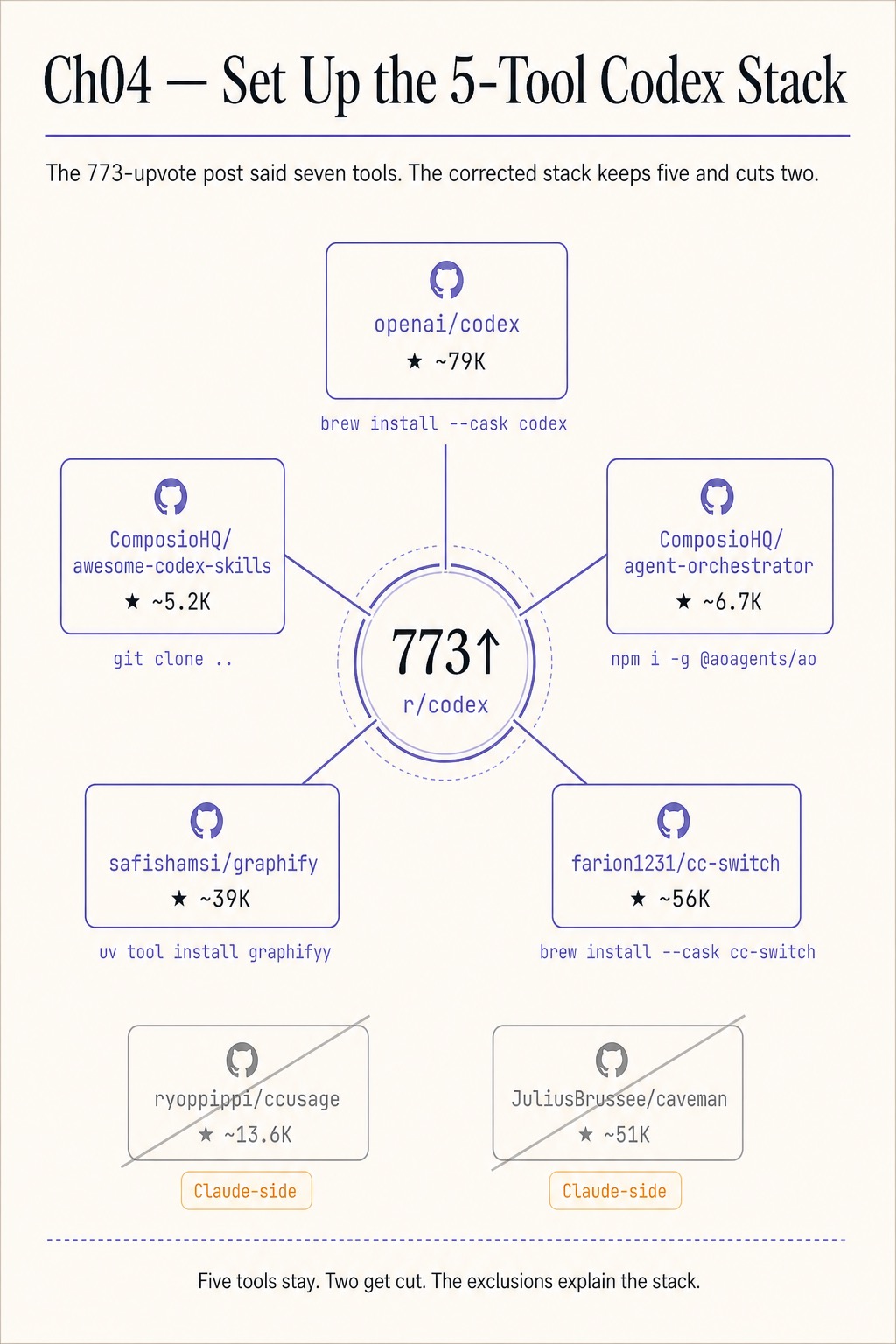
- Five tools make up the OpenAI Codex stack: the Codex CLI, awesome-codex-skills, agent-orchestrator, graphify, and cc-switch.
- Two tools the 773-upvote r/codex post named, ccusage and caveman, are Claude Code-side and get cut from a Codex-only setup.
- Each install has a specific package-name gotcha that stops most first attempts. The matrix below has the working commands.
- Wire all five into one
~/.codex/config.tomland a 6-linestack-health.shscript that catches drift before it costs an hour.
The OpenAI Codex stack the 773-upvote r/codex post promised. The post listed seven tools, ninety comments asked variations of “but how do I actually wire all of them up,” and the post itself never answered. This is the answer: five tools that run inside a Codex workflow, two that don’t, and the exact install commands for each.
What is the OpenAI Codex stack?
Five tools that compose into one daily-driver workflow. The Codex CLI runs the model. The skills index gives Codex a library of repeatable workflows it auto-discovers on session start. The agent orchestrator spawns parallel Codex sessions on git worktrees so two or three tickets can run at once. graphify compresses codebase context so the agent queries a graph instead of slurping files. cc-switch sits at the top as the multi-CLI safety net for the day Codex is down or a specific task is genuinely cheaper on Claude Code.
The 773-upvote post added two more: ccusage (a Claude Code token tracker) and caveman (a Claude Code skill that compresses Claude’s prompts). Both install via claude plugin marketplace add and read Claude Code’s local data files. They are good Claude tools. They are not Codex tools. The community confused “useful for Claude users who also run Codex” with “part of the Codex stack.” The matrix below corrects the list.
The install matrix
Live star counts and install commands, scraped from each repo’s GitHub page on the day this article shipped:
| Repo | Stars | Install command | Status |
|---|---|---|---|
| openai/codex | 80.4k | npm i -g @openai/codex or brew install --cask codex | keep |
| ComposioHQ/awesome-codex-skills | 7.1k | git clone …awesome-codex-skills.git && python skill-installer/scripts/install-skill-from-github.py --repo ComposioHQ/awesome-codex-skills --path <skill> | keep |
| ComposioHQ/agent-orchestrator | 6.8k | npm install -g @aoagents/ao | keep |
| safishamsi/graphify | 43.7k | uv tool install graphifyy && graphify install --platform codex | keep |
| farion1231/cc-switch | 61k | brew tap farion1231/ccswitch && brew install --cask cc-switch | keep |
| ryoppippi/ccusage | 13.6k | (Claude Code-side) | cut |
| JuliusBrussee/caveman | 51k | (Claude Code-side) | cut |
Star counts drift week to week. The shape of the matrix does not.
What broke on the way to a working stack
Three install errors swallow most first attempts at this stack. None of them is in the README’s quickstart. All three sit in the package-name divergence between repo, package, and binary.
agent-orchestrator: command not found after npm install -g agent-orchestrator. This is the package-name divergence. The npm package is @aoagents/ao, not agent-orchestrator. Uninstall the wrong package, install the right one, and the binary is ao:
npm uninstall -g agent-orchestrator
npm install -g @aoagents/ao
ao --version
graphify: command not found after pip install graphify. Same pattern, different name. The Python package is graphifyy (double y). The binary it lays down is graphify (single y). The pip-correct command:
uv tool install graphifyy
which graphify     # should return a path
graphify install --platform codex
cc-switch reports a CLI as “not installed” when it is. cc-switch detects installed CLIs by looking for known binary names on PATH at the version it expects. If your install diverged (Codex installed via Homebrew on macOS but at a non-default Cellar path), cc-switch reads it as missing. The fix:
cc-switch detect --refreshIf the binary lives in a custom location, set the matching CCS_<TOOL>_BIN environment variable to the absolute path and restart cc-switch.
What is cc-switch actually for?
A multi-CLI provider switcher that manages exactly five CLIs: Claude Code, Codex, OpenCode, Gemini CLI, and OpenClaw. Community write-ups occasionally claim cc-switch supports a sixth or seventh CLI, often listing Qwen3-Coder. The README does not. Qwen3-Coder is a model, not a CLI. Codex routes to it via its own --oss --local-provider ollama flag. cc-switch handles the CLI selection layer; Codex handles the provider routing layer underneath. Two layers, independent.
For the daily-driver setup, leave Codex as the active CLI. cc-switch is the safety net for the day Codex is down or a specific task is genuinely cheaper on Claude Code. The pattern:
cc-switch which          # tells you which CLI is fronting the `ccs` shim
cc-switch use claude-code
cc-switch use codex      # back to default
Wire ccs into your shell so the muscle memory is one command for whichever CLI you have routed to today.
Health-check the stack in 6 lines
The smallest sustainable habit is a one-line check that exercises every tool in the stack at once. Save as stack-health.sh:
#!/bin/bash
codex --version       || { echo "codex missing"; exit 1; }
ao --version          || { echo "ao missing"; exit 1; }
graphify --version    || { echo "graphify missing"; exit 1; }
cc-switch which       || { echo "cc-switch missing"; exit 1; }
ls ~/.agents/skills/  || { echo "skills dir missing"; exit 1; }
echo "stack ok"
Run it before the first Codex session of the day. Wire it into a precommit hook on the repo where you keep your scripts. The version drift that costs a four-hour debug session catches itself.
What should you actually do?
- If you are setting up a fresh machine → run the five install commands in order: Codex, awesome-codex-skills,
@aoagents/ao,graphifyy, cc-switch. Do not skip the package-name verification step (which graphify,ao --version). - If a community post tells you to install ccusage or caveman as part of “the Codex stack” → ignore that post. Both are Claude Code-side. Install them only if you are also running Claude Code in parallel and want one tool that reads both feeds.
- If you only have time for two tools today → install Codex itself plus graphify. graphify alone cuts a typical session’s input tokens by 60-80% by replacing full-file reads with scoped graph queries.
- If your team is two or more developers → cc-switch on every machine, default-routed to Codex. The day OpenAI has an outage you do not lose a workday.
- If your install drifted across machines → drop the 6-line health check on every box and wire it into shell startup. The drift becomes visible the next morning instead of three weeks later.
bottom_line
- The Codex stack is five tools, not seven. The two cuts are not optional; they are wrong-tool-for-the-job.
- Every install in this stack has a package-name gotcha. Verify the binary is on PATH after each step or you are wasting hours.
- cc-switch is the safety net, not the daily driver. Codex stays the active CLI; cc-switch is the layer that lets you survive a vendor outage.
Frequently Asked Questions
What tools do I actually need to run OpenAI Codex well?+
Five. The Codex CLI itself, the awesome-codex-skills index, agent-orchestrator for parallel sessions, graphify for codebase context compression, and cc-switch as the multi-CLI safety net. Two tools the community recommends, ccusage and caveman, are Claude Code-side and don't fit a Codex-only workflow.
Is the npm package name really `@aoagents/ao` and not `agent-orchestrator`?+
Yes. The GitHub repo name is `ComposioHQ/agent-orchestrator`. The npm package is `@aoagents/ao`. The binary on disk is `ao`. Running `npm install -g agent-orchestrator` installs an unrelated package and produces 'command not found' the first time you call it.
Why is graphify spelled `graphifyy` on PyPI?+
The Python package is `graphifyy` with double-y. The CLI binary it lays down is still `graphify` with one y. Running `pip install graphify` installs the wrong thing and `which graphify` returns nothing. Use `uv tool install graphifyy` or `pip install graphifyy`.