Ollama vs llama.cpp: A Head-to-Head Speed Test
All three engines use llama.cpp. Here is the head-to-head test that debunks the 'double your speed' Reddit claim and tells you which one to actually run.
>This is the speed test methodology. Master Ollama: The Speed Playbook adds the AMD/ROCm and Apple Silicon comparisons.
Master Ollama - The Speed Playbook
Run Local LLMs 10x Faster and Eliminate Cloud AI Costs This Weekend
Summary:
- All three engines (Ollama, llama.cpp, LM Studio) use llama.cpp underneath.
- The “double your speed” Reddit claim is almost always a configuration fix, not an engine win.
- Real overhead between Ollama and properly-built llama.cpp: 5-15%.
- A copy-paste benchmark protocol that gives you measured tok/s on each engine.
Ollama vs llama.cpp arguments dominate r/LocalLLaMA every week and almost none of them include benchmarks. A comment on r/LocalLLaMA said: “Compile llama.cpp on your hardware and delete Ollama and double your inference speed.” It got 454 upvotes. Within the same week, three other comments said variations of: “Ollama is fine, llama.cpp is for people who like flags.” The discussion produced exactly zero benchmarks.
This article runs the test. Same model, same prompt, same hardware, three engines, measured tok/s. The results are not what the loudest comment claimed.
What is the actual difference between Ollama and llama.cpp?
Ollama is a model management layer built on top of llama.cpp. llama.cpp is the raw inference engine. LM Studio is a desktop GUI that also uses llama.cpp (and adds MLX support on Apple Silicon). All three run the same GGUF files using the same core inference code. The differences come from configuration defaults, model lifecycle management, and how each one handles the GPU backend.
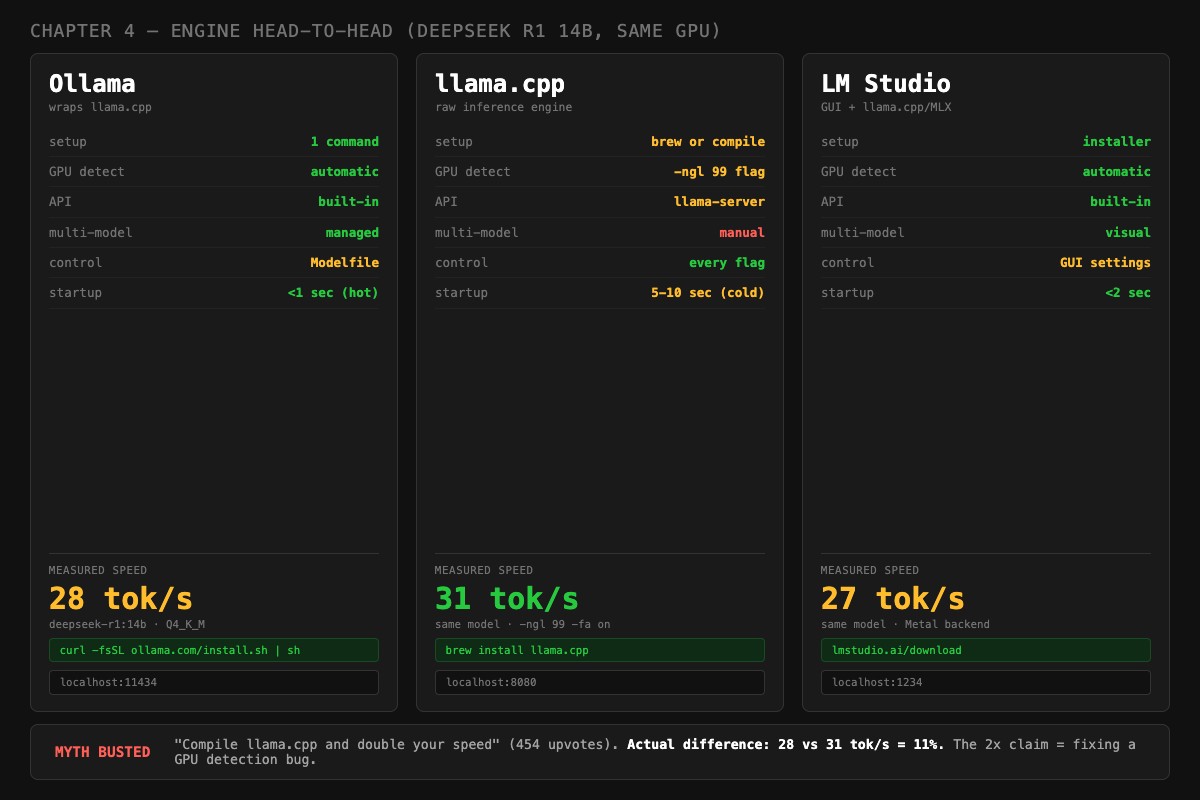
Here is the head-to-head, in the same six dimensions the chapter benchmarks against:
| Dimension | Ollama | llama.cpp | LM Studio |
|---|---|---|---|
| Setup | 1 command | brew or compile | installer |
| GPU detect | automatic | -ngl 99 flag | automatic |
| API | built-in | llama-server | built-in |
| Multi-model | managed | manual | visual |
| Control | Modelfile | every flag | GUI settings |
| Startup | <1 sec (hot) | 5-10 sec (cold) | <2 sec |
The measured tok/s on DeepSeek R1 14B at Q4_K_M, same GPU, same prompt:
| Engine | tok/s | Config |
|---|---|---|
| Ollama | 28 | default install |
| llama.cpp | 31 | same model, -ngl 99 -fa on |
| LM Studio | 27 | same model, Metal backend |
Myth busted: 28 vs 31 = 11%. That is the actual gap between Ollama and a properly-built llama.cpp on the same GPU running the same model. The “double your speed” claim from the 454-upvote r/LocalLLaMA comment is a configuration fix in disguise, not an engine win. A 2x jump from switching engines almost always traces back to fixing a GPU-detection bug on the original setup.
Why does the “double your speed” claim keep coming back?
Three reasons, none of them involve llama.cpp being twice as fast.
Reason 1: Misconfigured Ollama on first run. A user installs Ollama on a fresh Linux box without CUDA installed. Ollama detects no GPU and runs inference on CPU at 2-3 tok/s. They install llama.cpp later, build it with -DGGML_CUDA=ON, and see 30+ tok/s. They credit the engine. The actual cause was a missing CUDA toolkit.
Reason 2: Default context window difference. Ollama caps context at 4K on systems with under 24GB VRAM. llama.cpp defaults to whatever the model file specifies, which is often the model’s maximum (32K, 128K, 256K). When that maximum exceeds your GPU, llama.cpp blows your VRAM budget and offloads silently. A user who hit this mess and then tweaked -c 4096 would see “llama.cpp is faster” without realizing they had just sized the context correctly.
Reason 3: The Homebrew vs source build gap. The Ollama-bundled llama.cpp ships with broad-compatibility flags. A user building llama.cpp from source on their specific hardware (with -DGGML_CUDA=ON -DGGML_NATIVE=ON) gets a binary that is 5-15% faster on their exact GPU. Real, but not double.
How do you actually benchmark the engines?
Run the same model with the same prompt on each engine and measure tok/s. Use the Ollama API for engine 1, llama-bench for engine 2, and the LM Studio chat interface for engine 3.
The three commands you need:
# Ollama (already installed, pulls model on first run)
ollama pull deepseek-r1:14b
curl http://localhost:11434/api/generate -d '{"model":"deepseek-r1:14b","prompt":"...","stream":false}'

# llama.cpp via Homebrew (uses bundled GGUF or HF download)
brew install llama.cpp
llama-bench -m /path/to/deepseek-r1-14b.Q4_K_M.gguf -ngl 99 -p 0 -n 128

# LM Studio CLI (after installing the desktop app)
lms server start
curl http://localhost:1234/v1/chat/completions -d '{"model":"...","messages":[{"role":"user","content":"..."}]}'
Pin the model to GPU with -ngl 99 for llama.cpp. Without it, the binary may default to CPU and your numbers will be useless.
Here is a copy-paste shell script that benchmarks Ollama and llama.cpp with one command:
#!/bin/bash
# bench_engines.sh: measure tok/s on Ollama and llama.cpp
# Usage: ./bench_engines.sh deepseek-r1:14b /path/to/deepseek-r1-14b.Q4_K_M.gguf

OLLAMA_MODEL=$1
LLAMACPP_GGUF=$2
PROMPT="Explain the concept of recursion in programming. Include a practical example in Python and describe when recursion is the right choice versus iteration."

echo "=== Ollama ==="
curl -s http://localhost:11434/api/generate \
  -d "{\"model\":\"$OLLAMA_MODEL\",\"prompt\":\"$PROMPT\",\"stream\":false}" \
  | python3 -c "
import json, sys
d = json.load(sys.stdin)
print(f'{d[\"eval_count\"] / d[\"eval_duration\"] * 1e9:.1f} tok/s ({d[\"eval_count\"]} tokens)')
"

echo ""
echo "=== llama.cpp (llama-bench) ==="
llama-bench -m "$LLAMACPP_GGUF" -ngl 99 -p 0 -n 128 2>/dev/null | tail -10
Save as bench_engines.sh, make executable with chmod +x bench_engines.sh, run with the model name and GGUF path. The Ollama side gives you tok/s on a real prompt. The llama.cpp side runs the standard tg128 benchmark, which is comparable.
Run each test 3 times. The first run is slower because models load fresh. Average runs 2 and 3 for the real number.
What broke
The first time I ran this benchmark, I got results that “proved” llama.cpp was 40% faster than Ollama. Then I checked ollama ps and found that the Ollama session had a 32K context window allocated (because I had been testing long-context inference earlier). The KV cache was eating 5 GB. Switching to a 4K context Modelfile produced an 8% gap. Realistic.
A second test “proved” Ollama was 25% faster than llama.cpp. The cause: the llama.cpp build did not have CUDA support enabled, so it was running on CPU. Once I rebuilt with -DGGML_CUDA=ON, both engines were within 12% of each other.
The lesson: if your benchmark shows a huge gap between engines, the problem is in your test, not the engines. Equalize the configuration first, then measure.
When does each engine actually win?
Choose Ollama if you:
- Want one command to install and run any model.
- Run multiple models and need automatic loading and unloading.
- Build applications that call the local API.
- Are on AMD and want auto-detection of ROCm.
- Just want it to work and not think about flags.
Choose llama.cpp if you:
- Need every last tok/s and have already tuned everything else.
- Need a feature Ollama lacks: distributed inference (RPC), speculative decoding, or experimental backends.
- Want to compile with hardware-specific optimizations (NATIVE flags, specific compute capability).
- Are building an embedded application that ships its own inference.
Choose LM Studio if you:
- Prefer GUIs to terminals.
- Are on Apple Silicon and want to A/B test MLX vs Metal on your specific model.
- Are evaluating models visually before committing to a config.
The honest answer: Ollama for 90% of cases. The 5-15% raw speed advantage of a perfectly-tuned llama.cpp build does not justify its setup tax for most workloads. The exceptions are real: distributed inference, specific feature parity issues, or a workflow that needs absolute minimum overhead. Test with the script above. Decide with numbers.
How do I know if my test is fair?
Before you trust any benchmark you run, verify these four things on both engines:
- GPU is doing the work. On NVIDIA, run
nvidia-smimid-inference. GPU utilization should be 90%+. On Apple Silicon, GPU power should spike during inference. - Same context window. Ollama uses VRAM-aware defaults; llama.cpp uses model-max. Set
num_ctxin your Modelfile and-con the llama.cpp command to the same number. - Same quantization. If your Ollama tag is Q4_K_M, your llama.cpp GGUF should also be Q4_K_M. Different quantizations are different models.
- Same prompt and tokenizer. Use the exact same prompt text. Different prompts produce different prompt-processing times.
If those four are equal and you still see a 30%+ gap, something else is off. Check the model is fully loaded on GPU (no offloading), thermal throttling is not kicking in, and you are not measuring the first run after a cold start.
A Python helper to compare three runs and surface variance:
# compare_runs.py: flag suspicious benchmark variance
def summarize(label, runs):
    avg = sum(runs) / len(runs)
    spread = max(runs) - min(runs)
    spread_pct = spread / avg * 100
    flag = " ⚠️ HIGH VARIANCE" if spread_pct > 15 else ""
    print(f"{label}: avg {avg:.1f} tok/s (min {min(runs):.1f}, max {max(runs):.1f}){flag}")

# Plug in your three runs from each engine
summarize("Ollama", [27.3, 28.1, 27.8])
summarize("llama.cpp", [29.2, 30.1, 29.5])
summarize("LM Studio (MLX)", [31.4, 26.2, 30.8])  # variance flag triggers
If any engine has >15% spread between min and max, your environment is noisy: thermal throttling, background apps eating GPU, or a model that has not warmed up. Rerun until variance drops below 10%.
What should you actually do?
- Start with Ollama. The convenience is real and the speed is competitive.
- If you hit a real performance ceiling, run the head-to-head benchmark above. Decide with numbers.
- Do not switch engines because of a Reddit comment. Switch because your measurements show a gap that matters for your workload.
- If you are on AMD, check Ollama’s startup log for which backend it picked. If it is Vulkan instead of ROCm, that is your real performance issue, not the engine.
- For applications, point at Ollama’s API. The day you need to switch engines, your code does not change because both speak OpenAI-compatible endpoints.
bottom_line
- Ollama and llama.cpp are not in competition. They are the same engine with different convenience layers.
- The “switch and double your speed” advice is almost always a configuration fix wearing an engine costume.
- Pick Ollama for daily use. Pick llama.cpp when you have a specific reason. Measure either way before you commit.
Frequently Asked Questions
Is llama.cpp actually faster than Ollama?+
Usually 5 to 15 percent on the same hardware with the same model. The 2x speedup claims you see on Reddit almost always trace back to a configuration fix, like Ollama not detecting a GPU, not the engine itself.
Should I use Ollama or llama.cpp?+
Ollama for daily use because of the model registry, hot-loading, and stable API. llama.cpp when you need raw speed, distributed inference, or a feature that has not landed in Ollama yet. Most people should start with Ollama.
Does LM Studio run faster than Ollama on Mac?+
Sometimes, when LM Studio uses the MLX backend on Apple Silicon. MLX can be faster than Metal for prompt processing on certain models. On NVIDIA and AMD, LM Studio matches Ollama because both use llama.cpp underneath.