How to Fit a 26B LLM on a 16GB GPU
Q4_K_M is not the floor. Importance-matrix quantization, IQ3_M, and per-tensor tricks let you run models that 'cannot fit' your GPU with usable quality.
>This is the quantization playbook. Master Ollama: The Speed Playbook adds the per-tensor and KV-cache compression deep dives.
Master Ollama - The Speed Playbook
Run Local LLMs 10x Faster and Eliminate Cloud AI Costs This Weekend
Summary:
- Q4_K_M is the popular default, not the floor.
- Q3_K_M, IQ3_M, and IQ3_XS each shrink the model further with predictable quality tradeoffs.
- Importance-matrix quantization preserves quality where it matters most.
- Real Gemma 4 26B file sizes for every quantization level, with VRAM verdicts for 16 GB GPUs.
If you Googled “fit large LLM small GPU” and landed here, you already know Q4_K_M doesn’t fit and you want to know what does. A comment on r/ollama said: “The 31B model can’t fit on your 16GB vram. Maybe the 26B on low context could.” That was 56 upvotes of correct-but-incomplete advice. The complete answer is that aggressive quantization extends what fits by 30-40%, often without the quality cliff that everyone fears.
This is the quantization playbook for fitting models into VRAM that “cannot” hold them.
What is the smallest viable quantization for a usable LLM?
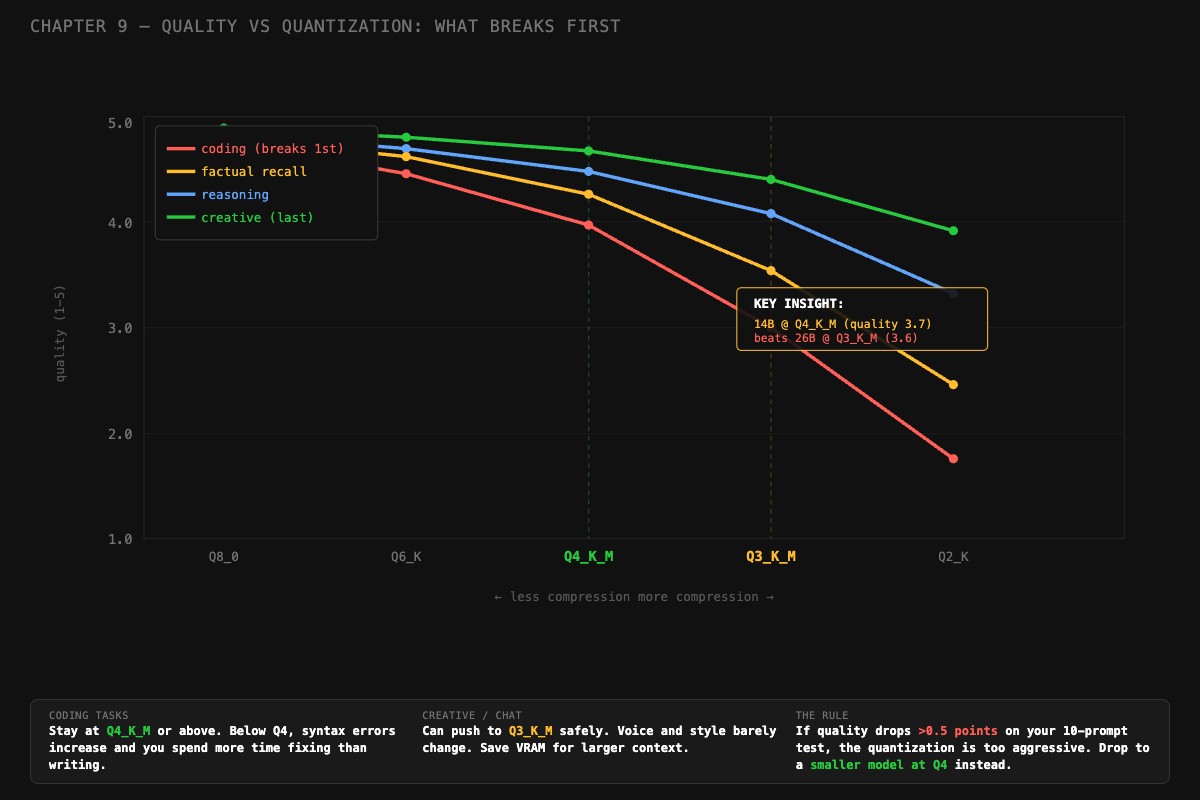
For most tasks, IQ3_M is the floor where output stays usable. Q3_K_M is close. Q2_K is the emergency option, with noticeable quality drops on coding and factual recall. Below 2 bits per weight, output quality typically falls off a cliff except for models trained at low precision from scratch (the Bonsai approach).
Real Gemma 4 26B file sizes pulled directly from bartowski’s GGUF repo on HuggingFace:
| Quantization | File size | Bits/weight | Fits 16 GB GPU? |
|---|---|---|---|
| Q8_0 | 26.9 GB | 8.0 | No, needs 32 GB+ |
| Q6_K | 22.9 GB | 6.0 | No |
| Q5_K_M | 19.3 GB | 5.0 | No |
| Q5_K_S | 18.1 GB | 5.0 | No |
| Q4_K_M | 17.0 GB | 4.0 | No, just over |
| Q4_K_S | 15.8 GB | 4.0 | Yes, no headroom |
| IQ4_XS | 14.2 GB | 4.25 | Yes, tight |
| Q3_K_L | 13.2 GB | 3.0 | Yes |
| Q3_K_M | 13.0 GB | 3.0 | Yes |
| IQ3_M | 12.4 GB | 3.66 | Yes, best quality at this size |
| IQ3_XS | 12.2 GB | 3.66 | Yes |
| Q3_K_S | 12.6 GB | 3.0 | Yes |
| IQ3_XXS | 12.2 GB | 3.66 | Yes |
| Q2_K_L | 11.1 GB | 2.0 | Yes, with quality drop |
| Q2_K | 11.0 GB | 2.0 | Yes, with quality drop |
The takeaway: Gemma 4 26B at Q4_K_M takes 17 GB and does not fit a 16 GB GPU. At IQ3_M it takes 12.4 GB, fits comfortably with room for context, and produces better quality than Q3_K_M because of the importance matrix.
What is an importance matrix and why does it matter?
An importance matrix (imatrix) is a calibration file that records how sensitive each tensor in the model is to precision loss. The quantizer reads it and allocates more bits to sensitive layers (typically attention and output) and fewer bits to resilient ones. The model’s overall file size stays similar, but quality holds up better than uniform quantization at the same bit budget.
Standard Q3_K_M uses a fixed 3-bit precision across all layers. IQ3_M (importance-matrix mixed) averages 3.66 bits per weight but distributes them where they matter. Result: same VRAM footprint as Q3_K_L (13.2 GB), better output quality.
This matters most for coding and factual recall, which are the first capabilities to degrade under quantization. Reasoning and creative writing are more resilient.
How do you quantize a model with an importance matrix?
Two paths: download a pre-built IQ3_M from HuggingFace, or quantize a full-precision model yourself with llama-quantize.
Path 1 is the easy one:
# Use a pre-quantized GGUF from bartowski
huggingface-cli download bartowski/google_gemma-4-26B-A4B-it-GGUF \
  google_gemma-4-26B-A4B-it-IQ3_M.gguf \
  --local-dir ./models

# Import into Ollama via Modelfile
cat > Modelfile.gemma4-iq3 << 'EOF'
FROM ./models/google_gemma-4-26B-A4B-it-IQ3_M.gguf
PARAMETER num_ctx 8192
PARAMETER temperature 0.3
PARAMETER stop "<end_of_turn>"
EOF

ollama create gemma4-iq3 -f Modelfile.gemma4-iq3
ollama run gemma4-iq3 "test prompt"
Path 2 is more work but gives you full control:
# Quantize from FP16 source with an importance matrix
# (requires building llama.cpp from source)
llama-perplexity -m gemma4-26b-fp16.gguf \
  --imatrix-file importance.dat \
  -f calibration_text.txt

llama-quantize --imatrix importance.dat \
  gemma4-26b-fp16.gguf \
  gemma4-26b-iq3m.gguf \
  IQ3_M
The calibration text matters. If you primarily code, calibrate on Python and JavaScript files. If you primarily chat, calibrate on conversational text. The imatrix records what matters for your use case, then preserves quality there during quantization.
How do you measure quality after quantizing?
Run 10 test prompts on both quantizations and score each response on a 1-5 scale. This is faster than it sounds. Here is the scoring rubric:
- 5: Excellent. Use as-is.
- 4: Good. Minor formatting or verbose explanation, content correct.
- 3: Adequate. Right answer, confusing delivery.
- 2: Poor. Meaningful errors, needs significant editing.
- 1: Unusable. Wrong, broken, or off-topic.
Mix the prompts: 3 coding, 3 knowledge, 2 reasoning, 2 creative. Run each on both Q4_K_M (baseline) and IQ3_M (your candidate). Score honestly. Track the delta:
# quality_delta.py: compare two quantizations on your own prompts
runs = {
    "Q4_K_M":  {"coding": 4.3, "knowledge": 4.0, "reasoning": 4.1, "creative": 4.2},
    "IQ3_M":   {"coding": 3.9, "knowledge": 3.8, "reasoning": 4.0, "creative": 4.1},
}

for category in runs["Q4_K_M"]:
    base = runs["Q4_K_M"][category]
    candidate = runs["IQ3_M"][category]
    delta = candidate - base
    flag = " ⚠️" if delta < -0.5 else ""
    print(f"{category:12s}  base {base}  candidate {candidate}  delta {delta:+.2f}{flag}")

# coding       base 4.3  candidate 3.9  delta -0.40
# knowledge    base 4.0  candidate 3.8  delta -0.20
# reasoning    base 4.1  candidate 4.0  delta -0.10
# creative     base 4.2  candidate 4.1  delta -0.10
If any category drops by more than 0.5 points, the quantization is too aggressive for that use case. Drop down to a smaller model at better quantization instead.
What broke
Three real cases of aggressive quantization that went wrong, and what fixed them.
The IQ2_M coding disaster. A user crammed a 26B model into 8 GB of VRAM using IQ2_M (2.7 bits/weight). It loaded. It generated text. The text was nonsense for coding: missing imports, made-up API names, syntax errors. The fix was switching to a 14B model at Q4_K_M. Same VRAM budget, dramatically better coding output. The lesson: aggressive quantization breaks coding before it breaks chat.
The “Q4_0 is fine” trap. A user pulled gemma3:27b-it-q4_0 (no K-quant suffix) on a 16 GB GPU. File size 14.8 GB. Tight but seemed to fit. PROCESSOR showed 95%/5% GPU/CPU. They thought 5% CPU was acceptable. tok/s was 8 on a GPU that should have produced 25+. Switching to IQ4_XS (14.2 GB) freed the headroom needed for 100% GPU. Speed jumped to 27 tok/s.
The skipped imatrix. A user quantized a model from FP16 to Q3_K_M without an importance matrix. The quality on factual prompts dropped noticeably, more than expected for Q3 vs Q4. Adding --imatrix with a calibration file targeted at factual text and re-quantizing got them most of the quality back at the same file size.
Should you quantize more or switch to a smaller model?
This is the actual decision point. A 26B at Q3_K_M and a 14B at Q4_K_M use similar VRAM. Which produces better output? It depends on the model and the task.
A rough rule from the chapter content:
# decide.py: compare bigger-quantized vs smaller-full-precision
def choose_model(big_params, big_quant_quality, small_params, small_quant_quality):
    """
    Quality scores from your 10-prompt benchmark, 1-5 scale.
    """
    if abs(big_quant_quality - small_quant_quality) < 0.3:
        return f"{small_params}B at Q4_K_M (close quality, faster generation)"
    elif big_quant_quality > small_quant_quality + 0.3:
        return f"{big_params}B aggressively quantized (clear quality win)"
    else:
        return f"{small_params}B at Q4_K_M (better quality at this VRAM tier)"

# Real measurement from a head-to-head test
print(choose_model(big_params=26, big_quant_quality=3.6,
                   small_params=14, small_quant_quality=3.9))
# Output: 14B at Q4_K_M (better quality at this VRAM tier)
The 14B at Q4_K_M wins this matchup. More parameters at worse precision is not always better. You only know which is which by running the benchmark on your actual prompts.
What should you actually do?
- For a 16 GB GPU running a 26B model, start with IQ3_M. Best quality at the smallest fit.
- Run the 10-prompt quality test BEFORE committing. Five minutes saves you from picking a quantization that wrecks coding.
- If your top use case is coding, do not go below Q4_K_M without testing aggressively.
- If your top use case is chat or summarization, IQ3_M is usually fine.
- Always pull pre-quantized GGUFs from a known quantizer (bartowski, mradermacher) before quantizing yourself. They use proper imatrices.
bottom_line
- Q4_K_M is the popular default. It is not the floor. IQ3_M and IQ3_XS extend what fits without the quality cliff.
- The importance matrix is what makes sub-4-bit quantization usable. Without it, you are throwing away quality on layers that matter.
- A 14B at Q4_K_M usually beats a 26B at Q2_K. Test before committing to either.
Frequently Asked Questions
Can I run a 26B model on a 16GB GPU?+
Yes, with aggressive quantization. Q4_K_M doesn't fit (17 GB). Q3_K_M fits at 13 GB. IQ3_M fits at 12.4 GB with better quality than Q3_K_M because it uses an importance matrix to preserve sensitive layers.
What is an importance matrix in quantization?+
A calibration file that tells the quantizer which tensors are most sensitive to precision loss. Layers that affect output quality (attention, output) get more bits. Resilient layers get fewer. Result: better quality at the same file size.
When should I drop to a smaller model instead of quantizing more?+
When your quality drops by more than 0.5 points on a 1-5 rubric across 10 test prompts. A well-quantized 14B at Q4_K_M usually beats a 26B at Q2_K. More parameters at worse precision is not always better.