Ollama Modelfile: 3 Templates That Beat the Defaults
Default Ollama settings produce mediocre output. These 3 ready-to-copy Modelfiles for chat, code, and analysis fix it in 2 minutes with explicit reasoning.
>This is the 3-template starter pack. Master Ollama: The Speed Playbook digs into the parameter combinations and the template format gotchas.
Master Ollama - The Speed Playbook
Run Local LLMs 10x Faster and Eliminate Cloud AI Costs This Weekend
Summary:
- Default Ollama settings ship for compatibility, not quality.
- Three task-specific Modelfiles (chat, code, analysis) tuned with explicit parameter logic.
- Each one builds in under 30 seconds with
ollama create.- Same base model produces visibly different output once tuned.
The Ollama Modelfile system prompt is the single highest-impact configuration change you can make, and most people leave it empty. A comment on the r/ollama 13-minute thread hit 266 upvotes for one observation: “Tools like cc or oc have system prompts > 20K tokens, so it’s not a clean slate on your first prompt.” Translation: professional AI tools spend thousands of tokens on instructions before you type anything. Ollama by default ships zero. That’s the difference between focused output and wandering output.
Three Modelfiles, three skills, all tested.
What is an Ollama Modelfile?
A Modelfile is a plain text configuration document. It declares the base model, the system prompt, the context window, the sampling parameters (temperature, top_p, repeat_penalty), and a few other dials. You build a custom model from it with ollama create. The custom model shares the base weights on disk, so creating three variants of the same base is free.
The minimum viable Modelfile is one line:
FROM gemma3:12bSave as Modelfile.bare, run ollama create gemma3-bare -f Modelfile.bare, and you have a copy of Gemma 3 12B with all defaults. That is exactly what you do not want, because the defaults are tuned for “works on the widest set of hardware” not “produces useful output.”
What settings actually matter?
Five parameters do most of the work. Here is what each one controls and a sane default range:
| Parameter | Range | Default | What it does |
|---|---|---|---|
num_ctx | 2048 - 131072 | 4096 (on <24GB) | Context window. Bigger = more conversation memory, more VRAM |
temperature | 0.0 - 2.0 | 0.8 | Randomness. Lower = focused, higher = creative |
top_p | 0.0 - 1.0 | 0.9 | Token pool size. Lower = narrow vocabulary |
repeat_penalty | 0.9 - 1.5 | 1.1 | Penalty for repeating tokens |
stop | model-specific | none | Token that ends generation |
The interactions matter. Low temperature + low top_p (0.2/0.7) gives precision: code, structured output, factual recall. Medium temperature + high top_p (0.7/0.9) gives natural conversation. High temperature + high top_p (0.9/0.95) gives creative writing. Pick the combination for the job, not a one-size-fits-all default.
How do you write a Modelfile for coding?
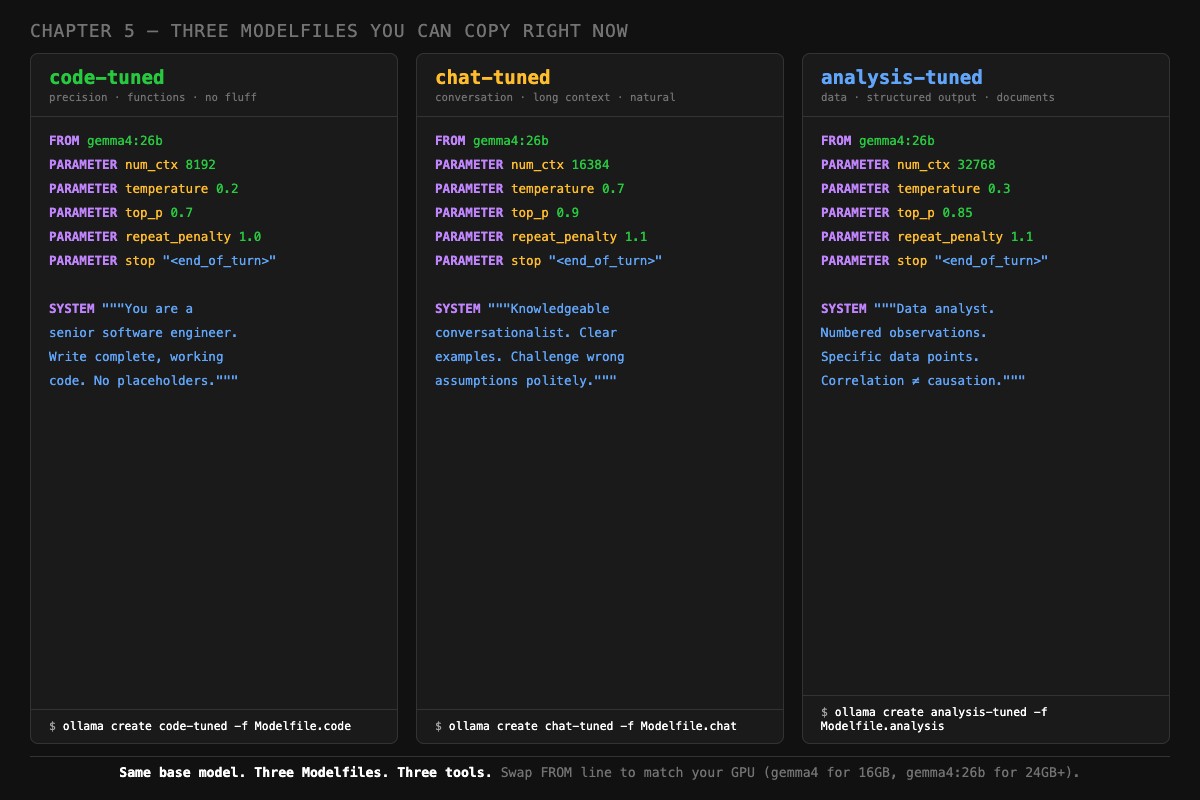
Lower the temperature, narrow the top_p, set a focused system prompt, and stop tokens for your model family. Here is the template:
# ~/modelfiles/Modelfile.code
FROM gemma3:12b

PARAMETER num_ctx 8192
PARAMETER temperature 0.2
PARAMETER top_p 0.7
PARAMETER repeat_penalty 1.0
PARAMETER stop "<end_of_turn>"

SYSTEM """You are a senior software engineer. Write complete, working code without placeholders or TODO comments. Use clear variable names. Include error handling where appropriate. When debugging, state the root cause first, then provide the fix. No commentary unless asked."""
Build it:
ollama create code-tuned -f ~/modelfiles/Modelfile.code
ollama run code-tuned "write a python function to deduplicate a list of dicts by id"
The differences from defaults: temperature drops from 0.8 to 0.2 (deterministic output, fewer “creative” syntax errors). top_p drops from 0.9 to 0.7 (the model picks from conventional tokens). The system prompt sets engineer-mode, which dramatically cuts hedge phrases and meta-commentary.
The <end_of_turn> stop token matters specifically for Gemma. Without it, Gemma 3 sometimes generates past its response into the next “turn” and starts answering its own follow-up question. If you swap to a Llama or Qwen base, change the stop token to match ([INST] for Llama, <|im_end|> for Qwen).
How do you write a Modelfile for chat?
Raise the temperature, raise the top_p, expand the context window for multi-turn conversations:
# ~/modelfiles/Modelfile.chat
FROM gemma3:12b

PARAMETER num_ctx 16384
PARAMETER temperature 0.7
PARAMETER top_p 0.9
PARAMETER repeat_penalty 1.1
PARAMETER stop "<end_of_turn>"

SYSTEM """You are a knowledgeable conversationalist. Explain concepts clearly with concrete examples. Challenge incorrect assumptions politely. When you don't know something, say so directly instead of guessing. Match the technical depth of the user's question."""
Note the num_ctx jump to 16384. Chat sessions accumulate. Default 4K runs out fast on a multi-turn conversation. 16K gives you room for a real exchange. The KV cache cost of going from 4K to 16K is about 1.2 GB on a 12B model, so check your VRAM headroom before pushing higher.
Build and test:
ollama create chat-tuned -f ~/modelfiles/Modelfile.chat
ollama run chat-tuned
>>> What is a closure in JavaScript?
The model should produce a conversational explanation with concrete examples, not a textbook definition. If it sounds robotic, the system prompt is being ignored. Run ollama show --modelfile chat-tuned and confirm your SYSTEM block is in there.
How do you write a Modelfile for analysis?
Low temperature for accuracy, larger context for documents, structured-output system prompt:
# ~/modelfiles/Modelfile.analysis
FROM gemma3:12b

PARAMETER num_ctx 32768
PARAMETER temperature 0.3
PARAMETER top_p 0.85
PARAMETER repeat_penalty 1.1
PARAMETER stop "<end_of_turn>"

SYSTEM """You are a data analyst. Present findings as structured observations with specific numbers. Distinguish between correlation and causation. When given data, start with the most surprising or actionable finding. Format output with headers and bullet points."""
Build:
ollama create analysis-tuned -f ~/modelfiles/Modelfile.analysisThat 32K context is deliberate. Analysis tasks often involve pasting a CSV, a log file, or a long document. 32K tokens covers most of those without truncation. The KV cache cost is real (about 3.2 GB on a 12B model), so if your GPU is already tight, drop to 16K and chunk your inputs.
What broke
Three real failures from people who skipped this and used defaults.
The 4K context wall. A user pasted a 6K-token document into a chat session, asked questions about it, and got confused responses that referenced “the document” without specifics. The default 4K context truncated the document on input. The model never saw the second half. The fix was a Modelfile with num_ctx 16384 and the same prompt produced accurate page-by-page references.
The temperature 0.8 coding bug. A user complained that “Gemma 3 hallucinates Python syntax.” They ran the same prompt on gemma3:12b and on Claude Sonnet for comparison. Claude was right, Gemma was wrong. The cause: default temperature of 0.8 introduces enough randomness that even known-correct syntax patterns get sampled out. Dropping to temperature 0.2 in a coding Modelfile eliminated the hallucinations on the same prompts.
The “no system prompt” personality void. A user asked “what’s a closure?” and got a Wikipedia-style response: detached, definition-first, no examples. They thought the model was bad. The default system prompt is empty. Adding “You are a senior engineer who explains with concrete examples” turned the same response into a usable explanation with code samples.
How do you switch between models cleanly?
VRAM is finite. If you load code-tuned and then chat-tuned, both end up in memory by default. On a 16 GB GPU running 12B models, that is a problem.
Stop the previous one explicitly:
ollama stop code-tuned
ollama ps  # confirm empty before loading the next
ollama run chat-tuned
Or set a shorter keep-alive in each Modelfile so models unload faster:
PARAMETER keep_alive 30sThis unloads the model 30 seconds after the last query instead of the default 5 minutes. Reloads are slower (you pay 5-15 seconds per cold load), but you never have two models splitting your VRAM.
What should you actually do?
- Build all three Modelfiles right now. The whole pack takes 5 minutes.
- Run the same test prompt through each: “write a Python function that deduplicates a list of dicts by id.” Notice the differences.
- For coding, use
code-tuned. For everything else, usechat-tuned. Pullanalysis-tunedout for documents. - If output still looks bad, run
ollama show --modelfile <name>and confirm your SYSTEM block landed. Sometimes a syntax error eats it silently. - When you upgrade to a new base model (Gemma 4, Qwen 3.6), copy your Modelfiles and change only the
FROMline. Your tuning carries over.
bottom_line
- The default Modelfile is the lowest-effort, lowest-quality configuration possible. Treating it as “the right setting” is leaving 80% of the model’s value on the table.
- Temperature alone is worth a Modelfile. Going from 0.8 to 0.2 changes coding output more than switching models.
- Three files, one base model, three personalities. This is the cheapest, highest-impact configuration in local AI.
Frequently Asked Questions
What is an Ollama Modelfile?+
A plain text file that configures a model: which base model to use, which system prompt to apply, what context window to allocate, and what sampling parameters to set. Think of it as a saved profile for the same underlying model.
Where should I save my Modelfile?+
Anywhere readable. A common pattern is `~/modelfiles/Modelfile.code` for a coding profile and `~/modelfiles/Modelfile.chat` for general use. Then create the model with `ollama create code-tuned -f ~/modelfiles/Modelfile.code`.
Does the system prompt eat context?+
Yes. Every system prompt token counts against your context window. Keep system prompts under 500 tokens on tight context setups (4K or 8K). On 16K+ context, this is rarely a concern.