How Much VRAM Do You Need for a Local LLM?
The exact formula for predicting VRAM use of any local LLM, plus the KV cache table you need before you waste 20 minutes downloading a model that crashes.
>This covers the math. Master Ollama: The Speed Playbook walks 4 worked examples and the multi-model VRAM budget.
Master Ollama - The Speed Playbook
Run Local LLMs 10x Faster and Eliminate Cloud AI Costs This Weekend
Summary:
- The VRAM formula: parameters × bits ÷ 8 × 1.2 = base size.
- Add KV cache: scales linearly with context length.
- Add 500 MB runtime overhead. Compare against your usable VRAM.
- Worked examples for 4B, 12B, and 27B models on 12 GB and 16 GB GPUs.
How much VRAM for local LLM workloads? Three numbers and a 30-second formula no one writes down clearly. A user on r/ollama wrote: “16 GB VRAM is not enough.” Another: “the 31B model can’t fit on your 16GB vram. Maybe the 26B on low context could.” Both right. Both also imprecise. The actual answer is a formula that takes 30 seconds to apply and tells you exactly which models fit.
You need this because the alternatives waste your time. Downloading a 17 GB model file just to find out it crashes your GPU is a 20-minute round trip. Trying every quantization until one works is a 90-minute project.
How do you calculate VRAM for an LLM?
Multiply the parameter count in billions by the bits per weight, divide by 8 for bytes, multiply by 1.2 for overhead. That gives you base model weight size in GB. Then add the KV cache for your context window and 500 MB of runtime overhead.
VRAM = (params_B × bits_per_weight ÷ 8 × 1.2) + KV_cache + 500 MBA worked example: Gemma 3 12B at Q4_K_M, 8K context, on a 16 GB GPU.
# vram_calc.py: predict any local LLM's VRAM footprint
def vram_estimate(params_b: float, bits: int, ctx: int, kv_per_1k_mb: float = 100):
    """
    params_b: model size in billions
    bits: bits per weight (4 for Q4_K_M, 8 for Q8_0)
    ctx: context window in tokens
    kv_per_1k_mb: KV cache MB per 1K context (~100 for 12B, ~175 for 26B)
    """
    weights_gb = params_b * bits / 8 * 1.2
    kv_gb = (ctx / 1000) * kv_per_1k_mb / 1000
    overhead_gb = 0.5
    total = weights_gb + kv_gb + overhead_gb
    print(f"Weights:  {weights_gb:.1f} GB")
    print(f"KV cache: {kv_gb:.2f} GB ({ctx} tokens)")
    print(f"Overhead: {overhead_gb:.1f} GB")
    print(f"TOTAL:    {total:.1f} GB")
    return total

# Gemma 3 12B at Q4_K_M, 8K context
vram_estimate(params_b=12, bits=4, ctx=8192, kv_per_1k_mb=100)
# Weights:  7.2 GB
# KV cache: 0.82 GB (8192 tokens)
# Overhead: 0.5 GB
# TOTAL:    8.5 GB
That fits comfortably in 16 GB. Plug in your own numbers before you download anything.
What does the model weight size actually look like?
The formula gets you within 80% of reality. The remaining 20% comes from mixed-precision K-quants, GGUF metadata, and KV cache pre-allocation. The 1.2 multiplier covers it.
Real Gemma 3 file sizes pulled directly from the Ollama library tags page:
| Tag | Size on disk | Param count | Quant | Math check (params × bits ÷ 8 × 1.2) |
|---|---|---|---|---|
gemma3:4b-it-q4_K_M | 3.3 GB | 4B | Q4_K_M | 2.4 GB (formula low; mixed quant adds) |
gemma3:4b-it-q8_0 | 5.0 GB | 4B | Q8_0 | 4.8 GB ✓ |
gemma3:12b-it-q4_K_M | 8.1 GB | 12B | Q4_K_M | 7.2 GB (formula low; close enough) |
gemma3:12b-it-q8_0 | 13 GB | 12B | Q8_0 | 14.4 GB ✓ |
gemma3:27b-it-q4_K_M | 17 GB | 27B | Q4_K_M | 16.2 GB ✓ |
gemma3:27b-it-q8_0 | 30 GB | 27B | Q8_0 | 32.4 GB ✓ |
gemma3:27b-it-fp16 | 55 GB | 27B | FP16 | 64.8 GB ✓ |
Note the disk size is close to but not identical to the runtime VRAM use. The formula gives you a reliable upper bound with the 1.2 multiplier. For more precise estimates after running once, replace 1.2 with the ratio you actually observed.
What is the KV cache and how big is it?
The KV cache is the attention state stored during inference: keys and values for every token in your current context. It scales linearly with num_ctx. Doubling context doubles the KV cache memory.
This catches people who set num_ctx 32768 because “the model supports 256K.” On a 16GB GPU, the cache alone can push the model into CPU offloading territory. The KV cache for a Gemma 4 26B-class model at 128K context is about 22 GB. Larger than the model weights.
Use this lookup table for a 12B-class model at default FP16 KV precision:
| Context length | KV cache size |
|---|---|
| 2,048 | ~200 MB |
| 4,096 | ~400 MB |
| 8,192 | ~800 MB |
| 16,384 | ~1.6 GB |
| 32,768 | ~3.2 GB |
| 65,536 | ~6.4 GB |
| 131,072 | ~12.8 GB |
For a 26B-class model, multiply each row by ~1.75. Larger models have wider attention layers, which means more bytes per token in the cache.
Three worked examples on a 16 GB GPU
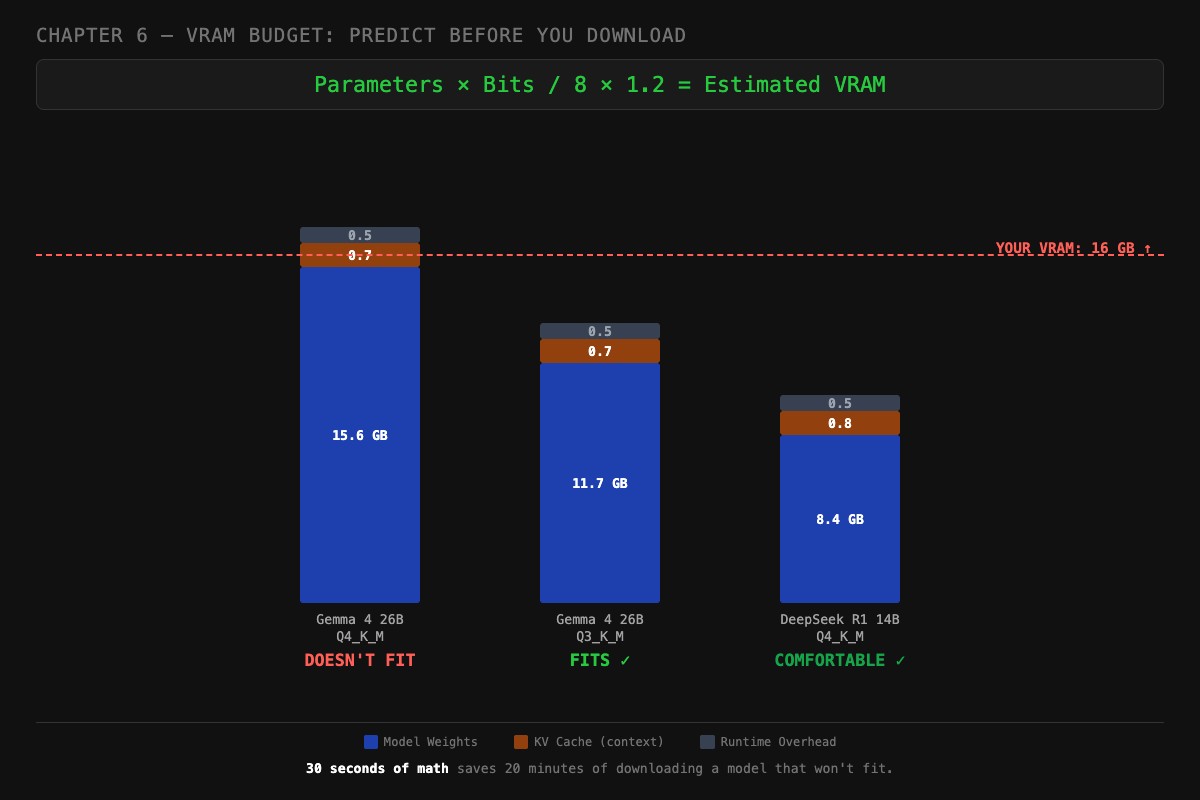
Here are the three scenarios the chapter uses to anchor the math. Same hardware (16 GB GPU, ~15 GB usable after OS), three different models, three different verdicts.
Gemma 4 26B at Q4_K_M, DOESN’T FIT.
# 26 params × 4 bits / 8 × 1.2 = 15.6 GB weights
vram_estimate(params_b=26, bits=4, ctx=4096, kv_per_1k_mb=175)
# Weights:  15.6 GB
# KV cache: 0.7 GB (4K context)
# Overhead: 0.5 GB
# TOTAL:    16.8 GB  ← over the 15 GB usable line
Weights alone exceed usable VRAM. Adding KV cache and runtime overhead pushes it further. PROCESSOR will show a CPU/GPU split. tok/s will collapse.
Gemma 4 26B at Q3_K_M, FITS.
# 26 params × 3 bits / 8 × 1.2 = 11.7 GB weights
vram_estimate(params_b=26, bits=3, ctx=4096, kv_per_1k_mb=175)
# Weights:  11.7 GB
# KV cache: 0.7 GB
# Overhead: 0.5 GB
# TOTAL:    12.9 GB  ← fits with ~2 GB headroom
Drop one quantization tier and the same model now fits with room for a 4K context window. Quality drop is real but bounded (about 0.3 perplexity points on coding, less on chat).
DeepSeek R1 14B at Q4_K_M, COMFORTABLE.
# 14 params × 4 bits / 8 × 1.2 = 8.4 GB weights
vram_estimate(params_b=14, bits=4, ctx=8192, kv_per_1k_mb=100)
# Weights:  8.4 GB
# KV cache: 0.8 GB (8K context)
# Overhead: 0.5 GB
# TOTAL:    9.7 GB  ← fits with 5+ GB to spare
Plenty of headroom. You could push context to 16K (KV cache 1.6 GB, total 10.5 GB) or move up to Q5_K_M. This is the sweet spot setup for a 16 GB GPU.
Thirty seconds of math saves twenty minutes of downloading a model that won’t fit. The formula above tells you the verdict before you spend bandwidth.
What broke
Three real failures the formula would have caught.
70B model on 24 GB GPU. A user pulled llama3:70b (~43 GB at Q4_K_M) on a 24 GB GPU. PROCESSOR went 50%/50% CPU/GPU. tok/s collapsed to 2. The formula would have shown 50.4 GB needed. Not even close to fitting.
Context blowout on Mac M2. A user set num_ctx 65536 on a 32 GB unified-memory Mac running a 26B model. The KV cache went to ~11 GB (using the 26B multiplier on the table above). Plus 17 GB of weights. Plus the OS taking 6 GB. Total: 34 GB needed, 32 GB available. Their fans screamed. Speed dropped from 24 tok/s to 5. Dropping num_ctx to 16K freed 8 GB and brought speed back.
Multi-model collision. A user kept Llama 3.2 3B loaded alongside DeepSeek R1 14B for “easy switching.” On a 16 GB GPU: 2.5 GB weights for 3B, 8.4 GB for 14B, plus KV caches and overhead = 13.5 GB. Tight. When they bumped context on the 14B, the 3B got evicted and reloads stuttered every switch. They had not done the math.
What should you actually do?
- Always do the math BEFORE downloading. The formula takes 30 seconds.
- Subtract 1-2 GB from your spec sheet VRAM for OS and display server.
- Pick
num_ctxdeliberately. Default to 4096 unless you have a long-context use case. - If a model fits but PROCESSOR shows any CPU split, reduce context first, quantization second.
- For a 16 GB GPU, the comfortable target is 14B at Q4_K_M with 8K context. That is your sweet spot.
- Keep a budget sheet for the 5-10 models you actually use. Update it when you change context or quantization.
bottom_line
- Most “is this VRAM enough” questions are 30 seconds of arithmetic that nobody bothers to do.
- The KV cache is the variable that surprises people. It scales linearly with context, and at long context, it is bigger than your model weights.
- A 16 GB GPU is plenty for serious local AI. The 48 GB build evangelists are running 70B models you do not need.
Frequently Asked Questions
How do I calculate VRAM for an LLM?+
Multiply parameters in billions by bits per weight, divide by 8, multiply by 1.2 for overhead. So a 14B model at Q4_K_M needs 14 × 4 ÷ 8 × 1.2 = 8.4 GB before context.
How much VRAM do I need to run a 26B model?+
About 17 GB at Q4_K_M for the weights plus 1.4 GB for an 8K context window plus 500 MB overhead. Total: roughly 19 GB. A 16 GB GPU cannot run it without quantizing more aggressively.
Does a larger context window need more VRAM?+
Yes. The KV cache scales linearly with context length. Doubling `num_ctx` from 8K to 16K doubles the KV cache memory. At 128K context, the cache alone can exceed the model weights.