How to Route Queries to Multiple Ollama Models
Build a Python router that sends coding questions to CodeLlama and general queries to Llama 3. Keyword-based and AI-powered routing strategies compared.
>This covers the routing system. Ship Local AI with Ollama goes deeper on tool-calling agents with retry logic, the complete system monitor build, and memory management for running 3+ models on 32GB machines.
Ship Local AI with Ollama
Build 5 Real Projects on Your Own Hardware in 30 Days
Summary:
- Build a keyword router that sends coding questions to CodeLlama and general questions to Llama in 40 lines of Python.
- An AI-powered router using a 3B classifier model that handles ambiguous queries better (90-95% accuracy vs 80-90%).
- A benchmark script to test routing accuracy before deploying.
- Memory management rules for running multiple models on 16GB and 32GB machines.
Running one model for everything is like using a Swiss Army knife when you have a toolbox. CodeLlama writes better code than general Llama. Qwen handles JSON extraction more reliably than either. A lightweight router picks the right specialist for each query. No frameworks, no cloud, no dependencies beyond requests. Just Ollama and 40 lines of Python.
How does multi-model routing work with Ollama?
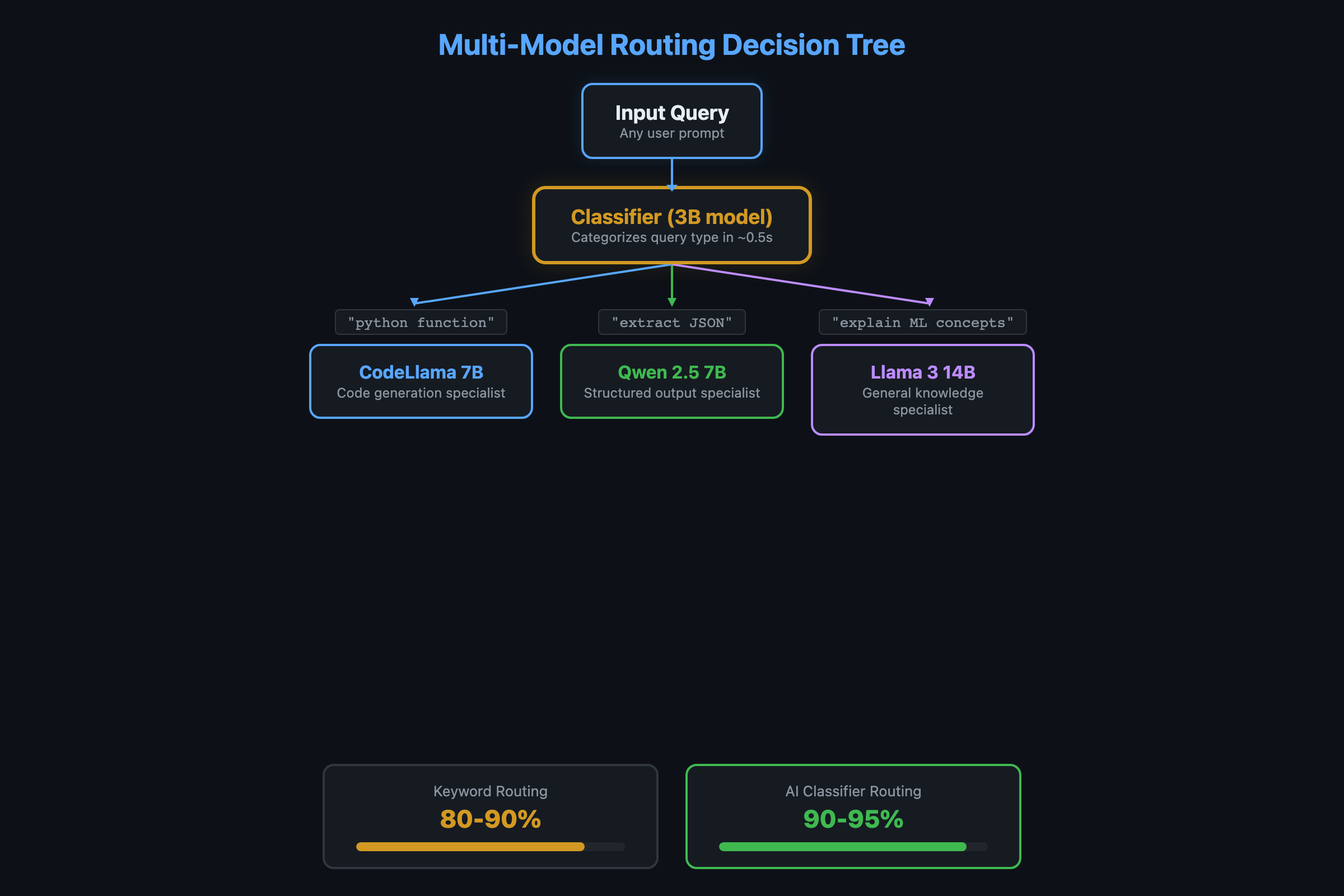
The router inspects each query and decides which model handles it. Coding questions go to CodeLlama. Structured output goes to Qwen. Everything else goes to general-purpose Llama. Ollama handles the model switching automatically.
import requests

MODELS = {
    "code": "codellama:13b",
    "general": "llama3.1:8b",
    "structured": "qwen2.5:14b"
}

def route_query(question):
    """Pick the right model based on keywords."""
    q = question.lower()

    code_keywords = ["code", "function", "class", "debug", "error",
                     "python", "javascript", "typescript", "rust",
                     "refactor", "test", "compile", "syntax", "bug"]
    if any(kw in q for kw in code_keywords):
        return "code"

    structured_keywords = ["json", "csv", "table", "extract", "parse",
                          "format as", "list of", "schema"]
    if any(kw in q for kw in structured_keywords):
        return "structured"

    return "general"

def ask(question):
    """Route to the right model and get a response."""
    category = route_query(question)
    model = MODELS[category]
    print(f"  [Routing to: {model}]")

    r = requests.post("http://localhost:11434/api/chat", json={
        "model": model,
        "messages": [{"role": "user", "content": question}],
        "stream": False
    })
    return r.json()["message"]["content"]

# Test it
print(ask("Write a Python function to reverse a linked list"))
# [Routing to: codellama:13b]

print(ask("Extract all emails from this text as JSON"))
# [Routing to: qwen2.5:14b]

print(ask("Explain machine learning in simple terms"))
# [Routing to: llama3.1:8b]
That’s the whole router. 40 lines. No LangChain, no LiteLLM, no framework overhead. Ollama handles model loading and unloading behind the scenes.
What broke with tool calling on local models?
Before building the router, I tried the standard approach: one model that decides which tool to call. It was a disaster.
The model called the weather tool with "get weather for San Francisco" instead of the structured JSON {"city": "San Francisco"}. When I fixed the prompt, it started calling the file search tool for weather queries because both descriptions contained “search.” When I rewrote the descriptions, it sometimes called two tools at once and sometimes called none.
Local 7B-14B models weren’t trained extensively on function calling. GPT-4 handles it with minimal prompting because of specific fine-tuning. The workaround: a structured prompt with a detectable prefix.
import json
import re

SYSTEM_PROMPT = """You have these tools:
- search_files: Search local documents. Params: {{"query": "search text"}}
- calculate: Math calculations. Params: {{"expression": "math expression"}}

When using a tool, respond with EXACTLY:
TOOL_CALL: {{"tool": "name", "args": {{"param": "value"}}}}

Rules:
1. Only ONE tool at a time.
2. If answerable without a tool, answer directly.
3. The TOOL_CALL must be valid JSON after the prefix.
"""

def extract_tool_call(text):
    """Parse TOOL_CALL from model response."""
    match = re.search(r'TOOL_CALL:\s*(\{.+\})', text)
    if match:
        try:
            return json.loads(match.group(1))
        except json.JSONDecodeError:
            return None
    return None
The TOOL_CALL: prefix works because the model doesn’t need to switch between “generate text” and “output JSON.” It always generates text, and sometimes that text includes the magic prefix. The regex catches it even if the model adds explanatory text around it. With few-shot examples in the prompt, Llama 3.1 14B hits 90-95% accuracy on tool selection.
How do you build an AI-powered router instead?
Keyword matching scores 80-90% but struggles with ambiguous queries. “How do I make my website faster?” could be code (frontend optimization) or general (hosting advice). A small model as the router handles the nuance:
def ai_route_query(question):
    """Use a 3B model to classify the query."""
    r = requests.post("http://localhost:11434/api/generate", json={
        "model": "llama3.2:3b",
        "prompt": f"""Classify this question into exactly one category.
Categories: code, structured, general

Question: {question}

Respond with ONLY the category name.""",
        "stream": False,
        "options": {"temperature": 0.1}
    })
    category = r.json()["response"].strip().lower()
    return category if category in MODELS else "general"
The 3B model adds 0.5-1 second of latency per request (the time to classify). But it correctly routes ambiguous queries that trip up keyword matching. On my 10-query benchmark, keyword scoring hits 80-90%. The AI router hits 90-95%.
How do you benchmark your router?
Test before you trust. Here’s the benchmark:
TEST_QUERIES = [
    ("Write a Python sort function", "code"),
    ("What's the weather like today?", "general"),
    ("Extract names from this JSON", "structured"),
    ("Debug this TypeError", "code"),
    ("Explain quantum computing", "general"),
    ("Fix a segfault in C", "code"),
    ("Format this data as CSV", "structured"),
    ("What's the meaning of life?", "general"),
    ("Refactor this class", "code"),
    ("Parse XML into a Python dict", "structured"),
]

def benchmark_router(router_fn):
    correct = 0
    for query, expected in TEST_QUERIES:
        actual = router_fn(query)
        status = "OK" if actual == expected else "MISS"
        if actual == expected:
            correct += 1
        print(f"  [{status}] '{query[:40]}' -> {actual} (expected {expected})")
    accuracy = correct / len(TEST_QUERIES) * 100
    print(f"\nAccuracy: {correct}/{len(TEST_QUERIES)} = {accuracy:.0f}%")

# Compare both routers
print("=== Keyword Router ===")
benchmark_router(route_query)

print("\n=== AI Router ===")
benchmark_router(ai_route_query)
Run this before and after adjusting keywords or the AI router prompt. The keyword router typically misses 1-2 ambiguous queries. The AI router misses 0-1.
How do you catch router regressions?
Build a golden set: 10 prompts with known-correct model assignments. Run it after every router change.
golden_set = [
    ("What time is it?", "small"),      # Simple fact
    ("Refactor this auth module", "large"),  # Complex code
    ("Summarize this paragraph", "small"),   # Easy NLP
    ("Design a database schema for a multi-tenant SaaS", "large"),
]
# Assert each routes to the expected tier
If a router update changes 3+ golden assignments, investigate before deploying.
Track your routing: Log which model handles each request, latency, and token count. After a week, check: What % of requests go to each tier? Are expensive-model requests actually complex? Routing without metrics is guessing.
How do you manage memory with multiple models?
The model you pick determines the RAM you need. Here are the actual sizes from the Ollama model library:
| Model | Parameters | RAM (4-bit) | Best For |
|---|---|---|---|
| llama3.2:3b | 3B | ~2 GB | Router/classifier |
| llama3.1:8b | 8B | ~5 GB | General chat |
| codellama:13b | 13B | ~8 GB | Code generation |
| qwen2.5:14b | 14B | ~9 GB | Structured output, JSON |
| qwen2.5-coder:32b | 32B | ~20 GB | Heavy code tasks |
Running multiple models simultaneously requires enough RAM for all of them.
On 16GB: Keep one model loaded at a time. Ollama swaps automatically. The model switch takes 5-10 seconds. Fine for interactive use, negligible for batch processing.
On 32GB: Keep two models loaded:
export OLLAMA_NUM_PARALLEL=2Two 8B models take about 10GB total. That leaves 22GB for OS and apps. A safer config: one 14B primary and one 7-8B secondary. Together about 13GB, leaves room for everything else.
Cost math: A 7B model processes ~30 tokens/second on an M2 Mac. At 500 tokens per request, that’s ~17 seconds wall-clock time with zero API cost. The same request on Claude Sonnet costs ~$0.004. Route 80% of requests locally and your API bill drops by 80%.
Preload at startup:
#!/bin/bash
# preload.sh - warm up models for instant routing
curl -s http://localhost:11434/api/generate \
  -d '{"model":"llama3.1:8b","keep_alive":-1}' > /dev/null &
curl -s http://localhost:11434/api/generate \
  -d '{"model":"codellama:13b","keep_alive":-1}' > /dev/null &
wait
echo "Models preloaded."
Add to cron (@reboot /path/to/preload.sh) for automatic warmup after reboots.
What should you actually do?
- If you have 16GB RAM: use the keyword router with llama3.1:8b (general) and codellama:13b (code). Accept the 5-10 second model swap delay. It’s still faster than switching between ChatGPT and a code-specific tool.
- If you have 32GB+ RAM: add the AI-powered router with llama3.2:3b as the classifier. Keep 2-3 models loaded with
OLLAMA_NUM_PARALLEL=2. Model switching becomes instant. - If routing accuracy matters (client-facing system): run the benchmark script against your actual queries, not just the test set. Adjust keywords or the AI prompt until you hit 90%+ on queries your system will actually receive.
- If you want tool calling: use the TOOL_CALL prefix pattern with few-shot examples. Llama 3.1 14B is the minimum for reliable tool calling. The 8B works for demos but isn’t dependable for unattended operation.
bottom_line
- Multi-model routing is the difference between “local AI demo” and “local AI system.” CodeLlama for code, Qwen for structured data, Llama for everything else. Each specialist outperforms a generalist on its own turf.
- The keyword router at 40 lines of Python covers 80-90% of routing decisions correctly. Wrong routes don’t crash anything. They just produce slightly less optimal responses.
- The real constraint is RAM, not complexity. On 16GB, model swapping works fine with a few seconds of delay. On 32GB, you can keep multiple models hot and route instantly. Don’t over-engineer the router until you’ve outgrown the hardware.
Frequently Asked Questions
Can Ollama run multiple models at the same time?+
On 32GB+ RAM, yes. Set OLLAMA_NUM_PARALLEL=2 to keep two models loaded simultaneously. On 16GB, Ollama swaps models automatically with a 5-10 second delay between switches.
How accurate is keyword routing vs AI-powered routing?+
Keyword routing scores 80-90% on a 10-query benchmark. AI-powered routing using a 3B classifier model scores 90-95%. The 3B router adds about 0.5-1 second of latency per request.
What happens when the router picks the wrong model?+
Nothing breaks. A code question going to the general model produces a less detailed answer. A general question going to CodeLlama works fine. The worst case is the general model trying complex code, where quality drops noticeably.