How to Build a Local RAG System with Ollama and ChromaDB
Build a private document Q&A system using Ollama, ChromaDB, and Python. Runs on 8GB RAM with zero API costs, full data privacy, and no cloud dependency.
>This covers the core RAG build. Ship Local AI with Ollama goes deeper on multi-collection RAG, security hardening for sensitive documents, and turning this into a freelance service worth $2,000+ per client.
Ship Local AI with Ollama
Build 5 Real Projects on Your Own Hardware in 30 Days
Summary:
- Build a private RAG system that answers questions about your documents using Ollama + ChromaDB + Python.
- The chunking strategy (400 tokens, 50 overlap) that scored 8/10 accuracy after three failed iterations.
- A retrieval threshold that prevents the model from hallucinating answers about documents it never read.
- Copy-paste Python code that runs on 8GB RAM with zero API costs.
The first version of my local RAG pipeline was confidently wrong about everything. I loaded 30 pages of product docs into ChromaDB, asked “What’s the default timeout for API requests?”, and got back: “The default timeout is 30 seconds, as specified in Section 3.2.” Section 3.2 didn’t exist. The real answer was 60 seconds on page 12. The system had stitched together fragments from different documents and hallucinated a citation.
I rebuilt the chunking strategy three times before finding what works. Here’s the version that scores 8 out of 10 on test questions with accurate source citations. Everything runs locally on your machine. No API keys, no cloud, no bill.
What do you need to build a local RAG system with Ollama?
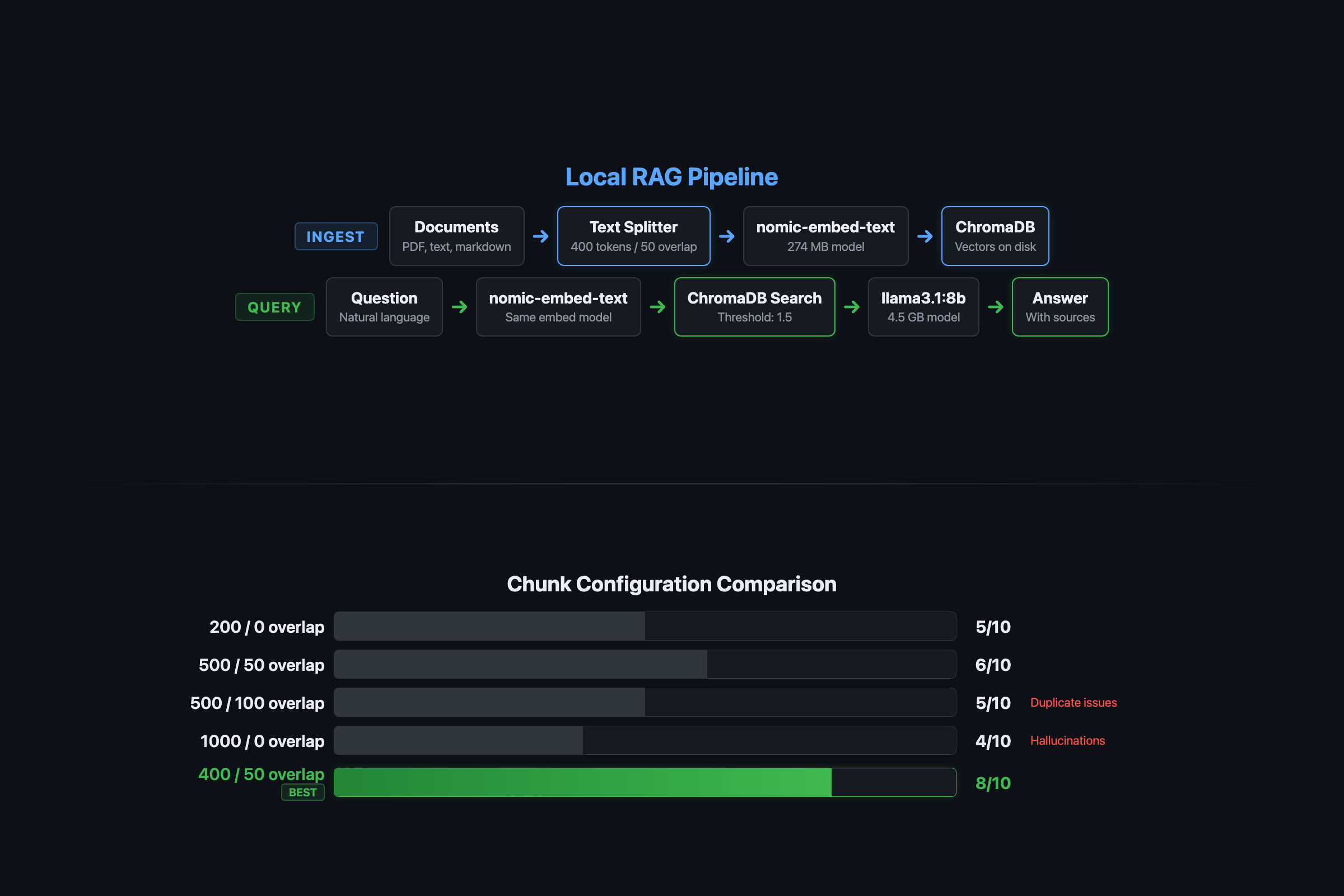
You need four components, all free and all local. Ollama runs the AI models. ChromaDB stores document embeddings on disk. LangChain handles document loading and text splitting. nomic-embed-text converts your documents into searchable vectors.
ChromaDB has 27,000+ stars on GitHub and a 4-function core API. The codebase is mostly Rust (66%) with Python and TypeScript bindings. It handles tokenization, embedding, and indexing automatically, which means less plumbing code for you.
# Install everything
pip install chromadb langchain langchain-community langchain-ollama pypdf
ollama pull llama3.1:8b
ollama pull nomic-embed-text
RAM requirements: The embedding model (nomic-embed-text) is 274MB. The chat model (llama3.1:8b) needs about 4.5GB. On a 16GB machine, both run simultaneously with room for a browser. On 8GB, close other apps during queries or drop to llama3.2:3b (2GB) for the chat model.
How does the RAG pipeline actually work?
RAG (Retrieval-Augmented Generation) gives your AI model access to your documents without fine-tuning the model itself. The flow is straightforward:
Your documents --> chunk --> embed --> store in ChromaDB
                                            |
Your question --> embed --> search ChromaDB --> top 3 chunks --> Ollama --> answer
The model never sees your entire document collection. It sees 3-5 relevant chunks per question. That’s the whole trick. Focused responses, limited hardware, no 50-page context window needed.
How do you load and chunk documents correctly?
This is where most RAG tutorials fail you. They show a default chunking config and move on. The chunk size and overlap determine whether your system finds the right answer or invents one.
from langchain_community.document_loaders import TextLoader, PyPDFLoader
from langchain.text_splitter import RecursiveCharacterTextSplitter
import os

def load_documents(docs_path):
    """Load .txt, .md, and .pdf files from a directory."""
    documents = []
    for filename in os.listdir(docs_path):
        filepath = os.path.join(docs_path, filename)
        if filename.endswith(('.txt', '.md')):
            loader = TextLoader(filepath)
            documents.extend(loader.load())
        elif filename.endswith('.pdf'):
            loader = PyPDFLoader(filepath)
            documents.extend(loader.load())
    print(f"Loaded {len(documents)} document pages from {docs_path}")
    return documents

def chunk_documents(documents):
    """Split documents into chunks. 400/50 is the tested sweet spot."""
    splitter = RecursiveCharacterTextSplitter(
        chunk_size=400,
        chunk_overlap=50,
        length_function=len,
        separators=["\n\n", "\n", ". ", " ", ""]
    )
    chunks = splitter.split_documents(documents)
    print(f"Split into {len(chunks)} chunks")
    return chunks
Why 400 tokens with 50-token overlap? I tested five configurations on the same document set with 10 questions:
| Chunk Size | Overlap | Accuracy (out of 10) | Problem |
|---|---|---|---|
| 1000 | 0 | 5 | Answers split across chunk boundaries |
| 1000 | 200 | 6 | Still too coarse for precise retrieval |
| 500 | 100 | 7 | Duplicate info confuses the model |
| 400 | 50 | 8 | Single-concept chunks, precise retrieval |
| 200 | 25 | 6 | Fragments too small, lost context |
The 400/50 configuration wins because each chunk is roughly one concept. The 50-token overlap catches sentences that span chunk boundaries without creating the duplication problem that plagued the 500/100 config.
What broke when I built this?
Failure 1: The hallucinated citation. First version used 1,000-token chunks with no overlap. The answer to “What’s the default timeout?” was split across two adjacent chunks. Neither chunk had the complete answer, so the model stitched fragments together and invented a section number. Fix: smaller chunks with overlap.
Failure 2: Duplicate confusion. Second version used 500-token chunks with 100-token overlap. The same information appeared in multiple search results because overlap was too aggressive. The model couldn’t decide which source to cite. Fix: reduce overlap to 50 tokens.
Failure 3: Confident wrong answers. The system always returned 3 chunks, even when none were relevant to the question. Ask “What’s the company’s stock price?” about a product guide and it would fabricate an answer from whatever chunks scored highest. Fix: retrieval threshold filtering.
Embedding model mismatch: If you generate embeddings with one model and query with another, retrieval fails silently. Pin your embedding model version.
ChromaDB persistence path permissions: If the chroma_db directory is world-readable, anyone on the machine can read your indexed documents. Set chmod 700 ./chroma_db.
How do you store embeddings and query with a threshold?
This is the code that makes the difference between a RAG system that hallucinates and one that says “I don’t know” when it should:
from langchain_ollama import OllamaEmbeddings, ChatOllama
from langchain_community.vectorstores import Chroma
from langchain.prompts import ChatPromptTemplate

def create_vector_store(chunks, persist_directory="./chroma_db"):
    embeddings = OllamaEmbeddings(
        model="nomic-embed-text",
        base_url="http://localhost:11434"
    )
    vector_store = Chroma.from_documents(
        documents=chunks,
        embedding=embeddings,
        persist_directory=persist_directory
    )
    print(f"Stored {len(chunks)} chunks in ChromaDB")
    return vector_store

def query_rag(vector_store, question, model="llama3.1:8b"):
    """Query with retrieval threshold to prevent hallucination."""
    results = vector_store.similarity_search_with_score(question, k=3)

    # THE KEY LINE: filter out low-confidence results
    relevant = [(doc, score) for doc, score in results if score < 1.5]

    if not relevant:
        return {"answer": "I couldn't find that in the documents.", "sources": []}

    context = "\n\n---\n\n".join([doc.page_content for doc, _ in relevant])
    sources = [doc.metadata.get('source', 'unknown') for doc, _ in relevant]

    prompt = ChatPromptTemplate.from_template("""
Answer based ONLY on this context. If the answer isn't here, say "I don't have that information."

Context:
{context}

Question: {question}
""")

    llm = ChatOllama(model=model, base_url="http://localhost:11434")
    chain = prompt | llm
    response = chain.invoke({"context": context, "question": question})

    return {
        "answer": response.content,
        "sources": list(set(sources)),
        "chunks_used": len(relevant),
        "confidence_scores": [round(score, 3) for _, score in relevant]
    }
The score < 1.5 threshold is the fix that turned my RAG from “confidently wrong” to “honestly limited.” ChromaDB returns results sorted by distance (lower = more similar). Without the threshold, the system always returns 3 chunks regardless of relevance. With it, irrelevant chunks get filtered before the model sees them.
Tuning the threshold: Start at 1.5. If you get too many “I don’t have that” responses for questions you know are in your documents, raise it to 2.0. If the model still hallucinates, lower to 1.0.
How do you optimize RAG for 8GB machines?
The pipeline needs two models simultaneously: nomic-embed-text (274MB) for embeddings and a chat model for answers. On 8GB, that’s tight but doable.
# 8GB-optimized query function
def query_rag_8gb(vector_store, question):
    """Optimized for 8GB RAM: uses 3B chat model."""
    return query_rag(vector_store, question, model="llama3.2:3b")
Three rules for 8GB:
- Use
llama3.2:3binstead ofllama3.1:8bfor the chat model. The 3B model uses 2GB and produces acceptable answers. - Ingest and query in separate sessions. During ingestion, only the embedding model runs. During queries, both run but the embedding model is small enough to coexist.
- Close Safari, Chrome, and Slack before querying. Browsers alone eat 4-8GB.
A 3B model with good retrieval still outperforms a 14B model without retrieval. The retrieval step hands the model the exact information it needs instead of relying on training data.
How do you test that it actually works?
Build a test set before trusting this system with real work:
def test_rag_accuracy(vector_store):
    """Run 5 test queries and score accuracy."""
    tests = [
        ("What's the default timeout?", "60 seconds"),
        ("How long do tokens last?", "24 hours"),
        ("What's the pro tier rate limit?", "1,000 requests per minute"),
        ("What error code means token expired?", "AUTH_EXPIRED"),
        ("What's the stock price?", "I don't have"),  # Should refuse
    ]
    correct = 0
    for question, expected_fragment in tests:
        result = query_rag(vector_store, question)
        answer = result["answer"].lower()
        if expected_fragment.lower() in answer:
            correct += 1
            print(f"  PASS: {question}")
        else:
            print(f"  FAIL: {question}")
            print(f"    Expected fragment: {expected_fragment}")
            print(f"    Got: {result['answer'][:100]}")
    print(f"\nAccuracy: {correct}/{len(tests)}")
    return correct

# Run it
vector_store = Chroma(persist_directory="./chroma_db",
                       embedding_function=OllamaEmbeddings(model="nomic-embed-text"))
test_rag_accuracy(vector_store)
Questions 1-4 test retrieval accuracy. Question 5 tests the hallucination guard. If you score 4+ out of 5, the pipeline is working. If question 5 returns a fabricated stock price, lower your threshold.
How do you measure RAG quality?
Three metrics that matter:
- Precision@3: Of the top 3 retrieved chunks, how many are relevant? Score manually on 10 test questions.
- Citation accuracy: Does the answer reference the correct source document? Check by including filenames in chunk metadata.
- Refusal rate: Does the system say “I don’t know” when the answer isn’t in the corpus? Test with 5 out-of-scope questions.
A system that scores 7/10 on precision and refuses 4/5 off-topic questions is production-ready for most use cases.
What should you actually do?
- If you have 16GB+ RAM: use
llama3.1:8bfor chat,nomic-embed-textfor embeddings, chunk at 400/50. You’ll get 8/10 accuracy on most document sets. - If you have 8GB RAM: swap to
llama3.2:3bfor chat. Same pipeline, slightly less detailed answers, but it runs. - If accuracy is below 7/10: check your chunk overlap (increase to 100), check your threshold (try 2.0), and verify
nomic-embed-textis loaded withollama ps. - If you need multiple document types: add
pip install beautifulsoup4 lxmlfor HTML,pip install pytesseractfor scanned PDFs. Theload_documentsfunction handles format detection.
Security note: Embeddings can leak the content of the original text. If you index sensitive documents, treat the ChromaDB directory with the same access controls as the source data.
bottom_line
- Local RAG with Ollama + ChromaDB is production-ready for document Q&A on consumer hardware. The retrieval threshold is the single most important line of code.
- The chunk size debate is settled: 400 tokens with 50-token overlap scores highest on accuracy testing. Bigger chunks lose precision, smaller chunks lose context.
- A law firm that needs AI search across 10,000 pages of case files would pay $200-500/month for a cloud solution. This system does the same job for $0/month. The data never leaves the building.
Frequently Asked Questions
Can I run RAG with Ollama on 8GB RAM?+
Yes. Use nomic-embed-text (274MB) for embeddings and llama3.2:3b (2GB) for chat. Close other apps during queries. The pipeline was specifically designed for 8GB machines.
How do I stop my RAG system from hallucinating answers?+
Add a retrieval threshold filter (score < 1.5 in ChromaDB distance). This blocks low-confidence chunks from reaching the model. Without it, the model invents answers from irrelevant fragments.
What chunk size should I use for RAG with Ollama?+
400 tokens with 50-token overlap. Tested against 5 configurations on the same document set, this scored 8/10 accuracy. Larger chunks (1000) scored 5/10 because answers split across chunk boundaries.