How to Replace GitHub Copilot with Ollama in VS Code
Set up a free AI coding assistant in VS Code using Ollama and Cline. Seven real workflows tested with honest quality scores compared to GitHub Copilot.
>This covers the coding assistant setup. Ship Local AI with Ollama goes deeper on custom Modelfiles for code, language-specific tips for Python/JS/Rust/Go, and optimizing context windows for large files.
Ship Local AI with Ollama
Build 5 Real Projects on Your Own Hardware in 30 Days
Summary:
- Set up a free AI coding assistant in VS Code using Cline + Ollama in under 5 minutes.
- Seven tested workflows: generate, refactor, explain, debug, test, document, and the combo workflow that produces production code in 8 minutes.
- Honest quality comparison: local matches Copilot on 5 of 7 tasks, falls short on 2.
- A custom Modelfile that drops temperature to 0.2 for more reliable code output.
I cancelled my Copilot subscription two months ago. The local coding assistant handles my daily grind: explaining error messages, generating boilerplate, cleaning up 3 AM code. It’s not Copilot-sharp on every task. But “good enough for free” beats “perfect for $240 a year” when 80% of what I ask an AI is routine.
Here’s the setup. It takes 5 minutes and zero API keys.
Cline by the numbers (April 2026): 59.9k GitHub stars, 5M+ VS Code installs, Apache 2.0 license. Supports Ollama, OpenAI, Anthropic, and any OpenAI-compatible endpoint. Zero telemetry when pointed at localhost. Cline on GitHub | VS Code Marketplace
How do you connect Ollama to VS Code?
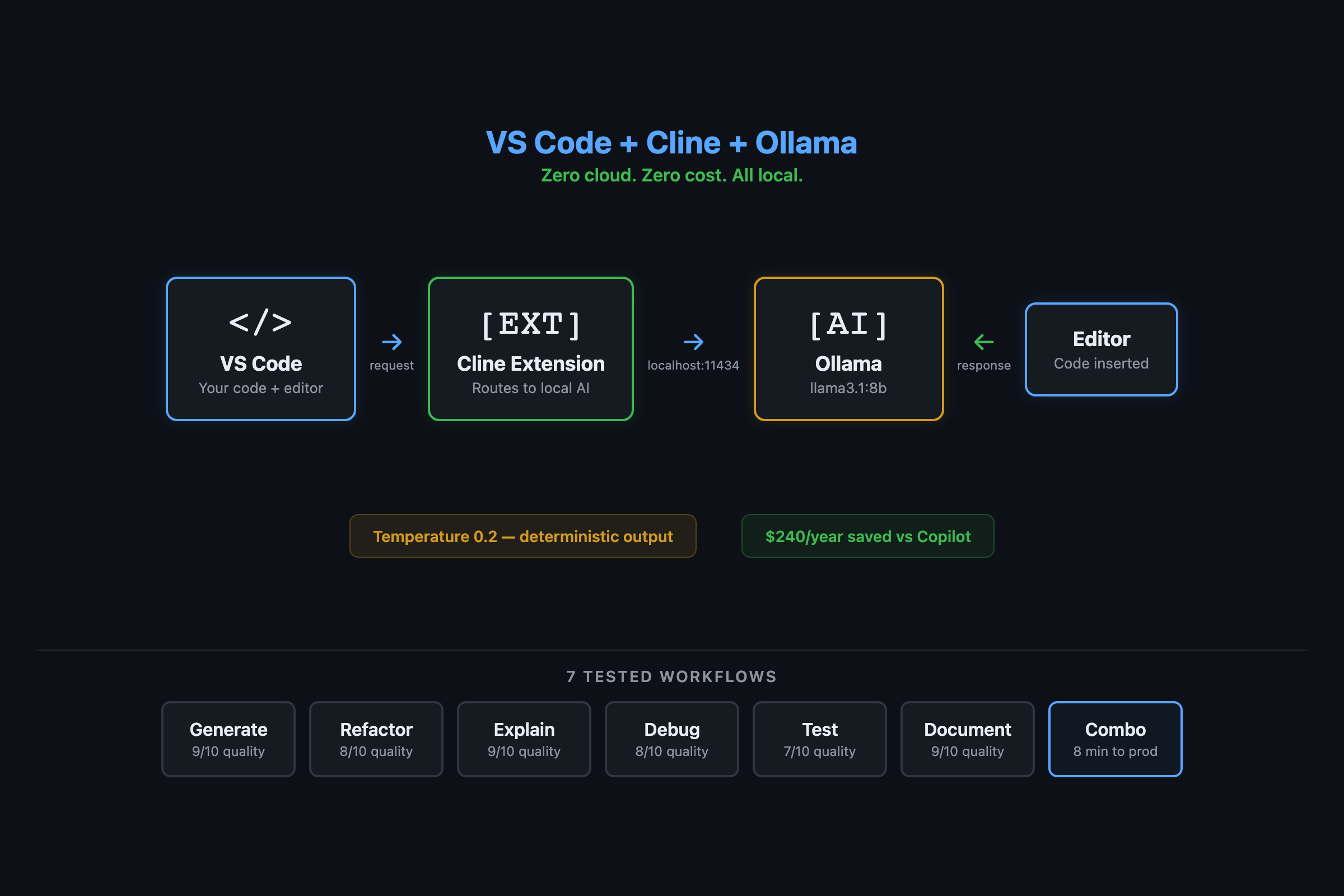
You need Cline, a free open-source VS Code extension that talks to Ollama over localhost. No cloud. No account.
# Make sure Ollama is running with a model pulled
ollama pull llama3.1:8b
curl http://localhost:11434 # Should say "Ollama is running"- Open VS Code. Extensions panel (Cmd+Shift+X on Mac, Ctrl+Shift+X elsewhere).
- Search “Cline”. Install the extension with the blue robot icon.
- Click the Cline icon in the sidebar. It asks for a provider.
- Select Ollama from the dropdown.
- Base URL:
http://localhost:11434 - Model dropdown: select
llama3.1:8b - Done.
Every request now goes to your local Ollama. Zero external network calls. Your code stays in your editor.
Threat model: Local Ollama models process everything on your machine. No data leaves localhost. However, VS Code extensions like Cline can have their own telemetry or update checks. Verify the extension’s privacy policy and check that requests go to
localhost:11434only.
What can you actually do with it?
Seven workflows that cover 90% of AI-assisted coding. I tested each one and scored quality against Copilot.
Workflow 1: Generate code (8/10 vs Copilot). Type a description, get a function.
# Prompt: "Write a function that validates a list of contacts,
# splitting them into valid and invalid based on email format."

def validate_contacts(contacts):
    valid, invalid = [], []
    for contact in contacts:
        email = contact.get('email', '')
        at_pos = email.find('@')
        if at_pos > 0 and '.' in email[at_pos:]:
            valid.append(contact)
        else:
            invalid.append(contact)
    return valid, invalid

# Test it
test_data = [
    {"name": "Alice", "email": "alice@example.com"},
    {"name": "Bob", "email": "bob-at-example"},
]
v, i = validate_contacts(test_data)
print(f"Valid: {[c['name'] for c in v]}")  # ['Alice']
The function works, handles edge cases, and is readable. A cloud model adds type hints and fancier variable names. The logic is identical.
Workflow 2: Refactor messy code (8/10). Highlight garbage, ask for cleanup.
Workflow 3: Explain unfamiliar code (9/10). Paste a decorator you don’t understand. The model explains it line by line. This is where local models match cloud almost exactly. Explanation doesn’t need creativity.
Workflow 4: Debug from error messages (8/10). Paste a stack trace, get the cause and fix. Faster than opening a browser because there’s no network round-trip.
Workflow 5: Generate tests (8/10). The highest-ROI workflow. Tests are tedious to write and local AI handles them well.
# Prompt: "Write pytest tests for validate_contacts.
# Include: happy path, empty input, missing email, empty email."

import pytest

def test_all_valid():
    contacts = [{"name": "A", "email": "a@b.com"}]
    v, i = validate_contacts(contacts)
    assert len(v) == 1 and len(i) == 0

def test_mixed():
    contacts = [
        {"name": "A", "email": "a@b.com"},
        {"name": "B", "email": "bad"},
    ]
    v, i = validate_contacts(contacts)
    assert len(v) == 1 and v[0]["name"] == "A"

def test_empty_list():
    v, i = validate_contacts([])
    assert v == [] and i == []

def test_missing_email():
    v, i = validate_contacts([{"name": "A"}])
    assert len(i) == 1

def test_empty_email():
    v, i = validate_contacts([{"name": "A", "email": ""}])
    assert len(i) == 1
Five test cases in 10 seconds. The 8B model gets these right about 85% of the time. The 14B pushes to 95%. Either way, you’ve got a test suite that would take 15 minutes by hand.
Workflow 6: Generate docstrings (9/10). Highlight a function, ask for a Google-style docstring. Reliable even on 7B models.
Workflow 7: The combo (generate + test + fix). The real workflow. Generate a function, generate tests, run tests, paste failures back into Cline, get fixes. Total time for a production retry decorator with full test coverage: 5-8 minutes. By hand: 30-45 minutes.
What broke and where does local fall short?
Hallucinated APIs. Local models sometimes invent function names that don’t exist. requests.get_json() isn’t a real method, but the 7B model suggests it. Always verify unfamiliar API calls in the docs. The 14B model does this less often.
Long conversations degrade. After 8-10 exchanges in a single Cline session, the model starts forgetting earlier context. Start a new conversation when this happens. Each fresh session gets a clean context window.
Complex multi-file refactoring. Cloud models hold more context and handle cross-file changes better. If a task spans many files, the local model loses the bigger picture. This is the one workflow where I still occasionally use a cloud model.
Set expectations: Local 7B-14B models handle single-file edits, boilerplate generation, and code explanation well. They struggle with multi-file refactoring, niche frameworks, and complex architecture decisions. Use cloud AI for the hard 20%.
How do you optimize for better code quality?
Switch to a code-specific model and lower the temperature:
ollama pull codellama:13b # Needs 16GB+ RAMCreate a custom Modelfile for coding:
FROM codellama:13b
PARAMETER temperature 0.2
PARAMETER top_p 0.9
PARAMETER num_ctx 8192
SYSTEM """You are a senior software engineer. When writing code:
- Always include type hints for Python
- Always include brief docstrings
- Handle common error cases
- Use descriptive variable names
When explaining code, be concise. Lead with what it does, then how."""
ollama create vscode-coder -f Modelfile-vscodeSelect vscode-coder in Cline’s model dropdown. The low temperature (0.2 vs default 0.7) makes output more deterministic. Same input produces similar output. Less creative, more reliable. For code, that’s what you want.
Offline-only configuration:
- Disable Cline’s telemetry in VS Code settings
- Set
ollama serveto bind127.0.0.1only (the default) - Verify with:
curl http://localhost:11434/api/tags(should return your models) - If
curlfails, Ollama isn’t running or is bound to a different address
What should you actually do?
- If you write Python or JavaScript daily: set up Cline + Ollama today. These are the languages where local models perform closest to cloud. The $240/year savings start immediately.
- If you have 16GB+ RAM: use CodeLlama 13B or DeepSeek Coder 16B instead of general-purpose Llama. The code quality jump is noticeable, especially for error handling and edge cases.
- If you hit a genuinely hard problem: ask the local model first (free), then compare against a cloud model if the answer isn’t satisfactory. Most of the time, local is fine. When it isn’t, you’ve spent $0 finding out.
- If you manage a team: 5 developers canceling Copilot saves $1,200/year. The local setup doesn’t stop working during GitHub outages and doesn’t send proprietary code to a third-party server.
bottom_line
- Local AI coding assistance is production-ready for everyday development. The setup takes 5 minutes, costs nothing, and keeps your code on your machine.
- The honest quality gap is narrow for routine tasks (8-9/10 vs Copilot) and wider for complex cross-file refactoring. For most developers, that tradeoff is worth $240/year in savings.
- The test generation workflow alone pays for the setup. A 5-test suite in 10 seconds that would take 15 minutes by hand. That’s the ROI of local AI: not toy examples, but the tedious code that eats your afternoon.
Frequently Asked Questions
Is Ollama as good as GitHub Copilot for coding?+
For everyday tasks (refactoring, debugging, test generation), local models match Copilot at 8-9/10 quality. The gap shows on complex multi-file refactoring and niche frameworks. Good enough for $240/year saved.
Which model should I use for coding with Ollama?+
Start with llama3.1:8b for general use. If you have 16GB+ RAM, switch to codellama:13b or DeepSeek Coder V2 16B for better code quality. Lower the temperature to 0.2 for more deterministic output.
Does Cline send my code to the cloud?+
No. When configured to use Ollama at localhost:11434, all requests stay on your machine. Zero network calls. Your proprietary code never leaves your editor.