How to Debug MCP Servers (10 Common Bugs Fixed)
Fix the 10 most common MCP server bugs with tested code patches, plus a 7-step production debug checklist. Real solutions from shipping 30+ MCP servers.
>This covers the 10 most common bugs. Model Context Protocol: The Builder's Playbook goes deeper on security vulnerabilities, OAuth authentication, automated testing with pytest, and the full production debug playbook.
Model Context Protocol: The Builder's Playbook
Build AI Agents That Connect to Everything
Summary:
- The 10 most common MCP bugs, ranked by how often they appear, with tested code fixes.
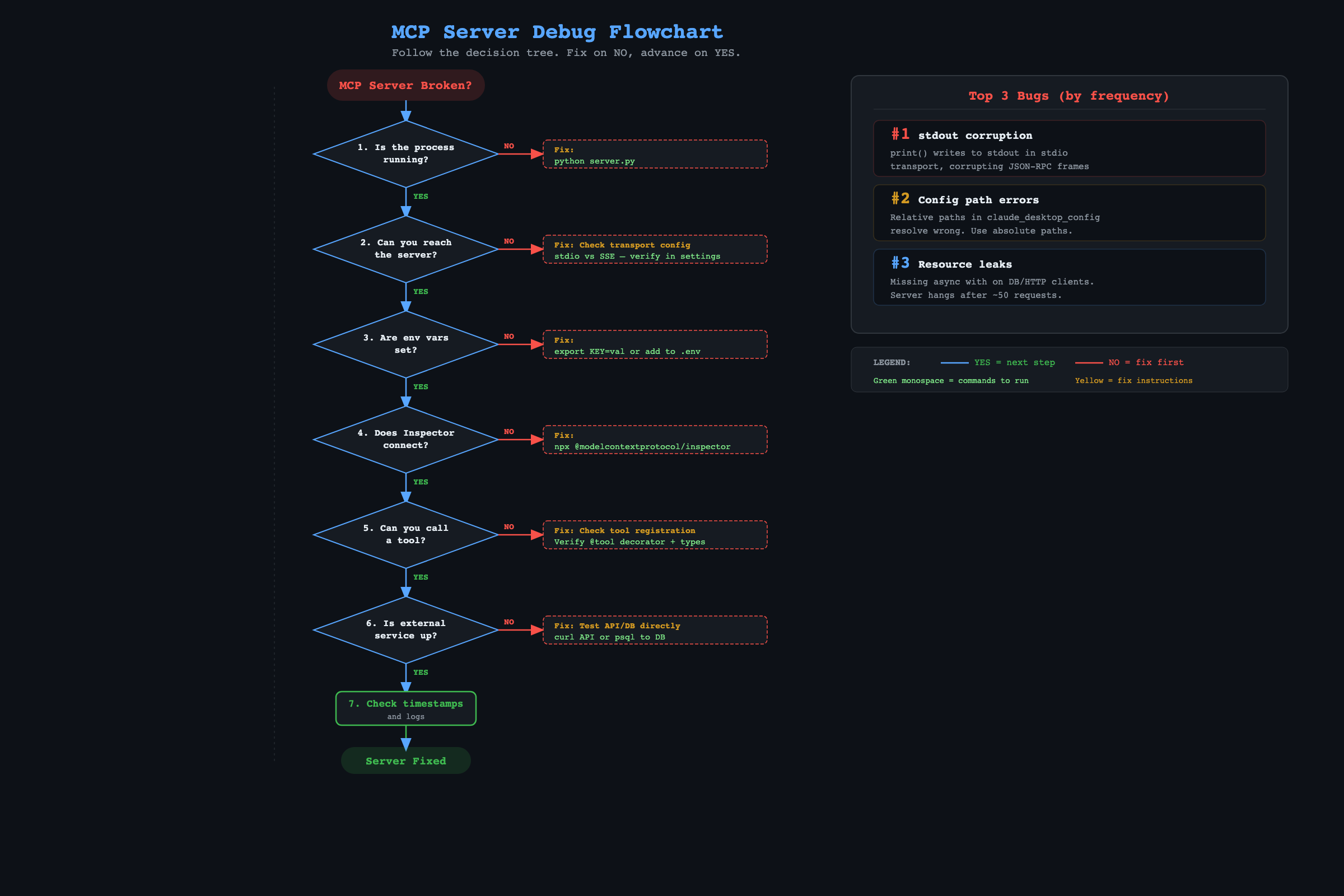
- A 7-step production debug checklist you can follow when something breaks at 3 AM.
- The error handling wrapper that prevents crashes from unhandled exceptions.
- Copy-paste fixes for stdout corruption, transport mismatches, and silent config failures.
Every MCP server breaks at least once in production. The question is whether you fix it in minutes or hours. This reference covers the bugs that account for roughly 80% of MCP support questions on r/mcp (89k members) and Twitter.
What are the 10 most common MCP bugs?
Bug 1: stdout corruption (the silent killer)
Symptom: Server crashes immediately or after the first request. No useful error message.
Cause: You used print() in a stdio-mode server. MCP uses stdout for JSON-RPC protocol messages. A stray print statement corrupts the stream.
Fix:
# WRONG - crashes the server
print("debug info")

# RIGHT - goes to stderr, not the protocol channel
import sys
print("debug info", file=sys.stderr)

# BETTER - use proper logging
import logging
logging.basicConfig(stream=sys.stderr, level=logging.INFO)
logger = logging.getLogger("mcp-server")
logger.info("debug info")
This trips up every new MCP developer at least once. Every print() in your server code is a potential crash.
Bug 2: Claude Desktop does not see tools
Symptom: You configured the server. You restarted Claude. No tools appear.
Cause: The config file has a syntax error, or the paths are wrong. For Claude Code, MCP servers live in .mcp.json (project root) or ~/.claude.json (global). For Claude Desktop, they live in ~/Library/Application Support/Claude/claude_desktop_config.json. These are different files.
Fix: Open the config JSON in a validator. Check three things:
- No missing commas between properties
- The
commandpath is the Python where the MCP SDK is installed (runwhich python3) - The
argspath is absolute, not relative
{
  "mcpServers": {
    "my-server": {
      "command": "/Users/you/project/.venv/bin/python3",
      "args": ["/Users/you/project/server.py"]
    }
  }
}
Relative paths like ./server.py cause silent failures. Learned this the hard way during the first week.
Claude Code vs Claude Desktop: These use different config files. Claude Desktop reads
~/Library/Application Support/Claude/claude_desktop_config.json. Claude Code reads.mcp.json(project) or~/.claude.json(global). Mixing them up is Bug 2’s most common cause.
Bug 3: transport mismatch
Symptom: “Transport Error” or “Connection refused” on startup.
Cause: The client expects stdio but the server runs HTTP, or the reverse.
Fix: Check what mcp.run() says in your server. If it has transport="sse", the client needs a URL config. If it has no transport argument, it defaults to stdio and needs a command config.
| Server code | Client config |
|---|---|
mcp.run() | "command": "python3", "args": ["server.py"] |
mcp.run(transport="sse", port=8080) | "url": "http://localhost:8080/sse" |
Bug 4: tool calls timeout
Symptom: Server hangs. Client eventually gives up.
Cause: An external API call or database query takes too long with no timeout set.
Fix: Set timeouts on everything external:
# HTTP calls: 30-second timeout
async with httpx.AsyncClient(timeout=30) as client:
    resp = await client.get(url)

# Database pool: kill queries after 30 seconds
pool = await asyncpg.create_pool(
    db_url, command_timeout=30
)
Bug 5: server crashes after multiple requests
Symptom: Works fine for the first few calls. Then dies.
Cause: Resource leaks. Usually an HTTP client created without async with.
Fix: Always use context managers:
# WRONG - leaks connections
client = httpx.AsyncClient()
resp = await client.get(url)

# RIGHT - cleans up automatically
async with httpx.AsyncClient() as client:
    resp = await client.get(url)
Bug 6: “Module not found” in production
Symptom: Works locally. Fails when deployed.
Cause: Missing dependency in requirements.txt. The most common omissions: httpx and asyncpg.
Fix: Pin all dependencies: pip freeze > requirements.txt. Compare this file between your local environment and production.
Bug 7: Claude calls the wrong tool
Symptom: You ask about your database. Claude calls the GitHub search tool.
Cause: Tool descriptions overlap. “Get data” and “Search code” are vague enough that Claude guesses.
Fix: Make descriptions specific and distinct:
# WRONG - too vague
@mcp.tool()
async def get_data(query: str) -> str:
    """Get data from the system."""

# RIGHT - Claude knows exactly when to use this
@mcp.tool()
async def query_customers_db(sql: str) -> str:
    """Run a read-only SQL query against the PostgreSQL customer database.
    Returns results as formatted text. Only SELECT queries allowed."""
Bug 8: JSON parsing errors in results
Symptom: Error about serialization or unexpected type.
Cause: Tool returns a Python object (dict, list, int) instead of a string.
Fix: Always return strings. Convert with json.dumps() for dicts or str() for numbers.
Bug 9: works locally, fails in cloud
Symptom: Everything runs on your laptop. Cloud deployment returns “Application failed to respond.”
Cause: Cloud platform sets a PORT environment variable. Your server ignores it. Or your server binds to localhost instead of 0.0.0.0.
Fix:
import os

port = int(os.environ.get("PORT", 8080))
mcp.run(transport="sse", host="0.0.0.0", port=port)
Bug 10: rate limit errors from external APIs
Symptom: “403 Rate limit exceeded” after Claude chains several tool calls.
Cause: Claude sometimes fires rapid tool calls. Ten GitHub API requests in two seconds burns through limits.
Fix: Add a per-service rate limiter:
from collections import defaultdict
from time import time

class RateLimiter:
    def __init__(self, max_calls: int, window: int):
        self.max_calls = max_calls
        self.window = window
        self.calls = defaultdict(list)

    async def check(self, key: str):
        now = time()
        self.calls[key] = [t for t in self.calls[key] if t > now - self.window]
        if len(self.calls[key]) >= self.max_calls:
            return f"Rate limit: max {self.max_calls} per {self.window}s"
        self.calls[key].append(now)
        return None

github_limiter = RateLimiter(max_calls=50, window=60)
What is the production debug checklist?
When something breaks, follow this sequence. Do not skip steps.
- Is the server process running? Check
ps aux | grep server.pyor the cloud platform’s process list. - Can you reach the server? For HTTP:
curl http://your-server:8080/health. For stdio: does Claude show the server in its MCP list? Runclaude mcp listto see all configured servers. Run/mcpinside Claude Code to check which servers are connected in the current session. - Are environment variables set? Log into the deployment platform and check. This accounts for about 30% of production incidents.
- Does the MCP Inspector connect? Run
mcp dev server.pylocally with the same config. If it connects, the server code is fine. - Can you call the failing tool manually? In the Inspector, use the exact parameters from your error logs.
- Is the external service responding? Test the database, API, or messaging service independently.
- Check timestamps. Compare the error time with the last successful request. Did a deployment, config change, or key rotation happen between them?
This checklist has resolved every production incident within 15 minutes.
Log hygiene for stdio servers: Since stdout is the protocol channel, ALL logging must go to stderr. Set up a file logger early:
logging.basicConfig(filename='mcp-server.log', level=logging.INFO). Review logs daily during the first week. After that, set up log rotation and check weekly.
What should you actually do?
- If your server will not start: check Bug 1 (stdout) and Bug 2 (config paths). These two cover most startup failures.
- If tools appear but return errors: check Bug 4 (timeouts) and Bug 5 (resource leaks). Add
async withand timeout values to every external call. - If it works locally but fails deployed: check Bug 9 (PORT and host binding) and Bug 6 (missing dependencies).
- Bookmark the 7-step debug checklist. Tape it next to your monitor if you run production servers.
bottom_line
- The stdout corruption bug (Bug 1) accounts for more wasted debugging hours than any other MCP issue. Never use
print()in a stdio server. - Specific tool descriptions fix more problems than code changes. “Run a SQL query against the customer database” beats “Get data” every time.
- The 7-step checklist works in order. Do not jump to step 5 until you have confirmed steps 1-4. Most “mysterious” failures are missing environment variables.
Frequently Asked Questions
Why does my MCP server crash after one request?+
Almost always resource leaks. You created an httpx.AsyncClient() without 'async with', so connections never close. Wrap every HTTP client and database connection in an 'async with' block.
Why does Claude not call my MCP tool?+
Two causes. Either your Claude Desktop config has a syntax error (validate the JSON), or your tool description is too vague for Claude to match it to the user's question. 'Get data' fails. 'Run a SQL query against the customer database' works.
How do I debug an MCP server in production?+
Follow this order: check if the process is running, check if the health endpoint responds, verify environment variables, test the failing tool in the MCP Inspector with the same parameters from your logs.