How to Build Your First MCP Server in Python
Build your first MCP server in Python from scratch. Start with a 20-line hello world, then add database and GitHub tools using the modular server pattern.
>This covers building your first multi-tool server. Model Context Protocol: The Builder's Playbook goes deeper on production patterns, multi-agent pipelines, and turning MCP skills into $3K-$5K client projects.
Model Context Protocol: The Builder's Playbook
Build AI Agents That Connect to Everything
Summary:
- Build a working MCP server in 20 lines of Python using FastMCP.
- Add real tools (database queries, GitHub integration) using the modular registration pattern.
- Test everything in Claude Desktop and the MCP Inspector.
- Copy-paste server template and common-mistakes checklist included.
I built my first MCP server in 20 minutes. It connected Claude to a PostgreSQL database and answered questions about production data in plain English. Three months later I have a library of 12 servers covering databases, APIs, and internal tools. The pattern is always the same: one Python function, one decorator, done.
What do you need before starting?
Python 3.10+, the MCP SDK, and Claude Desktop. That covers it.
# Create your project
mkdir -p ~/mcp-projects/first-server
cd ~/mcp-projects/first-server
python3 -m venv .venv
source .venv/bin/activate

# Install the SDK
pip install mcp httpx
Verify the install:
python3 -c "import mcp; print(mcp.__version__)"The MCP Python SDK has over 23k GitHub stars and handles all the protocol machinery. You write normal Python functions. The SDK turns them into tools any AI client can call.
How do you build the simplest possible MCP server?
You build it with one decorator and one function. Here is the complete server:
# server.py
from mcp.server.fastmcp import FastMCP
import httpx

mcp = FastMCP("weather")

@mcp.tool()
async def get_weather(city: str) -> str:
    """Get current weather for a city."""
    async with httpx.AsyncClient() as client:
        response = await client.get(
            f"https://wttr.in/{city}",
            params={"format": "3"}
        )
        if response.status_code == 200:
            return response.text
        return f"Could not get weather for {city}"

if __name__ == "__main__":
    mcp.run()
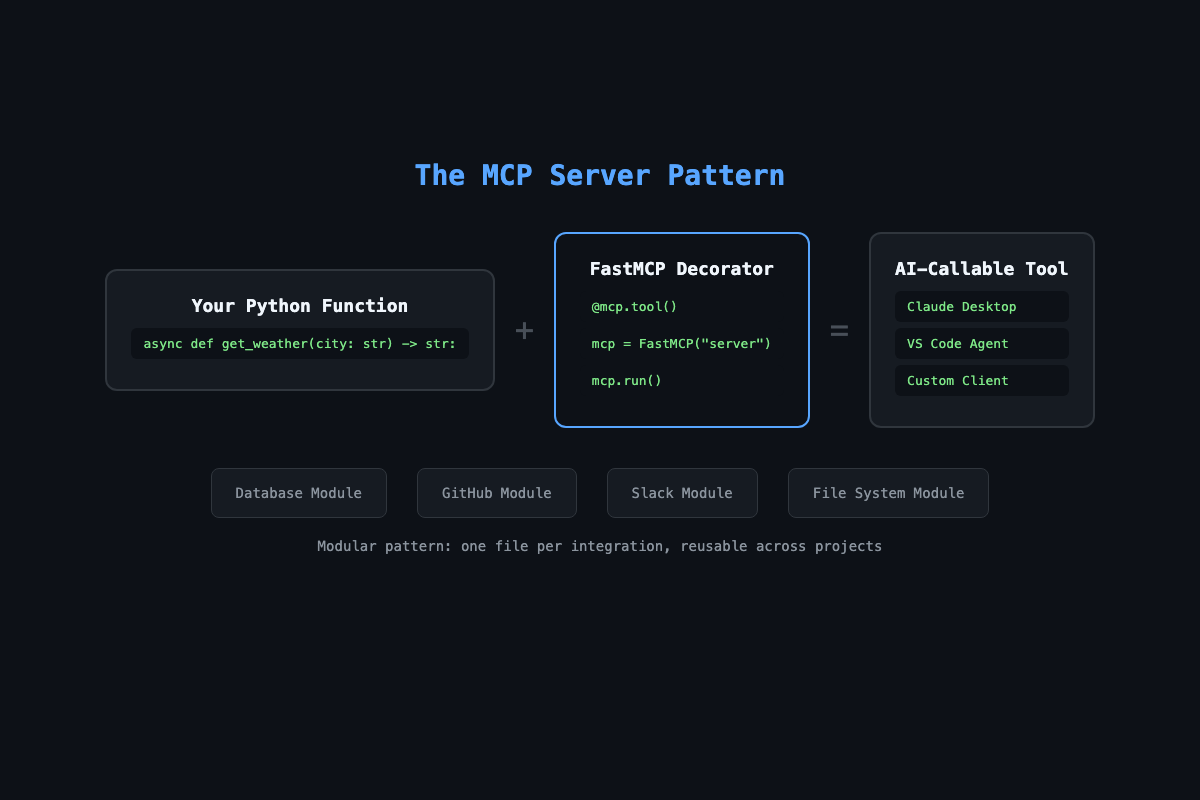
Three things make this work. The @mcp.tool() decorator registers the function so AI clients can discover it. The docstring becomes the tool description that Claude reads to decide when to call it. The type hints (city: str) generate the input schema automatically.
The function is async because MCP servers handle concurrent requests. You do not need to understand async deeply. Copy the pattern: async def, async with, await for I/O. By chapter 5 it will feel repetitive. That is the point.
How do you test it?
Two ways: the MCP Inspector for protocol-level debugging, and Claude Desktop for the real experience.
MCP Inspector (test tools directly):
mcp dev ~/mcp-projects/first-server/server.pyThis opens a browser dashboard. Click get_weather, enter {"city": "London"}, hit Execute. You see the raw response.
Claude Desktop (add to ~/Library/Application Support/Claude/claude_desktop_config.json):
Claude Code (add to .mcp.json in your project root, or ~/.claude.json for global access):
The JSON format is the same for both. The only difference is which file you edit:
{
  "mcpServers": {
    "weather": {
      "command": "/Users/yourname/mcp-projects/first-server/.venv/bin/python3",
      "args": ["/Users/yourname/mcp-projects/first-server/server.py"]
    }
  }
}
Use the full absolute path to the Python inside your virtual environment. Relative paths cause silent failures. Restart Claude Desktop completely (Cmd+Q, not just close the window). Ask: “What’s the weather in New York?” Your code answers.
Which transport should you use?
| Transport | How it works | Best for |
|---|---|---|
| stdio (default) | Communicates via stdin/stdout | Local tools, Claude Code, Claude Desktop |
| SSE (Server-Sent Events) | HTTP server, client connects via URL | Cloud deployment, multiple clients |
| Streamable HTTP | Newer HTTP-based transport | Production deployments with load balancing |
Start with stdio. Switch to SSE when you need remote access or multiple clients.
What breaks on day one?
Three mistakes hit every new MCP builder. I watched all three happen during my first week.
Mistake 1: Using print() for debugging. In stdio mode, stdout is the protocol channel. A stray print("debug") corrupts the JSON-RPC stream and crashes the connection. Use stderr instead:
import sys
print("debug info", file=sys.stderr)
Mistake 2: Forgetting to restart Claude Desktop. You changed the code, saved the file, went back to Claude. Nothing changed. Claude only loads servers on startup. Every code change requires a full restart. Not closing the window. Quitting the app.
# test_server.py
import pytest
from server import get_weather  # Import your tool function

@pytest.mark.asyncio
async def test_get_weather_returns_string():
    result = await get_weather(city="London")
    assert isinstance(result, str)
    assert "London" in result or "temperature" in result.lower()
Test your tools as regular async functions. You don’t need to spin up the full MCP server for unit tests.
Mistake 3: Returning non-string values. MCP tools must return strings. A dict, a list, an integer all throw serialization errors. Always convert with str() or json.dumps().
When returning structured data, always serialize it:
import json

@mcp.tool()
async def get_metrics(metric: str) -> str:
    """Get metrics as structured JSON."""
    data = {"metric": metric, "value": 42.5, "unit": "ms"}
    return json.dumps(data, indent=2)
    # NOT: return data  (crashes, tools must return strings)
How do you add real tools with the modular pattern?
One file per integration. Register tools through a function, not at the module level. This is the pattern that scales.
# db_tools.py
import aiosqlite
from mcp.server.fastmcp import FastMCP

async def register_db_tools(mcp: FastMCP, db_path: str):
    """Register database tools with the MCP server."""

    @mcp.tool()
    async def query_database(sql: str) -> str:
        """Run a read-only SQL query. Only SELECT allowed."""
        if not sql.strip().upper().startswith("SELECT"):
            return "Error: Only SELECT queries are allowed."
        async with aiosqlite.connect(db_path) as db:
            cursor = await db.execute(sql)
            rows = await cursor.fetchall()
            if not rows:
                return "No results found."
            columns = [d[0] for d in cursor.description]
            lines = [" | ".join(columns)]
            for row in rows:
                lines.append(" | ".join(str(v) for v in row))
            return "\n".join(lines)

    @mcp.tool()
    async def list_tables() -> str:
        """List all tables in the database."""
        async with aiosqlite.connect(db_path) as db:
            cursor = await db.execute(
                "SELECT name FROM sqlite_master WHERE type='table'"
            )
            tables = await cursor.fetchall()
            return "\n".join(t[0] for t in tables)
The query_database tool blocks everything except SELECT. This is deliberate. You do not want Claude running DROP TABLE customers because someone asked an ambiguous question.
How do you wire everything into one server?
Import the modules, register the tools, run:
# server.py
import os
import asyncio
from mcp.server.fastmcp import FastMCP
from db_tools import register_db_tools

mcp = FastMCP("workspace")

async def setup():
    db_path = os.environ.get("DB_PATH", "test.db")
    await register_db_tools(mcp, db_path)

asyncio.get_event_loop().run_until_complete(setup())

if __name__ == "__main__":
    mcp.run()
Add a GitHub module the same way. Separate file, registration function, import into server.py. Each module is reusable across projects. After six months of building MCP servers, you accumulate a library of integration modules. New server for a new client? Pull two modules, write a server.py that composes them, and bill for the customization rather than writing boilerplate.
What should you actually do?
- If you have never built an MCP server: type the 20-line weather server from scratch. Do not copy-paste. Run it in the Inspector. Then run it in Claude Desktop.
- If you have a database you query regularly: build the
db_toolsmodule with SQLite or PostgreSQL. Connect it to Claude. Ask it questions about your data. - If you want to build this into a skill you can sell: add the modular pattern now. One file per integration. Registration functions. Environment variables for secrets. This is the architecture that clients pay for.
What does the full system look like?
This article covers your first MCP server. The Builder’s Playbook includes 10 production server templates, a test harness, and deployment configs for stdio and HTTP transport.
Here’s one piece: the pytest fixture for testing MCP tools without running the full server:
# conftest.py
import pytest
from mcp.server.fastmcp import FastMCP

@pytest.fixture
def mcp_app():
    """Create a test MCP instance with no transport."""
    app = FastMCP("test")
    return app

@pytest.fixture
def mock_env(monkeypatch):
    """Set test environment variables."""
    monkeypatch.setenv("DATABASE_URL", "sqlite:///test.db")
    monkeypatch.setenv("GITHUB_TOKEN", "test-token")
That’s the foundation for testing any MCP server. The book includes test patterns for each of the 10 server templates.
bottom_line
- The MCP server pattern is four lines of framework code (
FastMCP,@mcp.tool(), type hints,mcp.run()). Everything else is standard Python you already know. - The modular registration pattern (separate files,
register_*_toolsfunctions) is what separates a demo from a reusable system. Build it this way from the start. - Block write operations by default. Read-only tools are safe tools. Add write access only after you have validation, confirmation flows, and audit logging.
Frequently Asked Questions
Do I need to know machine learning to build MCP servers?+
No. MCP is a protocol, not a model. You write Python functions that receive requests and return strings. The AI model handles the intelligence. If you can write a REST API endpoint, you can build an MCP server.
Does MCP only work with Claude?+
No. MCP is an open protocol. The same server works with Claude Desktop, VS Code agent mode, OpenAI via a custom client, and local LLMs like LLaMA through Ollama. Write once, connect to anything.
How long does it take to build a working MCP server?+
About 20 minutes for a single-tool server. A multi-tool server with database and GitHub integration takes 1-2 hours if you follow the modular pattern.