How to Build a Multi-Agent MCP Pipeline in Python
Chain three MCP servers into one automation pipeline with a Python coordinator script. Includes token cost controls, error recovery, and cron scheduling.
>This covers the 3-server pipeline pattern. Model Context Protocol: The Builder's Playbook goes deeper on custom client architecture, LLM swapping, and packaging pipelines as $5K-$10K client deliverables.
Model Context Protocol: The Builder's Playbook
Build AI Agents That Connect to Everything
Summary:
- Chain three MCP servers (data, analysis, action) with a Python coordinator client.
- Build cost controls that prevent runaway API bills.
- Schedule the pipeline to run automatically on a cron job.
- Copy-paste coordinator template and cost-estimation function included.
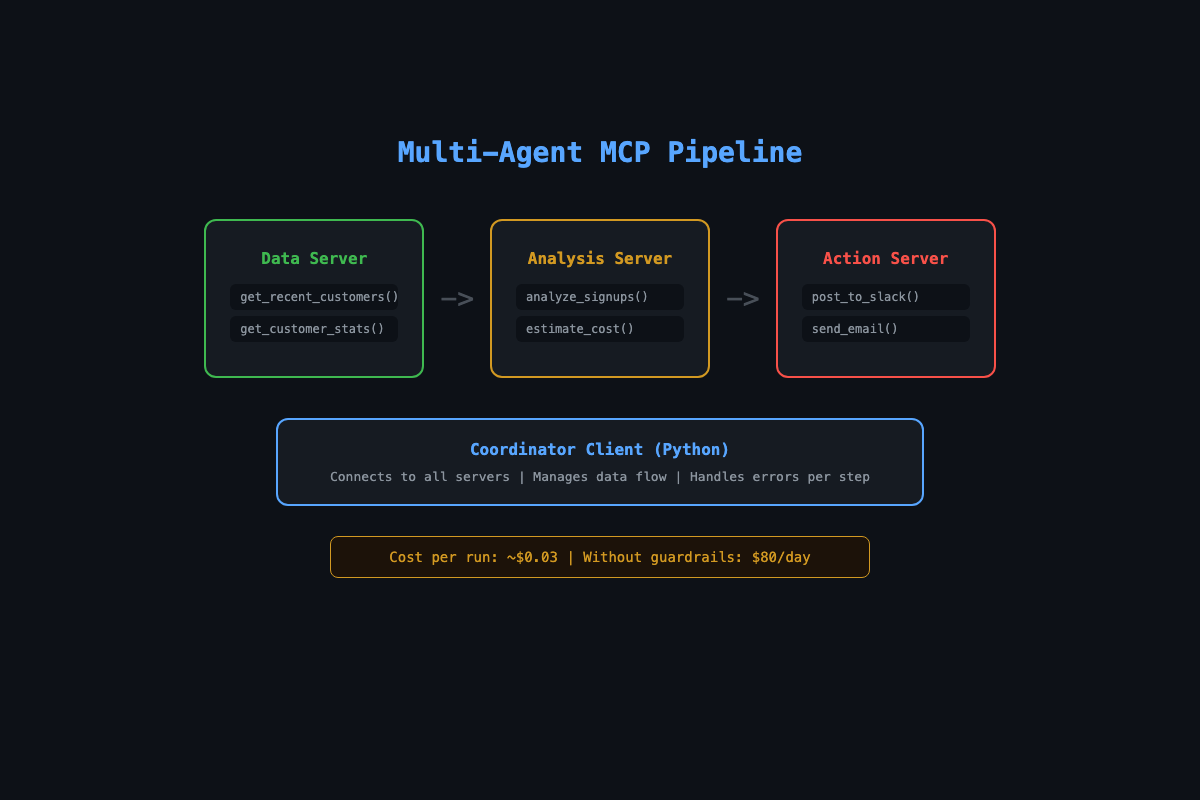
The first version of this pipeline cost $40 in API credits before the bug got caught. Three MCP servers wired together: one pulling customer data, one sending it to Claude for analysis, one posting results to Slack. The coordinator was sending 14,000 records to the analysis server every 15 minutes. Claude was happily churning through tokens while the Anthropic bill climbed.
The fix was two lines of code. This article gives you both: the architecture that works and the guardrails that keep it from eating your wallet.
Why chain MCP servers instead of building one big server?
Because real workflows cross system boundaries, and each system fails differently.
A single server with all tools works for simple cases. It falls apart when you need different error handling for different services, or when one flaky API takes down the whole thing. Three servers means the database outage disables data tools but Slack notifications still work.
The pattern: data in, intelligence in the middle, action at the end.
[Data Server] → customer records
       ↓
[Analysis Server] → LLM-generated insights
       ↓
[Action Server] → Slack notification
A marketing agency paid $4,500 for this exact pipeline. Here is how you build it.
Everything below uses the official MCP Python SDK. Install it and verify:
pip install mcp            # or: uv add mcp
python -c "from mcp.server.fastmcp import FastMCP; print('SDK ready')"
The SDK gives you FastMCP for servers and ClientSession + stdio_client for the coordinator. Declare a tool with a decorated Python function and the SDK generates the JSON schema, validates inputs, and handles the MCP protocol wire format automatically. No framework needed.
How do you build the data server?
One server, two tools. Pull recent customers and get summary stats:
# data_server.py
import os
import aiosqlite
from mcp.server.fastmcp import FastMCP

mcp = FastMCP("data-server")

@mcp.tool()
async def get_recent_customers(hours: int = 24) -> str:
    """Get customers who signed up in the last N hours."""
    db_path = os.environ.get("DB_PATH", "customers.db")
    async with aiosqlite.connect(db_path) as db:
        cursor = await db.execute(
            "SELECT name, email, company, created_at "
            "FROM customers "
            "WHERE created_at > datetime('now', ?)",
            (f"-{hours} hours",)
        )
        rows = await cursor.fetchall()
        if not rows:
            return "No new customers in the specified period."
        columns = [d[0] for d in cursor.description]
        lines = [" | ".join(columns)]
        for row in rows:
            lines.append(" | ".join(str(v) for v in row))
        return "\n".join(lines)

if __name__ == "__main__":
    mcp.run()
How do you build the analysis server?
This server wraps an LLM call behind an MCP tool. Raw data goes in, structured insights come out. The estimate_cost tool is the guardrail.
# analysis_server.py
import anthropic
from mcp.server.fastmcp import FastMCP

mcp = FastMCP("analysis-server")

@mcp.tool()
async def analyze_signups(data: str, context: str = "") -> str:
    """Analyze customer signup data and generate insights.
    Returns a summary, patterns, and 3 follow-up actions."""
    client = anthropic.Anthropic()
    prompt = (
        "Analyze these signups. Provide:\n"
        "1. One-paragraph summary\n"
        "2. Notable patterns\n"
        "3. Three specific follow-up actions\n"
        "Keep it under 200 words.\n\n"
        f"{'Context: ' + context if context else ''}\n"
        f"Data:\n{data}"
    )
    response = client.messages.create(
        model="claude-sonnet-4-20250514",
        max_tokens=1024,
        messages=[{"role": "user", "content": prompt}]
    )
    return response.content[0].text

@mcp.tool()
async def estimate_cost(data: str) -> str:
    """Estimate API cost before running analysis."""
    input_tokens = len(data) // 4 + 200  # rough estimate, not exact
    output_tokens = 300
    cost = (input_tokens * 0.003 + output_tokens * 0.015) / 1000
    return f"Estimated tokens: {input_tokens} in, {output_tokens} out\nEstimated cost: ${cost:.4f}"

if __name__ == "__main__":
    mcp.run()
The cost estimator is not optional. Without it, a dataset of 14,000 records costs roughly $0.21 per run. At 16 runs per hour, that is $80/day. With the estimator, the coordinator checks before sending.
Heuristic warning:
len(data) // 4is a rough estimate, not an accurate token count. Real tokenizers (liketiktokenfor OpenAI or Anthropic’s tokenizer) give exact counts. Use this estimate for cost guardrails, not for billing math. Add a 1.5x safety multiplier.
How do you build the coordinator?
The coordinator is a standalone Python client that connects to all three servers, runs the pipeline, and handles failures at each step:
# coordinator.py
import asyncio
import sys
from mcp import ClientSession, StdioServerParameters
from mcp.client.stdio import stdio_client

async def run_pipeline():
    servers = {
        "data": StdioServerParameters(
            command="python3", args=["data_server.py"],
            env={"DB_PATH": "customers.db"}
        ),
        "analysis": StdioServerParameters(
            command="python3", args=["analysis_server.py"],
            env={"ANTHROPIC_API_KEY": "your-key"}
        ),
    }

    sessions = {}
    try:
        for name, params in servers.items():
            transport = await stdio_client(params).__aenter__()
            session = await ClientSession(*transport).__aenter__()
            await session.initialize()
            sessions[name] = session
            print(f"Connected to {name}")

        # Step 1: Fetch data
        result = await sessions["data"].call_tool(
            "get_recent_customers", arguments={"hours": 24}
        )
        customer_data = result.content[0].text
        if "No new customers" in customer_data:
            print("No new signups. Done.")
            return

        # Step 2: Cost check
        cost = await sessions["analysis"].call_tool(
            "estimate_cost", arguments={"data": customer_data}
        )
        print(cost.content[0].text)

        # Step 3: Truncate if too large
        if len(customer_data) > 10000:
            print(f"Large dataset ({len(customer_data)} chars). Truncating.")
            customer_data = customer_data[:10000]

        # Step 4: Analyze
        analysis = await sessions["analysis"].call_tool(
            "analyze_signups",
            arguments={"data": customer_data, "context": "B2B SaaS, $99/mo"}
        )
        print(f"Analysis:\n{analysis.content[0].text}")

    except Exception as e:
        print(f"Pipeline failed: {e}", file=sys.stderr)
    finally:
        for session in sessions.values():
            try:
                await session.__aexit__(None, None, None)
            except Exception:
                pass

asyncio.run(run_pipeline())
Run it: python3 coordinator.py. You see data flow through both servers and get an LLM-generated analysis for about six-tenths of a cent.
What broke (and how to fix it)?
The $40 mistake. The first coordinator had no guardrails. It fetched all customer data (14,000 records), sent the entire dataset to Claude, and ran every 15 minutes via cron. The fix was two changes: filter to only new records since the last run, and check estimated cost before calling the analysis API. If cost exceeds $0.10, log a warning and truncate.
Token explosion from large results. Claude’s API charges per token. 14,000 customer records is roughly 70,000 input tokens. The truncation check (if len(customer_data) > 10000) catches this before the API call.
Server-to-server calls do not work. Having one MCP server call another MCP server internally sounds elegant but the SDK was not designed for it. Two days of debugging nested async contexts before abandoning the approach. The coordinator client pattern avoids the problem entirely.
Error recovery by step: Data step fails: retry once, then use cached data from last successful run. Analysis step fails: skip this cycle, alert. Action step fails: never retry automatically. Log the failure and wait for human review. The action step is where money moves. Never auto-retry money.
How do you schedule it?
A pipeline that runs once is a demo. A pipeline on a cron job is an automation:
# Run daily at 8:00 AM
0 8 * * * /usr/bin/python3 /path/to/coordinator.py >> /var/log/mcp-pipeline.log 2>&1
For continuous monitoring, a simple loop with error recovery:
import time

while True:
    try:
        asyncio.run(run_pipeline())
    except Exception as e:
        print(f"Pipeline error: {e}")
    time.sleep(3600)  # Run every hour
Cron + log rotation: For daily runs:
0 6 * * * cd /path && python coordinator.py >> logs/pipeline.log 2>&1. Rotate logs weekly:logrotateon Linux, or addif os.path.getsize(logfile) > 10_000_000: rotate()in your script. A 10MB log file per week is normal for a 3-server pipeline.
What should you actually do?
- If you want to test the pattern: build the data server and analysis server. Skip the action server. Run the coordinator and verify data flows through both.
- If you have a real workflow to automate: identify the “get data, think about it, do something” pattern in your business. Most workflows fit. Map each step to an MCP server.
- If you want to sell this: the coordinator pattern is worth $5K-$10K to clients who want automated analytics, support triage, or content pipelines. Package it with the scope document from the book.
bottom_line
- The coordinator client pattern (pure Python, no framework) is the simplest way to chain MCP servers. One script connects to all servers and manages data flow.
- Cost controls are not optional. Always estimate token cost before calling an LLM in a loop. The
estimate_costtool pays for itself on the first run. - The “data in, intelligence in the middle, action at the end” pattern covers most business automation. If you can describe the workflow in those three words, it is an MCP pipeline.
Frequently Asked Questions
Can I chain MCP servers without a framework like LangGraph?+
Yes. A plain Python script that connects to multiple MCP servers as a client handles all the orchestration. No framework needed. The coordinator pattern in this article is pure Python with the MCP SDK.
How much does a multi-agent MCP pipeline cost to run?+
About $0.03-$0.10 per execution for a typical analytics pipeline. The cost is almost entirely LLM API tokens. The MCP servers themselves use negligible compute.
Do MCP servers need to be on the same machine?+
No. Use stdio transport for local servers and HTTP/SSE transport for remote ones. A coordinator can connect to servers running anywhere. Same protocol, different wires.