How to Connect MCP to PostgreSQL, GitHub, and Slack
Build one MCP server wired to PostgreSQL, GitHub, and Slack with a modular Python architecture. Includes SQL safety, typed error handling, and rate limits.
>This covers multi-service integration. Model Context Protocol: The Builder's Playbook goes deeper on HTTP transport, Pydantic validation, production deployment, and multi-agent pipelines.
Model Context Protocol: The Builder's Playbook
Build AI Agents That Connect to Everything
Summary:
- Build one MCP server connected to PostgreSQL, GitHub, and Slack.
- Use the modular pattern: one file per integration, reusable across projects.
- Add the error handling wrapper that prevents one failure from crashing everything.
- Copy-paste modules for database, GitHub, and Slack included.
The “how do I connect my existing APIs to MCP?” question shows up on Twitter every few hours. Most answers point to pre-built official servers like the ones in the modelcontextprotocol/servers repository. Those handle generic use cases. They do not connect to your specific database schema, implement your business logic, or chain multiple services into one workflow. This article shows you how to build the custom version.
How does the architecture work?
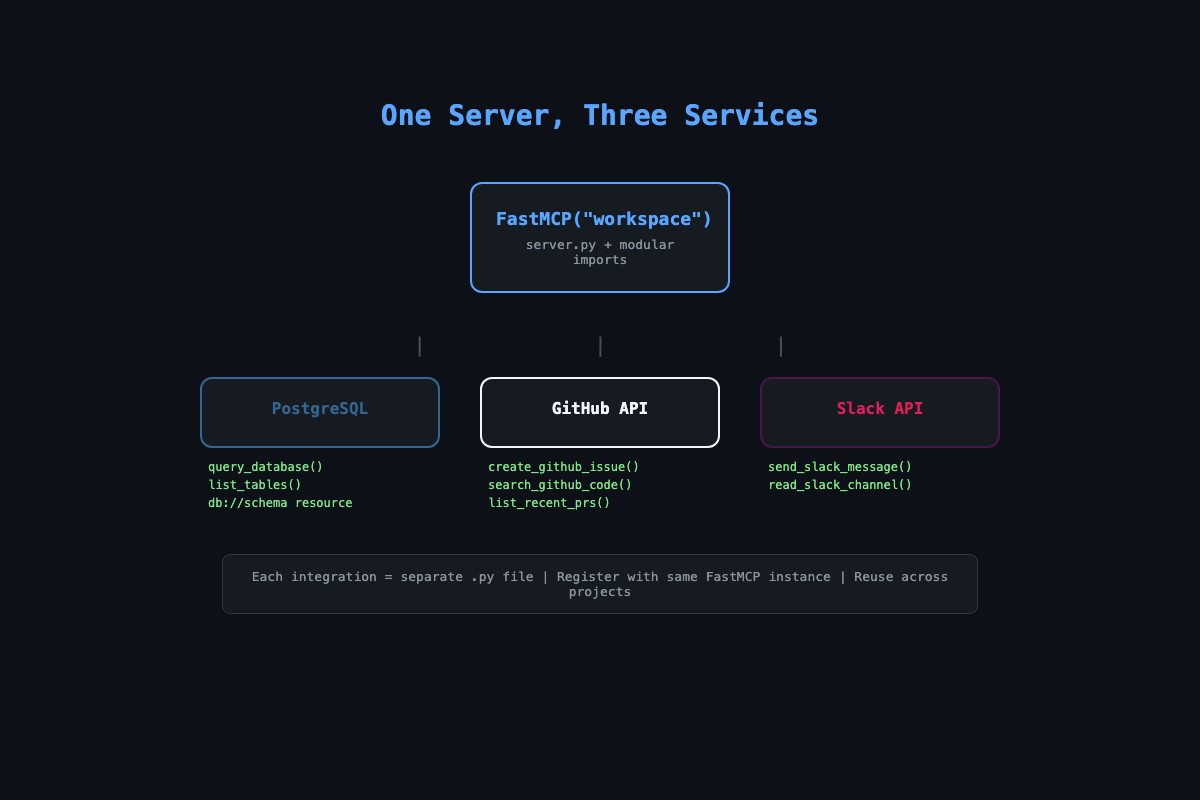
One server.py imports three integration modules. Each module registers its tools with the same FastMCP instance. The server runs as a single process exposing all capabilities to any MCP client.
# Project structure
workspace-server/
  server.py          # Composition layer
  db_tools.py        # PostgreSQL integration
  github_tools.py    # GitHub API integration
  slack_tools.py     # Slack API integration
  .env.example       # Credential template
  requirements.txt   # asyncpg, httpx, python-dotenv
Each module is a standalone file you can reuse. Your database tools work for any project that uses PostgreSQL. Your GitHub tools work for any repo. Build them once, assemble servers like building blocks.
How do you build the database module?
Two tools and one resource. The tools query data and list tables. The resource exposes the schema so Claude knows every column name and type before writing SQL.
# db_tools.py
import asyncpg
from mcp.server.fastmcp import FastMCP

async def register_db_tools(mcp: FastMCP, db_url: str):
    pool = await asyncpg.create_pool(
        db_url, min_size=2, max_size=10,
        command_timeout=30
    )

    @mcp.tool()
    async def query_database(sql: str) -> str:
        """Run a read-only SQL query against the database.
        Only SELECT queries are allowed."""
        if not sql.strip().upper().startswith("SELECT"):
            return "Error: Only SELECT queries are allowed."
        dangerous = ["DROP", "DELETE", "INSERT", "UPDATE", "TRUNCATE"]
        for keyword in dangerous:
            if keyword in sql.upper():
                return f"Error: query contains forbidden keyword: {keyword}"
        async with pool.acquire() as conn:
            rows = await conn.fetch(sql)
            if not rows:
                return "No results found."
            headers = list(rows[0].keys())
            lines = [" | ".join(headers)]
            for row in rows:
                lines.append(" | ".join(str(v) for v in row.values()))
            return "\n".join(lines)

    @mcp.resource("db://schema")
    async def get_schema() -> str:
        """Get the database schema for all public tables."""
        async with pool.acquire() as conn:
            tables = await conn.fetch(
                "SELECT table_name, column_name, data_type "
                "FROM information_schema.columns "
                "WHERE table_schema = 'public' "
                "ORDER BY table_name, ordinal_position"
            )
            current_table = None
            lines = []
            for row in tables:
                if row["table_name"] != current_table:
                    current_table = row["table_name"]
                    lines.append(f"\n{current_table}:")
                lines.append(f"  {row['column_name']} ({row['data_type']})")
            return "\n".join(lines)
The pool configuration matters. min_size=2 keeps connections warm. max_size=10 prevents a chatty AI client from opening hundreds of connections. command_timeout=30 kills queries that hang. One early version ran a full table scan on 2 million rows. Without the timeout, it blocked for four minutes.
The SQL validation blocks DROP, DELETE, INSERT, UPDATE, and TRUNCATE. A developer once asked Claude to “fix the duplicate entries in the users table” and Claude generated a DELETE statement. Technically correct. Not recoverable.
How do you build the GitHub module?
Three tools covering the operations that come up constantly: create issues, search code, list PRs.
# github_tools.py
import httpx
from mcp.server.fastmcp import FastMCP

async def register_github_tools(mcp: FastMCP, token: str):
    headers = {
        "Authorization": f"token {token}",
        "Accept": "application/vnd.github.v3+json"
    }
    base = "https://api.github.com"

    @mcp.tool()
    async def create_github_issue(
        repo: str, title: str, body: str, labels: str = ""
    ) -> str:
        """Create a GitHub issue. repo format: owner/repo"""
        label_list = [l.strip() for l in labels.split(",") if l.strip()]
        async with httpx.AsyncClient() as client:
            resp = await client.post(
                f"{base}/repos/{repo}/issues",
                headers=headers,
                json={"title": title, "body": body, "labels": label_list}
            )
            if resp.status_code == 201:
                data = resp.json()
                return f"Created #{data['number']}: {data['html_url']}"
            return f"Failed: {resp.status_code} {resp.text}"

    @mcp.tool()
    async def search_github_code(repo: str, query: str) -> str:
        """Search for code in a GitHub repository."""
        async with httpx.AsyncClient() as client:
            resp = await client.get(
                f"{base}/search/code",
                headers=headers,
                params={"q": f"{query} repo:{repo}"}
            )
            if resp.status_code != 200:
                return f"Search failed: {resp.status_code}"
            items = resp.json().get("items", [])
            if not items:
                return f"No results for '{query}' in {repo}"
            return "\n".join(
                f"{i['path']} (score: {i['score']:.1f})"
                for i in items[:10]
            )
GitHub API limits: Authenticated users get 5,000 requests/hour. Your MCP server should track usage. For large repos, paginate results.
search_codereturns max 100 items per request. Addper_page=100&page=Nfor pagination. Hit the limit? Back off for 60 seconds.
How do you add the error handling wrapper?
Without this, a database timeout crashes your entire server. With it, the server returns a clean error and keeps running.
# error_handler.py
import functools
import logging

logger = logging.getLogger("mcp-server")

def handle_errors(func):
    @functools.wraps(func)
    async def wrapper(*args, **kwargs):
        try:
            return await func(*args, **kwargs)
        except Exception as e:
            logger.error(f"Error in {func.__name__}: {e}", exc_info=True)
            return f"Tool '{func.__name__}' failed: {str(e)}"
    return wrapper
Stack it with @mcp.tool():
@mcp.tool()
@handle_errors
async def query_database(sql: str) -> str:
    # No try/except needed here
Every unhandled exception gets logged with a full traceback and returned to the client as a readable error. Apply this to every tool in every module.
How do you wire it all together?
# server.py
import os, asyncio
from dotenv import load_dotenv
from mcp.server.fastmcp import FastMCP
from db_tools import register_db_tools
from github_tools import register_github_tools

load_dotenv()
mcp = FastMCP("workspace")

async def setup():
    db_url = os.environ.get("DATABASE_URL")
    if db_url:
        await register_db_tools(mcp, db_url)
    github_token = os.environ.get("GITHUB_TOKEN", "")
    if github_token:
        await register_github_tools(mcp, github_token)

asyncio.get_event_loop().run_until_complete(setup())

if __name__ == "__main__":
    mcp.run()
Secrets handling: Create
.env.examplewith placeholder values and commit it. Add.envto.gitignoreimmediately. Never pass secrets as command-line arguments (they show up inps aux). Use environment variables loaded withpython-dotenv.
Credentials come from environment variables. For Claude Code, add the server to .mcp.json in your project root. For Claude Desktop, add to ~/Library/Application Support/Claude/claude_desktop_config.json:
{
  "mcpServers": {
    "workspace": {
      "command": "python3",
      "args": ["/path/to/server.py"],
      "env": {
        "DATABASE_URL": "postgresql://user:pass@localhost/mydb",
        "GITHUB_TOKEN": "ghp_your_token_here"
      }
    }
  }
}
What broke (and what to watch for)?
One integration fails, everything dies. The original server registered all tools at startup. If the database was unreachable, the whole server crashed. The fix: register conditionally. If database setup throws, log a warning and skip those tools. GitHub and Slack still work.
Tool description overlap confuses Claude. If query_database and search_github_code both mention “search,” Claude picks the wrong one. Fix: make descriptions specific. “Run a SQL query against the PostgreSQL customer database” does not overlap with “Search for files in a GitHub repository.”
Rate limit cascade. Claude sometimes chains rapid-fire tool calls. Ten GitHub API calls in two seconds hits the rate limit. Fix: add a rate limiter per service (50 calls per minute for GitHub is conservative).
Slack safety rules: Never post secrets or tokens in messages. Restrict the bot to specific channels via an allowlist. Redact PII (emails, phone numbers) from automated summaries before posting. A Slack message is visible to the entire channel. Treat it like a public announcement.
What should you actually do?
- If you have a PostgreSQL database: start with just
db_tools.py. Connect it, ask Claude about your data. Add the schema resource so Claude writes accurate SQL without guessing. - If your team uses GitHub and Slack: add both modules. The cross-tool test is the real proof of value. “Check our database for new signups and create a GitHub issue to follow up.”
- If you want to reuse these across projects: keep integration modules in a personal repo. After building for several clients, you will have modules for every common service. New project? Pull two modules, compose a server, bill for the customization.
bottom_line
- One file per integration. Registration functions. Environment variables for secrets. This modular pattern is the difference between a demo and a system you can reuse across ten projects.
- SQL safety is not optional. Block writes by default. The DELETE query that “fixes duplicates” is the one that costs you the client relationship.
- The error handling wrapper (
@handle_errorsdecorator) goes on every tool in every module. One unhandled exception should never take down a five-tool server.
Frequently Asked Questions
Can I use SQLite instead of PostgreSQL?+
Yes. Swap asyncpg for aiosqlite and change the connection code. The MCP tool pattern is identical. SQLite requires no server setup, which makes it faster for prototyping.
How do I keep API keys safe in MCP servers?+
Use environment variables. Never hardcode secrets. Pass them through the Claude Desktop config env block or a .env file loaded with python-dotenv. Add .env to .gitignore immediately.
What happens when one integration fails?+
With the error handling wrapper, a database outage returns a clean error but the GitHub and Slack tools keep working. Without it, one failure can crash the entire server.