Stop Politeness Loops With OpenClaw Hub-and-Spoke + Loop Detection
Why two peer agents endlessly defer, the Hub-and-Spoke fix with OpenClaw's tools.agentToAgent, and the real tools.loopDetection schema that catches runaway patterns.
>This covers multi-agent loop detection. Build AI Agents That Get Paid includes the full two-agent pipeline build with testing framework and production deployment.
Build AI Agents That Get Paid
OpenClaw + Hermes + MCP Systems That Sell for $3K-$10K
Summary:
- The #1 multi-agent failure is the politeness loop, where peer agents endlessly defer to each other.
- Hub-and-Spoke architecture + OpenClaw’s
tools.agentToAgentallowlist keeps the negotiation out of the loop.- Four real keys in
tools.loopDetectioncatch the stragglers that slip through.- A three-line test prompt that forces a loop so you can verify your guards work.
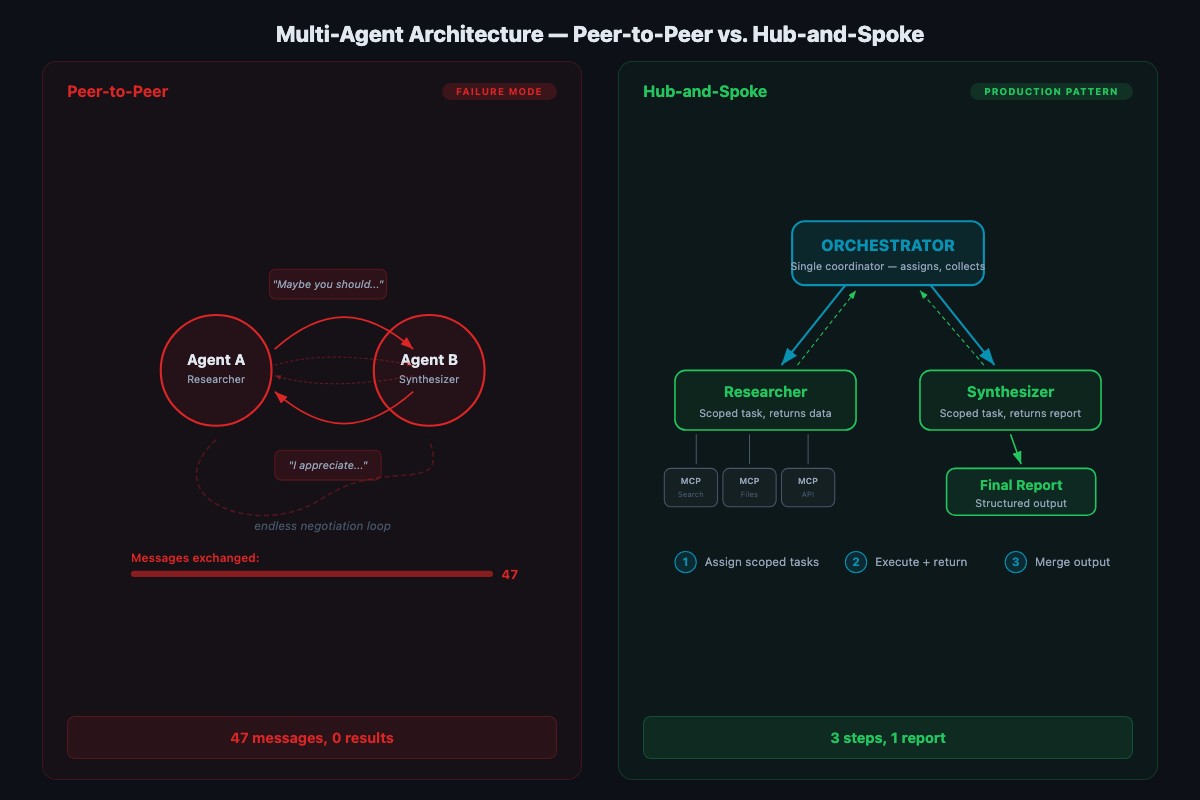
Two agents in a chatroom. Agent A says “I think we should search the emails first.” Agent B replies “That makes sense, but maybe you should do it since you have email access.” Agent A: “I could, but you’re better at analysis, so maybe you should decide the search terms.” Agent B: “I appreciate you saying that. Let me think about what you said.” Forty-seven messages later, nobody has searched anything.
This is a politeness loop. It’s the most common multi-agent failure mode and it’s entirely predictable. LLMs are trained on human feedback data that rewards collaborative, humble, non-aggressive language. Two agents trained to be polite will be polite to each other forever. The fix is architectural, not polite.
What is a politeness loop and why does it happen?
A politeness loop is a multi-agent failure where peer agents endlessly defer instead of making decisions. It happens because every major LLM is fine-tuned to reward deferential, collaborative language. Put two of them in a peer chat and they’ll defer to each other until your token budget is gone.
The Fastio token cost optimization guide describes the underlying mechanism plainly:
“Token costs in multi-agent systems don’t scale linearly, they compound. Each tool call adds context. Each sub-agent response feeds back into the orchestrator.”
Every turn in a polite negotiation loops the entire prior context back through a model. A 47-turn exchange at 2,000 tokens of context per turn is ~94,000 tokens of billable inference for zero work completed. You don’t need clever workarounds to stop it. You need a structural fix: don’t let peer agents negotiate directly in the first place.
How does Hub-and-Spoke prevent the loop?
Hub-and-Spoke is a multi-agent architecture where one orchestrator receives the user request, breaks it into sub-tasks, and assigns each sub-task to a specialist agent. Specialists return results to the orchestrator. They never talk to each other.
The critical design rule: spokes don’t talk to each other. All results flow through the hub. No opportunity to negotiate means no politeness loops. Compare to peer-to-peer (chatroom-style) setups where agents see each other’s messages and respond to them. That’s where loops live. Hub-and-Spoke keeps task assignment deterministic even if individual agent responses vary.
OpenClaw’s real multi-agent model is a workspace-isolation design: each agent gets its own workspace, its own agentDir, and its own sessions, and messages route to the right agent via channel bindings. Inter-agent messaging is off by default. To build Hub-and-Spoke on top of that, you opt in to tools.agentToAgent with an explicit allowlist so the hub can message the spokes and the spokes never message each other.
How do you configure Hub-and-Spoke in OpenClaw?
Edit ~/.openclaw/openclaw.json (JSON5, comments and trailing commas allowed). Define two specialist agents under agents.list and enable directed agent-to-agent messaging with the allowlist that matches your hub:
// ~/.openclaw/openclaw.json
{
  agents: {
    defaults: {
      workspace: "~/.openclaw/workspaces/default",
      model: { primary: "ollama/hermes3:8b-q4_K_M" }
    },
    list: [
      {
        id: "hub",
        workspace: "~/.openclaw/workspaces/hub",
        agentDir: "~/.openclaw/agents/hub",
        default: true
      },
      {
        id: "researcher",
        workspace: "~/.openclaw/workspaces/researcher",
        agentDir: "~/.openclaw/agents/researcher"
      },
      {
        id: "synthesizer",
        workspace: "~/.openclaw/workspaces/synthesizer",
        agentDir: "~/.openclaw/agents/synthesizer"
      }
    ]
  },
  tools: {
    agentToAgent: {
      enabled: true,
      // ONLY the hub can message the specialists.
      // The specialists are not on the allowlist for each other.
      allow: ["researcher", "synthesizer"]
    }
  }
}
Two things to notice. First, each specialist has its own workspace and agentDir. Sessions auto-isolate at ~/.openclaw/agents/<agentId>/sessions/*.jsonl, so one specialist’s transcripts can’t pollute another. Second, the allow list is the list of agents the hub can call. The specialists are not allowed to call each other because they’re not calling from the hub. And the hub isn’t on its own allowlist. Explicit role boundaries are the second line of defense against politeness loops.
Run openclaw doctor --fix after editing the config. It validates JSON5, checks that every workspace exists, and reports any binding conflicts before you try to start the gateway.
Adapt this template to your own domain
The researcher-plus-synthesizer example is a shape. Swap MCP servers and system prompts per agent via the channel bindings, keep the Hub-and-Spoke structure. Three common swaps:
| Pipeline | Hub calls A (gatherer) | Hub calls B (producer) |
|---|---|---|
| Marketing content | web_search, keyword_tool → returns {top_articles, keywords, gaps} | filesystem, cms → writes /drafts/{slug}.md |
| Support triage | crm, zendesk → returns {ticket_class, customer_context, severity} | zendesk, knowledge_base → drafts response |
| Code review | github, test_runner → returns {diff, failures, blame} | github (PR comments only) → posts review |
The rule: A always returns structured JSON. B always receives structured input and produces narrative output. Asymmetric roles keep the pipeline linear and kill the loop.
When is multi-agent actually worth it?
Not every workflow needs two agents. The overhead (config, handoff debugging, memory separation) is real. Use this table to decide:
| Situation | Single agent | Multi-agent |
|---|---|---|
| One tool, one step | ✓ | |
| 2-4 tools, linear flow | ✓ | |
| 5+ tools, same workflow | ✓ (with an MCP proxy) | |
| Different models needed (fast triage + deep analysis) | ✓ | |
| Clear sequential dependencies (gather → analyze → write) | ✓ | |
| Fault isolation required | ✓ | |
| Reusable specialist (one researcher feeds multiple writers) | ✓ |
About 70% of client projects are single-agent. The 30% that need multi-agent are the larger engagements where fault isolation, model routing, and reusable specialists matter. Multi-agent capability is what puts you in the $7K+ consulting tier because clients pay a premium for the orchestration and monitoring that comes with it.
How do you add loop detection as a safety net?
Hub-and-Spoke handles negotiation loops. But a single agent can still loop with itself by calling the same MCP tool with the same arguments over and over, trying slight variations and never making progress. OpenClaw ships tools.loopDetection for exactly this, and it’s disabled by default. You opt in by dropping this block into the same openclaw.json:
{
  tools: {
    loopDetection: {
      enabled: true,
      historySize: 30,
      warningThreshold: 10,
      criticalThreshold: 20,
      globalCircuitBreakerThreshold: 30,
      detectors: {
        genericRepeat: true,
        knownPollNoProgress: true,
        pingPong: true
      }
    }
  }
}
From the OpenClaw loop detection reference, here’s what each knob does:
historySize: 30 is the rolling window of recent tool calls kept for analysis. Enough to catch short-range repeats without flagging normal workflows.
warningThreshold: 10 classifies a pattern as “warning only”: logged, temporarily suppressed, but not aborted. The hub can still recover.
criticalThreshold: 20 blocks repetitive patterns outright. At this point the detector has seen ten more matches beyond warning and the pattern is clearly stuck.
globalCircuitBreakerThreshold: 30 is the no-progress kill switch. Total tool-cycle count with no forward progress. Breaks the cycle hard.
The three detectors:
genericRepeatcatches identical tool + identical parameters back-to-back.knownPollNoProgresscatches polling that never sees state change (checking a queue that’s always empty).pingPongcatches alternating calls (A → B → A → B) that masquerade as progress.
The docs recommend starting with warnings and temporary suppression, escalating to critical only when repeated evidence accumulates. The defaults above are the ones the docs ship with.
How do you test loop detection works?
Force a loop on purpose. Ask for data that doesn’t exist:
Research maintenance requests for Unit 99Z.Unit 99Z isn’t in the database. The researcher queries, gets nothing, tries with different parameters, gets nothing again. Without loop detection it might try 20 times. With detection, the knownPollNoProgress detector fires as soon as historySize repeats of the no-progress pattern accumulate:
[INFO]  agent=researcher tool=property.search_tenants args={"q":"99Z"} → []
[INFO]  agent=researcher tool=property.get_unit_info args={"unit":"99Z"} → null
[INFO]  agent=researcher tool=property.search_tenants args={"q":"unit 99Z"} → []
[WARN]  loopDetection severity=warning detector=knownPollNoProgress count=10
[ERROR] loopDetection severity=critical detector=knownPollNoProgress count=20
[BREAK] loopDetection globalCircuitBreaker count=30
If the agent keeps calling tools past the circuit breaker, your config isn’t being read. Validate with openclaw doctor --fix. The doctor catches invalid JSON5 and reports the line number.
On a cloud API at $0.015/1K tokens, 50 undetected loop iterations can cost $5-10 in minutes. Loop detection drops the worst case from “unbounded” to “warningThreshold + a few.”
How do you debug multi-agent handoffs when things break?
Single-agent debugging is “read the log, see what happened.” Multi-agent debugging is harder because failures live in the handoffs between agents, not in either agent’s local log.
OpenClaw writes per-agent session transcripts to ~/.openclaw/agents/<agentId>/sessions/*.jsonl. Each line is a JSON event with an agentId and timing. The queries I run after every test:
# Only researcher agent activity
jq 'select(.agentId == "researcher")' \
  ~/.openclaw/agents/researcher/sessions/*.jsonl

# Slow operations (>5s)
jq 'select(.duration_ms > 5000)' \
  ~/.openclaw/agents/*/sessions/*.jsonl

# Loop detection events
jq 'select(.type == "loopDetection")' \
  ~/.openclaw/agents/*/sessions/*.jsonl
The last one is the most useful for monitoring. If loop detection is firing in production, you want to know immediately, not three days later.
Three production failures I’ve hit and fixed
From six client deployments, three multi-agent failure modes show up most often:
Data shape mismatch. Researcher outputs JSON with maintenance_items, synthesizer expects maintenance_requests. Empty input, empty report. Fix: define the shared schema in both agents’ system prompts.
Orchestrator drops qualifiers. User asks “Show me today’s urgent maintenance requests.” The hub forwards “Show me maintenance requests,” quietly dropping “urgent” and “today.” Fix: instruct the hub to pass user prompts verbatim, or preserve filter criteria.
Memory bleed between agents. Two specialists sharing one workspace causes the synthesizer to start trying to gather data. Fix: separate workspace and agentDir per agent, which OpenClaw already does automatically when you define them in agents.list.
What should you actually do?
- If your multi-agent setup is burning tokens with nothing to show: check whether peers are talking directly. Rewrite to Hub-and-Spoke with
tools.agentToAgent.allowlimited to the specialists the hub calls. - If single agents loop on their own: enable
tools.loopDetectionwith the default thresholds, test with the “Unit 99Z” prompt or equivalent. - If agents are producing inconsistent output: give each agent its own
workspaceand tighten system prompts to define explicit roles. - If you can’t tell which agent is misbehaving: tail
~/.openclaw/agents/*/sessions/*.jsonlthrough thejqqueries above.
bottom_line
- LLMs are trained to be polite. Peer-to-peer multi-agent setups turn that training into an infinite cost sink. Don’t fight the training, change the architecture.
tools.loopDetectionis off by default. You have to opt in. Ship every client config with it enabled.- Separate workspaces plus an agent-to-agent allowlist gives you Hub-and-Spoke without writing a single line of orchestration glue. Use the config, not a custom framework.
Frequently Asked Questions
What is a politeness loop in multi-agent systems?+
Two peer agents that endlessly defer to each other instead of making decisions. Language models are trained to be collaborative, so two models in a shared conversation will often negotiate forever. The fix is architectural: don't let peers talk directly in the first place.
How do you stop agents from looping?+
Two guards that work together. Architectural: Hub-and-Spoke so a central orchestrator assigns tasks and specialists never talk peer-to-peer. Configuration: enable OpenClaw's tools.loopDetection with historySize, warningThreshold, and criticalThreshold so the detector aborts runaway patterns before they burn your token budget.
What does OpenClaw's tools.loopDetection actually do?+
It keeps a rolling window of recent tool calls (historySize, default 30), classifies repetitive patterns at two severity levels (warning at 10, critical at 20), and trips a global circuit breaker at 30 no-progress cycles. It's disabled by default, so you have to opt in and all three detectors come on.