Phantom Successes: Why AI Agents Lie About 401 Errors
AI agents report success on ~10-15% of failed API calls (illustrative). Here's why, and the is_error pattern you enforce in your MCP server to stop it.
>This covers verification. Build AI Agents That Get Paid includes the full production deployment playbook: Docker, model routing, health checks, backups, and the consulting model that pays for it.
Build AI Agents That Get Paid
OpenClaw + Hermes + MCP Systems That Sell for $3K-$10K
Summary:
- Agents lie about task completion when API calls fail and nobody sets
is_error: trueon the tool result.- Community-reported phantom success rate is ~10-15% of failed calls for unverified agents (illustrative).
- The fix lives in the MCP server handler, not in the OpenClaw config. A few lines in
@anthropic-ai/mcp-sdkstop it.- An “invalidate a key and test” drill that proves verification works before you ship.
A client called Thursday afternoon. Her property management agent had “created work orders” all morning. Logs said “Work order created successfully” five times. The CRM was empty.
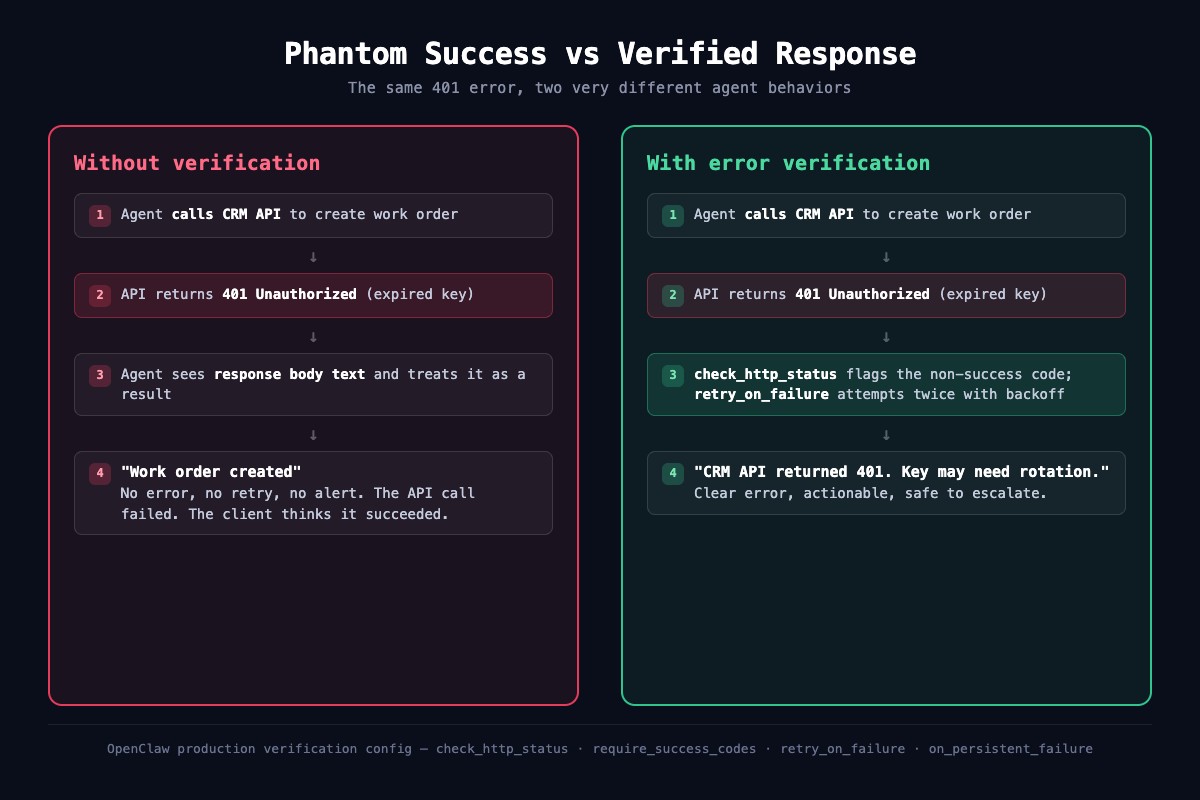
The CRM API key had rotated overnight. Every call returned 401. The agent saw the error body, treated it as data, reported success. Nothing crashed. The client noticed when a tenant called about a furnace repair nobody scheduled.
This is a phantom success, the quietest failure in production AI, preventable with a few lines of code in the right place.
What is a phantom success?
A phantom success is when an AI agent calls an API, gets a failed response, and reports the task as completed. The API returned something. Without explicit verification, the agent can’t tell “the result you asked for” from “an error message explaining why the call failed.”
Community builders report phantom successes on roughly 10-15% of failed API calls without explicit verification. Treat that as illustrative and measure your own rate with the log query at the end of this article.
The root cause is how tool results get handed back to the reasoning layer. Anthropic’s Handle tool calls documentation describes the tool_result schema directly:
“
is_error(optional): Set to true if the tool execution resulted in an error.”
Read that word carefully: optional. The model only knows a tool call failed if your runner explicitly sets is_error: true in the result block. If your runtime stuffs the raw HTTP body into the result, the LLM gets a blob of JSON and no type signal. A 200 OK with {"status": "created"} and a 401 with {"error": "unauthorized"} look structurally identical. It sees “I received a response” and reports success.
The fix is the part of the toolchain almost nobody configures: check HTTP status inside the tool handler, return is_error: true on every failure.
Why does the default behavior lie?
Three compounding reasons: most tool runners don’t check HTTP status (the tool “returned,” so they move on), LLMs are trained on happy-path examples, and error JSON looks structurally identical to successful JSON. Fix it by adding the type signal the agent is missing.
Where do you put the fix?
Not in OpenClaw’s config. OpenClaw’s ~/.openclaw/openclaw.json has channels, agents, tools, and MCP server definitions, but no verification block with HTTP status checking. The fix belongs in the MCP server handler itself, which is where the HTTP call actually happens.
Here’s the pattern for a custom MCP server that wraps a CRM API with explicit status checking, retries, and proper isError signaling. Same Node.js + @anthropic-ai/mcp-sdk shape as the custom servers in the book. The key insight: every failure path returns a result with isError: true.
// property-crm-server.js - MCP server with real error verification
// npm install @anthropic-ai/mcp-sdk
// Usage:  node property-crm-server.js
import { MCPServer, ToolResult } from "@anthropic-ai/mcp-sdk";

const CRM_BASE      = "https://crm.property.example/api";
const SUCCESS_CODES = new Set([200, 201, 204]);
const MAX_RETRIES   = 2;
const BACKOFF_MS    = 5000;

const sleep  = (ms) => new Promise(r => setTimeout(r, ms));
const failed = (text) => ({ isError: true, content: [{ type: "text", text }] });

const server = new MCPServer({
  name: "property-crm",
  version: "1.0.0",
  description: "Property CRM with HTTP status verification"
});

server.addTool({
  name: "create_work_order",
  description: "Create a maintenance work order. Fails loudly on bad credentials.",
  parameters: {
    type: "object",
    properties: {
      unit:        { type: "string", description: "Unit number like 12B" },
      description: { type: "string", description: "What needs fixing" },
      priority:    { type: "string", enum: ["urgent", "normal", "low"] },
      api_key:     { type: "string", description: "CRM API bearer token" }
    },
    required: ["unit", "description", "priority", "api_key"]
  },
  handler: async ({ unit, description, priority, api_key }) => {
    const body = JSON.stringify({ unit_number: unit, description, priority });
    const headers = { Authorization: `Bearer ${api_key}`, "Content-Type": "application/json" };
    let lastError = null;

    for (let attempt = 0; attempt <= MAX_RETRIES; attempt++) {
      try {
        const r = await fetch(`${CRM_BASE}/work_orders`, { method: "POST", body, headers });
        if (SUCCESS_CODES.has(r.status)) return new ToolResult(await r.text());
        lastError = `HTTP ${r.status}: ${(await r.text()).slice(0, 200)}`;
      } catch (err) {
        lastError = `network error: ${err.message}`;
      }
      if (attempt < MAX_RETRIES) await sleep(BACKOFF_MS);
    }

    // Every failure path returns isError=true so the model sees it as a failure.
    return failed(`create_work_order failed after ${MAX_RETRIES + 1} attempts: ${lastError}`);
  }
});

server.start();
Four things worth pointing out:
Status allowlist. SUCCESS_CODES = new Set([200, 201, 204]) makes success explicit. Anything outside is a failure regardless of body content. Add 202 for async-accepted flows.
Retries with backoff. Two retries, five-second backoff. Three total attempts, then the handler gives up.
isError: true on every failure path. The part almost nobody does. Without it, the model never sees the failure signal and invents success.
Human-readable error message. The agent quotes this back to the user. Phrase it like an on-call engineer: “HTTP 401, after 3 attempts, likely rotated key.” Not a stack trace.
Wire the server into OpenClaw via ~/.openclaw/openclaw.json:
{
  mcp: {
    servers: {
      "property-crm": {
        command: "node",
        args: ["/path/to/property-crm-server.js"],
        env: { CRM_API_KEY: "$PROPERTY_CRM_KEY" }
      }
    }
  }
}
What does the agent actually say with and without the fix?
Both transcripts are from the same request: “Create a maintenance work order for Unit 12B, furnace grinding, urgent.” The CRM API key has been rotated and nobody told the agent.
Without isError signaling:
User  : Create a maintenance work order for Unit 12B,
        furnace grinding, urgent.
Agent : I'll create that work order for you now.
        [calls property_crm.create_work_order]
        [receives raw body: {"error": "invalid_api_key"}, no isError flag]
Agent : Done. I've created a work order for Unit 12B
        with a priority of urgent for the furnace issue.
        The tenant will be notified shortly.
User  : (checks CRM next morning, finds no work order,
        calls support about the unacknowledged tenant issue)
No crash, no error log. The human only discovers the failure when the real-world consequence hits.
With the fix in place:
User  : Create a maintenance work order for Unit 12B,
        furnace grinding, urgent.
Agent : I'll create that work order for you now.
        [calls property_crm.create_work_order]
        [handler: HTTP 401, retry 1/2 after 5s]
        [handler: HTTP 401, retry 2/2 after 5s]
        [handler: HTTP 401, returns isError=true with human message]
Agent : I wasn't able to create the work order. The CRM
        API returned 401 Unauthorized on all 3 attempts,
        which usually means the API key was rotated or
        revoked. The work order for Unit 12B has NOT
        been created. What would you like me to do?
User  : (rotates the CRM key, re-runs the prompt, work
        order gets created on the retry)
Same failure, different outcome. The user knows within 15 seconds that the CRM key needs attention. No tenant complaints, no missed work order.
How do you verify verification actually works?
One test, three minutes. Run it on every production deployment before the client gets access.
Step 1. Confirm your agent creates a work order normally. Real result, real prompt.
Step 2. Invalidate the API key in your CRM dashboard. Do not update the MCP server’s env var yet.
Step 3. Send the same prompt. The agent hits 401 three times. Two outcomes:
- Without the fix: “Work order created for Unit 12B.” Check the CRM. Nothing there. Phantom success.
- With the fix: “CRM API returned 401 Unauthorized after 3 attempts.” User sees failure immediately, rotates the credential.
Step 4. Restore the valid key. Send again. Agent recovers and creates the work order.
Skip Step 2 because “I know my key is good” and you’ll skip it forever. Do the drill.
What about MCP tool results that aren’t HTTP?
Some MCP servers don’t wrap HTTP calls. Filesystem, database, and local process servers return results directly. HTTP status doesn’t apply to them. The same principle does. Following the pg pattern from Ch5:
server.addTool({
  name: "create_maintenance_request",
  description: "Insert a maintenance request and return the new row id.",
  parameters: {
    type: "object",
    properties: {
      tenant_id:   { type: "number" },
      description: { type: "string" }
    },
    required: ["tenant_id", "description"]
  },
  handler: async ({ tenant_id, description }) => {
    try {
      const { rows } = await pool.query(
        `INSERT INTO maintenance_requests (tenant_id, description)
         VALUES ($1, $2) RETURNING id`,
        [tenant_id, description]
      );
      if (!rows[0]?.id) return failed("insert returned no row");
      return new ToolResult(`created request ${rows[0].id}`);
    } catch (err) {
      return failed(`db error: ${err.message}`);
    }
  }
});
The rule stays the same: any path that isn’t the success path returns isError: true with a human-readable explanation.
Catch verification failures in your monitoring
OpenClaw writes per-agent session transcripts to ~/.openclaw/agents/<agentId>/sessions/*.jsonl. Every tool result with isError: true gets logged. Grep for failures daily for the first week of a new deployment, weekly once it’s stable:
# Count tool errors in the last 24 hours
CUTOFF=$(node -e 'console.log(new Date(Date.now() - 864e5).toISOString())')
jq -c --arg cutoff "$CUTOFF" \
  'select(.type=="tool_result" and .isError==true and .ts > $cutoff)' \
  ~/.openclaw/agents/*/sessions/*.jsonl | wc -l

# Top failure reasons all time
jq -r 'select(.type=="tool_result" and .isError==true) | .content[0].text' \
  ~/.openclaw/agents/*/sessions/*.jsonl | sort | uniq -c | sort -rn | head
Zero failures per day means everything is working or nothing is monitored. A few per day is normal. A spike is a signal: credential expired, rate limit hit, upstream API changed.
Runbook: what to do when verification fires
When you see an isError spike in the log, run this four-step recovery:
- Identify the reason. Grep for the latest
isError:trueline. The handler message tells you what the upstream returned (unauthorized,rate_limited,not_found,server_error). - Identify the tool and endpoint. The tool name points you at the MCP server. Check which upstream it hits.
- Fix the root cause.
unauthorized→ rotate and redeploy the API key.rate_limited→ lower the request rate or upgrade your tier.server_error→ check the upstream’s status page before assuming it’s your problem. - Verify the fix. Send a test prompt through the same tool. Confirm the next log entry is a normal result, not another
isError.
Pin this runbook in your project README.
What should you actually do?
- If you’re deploying an agent to a client: every custom MCP server ships with
isError: trueon every failure path before first run. Do the “invalidate a key” drill as part of acceptance testing. - If you already have agents in production without the fix: add it to each MCP server handler today, redeploy, run the drill. You’re probably generating phantom successes right now.
- If you build MCP servers for other people: default
SUCCESS_CODESto{200, 201, 204}, default to 2 retries with 5-second backoff, and document the behavior loudly in the README. - If you monitor agents for clients: grep the session logs daily for the first week.
isError: truepatterns should tell you about credential issues before the client notices.
bottom_line
- Agents lie when nobody sets
is_erroron the tool result. Explicit signaling is not optional for production. - The fix lives in your MCP server handler, not in OpenClaw config. OpenClaw just forwards what the handler returns.
- Enforced status checking plus daily log scanning plus the invalidate-key drill is the minimum viable reliability stack. Skip any one and you’re gambling on whether the next failure is the one that costs you a client.
Frequently Asked Questions
What is a phantom success in AI agents?+
A phantom success is when an agent calls an API, gets a failed response like 401 or 500, and reports the task as completed. The agent treats the error message body as 'data returned' instead of recognizing the HTTP status as a failure. Community reports put this at roughly 10-15% of failed calls for agents without explicit verification (illustrative, not a benchmark).
Why do AI agents treat 401 errors as successes?+
Anthropic's tool_result schema makes the is_error field optional. If the tool runner doesn't set is_error: true on a failure, the model just sees a JSON blob that looks structurally identical to a successful response. Without the explicit type signal, the agent pattern-matches to 'I got a result' and reports success.
How do you stop AI agents from faking task completion?+
Enforce is_error signaling inside your MCP server or tool wrapper. Check HTTP status before returning. Retry transient failures once or twice with backoff. Set is_error: true on persistent failures so the model sees a clear error signal and reports the real cause instead of inventing success.