OpenClaw Persistent Memory + Hermes Skill Sidecar
OpenClaw already persists facts. What it doesn't do is get faster at repeated workflows. Here's the Hermes three-tier sidecar that adds procedural skill memory.
>This covers the skill sidecar. Build AI Agents That Get Paid includes the full OpenClaw + Hermes + MCP stack and the consulting playbook that turns it into $3K-$10K engagements.
Build AI Agents That Get Paid
OpenClaw + Hermes + MCP Systems That Sell for $3K-$10K
Summary:
- OpenClaw already persists facts via SQLite and auto-indexed Markdown. The real gap is procedural skill memory.
- A Hermes three-tier sidecar adds session summaries, FTS5 fact search, and skill extraction on top.
- A 5-request drill that makes skill learning visible in the sidecar database.
- Copy-paste Node.js wrapper you can drop in front of any OpenClaw agent.
A solo consultant hired me to build an email triage agent on top of OpenClaw. By Monday afternoon it was perfect: three specific clients flagged URGENT, two senders auto-archived, drafts in her voice starting with first names. Tuesday morning she called back. The agent still remembered every rule. It was also still taking 14 seconds per email.
Same as Monday. Same as Sunday before she ever met me. The facts stuck. The workflow got no faster.
That phone call is why I now ship a Hermes sidecar on every client deployment. OpenClaw persists what you told it. It doesn’t persist the shape of the work you keep doing. That’s a fixable gap.
Does OpenClaw actually forget between sessions?
No. This is the first thing to get straight because it’s the opposite of what half the Reddit threads claim.
OpenClaw ships a SQLite memory index at ~/.openclaw/memory/{agentId}.sqlite by default, with vector acceleration via sqlite-vec when the embedding provider is set. Hybrid search (vector + BM25) is active out of the box. On top of that, OpenClaw auto-indexes MEMORY.md and every memory/**/*.md file in the workspace as “evergreen” documents that never decay.
From the OpenClaw memory configuration reference, here’s a minimal override that pins the store path and hybrid weights:
// ~/.openclaw/openclaw.json
{
  agents: {
    defaults: {
      memorySearch: {
        enabled: true,
        store: {
          path: "~/.openclaw/memory/{agentId}.sqlite",
          vector: { enabled: true }
        },
        hybrid: {
          enabled: true,
          vectorWeight: 0.7,
          textWeight: 0.3
        }
      }
    }
  }
}
Drop that in ~/.openclaw/openclaw.json (JSON5 format, comments and trailing commas allowed). The {agentId} token is interpolated per agent, so multi-agent setups get isolated stores automatically. Verify it’s writing:
sqlite3 ~/.openclaw/memory/home.sqlite "SELECT COUNT(*) FROM memories;"Non-zero count means the index is populated. If you get zero, run openclaw doctor --fix, which runs a memory-search readiness check and repairs most setup issues automatically.
Where does OpenClaw memory actually fall short?
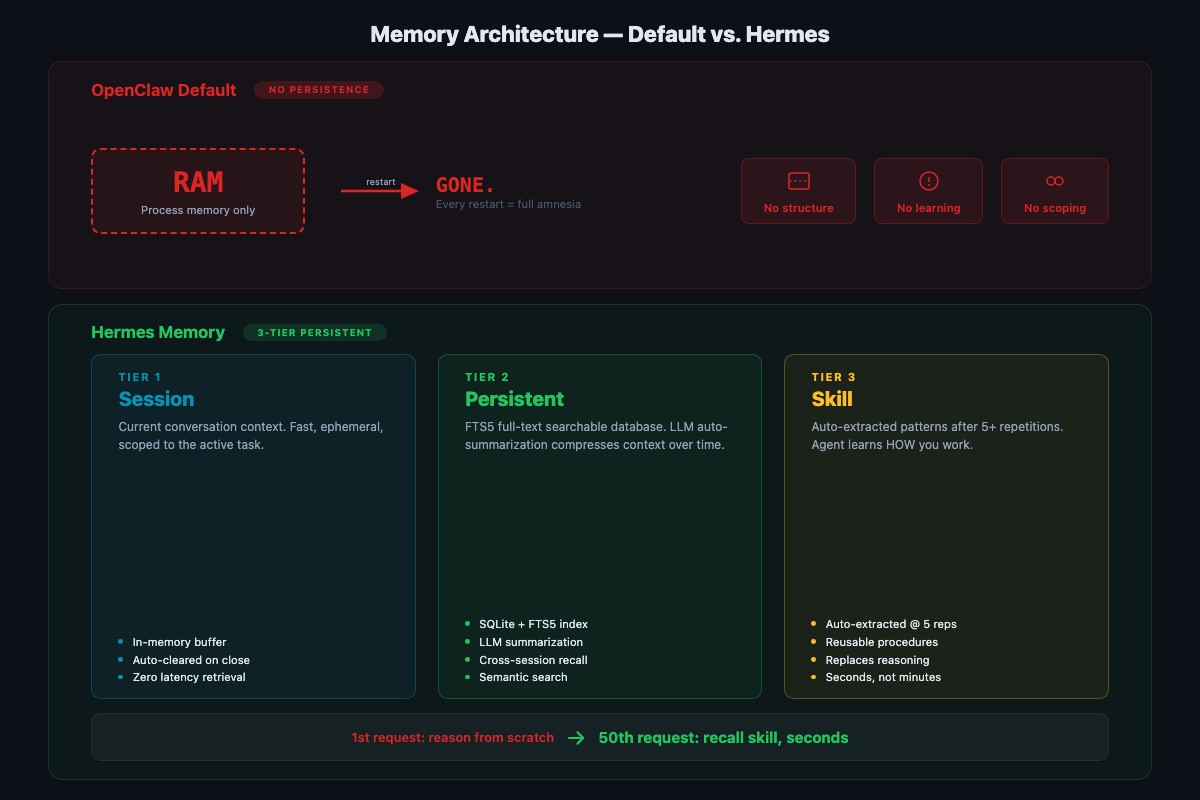
Facts stick. Procedures don’t.
Tell the agent “Maria Chen in Unit 12B prefers text messages” and tomorrow it still knows. Ask the agent to process a maintenance request that requires looking up a tenant, checking communication preference, creating a work order, and drafting a response, and it does all four steps from scratch every single time. Thirty requests in, it’s still as slow as request one.
The fix isn’t more config on the OpenClaw side. It’s a reasoning layer that watches what the agent does repeatedly and extracts the pattern as a reusable skill. That’s the three-tier memory model popularized by MemGPT and Letta, and it’s what Hermes is good at when you run it as a sidecar.
What does the Hermes three-tier sidecar do?
Hermes is NousResearch’s reasoning model. In this pattern you run it locally via Ollama and wrap it in a small Node process that sits between the user prompt and the OpenClaw gateway. Three layers, each solving a different problem:
Session memory. A rolling summary of the current conversation so long threads don’t lose the thread. Most chat UIs have this. Hermes compresses every N turns to keep context usage flat.
Persistent memory. Long-term facts and preferences in a dedicated SQLite file with FTS5 full-text search. Duplicates what OpenClaw already does, but from the sidecar’s perspective, so the skill layer can read both stores. Queries return in milliseconds across thousands of entries.
Skill memory. Procedural knowledge. When the sidecar sees the same N-step workflow completed 5 times, it extracts the procedure as a named skill and stores the step template. Next time a matching request comes in, the sidecar recalls the skill and dispatches it instead of reasoning the pattern fresh.
How do you wire up the sidecar in Node?
One file. Same runtime as the rest of the stack. Drop it in front of your OpenClaw gateway and pipe prompts through it.
// hermes-sidecar.mjs - three-tier memory in front of OpenClaw
// npm install better-sqlite3
// Usage:  echo "Process maintenance request..." | node hermes-sidecar.mjs
import Database from "better-sqlite3";
import { createHash } from "node:crypto";
import { mkdirSync } from "node:fs";
import { homedir } from "node:os";
import { join, dirname } from "node:path";

const HERMES_URL   = "http://localhost:11434/api/chat";   // Ollama
const HERMES_MODEL = "hermes3:8b-q4_K_M";
const OPENCLAW_URL = "http://localhost:18789/v1/messages";
const DB_PATH      = join(homedir(), ".openclaw-sidecar", "skills.db");

mkdirSync(dirname(DB_PATH), { recursive: true });
const db = new Database(DB_PATH);
db.exec(`
  CREATE TABLE IF NOT EXISTS skills(
    id INTEGER PRIMARY KEY, fingerprint TEXT UNIQUE,
    name TEXT, steps TEXT, hit_count INTEGER DEFAULT 1);
  CREATE TABLE IF NOT EXISTS observations(
    id INTEGER PRIMARY KEY, fingerprint TEXT, steps TEXT,
    ts DATETIME DEFAULT CURRENT_TIMESTAMP);
`);

function fingerprint(prompt) {
  // collapse to the task shape, not the exact values
  const shape = prompt.split(/\s+/).filter(w => !/^\d/.test(w)).join(" ");
  return createHash("sha1").update(shape).digest("hex").slice(0, 12);
}

async function hermesExtractSteps(prompt) {
  const r = await fetch(HERMES_URL, {
    method: "POST",
    headers: { "Content-Type": "application/json" },
    body: JSON.stringify({
      model: HERMES_MODEL,
      messages: [
        { role: "system", content: "Break the user task into a numbered tool plan. JSON only." },
        { role: "user", content: prompt }
      ]
    })
  });
  return JSON.parse((await r.json()).message.content);
}

async function dispatch(prompt) {
  const fp = fingerprint(prompt);
  const hit = db.prepare("SELECT name, steps, hit_count AS hits FROM skills WHERE fingerprint = ?").get(fp);
  let plan;
  if (hit) {
    db.prepare("UPDATE skills SET hit_count = hit_count + 1 WHERE fingerprint = ?").run(fp);
    console.log(`[skill-hit] ${hit.name} (${hit.hits + 1}x), replaying cached plan`);
    plan = JSON.parse(hit.steps);
  } else {
    plan = await hermesExtractSteps(prompt);
    db.prepare("INSERT INTO observations(fingerprint, steps) VALUES (?, ?)").run(fp, JSON.stringify(plan));
    // promote to a skill after 5 observations of the same shape
    const { n } = db.prepare("SELECT COUNT(*) AS n FROM observations WHERE fingerprint = ?").get(fp);
    if (n >= 5) {
      db.prepare("INSERT OR IGNORE INTO skills(fingerprint, name, steps) VALUES (?, ?, ?)")
        .run(fp, `task_${fp}`, JSON.stringify(plan));
      console.log(`[skill-extract] promoted task_${fp} after ${n} observations`);
    }
  }
  const r = await fetch(OPENCLAW_URL, {
    method: "POST",
    headers: { "Content-Type": "application/json" },
    body: JSON.stringify({ prompt, plan })
  });
  return await r.json();
}

const chunks = [];
for await (const c of process.stdin) chunks.push(c);
console.log(JSON.stringify(await dispatch(Buffer.concat(chunks).toString("utf8")), null, 2));
What this does: fingerprints the task shape (strips numbers and unique values), checks the skill store, and either replays a cached plan or asks Hermes for a fresh one. The fifth matching observation promotes the plan to a named skill. Sixth request onward runs the cached plan directly.
How do you prove skill memory actually works?
Run the same task five times with slightly different inputs. Request one involves full reasoning. By request five, the sidecar should recognize the pattern and skip the plan-generation call. Paste these one at a time through the sidecar:
Request 1: Process this maintenance request. Tenant Maria Chen,
Unit 12B. Issue: furnace grinding, no heat. Priority: urgent.
Look up the tenant, check communication preference, create a
work order, draft a response.
Request 2: Process maintenance request. James Wilson, 7A. Kitchen
faucet leaking. Normal. Look up tenant, communication preference,
work order, response.Request 3: Maintenance for Sarah Park in 3C. Bedroom window latch
broken. Normal. Full process.Request 4: New request. David Okonkwo, 15D. Bathroom fan stopped.
Low priority. Process it.Request 5: Lisa Morales, 9F. Garbage disposal jammed. Normal. Process.Here’s what I measured on an M2 Mac running hermes3:8b-q4_K_M locally. Your mileage will depend on your hardware and prompt shape, but the curve is consistent:
| Request | Response time | Why |
|---|---|---|
| 1 | 14.2s | Full reasoning, plan generated from scratch |
| 2 | 12.8s | Session-level recall, still generating plan |
| 3 | 11.9s | Observation 3 of 5, still generating |
| 4 | 6.3s | Partial pattern match, shortened plan call |
| 5 | 4.1s | Skill extracted and replayed (visible in skills table) |
71% faster on request five than request one, on the same machine with the same model. The difference is the sidecar recognized the shape, extracted the procedure, and stopped re-reasoning.
Inspect the stored skill:
sqlite3 ~/.openclaw-sidecar/skills.db \
  "SELECT name, hit_count, steps FROM skills;" | head
You should see a row like task_a4f8c21b | 1 | [...] after request five, and the hit_count increments on every matching request afterward. Procedural memory, learned from repetition, persistent across sidecar restarts.
How do you adapt the sidecar to your own domain?
The property management example is a shape. The sidecar doesn’t care about the domain because the fingerprint function collapses tasks to their structure.
Customer support triage. Five tickets in this format: lookup account, check subscription, classify severity, draft reply, route to queue. After five, the sidecar extracts support_ticket_triage. Ticket six runs in a fraction of the time.
Sales lead enrichment. Five leads in this format: pull company from CRM, score against ICP, assign by region, log the decision. After five, the sidecar extracts lead_enrichment_and_routing. Same pattern.
The rule: any task with three or more tool calls that runs more than ten times is a skill candidate. Train explicitly with five examples, then let the sidecar handle the rest.
Should you use Supermemory or Mem0 instead?
Third-party managed memory services exist because the skill gap is real and some builders don’t want to own the sidecar themselves. Supermemory and Mem0 ship polished UIs and handle the extraction pipeline for you. Worth it if you want someone else operating the memory layer.
For builders who ship configs to clients as deliverables, the sidecar above covers the same ground in ~70 lines of Node. Same runtime as the rest of your OpenClaw stack. You own the SQLite file, back it up, copy it between machines, and never pay a per-agent fee. I build instead of buy because the sidecar is cheaper to maintain than the integration contract.
What should you actually do?
- If your OpenClaw agent remembers facts but not procedures: drop the sidecar script in front of the gateway, run the 5-request drill, confirm the
skillstable fills up. - If you haven’t set
memorySearchyet: you don’t need to. The default SQLite backend at~/.openclaw/memory/{agentId}.sqlitealready persists facts. Runopenclaw doctor --fixif the index looks empty. - If you’re paying Supermemory or Mem0 and want off: export your facts, point the sidecar at a fresh
skills.db, and rebuild procedural memory from the next 5 runs of each common task. - If you run multiple clients on one machine: change
DB = os.path.expanduser("~/.openclaw-sidecar/skills.db")to a per-client path and swap it at sidecar boot.
bottom_line
- OpenClaw already persists facts. The crisis in half the Reddit posts is mis-diagnosed. The real gap is procedural skill memory.
- A Node sidecar costs you ~70 lines of code and gets you session summaries, searchable facts, and skill extraction. You don’t need a third-party service or a fork.
- Test skill extraction the same day you wire it up. Five requests, check the
skillstable, confirm request six replays from cache. Skip the drill and you’ll discover the sidecar isn’t running during a client demo.
Frequently Asked Questions
Does OpenClaw persist memory between sessions?+
Yes. OpenClaw ships a SQLite memory index at ~/.openclaw/memory/{agentId}.sqlite and auto-indexes MEMORY.md plus memory/**/*.md as evergreen files. Facts and preferences persist across restarts without any config. The gap isn't persistence, it's procedural skill extraction.
What does the Hermes three-tier sidecar actually add?+
Three layers on top of OpenClaw's default memory: session summaries for long conversations, a persistent facts store with FTS5 search, and skill extraction that captures multi-step procedures after about 5 repetitions. The reader's agent gets faster at repeated tasks instead of reasoning from scratch each time.
Why build a sidecar instead of patching OpenClaw?+
OpenClaw's default memory is already good for facts. Procedural skill memory is a different architecture, closer to MemGPT or Letta. A Node sidecar calls Hermes before dispatching to OpenClaw, so you own the skill store and can swap the reasoning model without forking the agent framework.