Write Your Own Claude Small Business Workflow
Build a Claude for Small Business custom workflow with no code: edit a plain-English SKILL.md, add an owner-review gate, ship the job the built-ins skip.
>This shows you how to fork and edit one workflow. Claude for Small Business: The Business That Runs Itself goes deeper on the fifteen built-ins, the connector spine they run on, and the guardrails that keep a custom workflow from going rogue.
Claude for Small Business: The Business That Runs Itself
The 30-Day System for Automating Your Back Office, Inbox, and Marketing
Summary:
- What a workflow actually is under the hood (a plain-English file, not code).
- The three levels of making the tool yours, easiest first.
- A finished custom quoting workflow you can copy and adapt, top to bottom.
- The two mistakes that turn a custom workflow dangerous, and how to dodge both.
When the fifteen built-ins do not cover the one thing your business does, you build a Claude for Small Business custom workflow, and you do it without writing a line of code. For a pool company it is quoting: nobody shipped a workflow for “take these photos, the address, and my site-visit notes, apply my pricing, and draft a quote for me to check.” An owner on Reddit asked for exactly this, “real examples of your workflows… and maybe give me some suggestions.” Here is how you stop being limited to what Anthropic shipped and start shaping the tool around your business.
What is a Claude workflow, under the hood?
A workflow is a plain-English text file. Every one of the fifteen skills the plugin ships is a file called SKILL.md: a short header with a name and description, then instructions written in normal English. No code, no programming language. Here is a real one, the invoice-chase skill, pulled straight from the official repo so you can see there is nothing scary in it:
---
name: invoice-chase
description: >
  Drafts overdue-invoice reminder emails from QuickBooks and PayPal data,
  matched to each customer's payment history and tone (gentle for good
  customers, firm for repeat late payers). Sends via PayPal with owner
  approval. Use when the user asks "who owes me money."
---

# Invoice Chase

## Quick start
Pull the AR aging report, score each customer by payment history, draft a
tone-matched reminder for each overdue invoice, and present them to the owner.
Nothing sends until the owner says so.

## Approval gates
- Never send or queue a draft without explicit owner approval. Present all
  drafts first; wait for the go-ahead.
- One approval covers one batch. Adding a customer after approval starts a new round.
That is from anthropics/knowledge-work-plugins, small-business/skills/invoice-chase/SKILL.md. Read it. It is a job description in plain English, the kind you would write for a new office manager. That is the whole revelation: the “AI workflow” you have been running is a set of instructions a person wrote, and you are allowed to be that person. Fifteen skills ship, each its own SKILL.md file, which is exactly why you can change them.
How do you make it yours?
There are three levels, and you always start at the top.
Level one: add your business context to a skill. Open a skill, drop in a line about your particular terms or a quirk in how you bill. Five minutes, plain English, zero risk. Most of what you will ever want, you get here.
Level two: adjust the thresholds. Some skills have numbers you can tune, like the cash level that triggers a low-cash flag. A seasonal pool company wants a different alarm than a steady year-round shop. Open the file, change the value.
Level three: write a workflow that does not exist yet. This is the real move, and it is still not code. The steps:
- Read one first. Open a built-in
SKILL.mdon GitHub. Once you have thought “oh, that is all it is,” the fear is gone. - Try level one before forking. Just tell an existing workflow about your gap in plain English and see how close it gets. Often you are done in five minutes.
- Fork and copy. Make your own copy of the official repo (forking is a button on GitHub, not a coding task), find the closest built-in skill, copy its folder, rename it to something like
quote-job. - Edit the instructions. Open the new
SKILL.mdand rewrite the plain-English steps for your task, pulling your real prices and process from your business context. - Run it and confirm. Trigger it, check the output, fix the wording if it is off, save, run again. Test on a fake or low-stakes job before a real customer.
A finished quote-job workflow, top to bottom
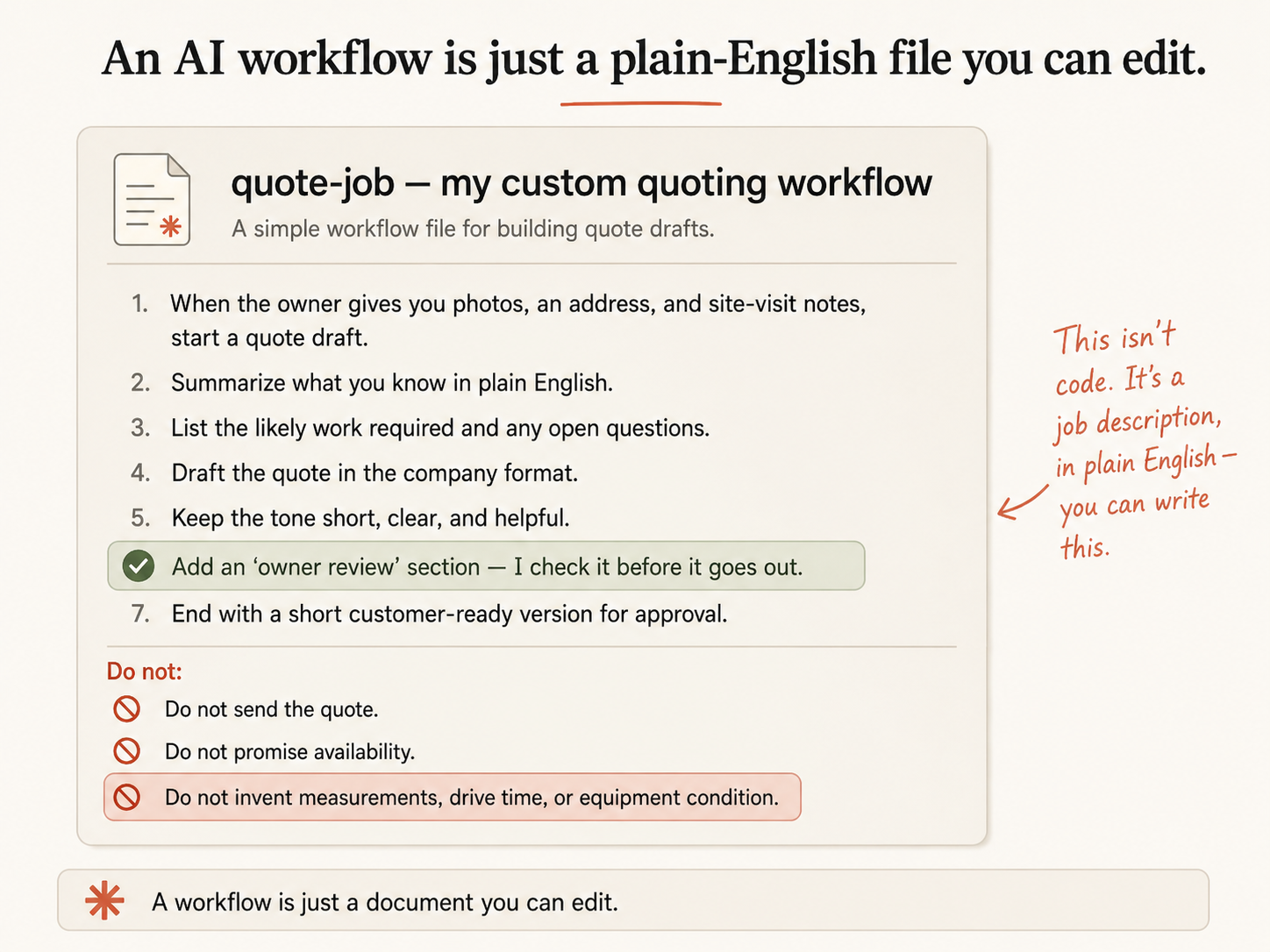
Talking about it is one thing. Here is the whole file for the pool company, the thing you end up with after the fork-and-edit. Notice there is nothing in it you could not have written:
name: quote-job
description: Drafts a pool-service quote from photos, an address, and the owner's pricing rules.

1. When the owner gives you photos, an address, and site-visit notes, start a quote draft.
2. Summarize what you know in plain English.
3. List the likely work required and any open questions.
4. Apply the owner's pricing rules from the context pack, and draft the quote in the company format.
5. Keep the tone short, clear, and helpful.
6. Add an "owner review" section. I check it before it goes out.
7. End with a short customer-ready version for approval.

Do not send the quote.
Do not promise availability.
Do not invent measurements, drive time, or equipment condition.
Slow down on the bottom three lines, because that is where a custom workflow either stays safe or quietly starts lying. The instructions never tell it to “figure out the gallons from the photos” or “calculate drive time from the address.” It cannot reliably do either from a picture and a street address, and a workflow that pretends it can will hand you confident, wrong numbers. Instead it works from what it has, applies your real rules, and flags what it had to assume. Run it on “three photos, an Oakdale address, green water, wants monthly service after a cleanup” and you get:
Quote draft:
Hi, thanks for sending those over. From the photos, your pool needs a green-to-clean
recovery before regular service starts. Our green-to-clean is a flat $350, and standard
weekly service in Oakdale runs $150/month after that. I'd want to confirm a couple of
things on a quick visit before we lock the price in.

Owner review:
- Assumptions: standard residential size; no major equipment repair visible in the photos.
- Items to confirm: actual pool size, pump and filter condition, gate access.
- Suggested price: $350 green-to-clean, then $150/month ongoing.
- Approval needed before sending: yes, confirm size and equipment on the site visit first.
A draft you can actually use. It did the tedious first pass and handed you the two or three things only a site visit can settle, instead of guessing and sounding sure.
What breaks when you customize?
Two opposite mistakes, both worth naming before you go editing everything in sight.
You break something that worked. Before you touch any skill the business depends on, copy it first so you can put the original back. Work in your forked copy so your experiments cannot break the real thing. And after you customize a workflow that takes action, run it once in a low-stakes way and verify the output before you trust it on a real customer or a real dollar. A custom workflow you did not test is exactly as risky as a connection you did not verify.
You customize things that were fine. Not every gap needs a custom workflow. Sometimes the built-in does 90% of what you need and the missing 10% is not worth an afternoon. Sometimes “just ask in plain English each time” beats building a permanent workflow for something you do twice a year. The rule: build a custom workflow only for tasks you do often enough that the time saved beats the time spent building it. A daily task no built-in covers? Build it. A quarterly oddity? Just ask for it and move on.
Before you build anything, run it through this checklist so you do not end up with a confident, dangerous workflow:
Before you build a custom workflow, answer these:
- What is the one task this handles?
- What inputs does it need from me each time?
- Which context files should it read?
- What is the output format?
- What should it never do? (estimate facts it can't see, send anything, promise availability)
- Where does it stop and ask for my approval?
- How will I test it safely before trusting it on a real customer?
What should you actually do?
- If the built-in gets you 90% there → stay at level one. Tell the existing workflow about your business in plain English. Done in five minutes.
- If you have a daily or weekly task no built-in covers → fork and build it. The first time takes an afternoon; the second takes twenty minutes.
- If it is a once-a-quarter oddity → do not build a workflow. Just ask Claude for it each time.
- Whatever you build → add the owner-review step and the “do not” list, version it before you edit, and test on a fake job first.
This is also the skill that outlives the product. Menus will move, buttons will get renamed, but your SKILL.md files still say what they say. You understand the tool at the level that does not change, the files, instead of the level that changes constantly, the interface. That is the difference between renting capability you can lose and owning a system you control.
The bottom line
- A workflow is a plain-English file, not code. If you can brief a new hire, you can write one. That single fact is what turns the tool from something you rent into something you own.
- The danger in a custom workflow is the line where it pretends to know things it cannot see. Tell it to draft from what is known and flag what is not. The “do not invent” rule is the whole safety net.
- Build only for the tasks you repeat. Owning the ability to customize does not mean you should customize everything; it means you reach for it exactly when it pays off.
Frequently Asked Questions
Do I need to code to build a custom Claude workflow?+
No. A workflow is a plain-English text file called SKILL.md. You copy a built-in one, rename it, and rewrite the instructions the way you would brief a new hire. If you can write a clear set of instructions, you can write one.
How do I make a workflow the built-ins do not cover?+
Fork the official knowledge-work-plugins repo, copy the closest existing skill folder, rename it, and rewrite its plain-English instructions for your task. Add an owner-review step and a 'do not' list, then test it on a low-stakes job before a real one.
What should a custom workflow never do?+
Never send anything, promise availability, or invent facts it cannot actually see (measurements, drive time, equipment condition). It should draft from what is known, flag what is missing, and stop for your approval before anything goes out.