Claude Design Weekly Limit: A 4-Step Refinement Budget
Hitting the Claude Design weekly limit on 'basic changes' isn't a bug. It's the wrong refinement pattern. The 4-step inline-first discipline cuts cost 3x.
>This is the rate-limit playbook in 1,500 words. Claude Design Playbook covers the runbook, the chunked-session protocol, and plan-tier math across 14 pages.
Claude Design Playbook
Ship 8 Client-Ready Projects in 30 Days
Summary:
- The Claude Design weekly limit is weekly, not hourly. Plan around 7-day buckets.
- Chat refinements cost 5-10x what inline comments cost. Use chat last.
- Four-step refinement discipline: inline first, slider second, chat last, export early.
- Target weekly split: 60% paid client work, 25% system upkeep, 15% experiments.
You opened Claude Design at 9 AM with one job to ship. By 11 AM you’d burned through most of your week’s allowance and the page wasn’t finished. You looked at the chat. Eleven refinements. Three “make it better” messages. The output you got was the same output you’d have gotten with one prompt and four inline comments. You hit the Claude Design weekly limit because of the pattern, not the workload.
This is the fix. It is operational, not philosophical. By the end you have a four-step refinement discipline taped to your monitor and a budget split that survives a 30-day client load.
Why does Claude Design eat my weekly limit so fast?
Because most users run chat as the default refinement tool, and chat is the most expensive of the four. From u/Roaring_lion_ on the r/ClaudeAI “Hitting Claude Design limits very quickly on the $100 plan” thread, running on the Max plan:
“I’m using Claude Design on the $100/month plan and I’m hitting usage limits much faster than expected… Mine is running out after about 2 prompts / 20-25 minutes of design work.”
A reply from u/weddellkw (6 upvotes): “Yes, the Design token budget seems tiny AND runs at a high burn rate in my experience so far.” Cross-thread on “10 Hours of Claude Design,” u/replayjpn on Max 5x: “I upload 1 page to ask for a redesign… Cost me 40% of my weekly tokens.” u/mosnik in the same thread: “I used 92% in one prompt (about 20 minutes of time).”
The cost ratio is roughly 1x for an inline comment, 1x for a slider drag, 5-10x for a chat refinement. That single ratio explains every “I burned the limit in 20 minutes” story on Reddit. Eleven chat refinements is the cost of fifty-five inline comments. People treat the chat panel like a free editor. It is not.
What broke on the bad day
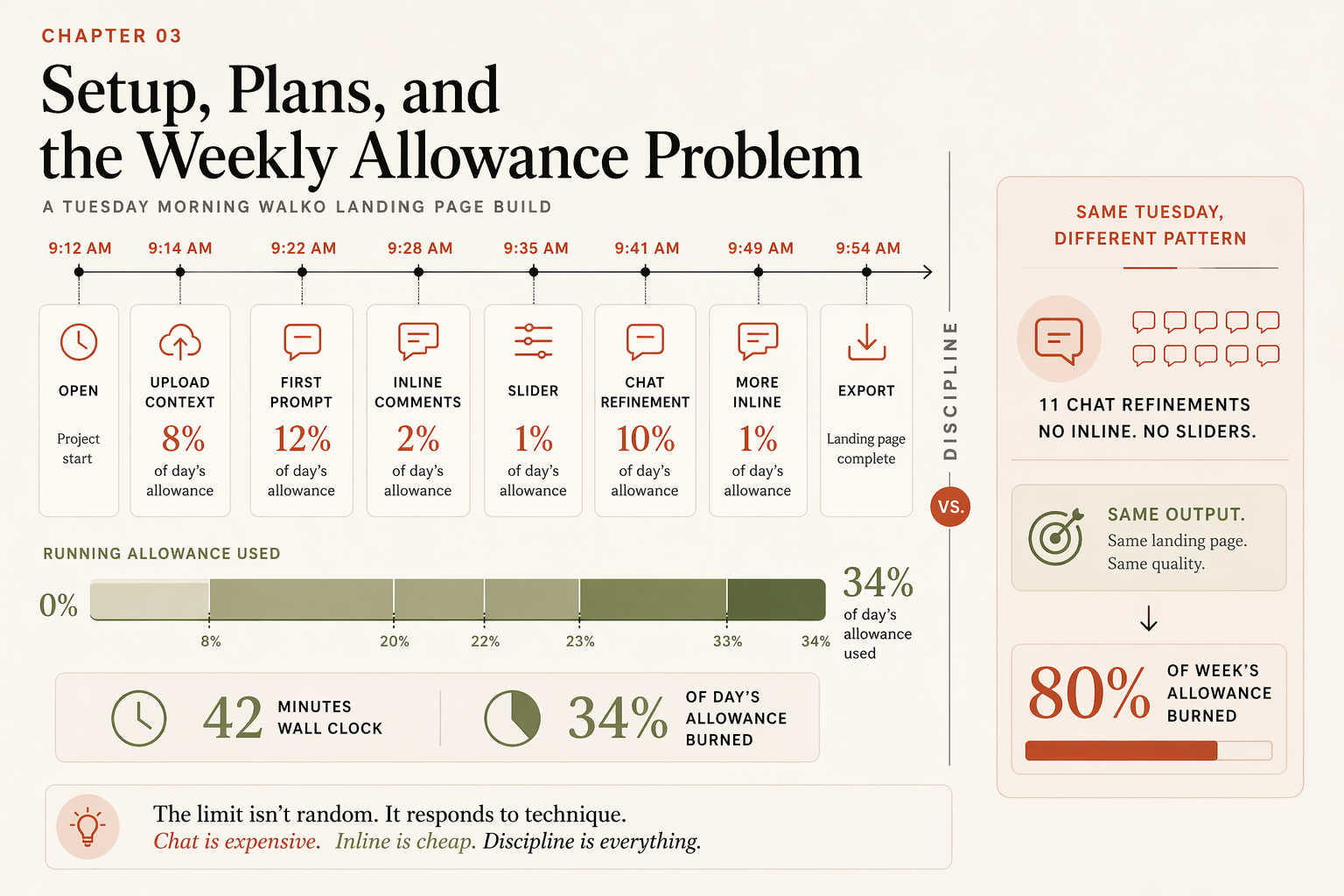
Tuesday morning, second day with the tool. I opened a landing page project. Generated. Looked at the result. Typed in chat: “Make the hero pop more.” The page re-rendered. I typed: “Make it warmer.” Re-rendered. Typed: “Less corporate.” Re-rendered. By the eleventh chat message I’d run through what later metering told me was 80% of my week’s allowance. The output was no better than what I’d have gotten by clicking on the hero, leaving an inline comment that said “rewrite the headline to emphasize the midday window,” and dragging a slider for typography seriousness.
Same target output. One-third the cost. The mistake wasn’t the work. The mistake was the tool I picked for each edit.
What does a clean Claude Design session look like, minute by minute?
Tuesday, the next week, I rebuilt the same client’s landing page and tracked every move:
09:14   Upload context (logo SVG, 3 reference photos, brand PDF, 4.2 MB total)
        +8% of day's allowance
09:22   First prompt submitted (140 words of specificity)
        +12% allowance, generation in ~70 seconds
09:28   Three inline comments on the hero
        +2% allowance, processed in ~30 seconds total
09:35   One slider request: "spacing density on feature cards"
        +1% allowance
09:41   One chat refinement: add a testimonial strip above the footer
        +10% allowance, page re-renders ~60 seconds
09:49   Two more inline comments (typo + CTA color nudge)
        +1% allowance
09:54   Export as .zip → handoff
        Done. 42 minutes wall-clock. 34% of day's allowance used.
Same shipped page. 1 prompt + 4 inline + 1 slider + 1 chat. 66% of day’s allowance still in reserve for Wednesday, Thursday, Friday. At this rhythm a Max 5x plan ships three landing pages a day without hitting the wall.
How do you split the weekly allowance across activities?
A budget that survives 30 days of client work:
| Bucket | Target % | What it covers |
|---|---|---|
| Paid client work | 60% | Generation + refinement on revenue projects |
| Design system upkeep | 25% | Brand-kit Remix, system validation tests, version updates |
| Learning + experiments | 15% | Trying new prompt patterns, frontier features, demo builds |
If you’re past 60% on paid work mid-week, you’re under-prompting. Too many refinement rounds, not too many projects. The fix is a tighter prompt template, not a bigger plan. Chapter 4 of the source book covers the 10-line prompt brief; this is where it pays off.
If you’re under 60%, you have headroom. Use it for design-system Remix work or frontier exploration before the week resets.
The pre-flight you run before opening the canvas, ninety seconds, every session:
# pre-flight.txt: answer all five out loud before opening claude.ai/design

1. WHAT AM I SHIPPING TODAY?  (one sentence; if blank, do not start)
2. WHAT IS MY CONTEXT BUNDLE?  (logo, deck, photos, brand-notes.txt)
3. WHAT IS MY TIME BUDGET?  (12-25 min landing, 30-60 deck, 60-90 prototype)
4. WHERE IS MY WEEK'S ALLOWANCE?  (under 40% used = experimental ok;
                                    40-60% = production only;
                                    over 60% with 3 days left = known-good only)
5. WILL I FINISH IN ONE SESSION?  (yes = open. no = pick a clean break point)
What is the four-step refinement discipline?
Pick the tool by the kind of edit, in this order. Cheapest tools first, structural changes last.
| Step | Tool | Use when the edit is | Cost |
|---|---|---|---|
| 01 | Inline comment | Element-specific (one headline, one button, one image) | ~1x |
| 02 | Slider | A continuous range (color saturation, spacing density, typography seriousness) | ~1x |
| 03 | Chat | Structural (add a section, reorder, remove a major component) | ~5-10x |
| 04 | Export | Good enough for handoff. Stop polishing. | 0x |
If you’re four refinements in and the page still isn’t there, do not escalate to chat. Re-prompt from scratch with a sharper brief. Restart cost is roughly 2% of allowance; salvaging a wrong direction with chat refinements runs 15-25%.
The pattern is exactly that. Inline for surgical changes. Slider for ranges. Chat for structure. Export when good-enough. Most week-one users invert it: chat for everything, never use sliders, never click into the canvas to leave inline comments. Inverting it back is the single biggest cost lever.
A copy-paste runbook template you fill in once and tape to your monitor:
# my-runbook.txt

PLAN: [Pro / Max 5x / Max 20x / Team / Enterprise]

WEEKLY ALLOWANCE BUDGET:
- Paid client work:        60%
- Design system upkeep:    25%
- Learning + experiments:  15%

SESSION CAP:               45 min   (longer = re-prompt, don't push)
PROJECTS PER WEEK MAX:     ___       (calibrate after week 1)
WORK WINDOW:               ___ AM to ___ AM   (when allowance is freshest)

SPLIT POINT FOR LONG PROJECTS:
After wireframe approved, before refinement
After refinement done, before export
After design system published, before first project on it

NEVER:
- chat refinement under 2 sentences
- "make it better" / "make it pop"
- mid-session context re-uploads
- experimentation past 60% of week
What are the three things that secretly burn allowance?
Three habits eat your week without showing up as a single bad session:
- Over-refining in chat instead of inline. Already covered. Worst offender. Costs 5-10x.
- Re-uploading context mid-session. When you upload a new file partway through a project, Claude has to re-read it and reconcile against earlier context. Both directions cost input tokens. Bundle context once, upfront, in step one of project setup.
- Freshness exploration after week one. Trying frontier features (3D, voice, interactive timelines) feels free in the first week because you’re under budget. By week three, those exploration sessions are stealing from paid work. Box exploration into your 15% bucket and stop after.
If you’re hitting the wall consistently, audit which of the three is the actual cause before you blame the plan. The audit takes 5 minutes a day for a week. Keep a tally:
# session-log.txt: fill in after every Claude Design session

DATE:                ____
PROJECT:             ____
DURATION:            ____ minutes
ALLOWANCE BURNED:    ____% (check the dashboard before and after)

REFINEMENT MOVES:
  Inline comments:   ____
  Slider drags:      ____
  Chat messages:     ____
  Mid-session uploads (re-context): ____
  Frontier-feature attempts:        ____

BURN RATE PER MINUTE: ____% (allowance / duration)
PATTERN GUESS:        [ ] chat-heavy  [ ] re-uploaded  [ ] frontier exploration
                      [ ] just a hard project  [ ] genuine plan ceiling

NEXT-SESSION FIX:     ____
After 5 sessions, the pattern is obvious. A burn rate above 1% per minute is too hot regardless of plan. Below 0.5% per minute is sustainable for full-time client work.
How do you know when you’re about to hit the wall?
Three signals:
- Slower responses. Generations that used to come back in 60 seconds start taking 90, then 120. That’s the server adding backpressure as you approach the cap.
- “Please wait” soft throttles. Claude returns a temporary throttle message asking you to retry in a few minutes. Not the hard limit. If you get it more than twice in an hour, you’re burning too hot for what’s left.
- The hard block. A message saying your weekly allowance is used up. Note the reset date and time. Until then, you’re done.
When the hard block hits, close Claude Design and go do the non-Claude work. Write client emails. Gather brand assets for next week’s projects. Draft the marketing copy. The reset will hit. You’ll come back fresh with a cleared queue and burn through three days of backlog in one morning.
What should you actually do?
- If you’re on Pro at $20/month → ship one or two projects per week max. Tight prompt, surgical refinement, no exploration.
- If you’re on Max 5x at $100/month → ship one to two paid landing pages per week, plus brand-system upkeep, plus a small experiment slot. Run the 60/25/15 split.
- If you’re on Max 20x at $200/month → run the small-agency rhythm. Three to five paid projects per week. Same discipline. Bigger absolute throughput.
- If you’re hitting the wall on basic changes → audit your last session. Count chat refinements vs inline comments. If chat is more than 30% of edits, the problem is the pattern.
- If a session has gone sideways and you’re 4+ refinements in → don’t push through. Stop. Re-prompt from scratch with a more specific brief. Restart costs ~2% of allowance. Salvaging a wrong direction costs 15-25%.
bottom_line
- Pick the right tool for the edit. Inline beats chat 5-to-1 on cost, every time.
- The weekly limit is weekly. Plan around 7-day buckets, not 6-hour cooldowns.
- The wall isn’t the plan. The wall is the pattern. Fix the pattern first, upgrade the plan last.
Frequently Asked Questions
Why does Claude Design eat my usage limits so fast?+
Three reasons: chat refinements re-render the entire page (5-10x the cost of an inline comment), large context uploads count as input tokens, and exploration prompts in week one carry over against the same weekly bucket. Surgical refinement with inline comments and sliders keeps cost low. Chat is a structural-change tool, not a copy-edit tool.
Is Claude Design's rate limit hourly or weekly?+
Weekly. The Anthropic Help Center documents it as a recurring weekly allowance that resets every seven days. Reddit threads about a six-hour cooldown mistake the general Claude.ai chat session limit for the Claude Design weekly cap. They are different mechanisms.
Which Claude plan should I get for Claude Design client work?+
Max 5x ($100/month) is the working operator's tier if you're shipping one to two paid landing pages a week. Pro at $20 is viable for one project a week with tight refinement discipline. Max 20x ($200) makes sense once you're billing $4K+/month and need headroom on multi-project days.