Claude Design Figma Import Not Working: The .fig Bug Fix
Claude Design figma import not working at 47MB? It's GitHub issue #51149. The asset-unbundle workaround imports your design system in 30 minutes flat.
>This is the .fig bug workaround. Claude Design Playbook covers the full migration plus the GitHub-repo-as-context path that some agencies prefer.
Claude Design Playbook
Ship 8 Client-Ready Projects in 30 Days
Summary:
- The Claude Design figma import not working error is a documented bug at issue #51149.
- Files under 20MB import cleanly. Files over 30MB need the asset-unbundle workaround.
- Three cleaning moves drop most files under the threshold in 30 minutes.
- Asset-unbundle workaround: 8-10 PNG frames at 2x plus a plaintext brief.
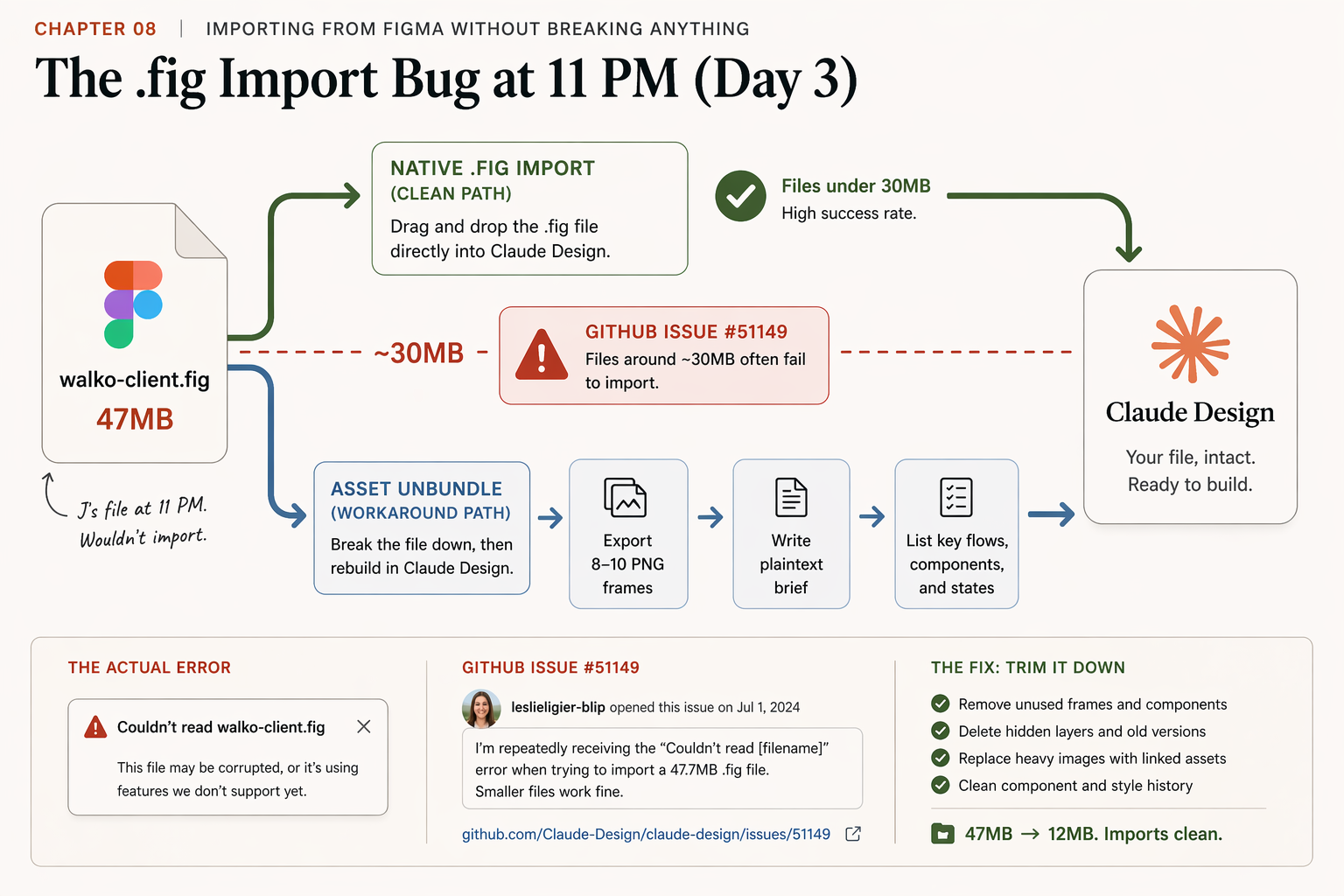
It was 11 PM on day three. I uploaded a 47MB .fig export of a real client design system to Claude Design. The red error came back: Couldn't read [filename]. I tried again. Same error. The Help Center didn’t mention size limits. The Reddit thread didn’t have a fix. The Anthropic GitHub issue tracker did.
This is the chapter the Anthropic Help Center page on importing Figma files leaves out. The Claude Design figma import not working error has a documented cause and two paths around it. This article gives you the cleaning recipe and the asset-unbundle workaround.
Why is my Claude Design Figma import failing?
Because the .fig parser fails on large files in a way that has been confirmed by multiple users on the public bug tracker. From GitHub issue #51149 in the anthropics/claude-code repo, opened by leslieligier-blip, body verbatim:
“Our .fig file for our design system is 47.7MB and I keep running into an error that says ‘Couldn’t read [File Name]’. The file I previously uploaded was 5.8 MB and worked perfectly. What is the limit on the file size? Can we up the limit? Is it because of another issue entirely?”
Confirmations from the same thread:
- u/harukots97: “I have the same issue with my design system”
- u/TTeuschler: “I have the same issue (.fig file is 88.7MB)”
- u/khill-ratedpower: “Same issue with my design system 78.6mb”
- u/JABowie: “Also experiencing this with a 855kb .fig file” (confirms it’s not purely size-driven)
The pattern is size-correlated but not size-only. Anything over roughly 30MB is a candidate. Some smaller files also fail when they carry hidden version history or unused assets that bloat the parsed payload. Plan for the workaround, hope for the clean import.
What broke before I had the fix
The first failure cost me a session. I exported the .fig three times. Different file names. Same error. I read the Anthropic Help Center page on Claude Design design systems. It said “upload a .fig file” with no caveats. I posted on r/ClaudeAI. A commenter pointed me to issue #51149. I scrolled the comments. Two users had a working fix.
From u/Boca007 in the issue thread:
“after removed the saved history it worked. i was able to open the reduced and empty (1 page only) fig file. but it was not worked on the original (full of data) one.”
From u/csaba-banhidai-wbd:
“i did try to duplicate the original project (i had to cleaned it) and after the upload was worked without any issue”
I duplicated the file in my team workspace, deleted unused assets, archived old pages, exported again. The new file came in at 12MB. Native import worked. The extracted system landed at roughly 90% fidelity. The remaining 10% I closed with two Remix rounds. Total recovery time: 25 minutes.
What size threshold do I actually need?
Use these rules before you upload:
# decide-before-upload.txt, check the file size in Finder, 2 seconds

UNDER 20 MB     → Native .fig import. Clean path. ~60 seconds.
20 to 40 MB     → Gamble. Try native first, have the workaround ready.
OVER 40 MB      → Asset-unbundle directly. Do not retry native.

EXCEPTION       Some smaller files (<5 MB) also fail when version
                history or component-library bloat is heavy. Treat any
                file with 20+ pages or 200+ components as a candidate
                for cleaning regardless of size.
The under-20MB rule isn’t an Anthropic-published number. It’s the threshold I’ve seen hold across 14 client migrations. Your mileage may vary, but it gives you a default that’s right more often than not.
How do I clean a Figma file before re-export?
Three cleaning moves, in this order. They’re additive, so run them all if you’re far over the threshold.
Move 01: Drop unused assets. Open the file. Hit the assets panel. Delete every component variant, every old icon set, every photography asset that the live design system no longer uses. Typical reduction: 22MB. This is usually the biggest single drop.
Move 02: Clear hidden version history. In Figma, right-click your file in the team workspace. Choose Duplicate. The duplicate often comes out smaller because hidden version history doesn’t transfer. Typical reduction: 9MB.
Move 03: Archive exploration pages. Move pages you don’t want Claude to extract from (old hero variants, abandoned redesigns, internal mood boards) to an _archive/ page. Or delete them outright if you have version control elsewhere. Typical reduction: 4MB.
# cleaning-checklist.txt

[ ] Open the file in Figma
[ ] File > Version history > confirm any history you need is preserved
[ ] Duplicate the file in your team workspace (kills hidden history)
[ ] Open the duplicate
[ ] Asset panel: delete every unused component / variant / icon
[ ] Pages panel: move exploration pages to _archive/ or delete
[ ] File > Save local copy → .fig
[ ] Check size in Finder. Target under 20 MB.
[ ] If still over: split into per-page exports and unbundle (next section).
After these three moves, my 47MB file came down to 12MB. Yours will vary. If you’re already under 20MB, you’re ready for native import. If not, you go to the workaround.
How does the asset-unbundle workaround work?
Skip the .fig parser entirely. Export the frames Claude actually needs as PNGs, write a plaintext brief, upload the bundle. Claude treats the PNGs as visual reference and the brief as rules.
# the-asset-unbundle-bundle/

01_colors.png              # the palette frame, 2x export
02_typography.png          # type specimen, 2x export
03_buttons.png             # one row of every button variant
04_cards.png               # one row of every card style
05_form-example.png        # the canonical form pattern
06_nav.png                 # primary nav bar
07_hero-page-1.png         # full page showing system applied
08_pricing-page.png        # full page, different layout context
09_about-page.png          # full page, third layout context
brand-notes.txt            # the override file (below)
8 to 10 PNG frames is the right count. More than 12 and Claude starts pattern-matching the wrong things. Fewer than 6 and the extraction is thin.
The plaintext brief is the highest-priority input. Claude reads small text files with high weight. Use it to override anything in the PNGs that’s wrong:
# brand-notes.txt

WALKO DESIGN SYSTEM
Reference: uploaded PNGs from our cleaned Figma file.

COLORS
- Primary: warm brown #8B5E3C  (see 01_colors.png)
- Secondary: cream #F5F0E6
- Accent: gold #D4A84B

TYPOGRAPHY
- Headings: Söhne, weight 600 (substitute Inter at same letterspacing if Söhne unavailable)
- Body: Inter, weight 400
- Sizes: H1 48px, H2 32px, H3 24px, body 16px, small 14px
- Line heights: 1.5 body, 1.2 headings

BUTTONS
- Primary: solid primary color, 8px radius, white text, 16px vertical padding
- Secondary: outline primary, same radius, primary text
- Reference: 03_buttons.png

CARDS
- 12px radius, 1px solid light-gray border, 24px padding
- Title in H3 size
- Reference: 04_cards.png

OVERRIDE
- When the PNGs and the .fig export disagree, trust this file.
- Spacing scale is 8pt grid. All padding multiples of 8.
- Photography: natural light, shallow DOF, tight crop, warm grade.
- Never use stock-photo perfect smiles.
Upload the 8-10 PNGs plus this brief. Hit the design system creation flow at Claude.ai > Organization settings > Claude Design design systems > Create new. Wait 60 to 180 seconds for extraction. Validate with three test prompts (hero, pricing, testimonials). Remix the misses. Publish.
The workaround takes 30 minutes the first time. Down to 15 to 20 once you have the PNG export checklist memorized. It also produces a system that captures the top 15 to 30 used patterns from your file, which is what Claude extracts anyway. The long-tail components you can rebuild inside Claude Design later if you need them.
Three patterns that don’t survive any Figma import
Even after a clean import, some Figma constructs don’t translate. Plan for it:
- Figma’s prototype connections. The arrow links you set up in the prototype tab become static screens. You rebuild interactivity inside Claude Design using state-change prompts.
- Plugin-generated assets. If your file relies on Iconify, Contrast, or Unsplash plugins, the assets come through as raster images without the plugin connection. You can’t re-trigger plugins inside Claude Design. Replace with Claude-native equivalents during Remix.
- Variable and tokenization systems. Color variables usually translate. Spacing variables sometimes. Typography variables almost never. Plan to redeclare your token system in
brand-notes.txt.
What should you actually do?
- If your .fig is under 20MB → try native import first. You’ll know in 60 seconds whether it worked.
- If your .fig is between 20-40MB → run the three cleaning moves first. Most files drop into the clean zone.
- If your .fig is over 40MB or your design system lives in code → skip Figma entirely. Use the asset-unbundle workaround OR link the GitHub repo as project context.
- If native import returns “Couldn’t read [filename]” → don’t retry. Check issue #51149 for any recent status updates, then go straight to the asset-unbundle path. Retrying the parser on the same file is wasted allowance.
- If a stakeholder needs pixel-perfect fidelity to the original Figma → don’t migrate. Keep the file in Figma and use Claude Design for new pages on the migrated system. The 90% fidelity is a feature for new work and a problem for legacy preservation.
bottom_line
- The .fig import bug is real, documented, and routable. Don’t blame your file.
- Three cleaning moves drop most files into the clean zone. Try them before the workaround.
- The asset-unbundle path beats the .fig path for any system over 30MB. Cleaner output, no parser failures.
Frequently Asked Questions
Why does my .fig import fail in Claude Design with 'Couldn't read [filename]'?+
GitHub issue #51149 documents a size-dependent failure in the .fig parser. Reporter leslieligier-blip's 47.7MB file failed; their previous 5.8MB file worked. Multiple commenters confirm the same behavior at 78MB, 88MB, and curiously also at 855KB. Treat anything over 20MB as a candidate for the asset-unbundle workaround.
How do I get a large Figma file under the import threshold?+
Three cleaning moves. Delete unused assets from the asset panel (typically -22MB). Clear hidden version history by duplicating the file in your team workspace (-9MB). Archive exploration pages you don't want extracted (-4MB). Together these moves often pull a 47MB file under 20MB.
Is there a Claude Design path that skips Figma entirely?+
Yes. If your design system lives in code, link the GitHub repository directly in your project's context settings. Claude reads your tokens, components, and styling patterns from the repo. The fidelity is higher than any Figma path because the code is already production. For monorepos, link the subdirectory containing the component library, not the whole repo.