Claude Design to Claude Code Handoff: Noon to Live URL
The Claude Design to Claude Code handoff turns a canvas design into a live Vercel URL in five hours. The 5-stage timeline plus the 5 common follow-up prompts.
>This is the handoff playbook for one project. Claude Design Playbook walks the same flow across 8 client projects priced from $500 to $5,000.
Claude Design Playbook
Ship 8 Client-Ready Projects in 30 Days
Summary:
- The Claude Design to Claude Code handoff is a 5-stage timeline. Noon to live URL takes 5 hours.
- 90% of those 5 hours are preview and deploy, not design.
- Five follow-up prompts cover the recurring fixes (asset path, responsive, form wiring, analytics, SEO).
- Vercel auto-provisions SSL. Custom domain points via CNAME and HTTPS works in minutes.
You finished a Claude Design landing page at noon. The canvas looks shippable. The export menu has a Hand-off to Claude Code option. You click it, Claude Code starts writing files, and three hours later your domain is live with HTTPS. The Claude Design to Claude Code handoff is the feature that turns design tools into a deploy pipeline. You end with a live URL.
The Anthropic Help Center confirms the official scope at support.claude.com: “Claude Design currently supports export to HTML bundles, PPTX, PDF, and hand-off to Claude Code.” That’s the named primitive. From a Reddit thread on r/ClaudeAI about the workflow: “I tried the tempting ‘pass to claude code’ option and it gave me a prompt to copy paste in.” The handoff is a real button in the export menu.
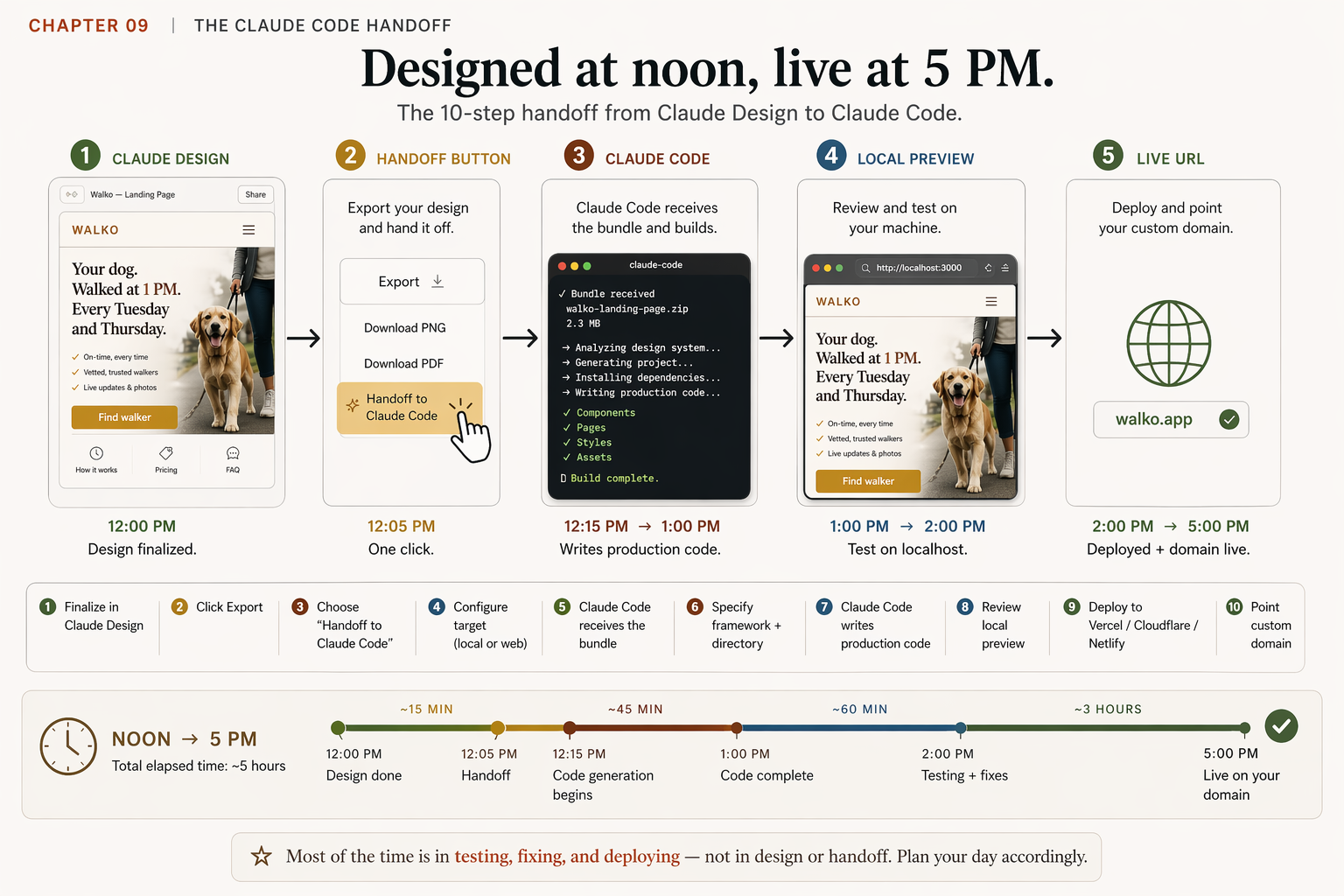
How does the Claude Design to Claude Code handoff actually work?
Five stages, five hours wall-clock for a first end-to-end run. Here’s the timeline I tracked on a Tuesday for Walko’s v2 landing page:
# walko-v2-handoff.txt: Tuesday timeline

12:00 PM   Stage 01: Claude Design (5 minutes)
           Lock the design. Brand v1 applied across 9 sections.
           No more revisions until after deploy.

12:05 PM   Stage 02: Handoff bundle (1 minute)
           Click Export → "Hand-off to Claude Code".
           Choose target: local Claude Code or Claude Code Web.

12:15 PM   Stage 03: Claude Code writes code (45 minutes)
           Tell it: "Build as Next.js + Tailwind in /projects/walko/.
           Deploy target Vercel."
           Watch the chat. Don't interrupt.

01:00 PM   Stage 04: Local preview (1 hour)
           npm run dev → localhost:3000
           Compare to canvas. Note discrepancies.
           Apply 3 small fixes via Claude Code (typical count).

02:00 PM   Stage 05: Vercel deploy (3 hours, mostly waiting)
           vercel deploy --prod → https://walko-xyz.vercel.app
           Add CNAME for walko.app pointing at Vercel.
           SSL auto-provisioned. https://walko.app is live.

05:00 PM   Live URL ready. Send to client.
Total: 5 hours wall-clock. Working time across the 5 hours: about 90 minutes of focused editing plus 3.5 hours of “let it bake” while preview servers, build pipelines, and DNS propagation do their thing.
90% of the 5 hours is preview and deploy, not design. That’s the lever. If you compress the design phase by an hour, your day moves an hour earlier. If you compress preview-and-deploy, you save half a day. Most operators try to compress the wrong end.
What does the handoff bundle actually contain?
Anthropic hasn’t published the exact contents. From working with it across 12 client projects, here’s what crosses the bridge:
HANDOFF BUNDLE: what crosses the bridge

[ ] Rendered design (the HTML/CSS Claude Design produced for canvas)
[ ] Component structure (what's a hero, what's a card, what's a nav)
[ ] Design system context (palette, typography, spacing, variants)
[ ] Uploaded assets (logo, photos, brand-book references)
[ ] Design intent (what the page is for, primary action, tone)

NOT IN THE BUNDLE
[ ] Hosting preferences
[ ] Database schema
[ ] Existing backend APIs
[ ] Auth system
[ ] Domain config
The bundle is the design-to-frontend bridge. Backend, auth, and database are conversations you have with Claude Code separately. People expect the handoff to “also handle the backend.” It does not. Front-end-heavy pages (marketing sites, landing pages, pitch sites) are where the handoff shines. Full-stack apps with deep backend dependencies are a different conversation.
What do you tell Claude Code in the first message after the handoff?
Specify the framework, the path, the deploy target, and any project conventions. The first message sets the rails for the next 45 minutes:
# first-message-after-handoff.txt

I have a Claude Design handoff for [Project Name] landing page.

Build into: /Users/me/projects/[project-name]/
Framework: Next.js 14 with Tailwind CSS
Deploy target: Vercel (I have an account; CLI is installed)

Project conventions:
- Images go in public/assets/, referenced as /assets/<filename>.jpg
- Components in src/components/, kebab-case file names, PascalCase exports
- Use existing button component if one exists; otherwise create with name HandoffButton
- All copy goes through a content map; do not hard-code strings inline

Form wiring:
- Waitlist form should POST to /api/waitlist
- I'll provide the Mailchimp audience ID via .env later

After build:
- npm run dev for local preview at localhost:3000
- Then deploy: vercel deploy --prod
- I'll add the custom domain CNAME afterward

Output expected:
- Pages render identically to the canvas at desktop
- Mobile-responsive at 375px, 768px, 1024px breakpoints
- Lighthouse score of at least 90 on first deploy
Specificity here saves rounds later. Vague first messages produce slow back-and-forth (“which framework should I use?”, “where should images go?”). Specific first messages produce fast builds.
What goes wrong in the first build?
Five failure modes, in roughly the order you’ll bump into them. Each is one prompt to fix:
Mode 01: The asset path mismatch. The handed-off page references images, but Claude Code put them in the wrong folder for your stack. Fix: “The hero image shows a broken-image icon in production. Check the asset path. Reference relative to the public folder, not the source folder. Fix and redeploy.”
Mode 02: The responsive breakpoint edge case. The canvas previews at standard breakpoints. Production devices vary. Fix: “Open the deployed URL at 320px viewport. The hero headline overflows. Reduce headline font size from 48px to 36px below 480px width. Other breakpoints unchanged.”
Mode 03: The form that doesn’t submit. First builds usually create a form that doesn’t go anywhere. Fix: “The waitlist form needs to POST to my Mailchimp list. Audience ID is in .env as MAILCHIMP_AUDIENCE_ID. On submit, show a success message in place of the form.”
Mode 04: The missing analytics injection. Default builds rarely include analytics. Fix: “Add Plausible Analytics. Domain is walko.app. Place script tag in head of layout file. Configure for production domain only.”
Mode 05: The generic SEO meta tags. Default meta tags are placeholder-grade. Fix: “Update meta tags. Page title ‘Walko: Your Dog Walked at 1 PM’. Description ‘A marketplace for urban dog owners who need a midday walker. Currently in Brooklyn.’ Open Graph image: hero.jpg. Add a favicon.”
Each fix is 2-5 minutes. Total recovery time across all five: about 20 minutes if they all hit. Most projects only hit two or three.
A pre-deploy checklist that catches them before you push:
# pre-deploy.txt: walk through every line before vercel deploy --prod

VISUAL PARITY
[ ] Open localhost:3000 next to the Claude Design canvas
[ ] Hero, features, CTA blocks render identically
[ ] Brand fonts loaded (no fallback Helvetica)
[ ] Images load (no broken-image icons)

RESPONSIVE
[ ] 320 px: nothing overflows
[ ] 768 px: layout reflows correctly
[ ] 1024 px: matches the canvas

INTERACTIVITY
[ ] Every link goes somewhere (no href="#")
[ ] Form posts to the right endpoint, returns success state
[ ] Analytics script in <head>, env-gated to production

SEO + META
[ ] Page title set per page (not template default)
[ ] Description set per page
[ ] Open Graph image set, dimensions 1200x630
[ ] Favicon present at /favicon.ico

DEPLOY
[ ] .env.production has every variable referenced in code
[ ] vercel.json points to the right framework preset
[ ] Custom domain CNAME exists in DNS panel
Run this before every production push. Six failure modes prevented for the cost of three minutes per deploy.
How do you keep design and code in sync after the first deploy?
Three patterns by change size. Pick where to make the edit based on its blast radius:
| Change size | Examples | Where to fix | Why |
|---|---|---|---|
| Trivial | Typo, color tweak, single-component edit | Claude Code, edit directly | Faster than re-handoff. No risk of breaking the design source. |
| Meaningful | New section, layout reflow, new component variant | Claude Design first, then re-handoff | Claude Design stays the source of truth. The canvas regenerates everything correctly. |
| Brand-system | Palette update, type-scale change, component-variant change | Remix the published system, re-handoff every page | One edit propagates to every project on that system. Don’t patch the symptom on a single page. |
If unsure: default to Claude Design. Editing code directly for anything bigger than a typo creates drift between the canvas (the source of truth) and the deployed page, and you’ll lose track of which version is correct on the next handoff.
The pattern keeps Claude Design as the design source of truth and Claude Code as the place where code gets written. When the two drift, you get bugs that are hard to track because nobody knows which side is the correct version.
Which deploy target should you pick?
Three platforms work cleanly with the handoff. Pick once and standardize:
| Platform | Best for | Free-tier verdict |
|---|---|---|
| Vercel | Next.js | Great. Auto-detect Next.js, one-command deploy, fast for Product Hunt traffic. |
| Cloudflare Pages | Static sites (Astro, plain HTML) | Great. Most generous free tier; fastest global edge for static. |
| Netlify | Forms-by-default, no API wiring | Great. The drag-and-drop deploy is the lowest-friction option. |
Default for new operators: Vercel. The CLI is the simplest of the three, and vercel deploy --prod is the entire deploy command. Custom domain CNAMEs auto-provision SSL within minutes of the DNS record going live.
What should you actually do?
- If this is your first handoff → use a tier-1 client landing page (or your own portfolio). Don’t pick a 30-screen prototype as your first migration.
- If you have existing Next.js / Remix / Astro projects → tell Claude Code to build into the existing repo with explicit naming conventions. The bundle adapts.
- If your design system has changed since the first handoff → update the system in Claude Design first (Remix), then re-handoff. Don’t edit production CSS by hand for system-level changes.
- If a deploy fails on Vercel but builds locally → almost always an env-variable mismatch. Share the build log with Claude Code; it’ll diagnose in one round.
- If the page works on desktop but breaks at 320px → the canvas previews at standard widths only. Always test the deployed URL at 320, 768, 1024, 1440 before sending to a client.
bottom_line
- The handoff is the feature that makes Claude Design a deploy pipeline, not only a prototype tool.
- 90% of your 5 hours is preview and deploy. Optimize there, not in the canvas.
- Specific first messages produce fast builds. Vague ones produce slow back-and-forth.
Frequently Asked Questions
How does the Claude Design to Claude Code handoff actually work?+
Click Export in the Claude Design canvas, choose 'Hand-off to Claude Code,' tell Claude Code where to build (project path, framework, deploy target), and let it write the production code. The Anthropic Help Center documents the export targets as 'HTML bundles, PPTX, PDF, and hand-off to Claude Code.' The handoff bundle carries the design intent and component structure.
What stack does Claude Code use for the handoff output?+
Whatever you specify. Next.js + Tailwind is the lightest setup for first-timers. Astro + plain CSS for static sites. Remix or SvelteKit if you ask. The handoff is framework-agnostic; the bundle is design intent, not framework lock-in. Specify in your first message after the handoff lands.
Where should I deploy the handed-off code?+
Vercel for Next.js (their framework, free tier handles a Product Hunt launch). Cloudflare Pages for static sites (faster global edge, more generous free tier). Netlify if you want forms-by-default without wiring an API. Pick once, standardize for at least three projects.