Security-Audit Your Claude Code App Before Launch
Your Claude Code app works but has holes a pen tester would laugh at. The 5 places AI code leaks data, plus the audit you run before real users log in.
>This is the 5-leak audit in brief. Claude Code for Beginners runs the full 20-point checklist on a real app before launch.
Summary:
- Claude writes code that works, not code that’s safe. Functional and secure are different jobs.
- AI-generated bugs cluster in five places: auth, input validation, data access, secrets, and dependencies.
- Run a 20-point audit and one XSS self-test before a stranger ever logs in.
- Walk away able to hand your app to real users without leaking their data.
A vibe-coded app handling real user data is asking for a breach that gets you sued. Doing Claude Code security testing production-grade, before a stranger ever logs in, is what keeps you out of court. Your app works and it looks good. It also probably has three holes a pen tester would laugh at, because Claude optimizes for “does it run,” not “is it safe.” Here are the five places it leaks, and the audit that catches them.
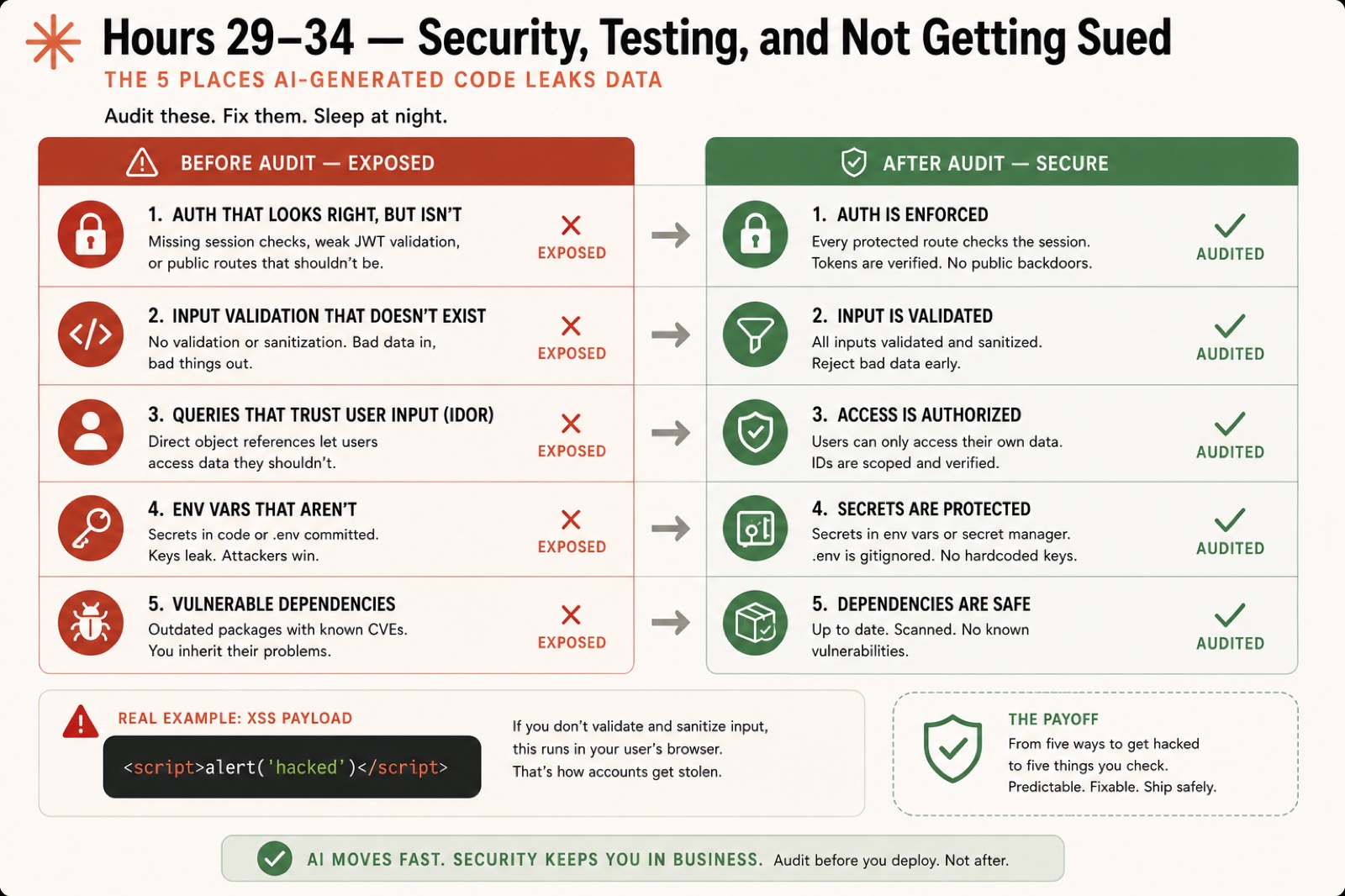
What are the five places AI code leaks data?
The same five, project after project. These aren’t obscure edge cases.
1. Auth that looks right but isn’t. Login works, sessions persist, users see their own data. It feels secure. But is the session token in an httpOnly cookie, or one any script can read? Is the auth secret a real random value or a leftover placeholder? Is the login route rate-limited, or can an attacker try a thousand passwords a second? Tell Claude: “Review the auth setup. Put session tokens in httpOnly cookies, confirm the secret is real, and rate-limit login to 5 attempts per minute per IP.”
2. Input validation that doesn’t exist. Claude rarely validates input unless you ask. The form accepts anything, the database stores it, the page renders it. Tell Claude: “Validate and sanitize all user input on the server. Strip HTML from text fields, cap title at 200 characters and description at 2000.”
3. Queries that trust user input (IDOR). An Insecure Direct Object Reference is when an endpoint hands back a record by ID without checking it belongs to the current user. If I can read your data by guessing a URL, you have one. Tell Claude: “Every query that fetches user data must filter by the logged-in user’s id. Reject the request if there’s no session.”
4. Env vars that aren’t. Claude often writes .env files with placeholder values during setup, those placeholders get committed, and later you swap in real keys. The placeholder commit is still in git history. Find hardcoded secrets yourself in 30 seconds:
grep -r "sk_\|password=\|secret=" src/ --include="*.ts" --include="*.tsx"
git log --all -- .env .env.local
If anything turns up, move it to an env var, add .env* to .gitignore, and rotate the exposed values. Removing the file from the latest commit is not enough.
5. Vulnerable dependencies. Your project has hundreds of transitive packages, and some carry known CVEs. Check them:
npm auditThen tell Claude to fix what it can and report what needs a manual decision. The 2018 event-stream compromise (malicious code in a package with millions of weekly downloads) is why this is a weekly habit, not a one-time check.
How does this map to the industry standard?
The five leak points line up with the OWASP Top 10:2025, the reference list of the most critical web app risks. This is the same framework professional security teams audit against:
| The leak point | OWASP Top 10:2025 category |
|---|---|
| Auth that isn’t | A07 Authentication Failures + A01 Broken Access Control |
| Missing input validation (XSS) | A05 Injection |
| IDOR queries | A01 Broken Access Control |
| Exposed secrets | A02 Security Misconfiguration |
| Vulnerable dependencies | A03 Software Supply Chain Failures |
You don’t need to memorize the list. You need to know your five buckets cover the risks that put a small app in the news.
How do you run the audit?
Two moves. First, hand Claude the checklist and let it grade itself:
Run a 20-point security audit on this app. For each point, report PASS, FAIL, or N/A, and fix every FAIL. Cover: password hashing, httpOnly cookies, a real auth secret, login rate limiting, server-side input validation, HTML sanitization, userId checks on every query, no raw SQL, secrets in env vars, .env gitignored, and npm audit clean.What comes back is a numbered report, one line per point, fixes called out:
1. Passwords hashed (bcrypt)......... PASS
2. Session cookies httpOnly.......... FAIL -> fixed: set httpOnly + sameSite
3. Auth secret is real random........ FAIL -> fixed: generated 32-byte secret
11. Every query scoped to userId..... PASS
18. npm audit zero high/critical..... PASS

Result: 3 FAIL found and fixed, 16 PASS, 1 N/A.
Run it a second time after the fixes land. Every line reading PASS or N/A means the audit is clean. Second, verify the XSS fix with your own hands. Enter this as a task title and save it:
<script>alert('hacked')</script>You must see that literal text sitting in your list. You must NOT see an alert box. If the alert fires, sanitization failed, and you tell Claude to escape HTML on render.
What broke
Two failures that show why you verify instead of trust.
The happy path that wasn’t a test. A developer built a fintech app with Claude Code and tested it for months on his own bank account. Everything worked. The first outside tester connected a different bank and transactions started disappearing, a data bug that only showed with a format he’d never tested. Claude writes code that works for the path you tried. The first person who does something different breaks it.
The caching that wasn’t there. Someone asked Claude to add caching to an endpoint. Claude reported “added Redis caching with a 5-minute TTL.” The truth: it had written a comment that said // Cache for 5 minutes above a query that still hit the database every single time. No Redis, no cache. Claude’s summary of its own work is unreliable. When it says “I added rate limiting” or “this is secure,” read the code and confirm. That’s the whole reason the audit exists.
What should you actually do?
- If you’re storing anything personal (emails, payments) → run the 20-point audit before you share the URL, not after.
- If you only test one account → create a second one and confirm it can’t see the first’s data. That’s your IDOR check in 60 seconds.
- If Claude says “it’s secure” → read the code anyway. Its self-assessment is the least reliable signal you have.
- If
npm auditshows high or critical → fix before launch. Make the scan a weekly habit after. - If the XSS test pops an alert → stop and fix sanitization before anything else ships.
The bottom line
- Functional and secure are two different jobs, and Claude only does the first by default. The audit is how you do the second.
- The five buckets cover the risks that actually sink small apps. You don’t need a security team. You need a checklist and the discipline to run it twice.
- Verify everything Claude claims about its own work. “It’s secure” from the thing that wrote the code is not evidence. The audit and the XSS test are.
Frequently Asked Questions
Is code from Claude Code secure by default?+
No. Claude writes functional code, not secure code. It skips input validation, stores weak session cookies, and leaves endpoints open unless you ask for hardening. Run the audit before real users touch it.
How do I test my Claude Code app for XSS?+
Enter an HTML script tag with an alert in it as a form value and save it. If an alert box pops up, sanitization failed. You should see the literal text in your task list, not a popup.
What should I check before launching a vibe-coded app?+
Five things: enforced auth, validated input, user-scoped queries with no IDOR, secrets in env vars, and patched dependencies. That is the 20-point audit boiled down to five buckets.