Cut Your Claude Code Token Bill in Half
Your Claude Code bill is mostly overhead, not features. Cut your token cost with six fixes plus the one effort setting that quietly drains your account.
>These are the six fixes that halved my bill. Claude Code for Beginners runs the full token audit on a real app.
Summary:
- Most of your bill is overhead: re-reads, long histories, and high effort on trivial edits.
- The biggest lever is the effort dial. Claude Code defaults to high; drop to low for mechanical work.
- Plug the six token sinks with specific prompts and a file map in your CLAUDE.md.
- Walk away with a daily rhythm that ships the same work for half the spend.
Your Claude Code token optimization cost is mostly money you hand over for overhead, not for features. My first month cost $1,400. Three weeks, 2,000 lines of code that actually shipped, and a bill that read like I’d hired a contractor. The other 218,000 lines of context Claude processed were waste. Here is where the money goes, and how to stop burning it.
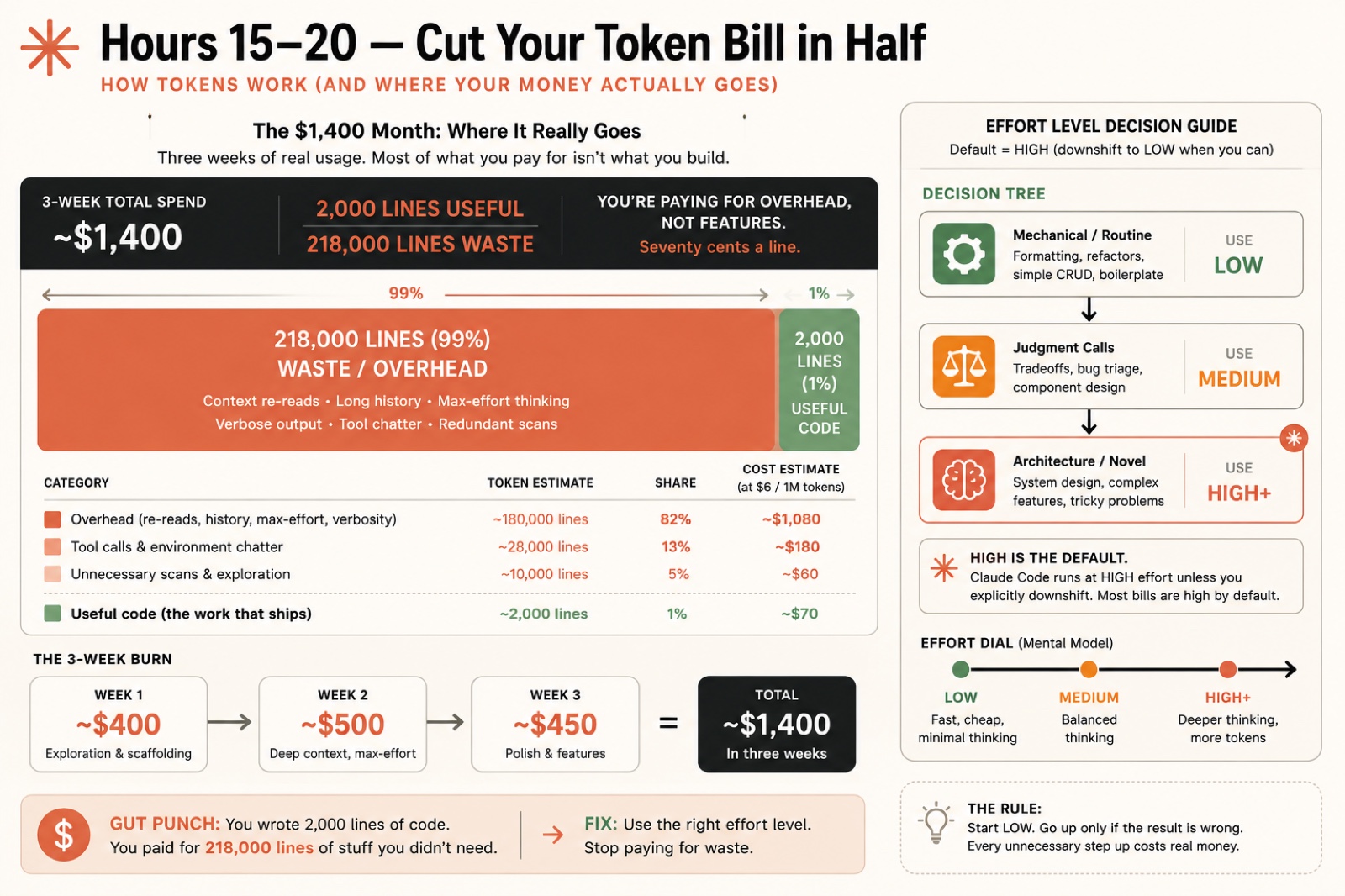
Where does a $1,400 month actually go?
Almost entirely to overhead. I wrote 2,000 useful lines. I paid for 218,000 lines of stuff I didn’t need: re-reads of files Claude already saw, hundred-message histories dragged into every reply, max effort on one-line renames. That is 99 percent waste, 1 percent work. Seventy cents a line.
Broken down by category, plain overhead (re-reads, history, max effort) was about $1,080 of that bill, a full 82 percent. Tool-call chatter added another ~$180 (13 percent), unnecessary file scans ~$60 (5 percent), and the useful code that actually shipped cost ~$70 (1 percent). You read that right: the work was the cheapest line item.
The week-by-week burn:
| Week | Spend | What burned it |
|---|---|---|
| Week 1 | ~$400 | High effort on everything, 100-message conversations, three full-codebase re-reads a day |
| Week 2 | ~$500 | Three-paragraph prompts, four conversations per feature |
| Week 3 | ~$450 | One bug, debugged in a context polluted with 100 messages |
None of that overhead shipped a single feature. The lesson isn’t “be cheap.” It’s that careless usage pays for overhead instead of work. Fix that and the building stays exactly the same.
What one setting controls your bill?
The effort level. Claude Code has five (low, medium, high, xhigh, max) and one fact most beginners never learn: the default is high. So every trivial edit gets full-reasoning treatment, and full-reasoning pricing, unless you say otherwise. Adding a CSS class does not require the model to weigh architectural trade-offs.
Match the level to the task. Default is high; the money move is the downshift:
| Task | Effort | Example |
|---|---|---|
| Mechanical / routine | /effort low | Rename, format, a simple CRUD edit, boilerplate |
| Judgment calls | medium | Build a feature, fix a bug, write a test |
| Architecture / novel | /effort high, xhigh, or max | System design, a refactor across five files |
Change it on the fly inside a session:
/effort lowOr set it at launch with --effort <level>. The rule that runs my whole month: start low, go up only if the result comes back wrong. Every unnecessary step up the dial costs real money.
What are the six token sinks?
Every wasted dollar traces back to one of six habits. Plug each one.
Sink 1: Conversations that run too long. Message 50 pays for the full history of the first 49. One conversation per feature. Start fresh with a one-line handoff:
I just finished the status toggle on the Task Tracker. Next: add filtering by status. Relevant files: src/app/page.tsx and src/components/TaskList.tsx.Sink 2: Wrong effort level. Covered above. The downshift is the single biggest lever on the bill.
Sink 3: Claude reading files it doesn’t need. Say “add a button to the task list” and Claude may read your whole components folder for one file. Name the files instead:
Add a delete button to src/components/TaskList.tsx. Wire it to the deleteTask action in src/app/actions.ts. Don't read other files.Sink 4: No file map. Put one in your CLAUDE.md so Claude reaches straight for the right file every time, instead of scanning the tree.
Sink 5: Essay prompts. A 48-word prompt with four words of instruction costs the same as a paragraph of preamble. Write prompts like text messages, not emails.
Sink 6: Asking Claude to explain instead of just doing. “Explain how auth works and suggest improvements” makes Claude write the explanation AND the suggestions, and you pay for both. Ask for the change: “Add rate limiting to the login route. Make the edit, don’t explain it.”
When a feature build crosses 60 percent context mid-task and you don’t want to lose the thread, compact it:
/compactThe back-and-forth gets replaced with a short summary and the context bar drops hard.
What broke
The proof is in a side-by-side audit I run on every project. Same feature, two ways.
Run A, old habits, a vague prompt at the default high effort: “Read through the project and add a priority field somewhere it makes sense.” Claude opens a stack of files, the context bar climbs, the feature lands. The token count came back around 147,000 input tokens across 14 files read.
Run B, optimized, a fresh session at /effort medium with a scoped prompt: “Add a priority field to the Task model. Edit prisma/schema.prisma, run the migration, then update TaskList.tsx to show a colored dot. Don’t read other files.” Claude opens three files. The same feature came in around 62,000 tokens, and it finished faster.
Same result. Less than half the tokens. That gap, repeated across every feature you build, is the whole difference between Claude Code feeling expensive and feeling free.
What does this look like by plan?
Your fix changes shape depending on how you pay. Here are the current Claude plans, from Anthropic’s pricing page:
| Plan | Price | What the fixes buy you |
|---|---|---|
| Free | $0 | Not enough headroom for real building |
| Pro | $17/mo (annual) or $20/mo (monthly) | A later rate-limit hit instead of an early-afternoon wall |
| Max 5x | from $100/mo | A full workday of building before you run dry |
| Max 20x | $200/mo | Heavy daily use without watching the meter |
On Pro or Max, your metric is rate-limit timing: note when you first hit the wall each day, apply the six fixes, and watch that time slide later. On the API, your metric is cost per feature: log what you built and what it cost, and the expensive work (debugging, architecture) shows itself fast.
What should you actually do?
- If you’re posting a four-figure bill → fix Sink 1 first. Long conversations multiply every other cost.
- If you leave effort untouched → it’s running high on everything. Drop to
/effort lowfor your next mechanical edit. - If Claude reads ten files for a one-file change → name the files and add “don’t read other files.”
- If your context bar passes 60 percent mid-feature → run
/compact, or start fresh if you’re between features. - If you want a real number → run the A/B audit above on your next feature and write down both token counts.
Same build speed, half the spend. Turn these habits on today and check your dashboard tomorrow.
The bottom line
- The effort dial is the whole game. Default high is great for features and a quiet tax on everything trivial. Downshift constantly.
- Long conversations are the silent killer. One feature, one conversation, one fresh start. It costs 30 seconds and saves a fortune in dragged-along history.
- You are not rationing yourself. You are refusing to pay for overhead you never needed. The output stays the same; only the waste leaves.
Frequently Asked Questions
Why is Claude Code so expensive?+
Because most of what you pay for is overhead, not code. Long conversations, full-codebase re-reads, and high effort on trivial edits cost more than the features you ship. Cut the overhead and the bill drops by half.
What is the default effort level in Claude Code?+
High. Claude Code runs at high effort unless you drop it, so every trivial edit gets full-reasoning treatment and full-reasoning pricing. Use /effort low for mechanical work and the bill falls fast.
How do I lower my Claude Code token usage?+
Start a fresh conversation per feature, name the exact files in your prompt, drop to /effort low for simple edits, and run /compact when the context bar passes 60 percent.