5 Claude Code Power Features Beginners Aren't Using
Remote control, background agents, MCP, LSP, and voice mode: five Claude Code power features beginners skip, with the exact current commands that work.
>This is the power-features chapter in brief. Claude Code for Beginners sets all five up on a real app you build.
Summary:
- Five features separate fluent Claude Code users from people still typing like it’s a chatbot.
- Each one is a single command: remote control, background agents, voice mode, LSP, and MCP.
- The commands here run on the current CLI, so you skip the deprecated syntax floating around old posts.
- Walk away able to run parallel tasks, work from your phone, and wire Claude into external tools.
Claude Code background agents, remote control, MCP, LSP, and voice mode: five power features most beginners never touch. They aren’t future features. The rush jobs filling up the Claude Code shelf don’t mention one of them, and they all run on commands you can paste right now. The tool evolved. Most of the user base didn’t. Here’s how to catch up in an afternoon.
What are the five power features beginners skip?
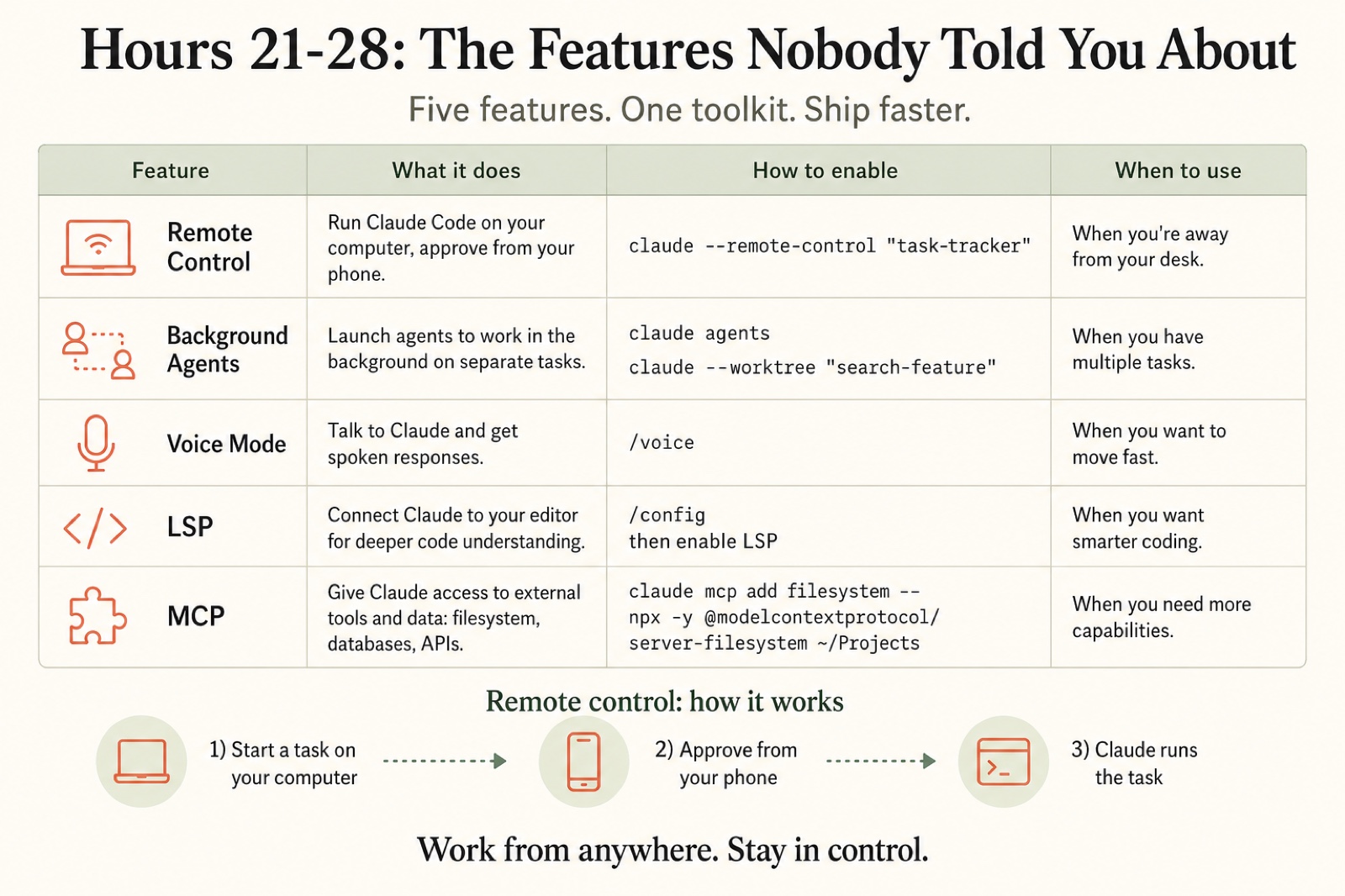
Five features, one command each. Here’s the whole toolkit at a glance:
| Feature | What it does | How to enable | When to use |
|---|---|---|---|
| Remote control | Run Claude on your computer, approve from your phone | claude --remote-control "task-tracker" | When you’re away from your desk |
| Background agents | Run separate tasks in parallel | claude agents / claude --worktree "name" | When you have multiple independent tasks |
| Voice mode | Talk to Claude instead of typing | /voice | When you want to move fast at your desk |
| LSP | Connect Claude to your code index for instant lookups | /config, then enable LSP | When you want faster, cheaper code navigation |
| MCP | Give Claude access to external tools and data | claude mcp add ... | When you need to reach past your own files |
The rest of this guide is the setup for each, with the exact command.
How do you run Claude Code from your phone?
Start the session with the --remote-control flag and give it a name:
claude --remote-control "task-tracker"A /rc active link appears in the footer. Open the status panel, and you get a session URL and a QR code. Scan the QR with your phone to open the same session in the Claude app, or open the URL in any browser. The flow is always the same three steps: start a task on your computer, approve it from your phone, Claude runs it. You tell Claude to build a feature, go make dinner, and approve the file changes from the kitchen. It never merges anything without your say-so.
One caveat: remote control runs through your paid login, so run /login once first. A raw API key won’t work.
How do you run background agents in parallel?
By default Claude Code does one task at a time. Background agents run several at once. Open the agent view:
claude agentsThe one rule that keeps this safe: parallel tasks must not fight over the same files. Give each its own git worktree so the work stays isolated:
claude --worktree "search-feature"Now two or three sessions build side by side, each in its own copy of the repo, and you merge them when you’re happy. Three features that would take 45 minutes one at a time finish closer to 15. Start with two parallel tasks, not five, and always split the work so each touches different files. Same-file conflicts eat the time you saved.
How do you add an MCP server to Claude Code?
MCP (Model Context Protocol) is what lets Claude reach external tools: your database, a browser, your design files. The clean way to add one is the CLI, not a hand-edited config file. To give Claude read access to a folder outside your project:
claude mcp add filesystem -- npx -y @modelcontextprotocol/server-filesystem ~/Downloads
claude mcp list
The -- separates the claude mcp add options from the command that launches the server, and npx -y fetches and runs it. These are real, published packages, not examples. Here is what you’re actually installing:
| MCP server | npm package | Latest version | Author |
|---|---|---|---|
| Filesystem | @modelcontextprotocol/server-filesystem | 2026.1.14 | Anthropic |
| Playwright | @playwright/mcp | 0.0.76 | Microsoft |
The Playwright server is the one to want next. It gives Claude a real browser, which automates the screenshot loop: Claude opens your app, screenshots it, and fixes the CSS without you touching a thing.
claude mcp add playwright -- npx -y @playwright/mcp@latestWhat about voice mode and LSP?
Both are one move. Voice mode lets you talk to Claude at your desk:
/voiceHold to talk, speak your instruction, release. It’s local only, so it pairs with sitting at your machine, not the couch-and-phone remote flow.
LSP (Language Server Protocol) gives Claude instant “go to definition” instead of reading file after file to find a function. Turn it on through config:
/configFor a TypeScript project, the compiler is all it needs. Once active, Claude finds a function in milliseconds instead of scanning a pile of files, which is faster and burns fewer tokens on every task.
What broke
The single biggest trap is following stale instructions. Claude Code ships updates constantly, and a popular cheatsheet went stale within weeks because, as one commenter put it, “commands have been deprecated.”
Two specific failures I see beginners hit:
Hand-editing the settings file for MCP. Old guides tell you to open a global settings JSON and paste a mcpServers block. Skip it. The CLI (claude mcp add) puts the configuration in the right place for you, and a project-scoped server (claude mcp add -s project ...) writes to a .mcp.json in your repo so your whole team gets it. Hand-editing the global file is how you end up with a server that never shows in claude mcp list.
Guessing the remote flag. It is claude --remote-control, not a shorter guess. When a command doesn’t exist, confirm the real one against claude --help and the docs at code.claude.com instead of trusting a six-month-old screenshot.
The concepts here (remote execution, parallel tasks, voice, instant code search, external tools) are stable even when a flag gets renamed. Learn the concept, confirm the syntax.
What should you actually do?
- If you only adopt one → set up LSP first. Almost no learning curve, and every task gets faster and cheaper.
- If you build more than one feature at a time → run two
claude --worktreebackground agents on different files. Output roughly doubles. - If you step away from your desk a lot → start long jobs with
claude --remote-controland approve from your phone. - If you need Claude to reach a database or browser →
claude mcp add, thenclaude mcp listto confirm. Never hand-edit a config file. - If a command throws “unknown command” → it’s deprecated or guessed. Check
claude --helpbefore you trust an old post.
The bottom line
- These five features are the gap between someone using Claude Code like it’s 2024 and someone shipping from a park bench. None of them takes more than one command.
- Accuracy is the whole point. The reason old posts fail isn’t that the ideas changed, it’s that the commands did. Run them against the current CLI.
- Start with LSP and one background agent. Add MCP the day you need Claude to touch something outside your repo. That’s the working setup the pros actually use.
Frequently Asked Questions
How do I run background agents in Claude Code?+
Open the agent view with `claude agents`, then start each task in its own git worktree with `claude --worktree "name"` so parallel work runs in isolation and can't collide on the same files.
How do I add an MCP server to Claude Code?+
Use the CLI: `claude mcp add <name> -- npx -y <package>`. Do not hand-edit a settings JSON file. Confirm it registered with `claude mcp list`.
Can I control Claude Code from my phone?+
Yes. Start a session with `claude --remote-control`, open the /rc status panel, scan the QR code, and watch and approve changes from the Claude app or a browser.