Voice AI Agent Failures: 8 Modes and the Exact Fixes
Eight ways voice AI agents fail in production with the exact prompt lines that fix each one. Copy-paste anti-hallucination, silence, and loop-breaker rules.
>This covers failure modes. How to Build Voice AI Agents includes the 3-phase deployment process, monitoring metrics, and the rollback plan.
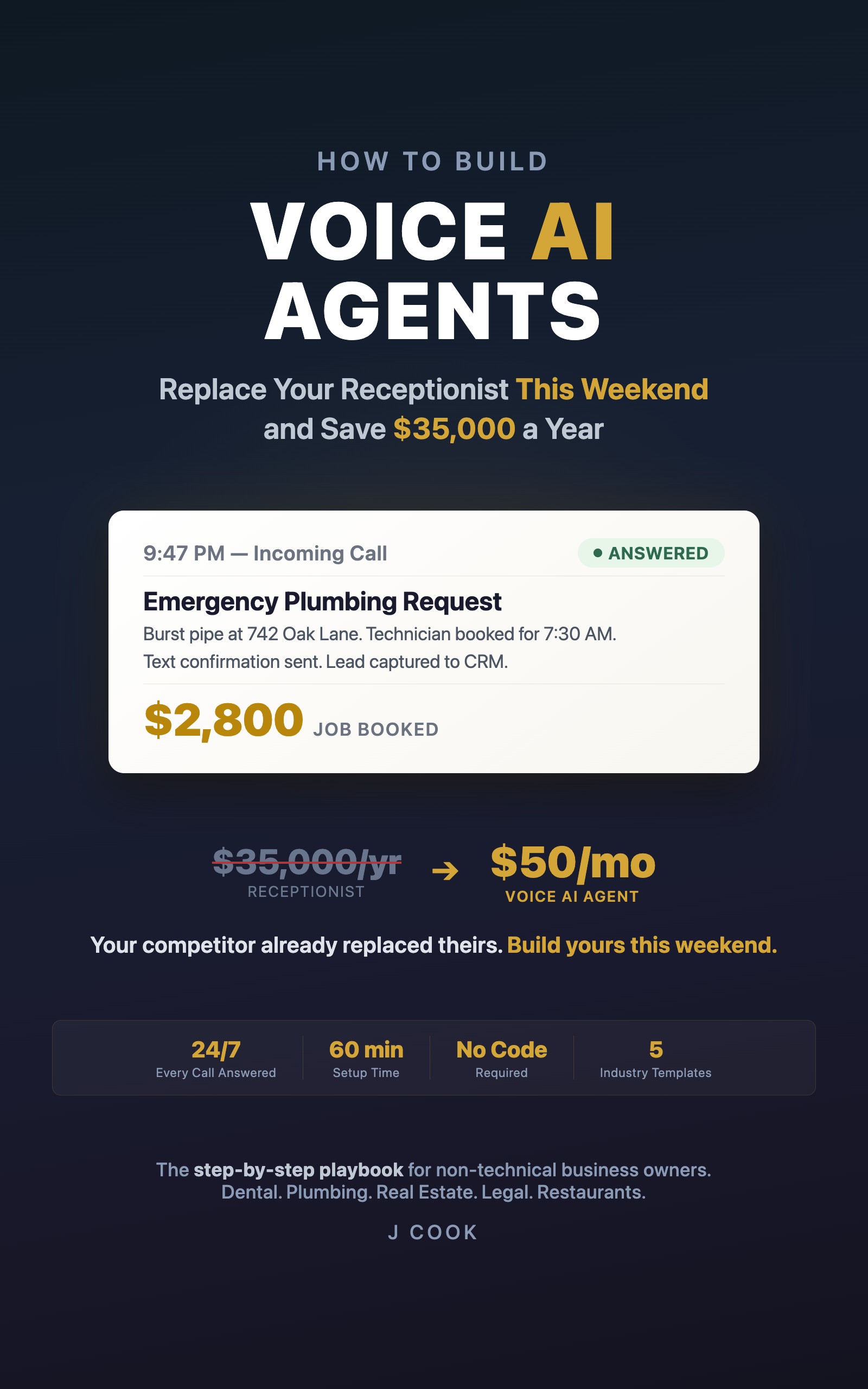
How to Build Voice AI Agents
Replace Your Receptionist This Weekend and Save $35,000 a Year
Summary:
- Eight specific voice AI failure modes with severity ratings and fix complexity.
- Copy-paste prompt rules for anti-hallucination, silence prevention, and loop-breaking.
- The honest assessment: 80-90% of calls handled well, 1-5% handled poorly.
- Every fix is a prompt change, not a platform change.
The blog posts and platform marketing pages paint perfect AI conversations where every caller is delighted. That’s not reality. Reality is an agent that mishears “crown” as “Cron,” a caller sitting in confused silence for eight seconds, and a Google review saying “the robot hung up on me.”
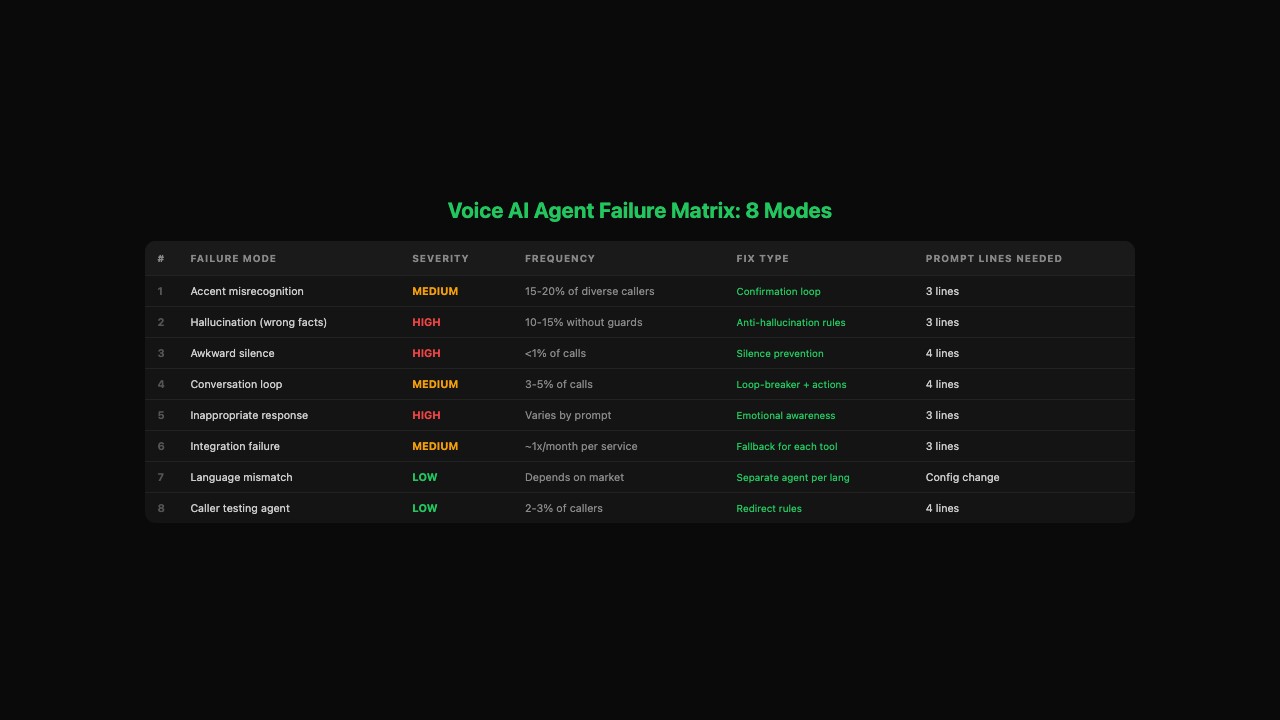
Here are the eight ways voice AI agents fail in production, and the prompt lines that fix each one.
If you only fix three things, fix these first
Most voice AI failures come from three gaps in the prompt. Add these blocks before you go live and you’ll prevent the majority of bad calls:
- Anti-hallucination rules (Failure 2 below). Stops your agent from inventing prices and appointment times. This is the single most dangerous failure mode.
- Silence prevention (Failure 3 below). Stops the awkward 8-second dead air that makes callers hang up.
- Loop-breaker instructions (Failure 4 below). Stops the agent from asking the same question three times in a row.
All three are copy-paste prompt blocks below. Total: 11 lines of prompt text. Takes 2 minutes to add.
Failure 1: How do you fix the accent problem?
Speech recognition works great for clear English. It struggles with heavy accents, non-native speakers, and bad cell connections. When it mishears something, your agent responds to the wrong words and the conversation derails.
ACCENT MITIGATION:
- Confirm critical details: "I want to make sure I have that
  right. You said Thursday at 2 PM?"
- Ask for spelling on names and addresses: "Can you spell that
  for me?"
- After 2 failed attempts to understand: "I'm having trouble
  hearing you clearly. Can I get your number and call you back?"
If your callers are diverse, test with speakers of those languages during setup. Don’t assume it works because it worked for you.
Failure 2: How do you stop hallucination?
Hallucination is when the agent confidently says something wrong. “Yes, I have 3 PM available” when the calendar is full. “$450 for a root canal” when the real price is $1,200. This is the scariest failure because the agent sounds completely sure while being completely wrong.
ANTI-HALLUCINATION RULES:
- Never state pricing from memory. Always reference the pricing
  list in this prompt. If a service isn't listed, say "I'd need
  to have someone give you a specific quote for that."
- Never state availability without checking the calendar tool.
  If the tool fails, say "I'm having trouble checking the schedule"
  and take a message.
- If you are not 100% certain about any factual claim, say
  "I want to make sure I give you accurate information. Let me
  have someone call you back about that." Never guess.
One dental practice reported that their agent told a caller the office was open on a holiday. The patient showed up to a locked door. Cost: a $75 discount and a 2-minute prompt update. The agent had reportedly booked over 200 appointments that same month. One error in hundreds of correct interactions.
Failure 3: How do you prevent awkward silence?
The line goes quiet for 5, 8, 10 seconds. The caller says “Hello?” The agent either snaps out of it with something random or stays silent until the caller hangs up. Rare, but one dead-air moment sticks in a customer’s memory longer than twenty smooth calls.
SILENCE PREVENTION:
- If you don't understand the caller, say "I didn't quite catch
  that. Could you say that one more time?"
- If you need more than 3 seconds to process, say "One moment,
  let me check on that."
- Never go silent for more than 4 seconds. If you have nothing
  to say, ask a clarifying question.
- After 2 failed attempts to understand: "I apologize, I'm
  having trouble hearing you clearly. Can I get your number
  and call you back?"
Failure 4: How do you break conversation loops?
The caller says “Thursday.” The agent says “When would you like to reschedule to?” The caller says “I just said Thursday.” The agent says “I understand. When works for you?” Round and round until the caller hangs up.
This happens when the prompt tells the agent what to ask but not what to do with the answer.
LOOP PREVENTION:
- When the caller gives a day (e.g., "Thursday"), immediately
  use the calendar tool to check availability. Do not ask again.
- When the caller gives a time (e.g., "morning"), offer the 2-3
  earliest morning slots. Do not ask "what time?"
- If you've asked the same question twice, say: "Let me make
  sure I have this right. You'd like to reschedule to [what you
  know so far]. What specific time works best?"
- After 3 exchanges on the same topic without progress: "I want
  to get this right. Let me have someone call you back to sort
  out the details."
The key insight: loops happen because the prompt tells the agent what to ask but not what to do with the answer. Every question needs a corresponding action for every likely response.
Failure 5: How do you handle inappropriate responses?
A caller says “My mother just fell” and the agent says “I’m sorry. Would you like to schedule an appointment?” A caller is angry about a previous service and the agent responds with the standard calm greeting.
EMOTIONAL AWARENESS:
- If the caller sounds distressed or mentions an emergency,
  acknowledge first: "I can hear this is urgent. Let me help
  you right away."
- If the caller is angry or abusive: "I understand you're
  frustrated. Let me transfer you to someone who can help
  directly." Then transfer.
- For medical/safety emergencies: "Please call 911 first.
  I can schedule a follow-up for you after that."
Failure 6: What happens when integrations break?
The calendar goes down. The Google Sheet is full. The SMS provider has an outage. Your agent still answers calls but can’t book, capture leads, or send confirmations.
Integration failures happen roughly once a month for each connected service. Build a fallback for every tool the agent uses.
INTEGRATION FALLBACKS:
- Calendar unavailable: "I'm having trouble checking the
  schedule right now. Let me get your name and number and
  we'll call you back within the hour to book."
- Lead capture failed: continue the call normally. Log the
  caller's info from the call transcript after the fact.
- SMS not sending: "You'll receive a confirmation shortly.
  If you don't get one within a few minutes, give us a
  call back."
Set up failure notifications in Make.com or Zapier so you know when an integration breaks, not when a customer tells you.
Failure 7: What about multilingual callers?
If your business serves a multilingual community, create a separate agent per language. Bland supports multiple languages. ElevenLabs handles 29+ languages with native accents.
For languages you can’t support: “Let me take your number and have someone who speaks [language] call you back.” Better than a confused conversation.
Failure 8: What about callers who test the agent?
About 2-3% of callers deliberately try to break your agent. Absurd questions, “are you real?” challenges, inappropriate requests.
TESTING CALLER RULES:
- Off-topic questions: "I'm set up to help with scheduling
  and questions about our services. Is there something I
  can help you with?"
- "Am I talking to a real person?": "I'm handling calls
  for [Business Name] today. How can I help?"
- Inappropriate requests: "I'm not able to help with that."
- If they persist after 2 redirects: end the call politely.
From Webfuse, the top voice AI failures they identify are hallucination, latency, and context loss. What they don’t cover: the specific prompt lines that prevent each one. That’s the gap this article fills.
What should you actually do?
- If you haven’t deployed yet: add all eight prompt sections before going live. Prevention is cheaper than damage control.
- If you’re already live and seeing failures: check your call transcripts for the patterns above. Most failures map to one of these eight modes. Copy the relevant prompt block and test.
- If your transfer rate is above 20%: your prompt is missing coverage. Shadow mode (running the agent alongside your current setup for 3 days) reveals exactly which questions your callers actually ask vs what you predicted.
bottom_line
- In practice, voice AI agents handle the large majority of routine calls well. The small percentage that fail are fixable with prompt changes, not platform changes. Every fix in this article is a copy-paste prompt block.
- Hallucination is the scariest failure because the agent sounds confident while being wrong. The anti-hallucination rules are the single most important addition to any production prompt.
- One bad call out of a hundred is a normal first week. One bad call out of a thousand is what you’ll hit after a month of tuning. The alternative (voicemail, missed calls, expensive answering services) is worse.
Frequently Asked Questions
What's the most common voice AI agent failure?+
Hallucination. The agent confidently states wrong information like inventing appointment times or fabricating prices. Fix it with explicit anti-hallucination rules in the prompt that force the agent to reference its knowledge base instead of generating answers.
How do I stop my voice agent from going silent?+
Add silence prevention rules to your prompt: 'If you don't understand the caller, say I didn't quite catch that. If you need more than 3 seconds to process, say One moment. Never go silent for more than 4 seconds.'
What percentage of calls will my voice AI agent handle correctly?+
With a well-written prompt, the large majority of routine calls get handled well. A small percentage go poorly. The ones that work save thousands monthly. The ones that fail are manageable with the prompt fixes in this article.