Run Claude Code Locally with Ollama
Point the real Claude Code CLI at a local Ollama model through a LiteLLM proxy. The exact env vars, the config.yaml, and the version you must never install.
>This covers the Claude Code proxy. Run Claude Code Locally goes deeper on model choice, hardware tuning, and the full troubleshooting runbook.
Run Claude Code Locally
Kill the $300 AI Bill with Free, Private Coding Agents on Ollama and Open Models
Summary:
- Wire the real Claude Code CLI to a local Ollama model through a LiteLLM proxy.
- Copy-paste the two env vars and the config.yaml that do it.
- The one LiteLLM version you must never install, and why.
- Prove nothing leaves your machine with the Wi-Fi off.
You decided to run Claude Code locally with Ollama, opened Claude Code’s settings looking for a “use local model” toggle, and it wasn’t there. It never was. The redirect isn’t a setting inside the app at all. It’s one environment variable and a fifteen-line proxy, and once you’ve built it, every project you own can go local with three commands.
Why does Claude Code need a proxy when Codex doesn’t?
Claude Code needs a proxy because it only speaks Anthropic’s API format, and your local model speaks OpenAI-compatible. They don’t connect without a translator.
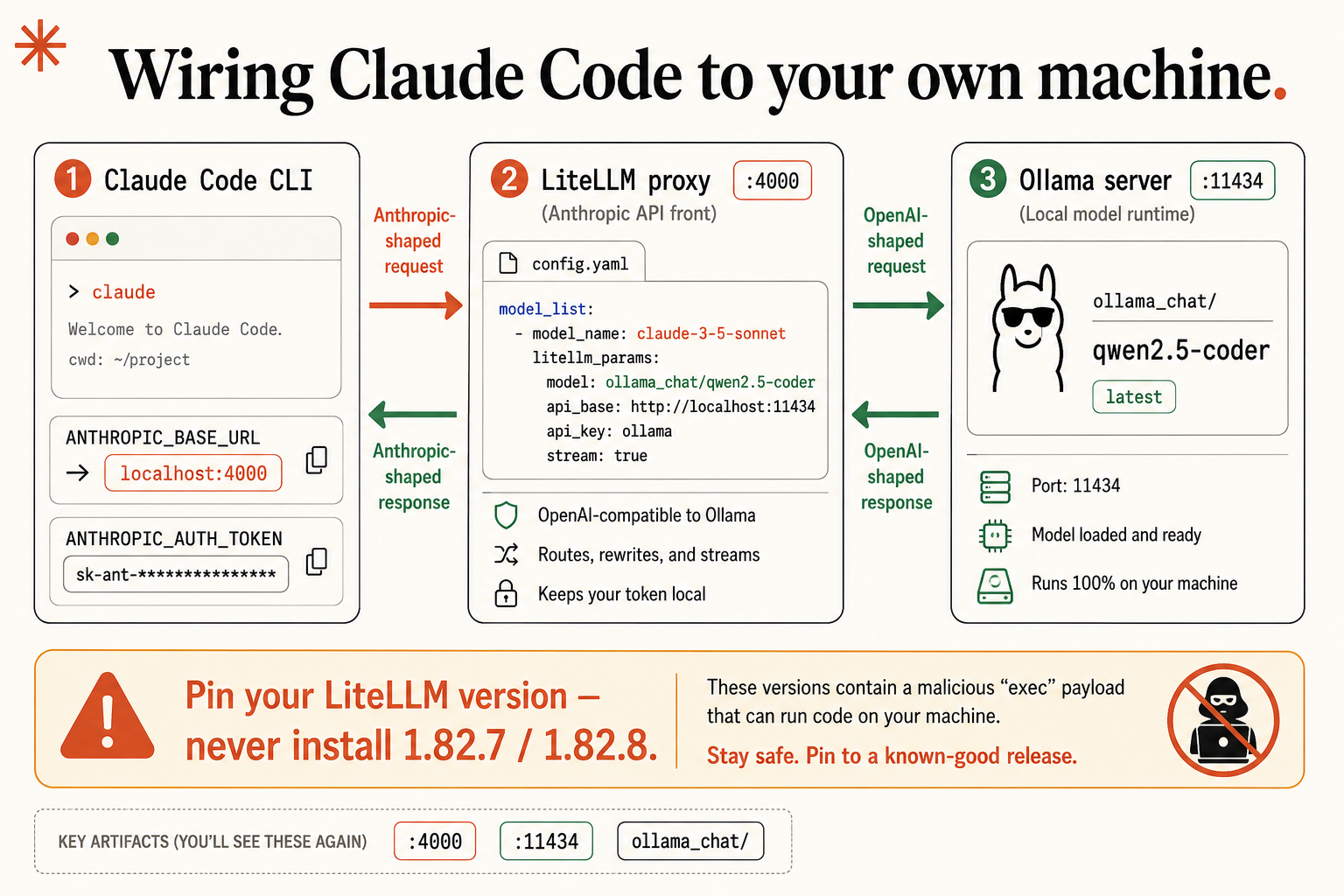
Here’s the layer that matters. The agent CLI you drive (Claude Code) talks to a model over HTTP, and the two sides have to agree on the request format. Claude Code sends Anthropic-shaped requests to /v1/messages. Ollama, the runtime that loads your open model and serves it on port 11434, only understands OpenAI-compatible requests. Point Claude Code straight at Ollama and they talk past each other.
So you put a small proxy called LiteLLM in the middle. It presents itself to Claude Code as an Anthropic endpoint, rewrites each request into the OpenAI-compatible shape Ollama wants, and translates the answer back. To Claude Code it looks like Anthropic’s server. To Ollama it looks like a normal local client. Neither side knows there’s a translator. Codex and OpenCode skip all of this because they already speak OpenAI-compatible. Claude Code is the one that needs the bridge.
Stop: the one LiteLLM version that ships malware
Before you type pip install, read this twice, because it’s specific and real. Two published LiteLLM releases, 1.82.7 and 1.82.8, were compromised with a credential-stealing payload that runs code on your machine. For a developer that means API keys, tokens, anything in your environment.
So pin your version on purpose. List what’s published, read the top line with your own eyes, confirm it isn’t one of the two bad ones, and install that exact version:
pip index versions litellm
pip install "litellm[proxy]==<paste-a-known-good-version>"
The == is the whole lesson. It’s the difference between “give me whatever’s latest, sight unseen” and “give me this version I just looked at.” If you already have LiteLLM installed, run pip show litellm right now; if it reports 1.82.7 or 1.82.8, uninstall it, install a clean version, and rotate every credential that was sitting in your environment. The proxy sits in the path of every coding request you make, so treat it as security-sensitive from here on.
How do you map an Anthropic model name to a local one?
You map it in the proxy’s config.yaml. The proxy needs to know two things: which Anthropic name Claude Code will ask for, and which local model should answer it.
This is the official LiteLLM config shape, straight from the docs: model_name is the name the client requests, litellm_params.model is what LiteLLM actually calls.
# the documented LiteLLM model_list shape (docs.litellm.ai/docs/proxy/configs)
model_list:
  - model_name: gpt-4o            # the name the client asks for
    litellm_params:
      model: azure/gpt-4o-eu      # the model litellm actually calls
Your version maps a Claude name to a local Ollama model. Save it somewhere permanent like ~/litellm/config.yaml:
model_list:
  - model_name: "claude-3-5-sonnet"        # the name Claude Code asks for
    litellm_params:
      model: "ollama_chat/qwen2.5-coder"    # the local model that answers
      api_base: "http://localhost:11434"
The ollama_chat/ prefix is doing real work. It tells LiteLLM to use Ollama’s chat endpoint, which translates cleanly. Do not write ollama/qwen2.5-coder; that’s the older generate endpoint and it’s a frequent source of mid-stream parsing errors. The api_base is where Ollama listens, port 11434. Start the proxy and it reports it’s listening on port 4000:
litellm --config ~/litellm/config.yamlLeave that running in its own terminal. Add --detailed_debug if you want to watch each request get translated.
Point Claude Code at the proxy
Two environment variables do the redirect. The proxy runs on port 4000, so:
export ANTHROPIC_BASE_URL=http://localhost:4000   # the proxy, NOT Ollama's 11434
export ANTHROPIC_AUTH_TOKEN=sk-local-anything     # any value; must be present
Two spots people trip on. The port is 4000, the proxy, not 11434, which is Ollama. Pointing Claude Code at 11434 is the classic mistake, and now you know why it fails: that’s Ollama, speaking the wrong format. And the variable is ANTHROPIC_AUTH_TOKEN, not ANTHROPIC_API_KEY. LiteLLM wants the token in the Authorization header, which is what AUTH_TOKEN sends. The value can be anything for a local proxy.
With both exports set and the proxy running, launch Claude Code in a project:
claudeThere’s no special local mode. Claude Code reads ANTHROPIC_BASE_URL, sees localhost:4000, and sends its requests there. It behaves exactly like it always does, except the brain now runs on your machine.
What broke: the snags everyone hits first
Almost everyone hits one of these on the first wire-up, and every one is a one-minute fix.
Claude Code can’t connect, or it’s clearly still hitting the cloud. Your env vars aren’t set in the terminal you’re running claude in. Exports don’t travel between windows. Run echo $ANTHROPIC_BASE_URL in that exact terminal; if it’s empty, you opened a fresh window and lost them. This is the single most common one.
A 401 or auth error from the proxy. You set ANTHROPIC_API_KEY instead of ANTHROPIC_AUTH_TOKEN. Switch the variable and give it any value.
The proxy starts but can’t reach the model. That’s Ollama not running, not a proxy problem. Confirm with ollama ls; if it doesn’t answer, start the server with ollama serve.
A strange parsing error partway through a response. That’s the Anthropic-to-OpenAI shape mismatch showing up live. First thing to check: the ollama_chat/ prefix in your config. Turn on --detailed_debug and you’ll see the malformed chunk where it happens. The proxy almost never silently does the wrong thing. It tells you, in the startup output or the logs, where the request stopped. Read the logs before you change anything.
Prove it’s actually local
Don’t trust that it’s private. Prove it. The test is the one you can’t fake: turn off your Wi-Fi, completely, then give Claude Code a real task. If it works with the network physically off, nothing left your machine while that task ran, because there was no connection for it to use.
Be precise about what that proves. The airplane test proves the task itself leaked nothing. A normal claude launch still does background work at startup (update checks, plugin sync) that has nothing to do with your code. If your bar is the strict one, start from network-off before you launch, so even startup has nothing to talk to. Start with the airplane test, because it can’t lie.
What should you actually do?
- If you came for Claude Code specifically, build the proxy. It’s the only path, and it’s fifteen lines you write once.
- If you just want a local agent fast and don’t care which one, use Codex or OpenCode instead. No proxy, no translation, working in fifteen minutes.
- If you hit a parsing error, check the
ollama_chat/prefix first, then read the--detailed_debuglogs. Don’t reinstall anything.
The bottom line
- Claude Code going local is two artifacts: a
config.yamland two env vars. You build them once and reuse them on every project, forever. - Pin your LiteLLM version and never install 1.82.7 or 1.82.8. A proxy in the request path is security-sensitive.
- The airplane test is the only privacy proof worth trusting. If it runs with the Wi-Fi off, it’s local. Full stop.
Frequently Asked Questions
Can Claude Code point directly at Ollama?+
No. Claude Code only speaks Anthropic's API format and Ollama speaks OpenAI-compatible, so you put a small LiteLLM proxy in between to translate. Codex and OpenCode can point at Ollama directly because they already speak OpenAI-compatible.
Why does Claude Code ask for a Sonnet model when I'm running Qwen?+
Claude Code requests Anthropic model names like claude-3-5-sonnet. Your LiteLLM config.yaml maps that name to a local model such as ollama_chat/qwen2.5-coder, so the request gets served by Qwen.
Is running Claude Code on Ollama actually private?+
Yes, once the model is downloaded. Turn your Wi-Fi off and run a task. If it completes with no network, nothing left your machine, because nothing could have.