Run a Local AI Coding Agent Free in 15 Minutes
Build a local AI coding agent on Ollama that edits real code offline. Install, pull qwen2.5-coder, run Codex, ship your first edit with the Wi-Fi off.
>This is the 15-minute first win. Run Claude Code Locally goes deeper on wiring Claude Code, picking your model, and tuning your hardware.
Run Claude Code Locally
Kill the $300 AI Bill with Free, Private Coding Agents on Ollama and Open Models
Summary:
- Stand up a local AI coding agent that edits real files, fully offline.
- Three commands: install Ollama, pull qwen2.5-coder, run Codex.
- Watch it propose a code change and write a test, with the Wi-Fi off.
- The first-run errors everyone hits, and the one-line fix for each.
Fifteen minutes from now, a local AI coding agent will read a file in your own repo and propose a working edit with your Wi-Fi switched off. No API key. No bill. No rate limit. I’ve timed this on a clean machine and fifteen minutes is honest, as long as you don’t get distracted picking a model, which is the trap I’m going to walk you around.
We’re not using Claude Code for this. Claude Code only speaks Anthropic’s format and needs a translation proxy, which is a real step you don’t want as your first experience. Codex speaks OpenAI-compatible, the same format your local model speaks, so it points at the model directly. We choose the path with the fewest things that can break, on purpose.
Step 1: Install Ollama
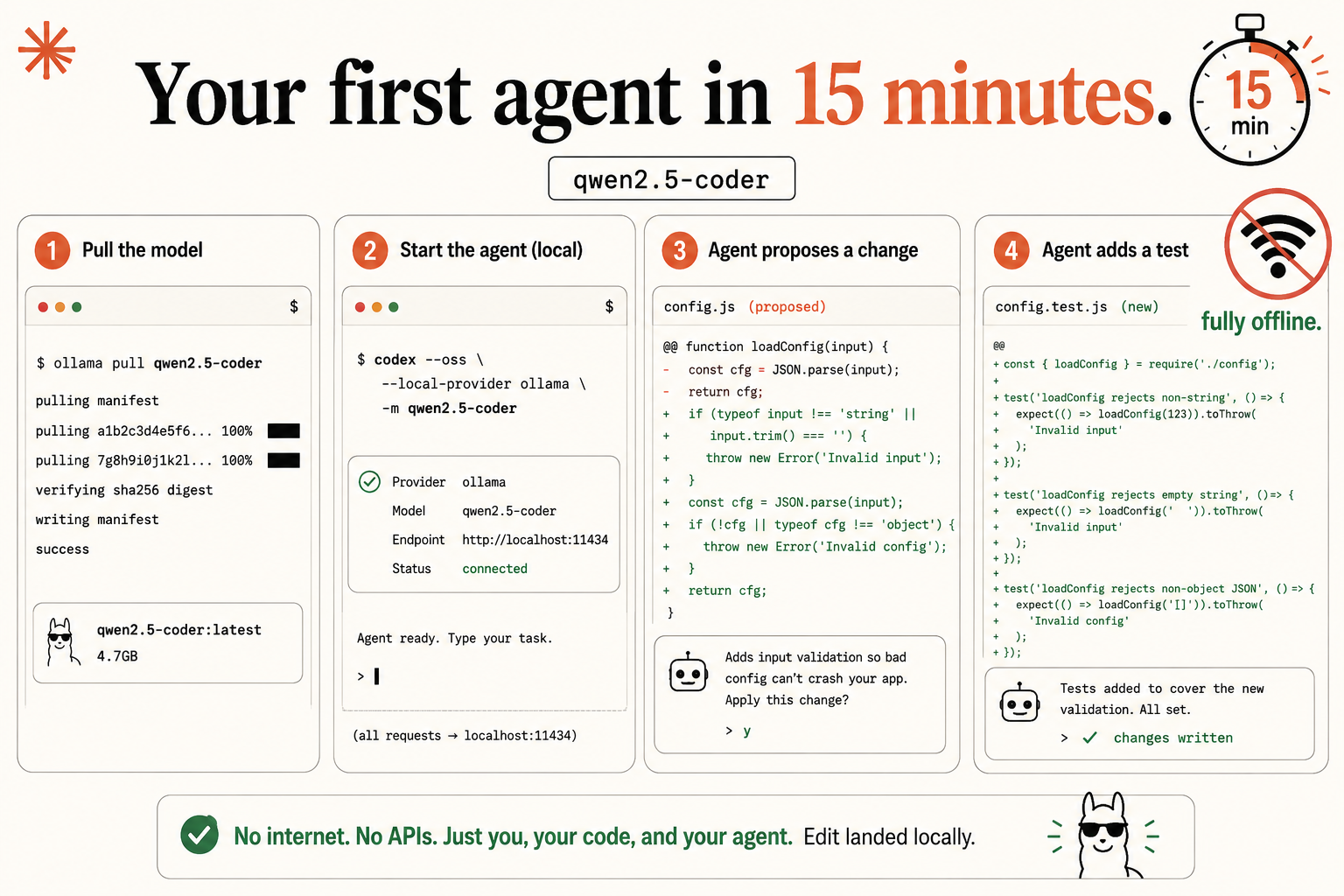
Ollama is the runtime. It loads an open model into memory and serves it over HTTP so an agent can talk to it. On macOS or Windows, grab the app from ollama.com/download. On Linux, it’s one line:
curl -fsSL https://ollama.com/install.sh | shHowever you install it, Ollama runs a server on port 11434. Memorize that number; it shows up everywhere. Confirm the server answers before you go further:
ollama lsYou’ll probably get an empty list, because you haven’t pulled a model yet. An empty list is success here. It means the server answered. A “command not found” or connection error means the install didn’t take, and you fix that now, before adding any layers.
Step 2: Pull one known-good model
Here’s where people lose their fifteen minutes, so I’m making the decision for you. Pull this:
ollama pull qwen2.5-coderThat’s it. Don’t browse the model library. Don’t read six threads comparing this week’s releases. qwen2.5-coder is coding-specialized with millions of downloads, and it’s the right first pick. The default tag pulls the 7B build at about 4.7GB, so it’ll take a few minutes on your connection. This is the last time you need the internet.
The model ships in six sizes, all with a 32K context window. Pulled live from its Ollama library page:
| Tag | Download size |
|---|---|
| qwen2.5-coder (default, 7b) | 4.7GB |
| qwen2.5-coder:0.5b | 398MB |
| qwen2.5-coder:1.5b | 986MB |
| qwen2.5-coder:3b | 1.9GB |
| qwen2.5-coder:14b | 9.0GB |
| qwen2.5-coder:32b | 20GB |
Source: ollama.com/library/qwen2.5-coder (16.3M downloads). For now, take the default. Before wiring an agent, talk to the model directly for ten seconds, the best sanity check in the whole setup:
ollama run qwen2.5-coderType “write a function that reverses a string” and watch it answer. A sensible response proves the hardest-to-debug layer works: the model is loaded and generating. Type /bye to exit. Now if the agent misbehaves next, you know for certain the problem is the wiring, not the model.
Step 3: Point Codex at your model
Install Codex if you don’t have it, then run this in your project directory:
codex --oss --local-provider ollama -m qwen2.5-coderRead the flags, because each earns its place. --oss tells Codex to use a local open model instead of the cloud. --local-provider ollama tells it the model is served by Ollama, on that port 11434. And -m qwen2.5-coder (the long form is --model) names the model you just pulled. That last flag matters: by default --oss reaches for gpt-oss:20b, which you don’t have, so name your model explicitly. Run it, and Codex starts up connected to your local model, with every request going to localhost:11434.
Build step: make your first offline edit
This is the deliverable.
- Open a real project. Not a toy. Use an actual repo under git so you can undo anything.
cdinto it and launch Codex from Step 3. - Give it a green-zone task. Pick a small, single-file edit, the kind local is great at. Type something like: Add input validation to the
loadConfig()function inconfig.jsso it throws a clear error when a required field is missing. - Watch it read and propose. The agent opens
config.js, readsloadConfig(), and comes back with a proposed edit: the validation block, written into the right place. It shows you the diff and asks “Apply this change?” Read the diff. This is the moment the agent understood your code and produced a real change, on your hardware. - Apply it, then add a test. Accept the edit. Then ask: “Now add a matching test in config.test.js.” It writes the test file and reports the changes are written.
- Prove it’s local. Turn off your Wi-Fi, from the menu bar. Give the agent another small task and watch it work anyway. No internet. No connection to anyone’s servers. The model is on your disk, the agent is on your machine, and the whole loop runs in airplane mode.
When that finishes, the banner is real: no internet, no APIs, just you, your code, and your agent. The edit landed locally.
What broke: the first-run errors everyone hits
Hitting an error in the first fifteen minutes is where momentum dies, so here are the usual stumbles and their fixes.
“Model metadata for gpt-oss:20b not found.” Codex is looking for its default model, which you didn’t pull. The fix is the -m qwen2.5-coder you already added. If you hit it anyway, ollama pull gpt-oss:20b clears it.
The first request is slow, then it’s fine. That’s not your hardware. That’s Ollama loading the model from disk into memory the first time. Once it’s warm, requests are much faster. Judge the speed on the second task, not the first.
The agent describes the edit but never applies it. Some local models hand back a tool call as plain text instead of a structured call. The quick fix is a model that emits native tool calls, like Codex’s default gpt-oss:20b (ollama pull gpt-oss:20b, then run without -m).
The agent can’t connect at all. Ninety percent of the time, Ollama isn’t running. Run ollama ls; if it fails, restart Ollama and try once more.
What should you actually do?
- If you want the fastest possible first win, use Codex or OpenCode. No proxy, working in minutes.
- If your first edit felt slow, don’t quit. That’s the single most fixable thing in local coding, and it’s a model-size and context-length problem, not a verdict.
- If the edit described but didn’t apply, switch to a model that emits native tool calls and keep going.
The bottom line
- The hard part is already done. You have an open model on your machine and a real agent driving it, with the internet off.
- Codex first, Claude Code later. Get the win on the no-proxy path before you touch the proxy.
- Rack up a handful of small green-zone edits before you judge it. One edit proves it works; ten prove it’s useful.
Frequently Asked Questions
Do I need a GPU to run a local AI coding agent?+
No. A small coding model like qwen2.5-coder runs on a CPU-only laptop. It's slower than a GPU box but genuinely useful for everyday edits, tests, and boilerplate.
Why use Codex instead of Claude Code for the first run?+
Codex speaks OpenAI-compatible, the same format Ollama speaks, so it points at your local model with no proxy. Claude Code needs a translation proxy, which is a step you don't want on day one.
Does the qwen2.5-coder download need the internet every time?+
Only once. The model download is the single online step. After it's on disk, the whole agent loop runs offline, with no outbound calls.