Local Semantic Search for an Obsidian Vault with Ollama
Set up obsidian semantic search with Ollama and obsidian-copilot in 20 minutes. Local embeddings, no data leaves your machine, three-tier retrieval ladder.
>This covers tier-two semantic search. Claude Code + Obsidian: The AI Second Brain Playbook goes deeper on the lifecycle hooks, vault subagents, and the 20-minute diagnostic that keeps a vault honest at scale.

Claude Code + Obsidian: The AI Second Brain Playbook
Build Your AI's Long Term Memory in a Weekend
Summary:
- Set up local obsidian semantic search with Ollama and obsidian-copilot in 20 minutes.
- See the three-tier retrieval ladder so you upgrade only when your vault size demands it.
- Get the verbatim Ollama provider config from the obsidian-copilot docs.
- Avoid the OLLAMA_ORIGINS gotcha that breaks connection on first run.
For an obsidian semantic search Ollama setup, the working stack is Ollama plus the obsidian-copilot plugin, both free, both local. Pull an embedding model, set one environment variable before starting Ollama, point the plugin at the local server, and your vault gains concept-level retrieval without any data leaving your machine. The whole install is about 20 minutes. The hard part is the env-var gotcha, which is below.
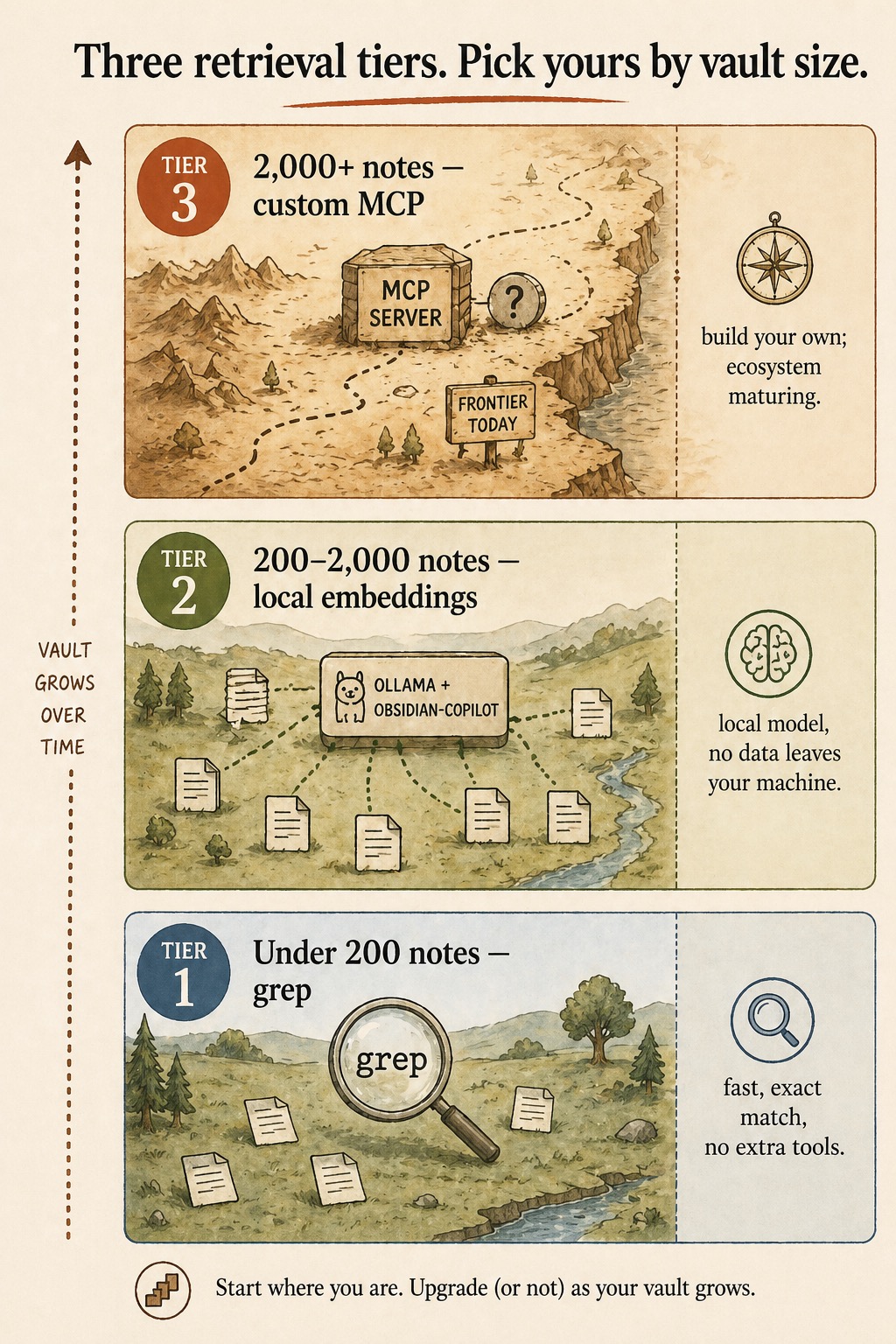
When does semantic search beat grep?
Around 200 notes. Below that threshold, grep finds anything you ask for in the time it takes to type the question. A 200-note vault has small enough surface area that exact match is usually what you want.
Above it, grep starts returning thirty hits per query, none of them obviously the right one. The retrieval problem changes shape. The fix at this scale is local embeddings: notes get indexed by topical similarity, and a query like “what did I decide about pricing last quarter” returns the right note even if the keyword “pricing” doesn’t appear verbatim.
The full ladder, from the diagram above:
| Tier | Vault size | Tool | What it does |
|---|---|---|---|
| 1 | Under 200 notes | grep | Fast, exact match, no extra tools |
| 2 | 200 to 2,000 notes | Ollama + obsidian-copilot | Local model, no data leaves your machine |
| 3 | 2,000+ notes | Custom MCP server | Frontier today; build your own as the ecosystem matures |
Start where you are. Upgrade (or not) as your vault grows.
Step 1: Install Ollama
On macOS or Windows, download from ollama.com and run the installer. On Linux, one line:
curl -fsSL https://ollama.com/install.sh | shVerify the install:
ollama --versionYou should see a version number. If not, the binary isn’t on your PATH yet. Reopen the terminal.
Step 2: Pull an embedding model
ollama pull nomic-embed-textThat pulls a small, fast embedding model that handles markdown well. An alternative the obsidian-copilot docs name is mxbai-embed-large, which is slower but produces more precise embeddings:
ollama pull mxbai-embed-largeEither works. Start with nomic-embed-text. Switch to mxbai-embed-large if results aren’t precise enough.
A note on flags: there is no --quantize flag on ollama pull. Quantization is a model tag (e.g., nomic-embed-text:q4_K_M), not a CLI flag. Blog posts that suggest otherwise guessed wrong; following them produces an error.
Step 3: Set OLLAMA_ORIGINS before starting the server
This is the gotcha most setups hit. The Obsidian plugin can’t connect to local Ollama unless you allow the Obsidian app origin first:
export OLLAMA_ORIGINS="app://obsidian.md*"
ollama serve
If you start ollama serve first and then export the variable, the variable doesn’t take effect. Quit Ollama (Ctrl+C), set the variable, restart. Make this permanent by adding the export line to your ~/.zshrc or ~/.bashrc.
Step 4: Install and configure obsidian-copilot
Install the plugin: Obsidian → Settings → Community plugins → Browse → search “Copilot for Obsidian” → Install → Enable. Make sure safe mode is off; the plugin is mature but Obsidian flags every community plugin regardless.
The verbatim Ollama setup snippet from the obsidian-copilot docs:
### Ollama

Runs open-source models locally on your machine.

- **Default port**: 11434
- **URL**: `http://localhost:11434/v1/`
- **Setup**: Install Ollama (ollama.ai), pull a model, then add it in
  Copilot's Model settings
- **No API key required**
In the plugin settings, click “Add Custom Model.” Provider: Ollama. Model name: nomic-embed-text (or whichever you pulled). Save. The plugin connects and begins indexing.
The local-provider comparison from the same docs page:
| Provider | Default port | Endpoint URL | API key | Notes |
|---|---|---|---|---|
| Ollama | 11434 | http://localhost:11434/v1/ | None | Pull a model first via ollama pull <model> |
| LM Studio | 1234 | http://localhost:1234/v1 | None | Must enable CORS in Developer tab before “Start Server” |
| 3rd Party (OpenAI-format) | varies | user-supplied base URL | optional | For vLLM, LiteLLM, custom proxies; enable CORS toggle if provider lacks CORS support |
If you ever switch to LM Studio, the equivalent gotcha is the CORS toggle in the Developer tab. Same shape of problem, different tool.
What broke on first run
The obsidian-copilot docs name the most common Ollama failure verbatim: “Connection refused. Make sure Ollama is running (ollama serve) and the port is correct.” That covers two real failure modes.
Ollama isn’t running. The installer drops the binary, but it doesn’t autostart on every platform. Run ollama serve in a terminal and leave that window open while you use Obsidian. (Mac users: the desktop app starts the server automatically; Linux users typically need to run it manually or set up a systemd unit.)
The plugin started before Ollama was up. Symptom: connection refused, even though ollama serve is running now. Fix: in Obsidian’s Copilot settings, toggle the model off and on again. The plugin retries the connection on the toggle.
OLLAMA_ORIGINS not set. Symptom: connection accepted but indexing fails silently or returns no embeddings. Fix: confirm the env var is in your shell profile, kill ollama serve, restart it. The variable must be in scope of the process that ran ollama serve.
If none of those three explain it, try a curl test against the local endpoint to isolate plugin issues from Ollama issues:
curl http://localhost:11434/v1/modelsYou should see a JSON list of pulled models. If that works but the plugin still can’t connect, the issue is the plugin config (model name typo, wrong provider). If that fails, the issue is Ollama itself.
What semantic search won’t fix
Embeddings are good at semantic recall: finding notes that talk about a concept even when the keywords don’t match. They are not good at exact-fact retrieval.
Ask “what was the dollar amount in the Acme contract” and embeddings return the right notes. Ask “what was the exact phrase Priya used about the deadline” and embeddings might miss the right note in favor of a topically-similar one. For exact-phrase retrieval, grep is still the right tool. The smart move is running both: embeddings for “find me notes about X,” grep for “find me the line where I wrote Y.” The Copilot panel exposes both modes.
A second limit: embeddings index file contents, not the relationships between files. If your reasoning depends on which two notes link to each other, the wikilink graph and the cross-linker subagent are the better tools. Embeddings tell you about content; graphs tell you about structure.
What should you actually do?
- If your vault is under 200 notes → skip this stack. Grep is faster than the install. Revisit when search results stop trusting themselves.
- If your vault is 200 to 2,000 notes → Ollama + obsidian-copilot is the answer. Twenty minutes, free, local.
- If your vault is over 2,000 notes → start with the same stack. Tier 3 (custom MCP server) is a frontier project; most readers never need to leave Tier 2.
bottom_line
- Local first. The Ollama path keeps your vault on your machine. Cloud-API embeddings are unnecessary for the 200-to-2,000-note band.
- The OLLAMA_ORIGINS env var is load-bearing. Set it in your shell profile so the gotcha never bites again.
- Embeddings extend grep, they don’t replace it. Use both.
Frequently Asked Questions
How big does my Obsidian vault need to be before semantic search beats grep?+
Around 200 notes. Below that, grep returns three relevant hits in the time it takes to type the query. Above 2,000 notes, even semantic search starts wanting a dedicated MCP server. The sweet spot for Ollama plus obsidian-copilot is the 200-to-2,000 band.
Which Ollama embedding model should I pull first?+
Start with nomic-embed-text. It is small, fast, and handles markdown well. Switch to mxbai-embed-large if your search results aren't precise enough. The obsidian-copilot docs note both work; the trade-off is speed versus precision.
Why does the obsidian-copilot panel say 'connection refused' on first run?+
Two common causes. Either Ollama isn't running (`ollama serve`) or the OLLAMA_ORIGINS environment variable wasn't set before Ollama started. The plugin can't connect to local Ollama unless the origin is allow-listed first.