Five Claude Code Lifecycle Hooks for Your Obsidian Vault
Configure five Claude Code lifecycle hooks (SessionStart, UserPromptSubmit, PostToolUse, PreCompact, Stop) that load and re-inject vault context every prompt.
>This covers the five lifecycle hooks. Claude Code + Obsidian: The AI Second Brain Playbook goes deeper on the three subagents and the role-specific weekly reviews that scale past 2,000 notes.
Claude Code + Obsidian: The AI Second Brain Playbook
Build Your AI's Long Term Memory in a Weekend
Summary:
- Configure the five Claude Code lifecycle hooks that fire automatically on every session.
- Get the SessionStart handler script and the JSON payload schema as copy-paste.
- See how PostToolUse with a Matcher: Edit|Write chip turns Claude into a vault auditor.
- Avoid the three first-time-author failures that silently break the loop.
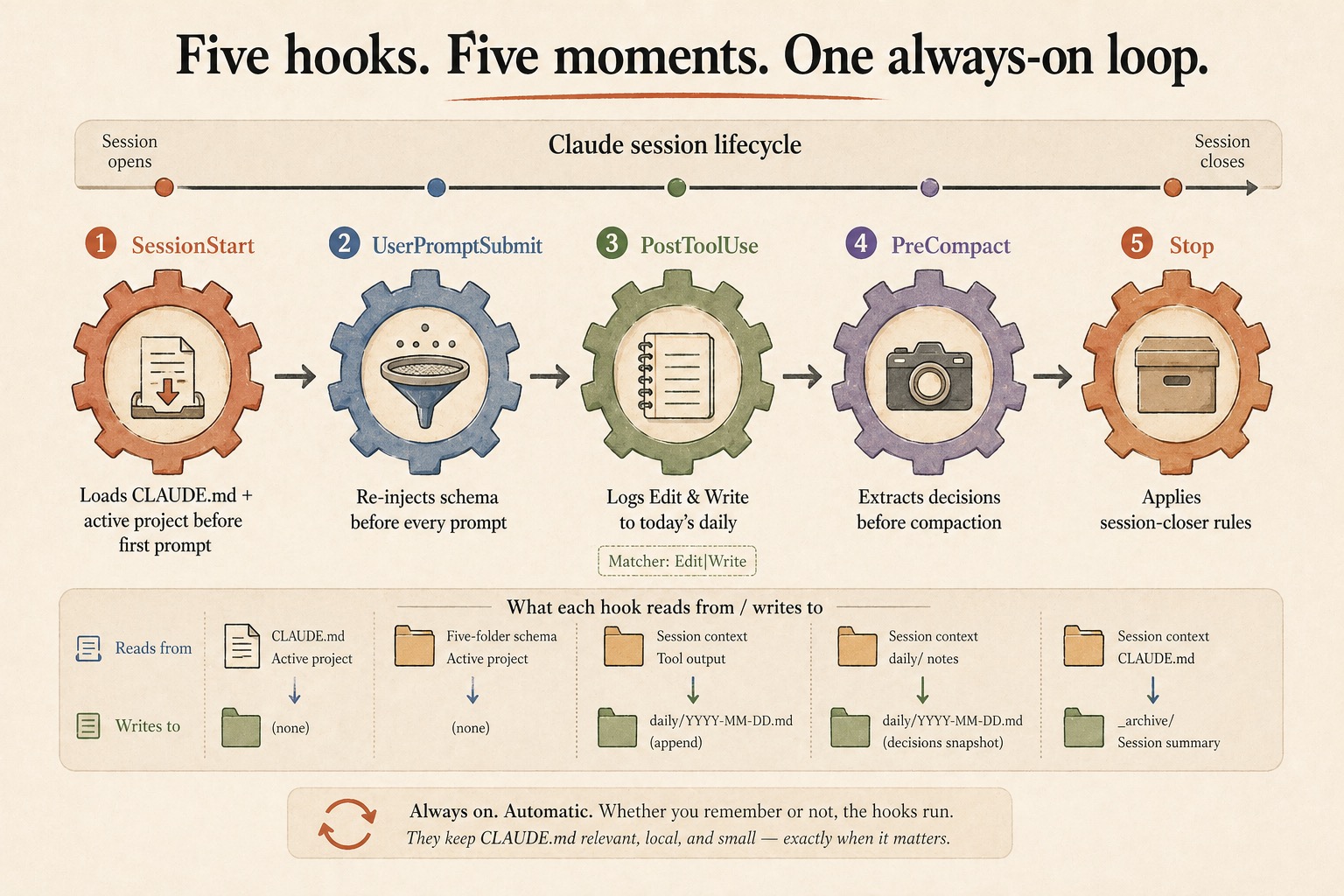
The Claude Code lifecycle hooks SessionStart, UserPromptSubmit, PostToolUse, PreCompact, and Stop fire at five different moments in every Claude session. Configure them once and they keep your CLAUDE.md present-tense across long sessions instead of fading into background. Below is the actual settings.json, the handler scripts, and the JSON payload schema straight from Anthropic’s docs.
What is a Claude Code lifecycle hook?
A hook is an event trigger configured in .claude/settings.json that fires when the runtime hits a named lifecycle event. The trigger names a hook event (SessionStart, PostToolUse, etc.), an optional matcher (which tool calls or sub-events to fire on), and a handler (typically a shell command). The handler script can live anywhere on disk; the convention is .claude/hooks/. The settings file is what matters.
A minimal config looks like this:
{
  "hooks": {
    "PostToolUse": [
      {
        "matcher": "Edit|Write",
        "hooks": [
          { "type": "command", "command": ".claude/hooks/lint-check.sh" }
        ]
      }
    ]
  }
}
That tells the runtime: every time Claude finishes an Edit or Write tool call, run the script at .claude/hooks/lint-check.sh. The matcher is a regex; this one fires on Edit OR Write but not other tools. The chip on PostToolUse in the diagram above (Matcher: Edit|Write) is exactly this regex.
The five hooks for an Obsidian vault
For a vault setup, five events do most of the work. Each one fires at a different moment, receives a different payload, and reads or writes a different slice of the vault.
| Hook | When it fires | Cadence | What it does |
|---|---|---|---|
SessionStart | Session begins or resumes | Once per session | Loads CLAUDE.md + active project before first prompt |
UserPromptSubmit | User submits a prompt | Once per turn | Re-injects schema before every prompt |
PostToolUse | After a tool call | Every Edit/Write | Logs Edit & Write to today’s daily |
PreCompact | Before context compaction | When compaction triggers | Extracts decisions before compaction |
Stop | Claude finishes responding | Once per turn | Applies session-closer rules |
Always on. Automatic. Whether you remember or not, the hooks run. They keep CLAUDE.md relevant, local, and small, exactly when it matters.
The SessionStart payload
This is the schema the runtime hands your handler on stdin. From the official Claude Code Hooks reference:
{
  "session_id": "abc123",
  "transcript_path": "/Users/.../.claude/projects/.../00893aaf-19fa-41d2-8238-13269b9b3ca0.jsonl",
  "cwd": "/Users/...",
  "hook_event_name": "SessionStart",
  "source": "startup",
  "model": "claude-sonnet-4-6"
}
The handler reads that JSON, does its work (read CLAUDE.md, look up the active project, count today’s open tasks), and writes back a JSON object on stdout whose additionalContext string gets injected into Claude’s session before the first user prompt.
The SessionStart handler that loads your vault
Save this as .claude/hooks/session-start.sh inside the vault and chmod +x it:
#!/usr/bin/env bash
set -euo pipefail

VAULT="${CLAUDE_PROJECT_DIR:-.}"
CLAUDE_MD=$(cat "$VAULT/CLAUDE.md" 2>/dev/null || echo "")

CONTEXT=$(printf "Vault context loaded.\n\n=== CLAUDE.md ===\n%s" "$CLAUDE_MD")

jq -n --arg ctx "$CONTEXT" \
  '{hookSpecificOutput: {hookEventName: "SessionStart", additionalContext: $ctx}}'
Then wire it in .claude/settings.json:
{
  "hooks": {
    "SessionStart": [
      {
        "matcher": "startup|resume",
        "hooks": [
          { "type": "command", "command": ".claude/hooks/session-start.sh" }
        ]
      }
    ]
  }
}
The matcher startup|resume covers fresh claude sessions and claude -c resumes. It deliberately skips clear (you just asked for a clean slate) and compact (PreCompact handles that case). When you start a new session in the vault, Claude opens already knowing what’s in CLAUDE.md. You didn’t tell it. The hook did.
What broke the first time I wired hooks
Three first-author failures account for almost every broken hook. None of them require deep debugging once you know what to look for.
Forgot chmod +x. The script runs fine in the terminal because bash session-start.sh works regardless of executable bit. The runtime calls the script directly, so the file needs chmod +x. Symptom: the hook silently does nothing. Fix: chmod +x .claude/hooks/session-start.sh.
jq not installed. Every handler in this set uses jq to emit the JSON output. On a fresh laptop, jq is often missing. Symptom: stderr says jq: command not found but the runtime swallows the error. Fix: brew install jq (macOS), apt install jq (Debian/Ubuntu), winget install jqlang.jq (Windows).
Relative path that resolves differently. Hooks run with the current working directory set by Claude Code, which may not be the same as your terminal’s directory. A relative path that works manually breaks under the runtime. Fix: use ${CLAUDE_PROJECT_DIR:-.} inside scripts. Claude Code exports CLAUDE_PROJECT_DIR as the launch directory; the fallback covers manual testing.
If none of those three explain it, run the handler manually with a sample stdin:
echo '{"session_id":"test","cwd":"'"$PWD"'","hook_event_name":"SessionStart","source":"startup"}' \
  | .claude/hooks/session-start.sh
You should see a JSON object on stdout with hookSpecificOutput.additionalContext populated. Empty stdout means the script is broken. Anything else means the registration in settings.json is wrong.
The 29 events Claude Code actually supports
The five hooks above are the lifecycle slice. The official docs list 29 events total. The full list (verbatim):
SessionStartSessionEndUserPromptSubmitUserPromptExpansionPreToolUsePostToolUsePostToolUseFailurePostToolBatchPermissionRequestPermissionDeniedNotificationSubagentStartSubagentStopStopStopFailureTaskCreatedTaskCompletedTeammateIdlePreCompactPostCompactConfigChangeInstructionsLoadedCwdChangedFileChangedWorktreeCreateWorktreeRemoveSetupElicitationElicitationResult
Most of those are for advanced setups (subagent telemetry, worktree management, permission callbacks). The five-hook lifecycle covers 90% of the vault use case. Reach for the others when a specific need shows up, not before.
Manual hooks are not a thing
A common framing on Reddit: “How are you handling the lifecycle hooks, manual triggers or automated?” The framing carries an assumption worth correcting. There is no manual-hook category. Hooks are lifecycle event handlers. They fire automatically when the runtime detects the event. The thing some people call “manual hooks” is a slash command (a skill in .claude/commands/) that does similar work. Both have their place: hooks fire whether you remember or not; slash commands let you re-trigger work mid-session. The book uses both, in the layers they belong.
What should you actually do?
- If your vault has a CLAUDE.md but Claude still drifts on long sessions → wire SessionStart and UserPromptSubmit. The two together solve what CLAUDE.md alone does not.
- If you want a vault audit trail without typing one → wire PostToolUse with
Matcher: Edit|Write. Today’s daily file gets a timestamped log of every Edit/Write Claude makes. - If you want a session-closer that fires whether you remember or not → wire Stop with the activity check. It exits silently on read-only Q&A turns and applies your CLAUDE.md session-closer rules when actual vault work happened.
bottom_line
- Hooks fire deterministically. Typed context drifts. The runtime is more reliable than your morning routine.
- The matcher field is load-bearing on PostToolUse.
Edit|Writekeeps logging useful; matching everything makes it noise. - The five-hook lifecycle covers most vault needs. The other 24 events exist for specific reasons; reach for them only when you have one.
Frequently Asked Questions
What does the SessionStart hook actually receive on stdin?+
A JSON payload with session_id, transcript_path, cwd, hook_event_name, source, and model. The handler reads this from stdin, does its work (read CLAUDE.md, look up the active project), and writes back a JSON object whose additionalContext field is injected into Claude's working memory before the first prompt.
How many lifecycle hook events does Claude Code support?+
Twenty-nine, per the official docs. The five used for vault context are SessionStart, UserPromptSubmit, PostToolUse, PreCompact, and Stop. Others cover tool-level events, subagents, permissions, worktrees, and session compaction.
Why use lifecycle hooks instead of just typing context at the start of every session?+
Hooks fire deterministically whether you remember or not. Typed context drifts the moment you forget. SessionStart re-loads CLAUDE.md and the active project file every session. UserPromptSubmit re-injects the schema before every prompt. The discipline lives in the runtime, not your morning routine.