How to Build a 5-Folder Obsidian Vault for Claude Code
Ship the Obsidian vault structure Claude Code uses as primary context: five folders, install commands, and the smoke test that proves the loop in 60 minutes.
>This covers the 5-folder vault. Claude Code + Obsidian: The AI Second Brain Playbook goes deeper on the CLAUDE.md, lifecycle hooks, and three subagents that scale past 2,000 notes.

Claude Code + Obsidian: The AI Second Brain Playbook
Build Your AI's Long Term Memory in a Weekend
Summary:
- Ship the 5-folder Obsidian vault structure Claude Code reads as primary context.
- Get the install commands, README templates, and smoke-test prompt as copy-paste.
- See why folders beat tags for AI retrieval and why one vault works for most readers.
- Avoid the three folders newcomers add that always wreck the schema.
The right Claude Code Obsidian vault structure is five folders. Not seven. Not twenty. Five, with two underscored at the top so they float in your file tree. Ship them in an hour and stop fighting your AI for context every morning.
How do you structure an Obsidian vault for Claude Code?
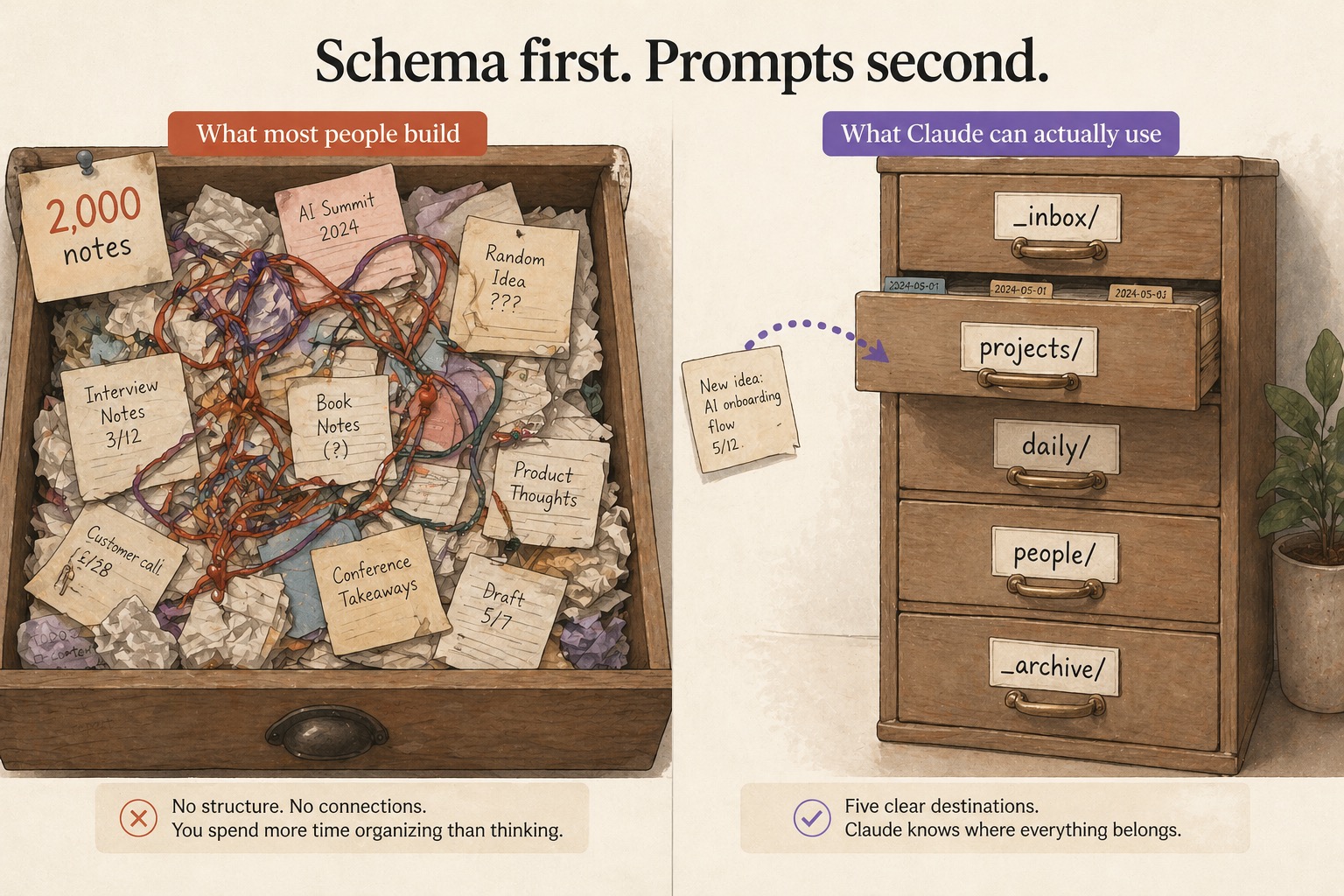
You build a 5-folder schema and put every note in exactly one folder. The five: _inbox/, projects/, daily/, people/, _archive/. The leading underscores on _inbox/ and _archive/ sort them to the top alphabetically so your eye lands on them. Everything else lives below.
Claude reads file paths as primary context. A note inside projects/exports-api/ is unambiguous to the model. The same note at vault root with #project #api #export tags is three labels with no implicit hierarchy. The folder tells Claude what it is. The tags tell it nothing it can act on.
Run this from inside your vault root to create the schema:
mkdir -p _inbox projects daily people _archiveReload Obsidian. The five folders show up in the file pane. The whole schema fits on a sticky note. If it doesn’t, you broke a rule.
What broke before this schema
I watched a vault grow to 2,000 notes with no structure. Same daily Claude habit, no schema. The graph view looked impressive at the demo and was useless inside two months. Every search returned thirty hits. Most of them were copy-pasted Claude conversations saved because they “felt useful at the time.” You scroll, you give up, you write the note again. Multiply by a year. That is the cost of skipping the schema on day one.
Tag spaghetti is the other failure mode. Notes accumulate seven tags each, half of which you don’t remember inventing, and search-by-tag gets no faster than search-by-text. Adding tags multiplies the chaos because the routing decision moves from one choice (folder) to many (tags), and the cost of a bad tag isn’t visible for months.
The schema fixes both because every capture has exactly one home. The discipline lives in the constraint, not in your willpower.
What goes in each folder
Five folders, five contracts. Memorize them once.
| Folder | What goes here | What does NOT |
|---|---|---|
_inbox/ | Anything you capture quickly, unclassified | Anything already classified: route directly |
projects/ | Active work, one subfolder per project | Anything dormant for 2+ weeks (move to _archive/) |
daily/ | One ISO-dated file per day | Project-specific notes (those go in projects/<name>/) |
people/ | One subfolder per recurring contact | One-off mentions (those live in daily/) |
_archive/ | Dormant projects + processed notes | Anything you actively use this week |
The projects/ folder drifts fastest. The contract: if you haven’t touched a subfolder in two weeks, move it to _archive/projects/<name>/. The active list should fit on a screen. A projects/ with twenty subprojects is lying about the work you’re actually doing.
What Karpathy actually shipped
Andrej Karpathy posted a gist titled llm-wiki.md that started this whole wave. It is intentionally schema-free. He gives the pattern in three layers, not a directory tree. The verbatim “Architecture” section from the LLM Wiki gist:
**Raw sources**: your curated collection of source documents. Articles, papers,
images, data files. These are immutable: the LLM reads from them but never
modifies them. This is your source of truth.

**The wiki**: a directory of LLM-generated markdown files. Summaries, entity
pages, concept pages, comparisons, an overview, a synthesis. The LLM owns this
layer entirely.

**The schema**: a document (e.g. CLAUDE.md for Claude Code) that tells the LLM
how the wiki is structured, what the conventions are, and what workflows to
follow when ingesting sources.
In the closing note Karpathy writes: “The right way to use this is to share it with your LLM agent and work together to instantiate a version that fits your needs.” The 5-folder schema in this article is one of those instantiations. The pattern is his. The specifics, _inbox/, projects/, daily/, people/, _archive/, are what works for knowledge workers, freelancers, and PMs who built the version that survives a year of daily use.
Drop a README in each folder
The schema needs labels. Each folder gets a 3-line README so future-you, and Claude on session 50, knows what belongs there:
cat > _inbox/README.md <<'EOF'
# _inbox/
Capture-first folder. Anything you write down quickly.
Notes here are temporary. Route or archive within 7 days.
EOF
Repeat for the other four. The body in each is one sentence on what goes there and one on what does not. The READMEs are for two readers: future-you, who forgets the rules in a month, and Claude, who reads each README to ground its sense of the folder’s purpose. Without them, every write is a guess. With them, the write is deterministic.
The smoke test that proves the loop
Open Claude Code from inside your vault:
cd ~/vault && claudeType this prompt:
Create a markdown file at
_inbox/test-vault-check.mdcontaining the current date and one line that says “vault read/write loop verified.”
Watch the Obsidian file pane. The file appears in _inbox/ without you doing anything else. No refresh, no plugin, no sync trigger. Obsidian watches the directory; Claude wrote one. Open the file. Read what Claude wrote.
If the file appears, you have a working vault. The loop is closed. Everything else, the CLAUDE.md, the lifecycle hooks, the three subagents, is making the loop richer. If the file doesn’t appear, you’re running claude from the wrong directory. Quit, cd ~/vault, run claude again. That’s the failure mode 90% of the time.
Three folders newcomers always want to add
Three temptations show up in month one. None of them solve the problem they seem to.
references/. “I have articles, PDFs, reference material that don’t fit the five.” They fit. Reference material lives in projects/<name>/refs/ while the project is active and _archive/refs/ when not. A standalone references/ folder accumulates indefinitely and gets searched once a year.
templates/. “Where do my markdown templates live?” In .claude/commands/ (the skill files) or _archive/templates/. Templates are tools, not content. The vault is for content.
someday/ or ideas/. “I have ideas I might act on someday.” They go in _inbox/. If they survive the first weekly review, they become a projects/ entry. If not, _archive/. A standalone someday/ is a graveyard of half-baked ideas, which is exactly what _archive/ already does honestly.
The pattern: a sixth folder feels like it solves a real categorization problem. It adds a sixth decision point at every capture, and decision points are where schema discipline cracks. Five is the cap.
What should you actually do?
- If you have a fresh Obsidian vault → run
mkdir -p _inbox projects daily people _archive, drop the READMEs, run the smoke test. One hour, done. - If you have an existing junk-drawer vault → bulk-move everything into
_archive/, start the five folders empty, route new captures going forward. Don’t mass-import. That’s how week one drowns. - If you have multi-context work (NDA clients, multiple jobs) → one vault per privacy boundary, the same five folders inside each. Privacy splits are not the same as organization splits.
bottom_line
- Five folders, one home per note. The constraint is the discipline.
- Folders beat tags for AI retrieval. Claude reads the path; tags add ambiguity.
- The smoke test is the only thing that matters in the install hour. If Claude can write a file you see in Obsidian, you’re done.
Frequently Asked Questions
What folder structure does Claude Code expect in an Obsidian vault?+
There is no required structure. The five folders that work in practice are _inbox/, projects/, daily/, people/, _archive/. Every note goes in exactly one. Underscores on _inbox/ and _archive/ float them to the top of the tree.
Should I use one Obsidian vault or multiple for Claude Code?+
One vault is right for most people. Split into multiple only when you have a real privacy boundary, like NDA client material or separate jobs. Don't split for organization. That's what the five folders are for.
Why does Claude care about folder names if I have tags?+
Claude reads file paths as primary context. A note inside projects/exports-api/ is unambiguous to the model. The same note at vault root with #project #api tags is three labels with no implicit hierarchy. The folder tells Claude what it is. Tags add ambiguity.