Claude Code vs Cursor vs Copilot — Which Actually Ships?
>This covers tool selection. Master Claude Code goes deep on the Claude Code side: multi-agent pipelines, production hardening, and $150/hr consulting setups.
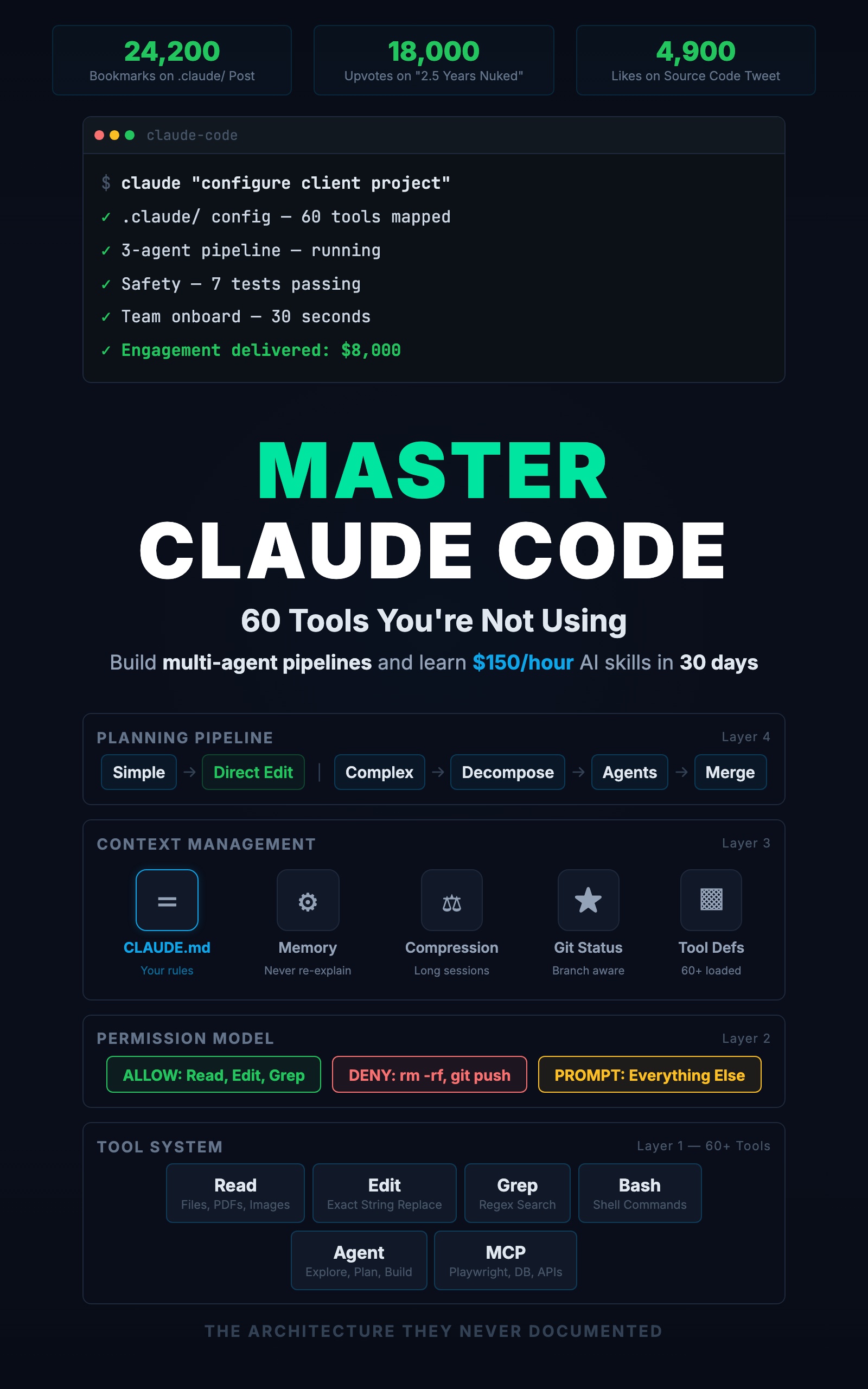
Master Claude Code: 60 Tools You're Not Using
Build Multi-Agent Pipelines and Learn $150/Hour AI Skills in 30 Days
Summary:
- Three tasks, three tools, real output comparison.
- The scope-matching rule: line, file, or project.
- A daily cost breakdown from a real development day.
- The three-tool workflow that eliminates overlap.
“Should I use Claude Code or Cursor?” is the wrong question. It is like asking “should I use a hammer or a screwdriver?” The answer depends on the nail.
This article does not compare tools abstractly. It takes three tasks at different scales, runs them through Copilot, Cursor, and Claude Code, and shows what each one produces.
How does each tool handle inline completion?
You are typing a Zod validation schema. You have written two lines:
const createTaskSchema = z.object({
  title: z.string().min(1).max(200),
Copilot suggests the next lines as you type:
// Copilot autocompletes — one Tab keystroke, two seconds
  description: z.string().optional(),
  priority: z.enum(['low', 'medium', 'high']).default('medium'),
})
Done. You hit Tab once and the schema is finished.
Cursor requires opening the inline chat and asking “complete this schema.” Same result, but about 10 seconds because you had to describe the task.
Claude Code requires switching to your terminal and typing “add a Zod schema for task creation to the validation file.” Same result, about 15 seconds plus the context switch overhead.
Winner: Copilot. For inline completions where you already know the shape, Copilot is instant. Using Claude Code for this is driving to the corner store.
How does each tool handle a single-file edit?
Your POST /tasks route is missing error handling. The handler needs try/catch with your project’s pattern.
Copilot suggests a generic catch block:
// Copilot's output — wrong response shape, no middleware pattern
} catch (error) {
  res.status(500).json({ error: 'Internal server error' })
}
Does not match your { data, error, meta } shape. Does not use next(err). You would rewrite it manually.
Cursor reads the file, sees your pattern in the other route handlers, and generates:
// Cursor's output — matches existing patterns
router.post('/tasks', authMiddleware, validate(createTaskSchema),
  async (req, res, next) => {
    try {
      const task = await taskService.createTask(req.user.id, req.body)
      res.status(201).json({ data: task, error: null, meta: null })
    } catch (err) {
      next(err)
    }
})
Correct pattern, consistent with the file. Inline in the editor. About 15 seconds.
Claude Code reads the file, finds the same pattern, makes the same edit. About 20 seconds, plus the terminal round-trip.
Winner: Cursor. For single-file edits where the context is in the current file, Cursor gets the right answer fastest. Copilot gets it wrong because it cannot see your patterns. Claude Code gets it right but is slower.
How does each tool handle a project-wide change?
You realize none of your list endpoints validate query parameters. Five endpoints across three route files need Zod validation for limit and offset.
Copilot cannot help. It works on the current line, not across files.
Cursor can handle 1-3 files. Five endpoints across three files with a shared validation pattern? It might miss files. It does not read your CLAUDE.md to know that all validation should use Zod.
Claude Code searches the project, finds all 6 GET endpoints across 3 files, creates a shared validation schema, applies it everywhere, and runs tests:
Grep: pattern "router.get" in src/routes/
  → 6 endpoints across 3 files

Write: src/middleware/validate.ts
  → creates listQuerySchema with Zod

Edit: src/routes/tasks.ts, tags.ts, users.ts
  → adds validation to each GET endpoint

Bash: npm test
  → all tests passing
Seven tool calls, three files updated, one shared schema created. Under two minutes.
Winner: Claude Code. For project-wide changes that require finding files, reading patterns, creating shared code, and editing multiple files consistently, Claude Code is the only tool that does it in one request.
What is the scope-matching rule?
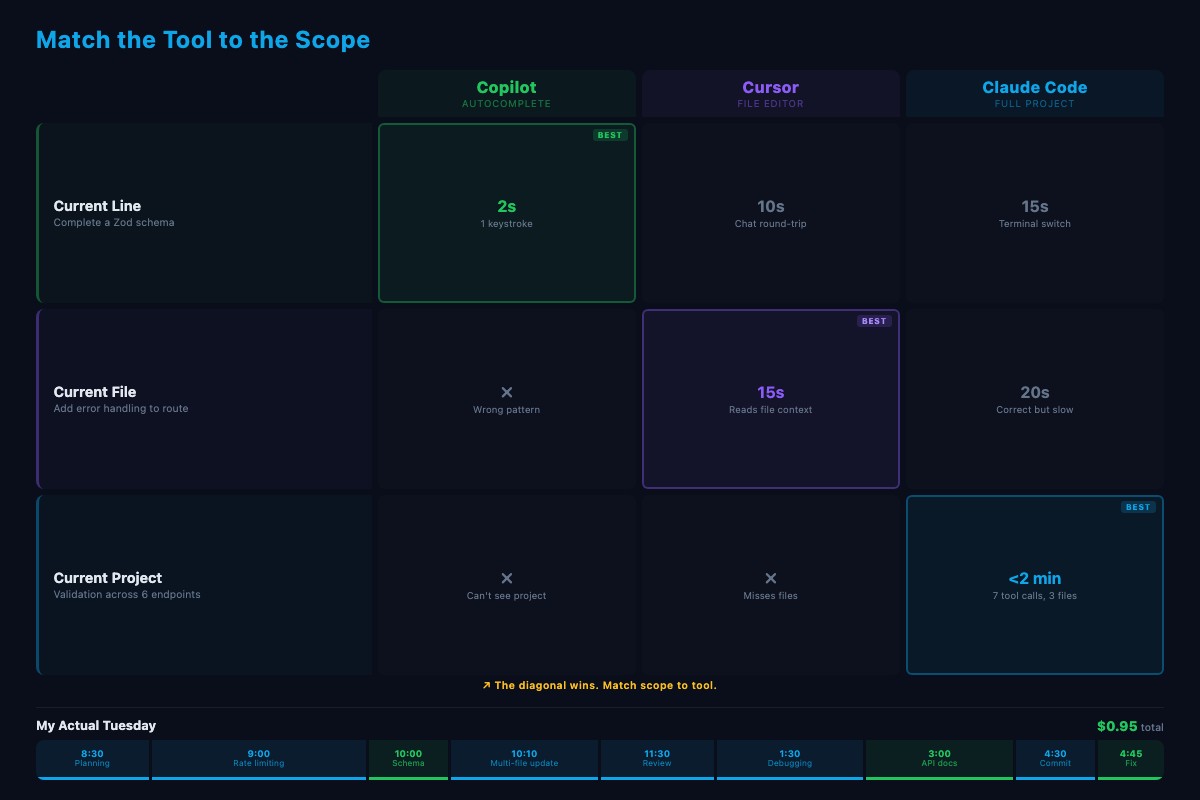
| Task Scope | Best Tool | Why |
|---|---|---|
| Current line | Copilot | Instant, zero friction |
| Current file | Cursor | Reads file context, inline editing |
| Current project | Claude Code | Reads all files, runs commands, multi-step |
This is not a brand preference. It is a scope question. Match the tool to the scope.
From a Builder.io analysis comparing the two tools:
“Independent testing found Claude Code uses 5.5x fewer tokens than Cursor for identical tasks.”
Claude Code is more token-efficient for the tasks it is best at. But efficiency does not matter if the task only needs Copilot.
What does a real development day look like?
Here is one Tuesday with all three tools:
| Time | Tool | Task | Cost |
|---|---|---|---|
| 8:30 AM | Claude Code | Planning: scan git log, pick today’s priorities | $0.08 |
| 9:00 AM | Claude Code + Cursor | Build rate limiting: CC installs and applies middleware, Cursor fixes a variable name | $0.35 |
| 10:00 AM | Copilot + Claude Code | Add priority field: Copilot completes the schema, CC updates routes and tests | $0.22 |
| 11:30 AM | Claude Code | Code review: run /project:review, write missing tests | $0.12 |
| 1:30 PM | Claude Code | Debug intermittent test failure, find race condition | $0.18 |
| 3:00 PM | Copilot | Update API docs: type signature, Copilot fills descriptions | $0.00 |
| 4:30 PM | Claude Code | Generate commit message from diff | $0.00 |
Total daily cost: $0.95. About the price of a bad coffee.
The pattern: Claude Code handles multi-step work (planning, building, reviewing, debugging). Cursor handles in-editor edits (rename a variable, adjust an error message). Copilot handles the typing (schema completion, doc formatting, quick fixes). Three scopes, zero overlap.
How do you test the scope-matching rule on your project?
Run these three tasks right now on your own codebase:
-
Line scope: Open any file in VS Code. Start typing a function signature or variable declaration. Does Copilot complete it before you finish typing? That is the line-scope tool working.
-
File scope: Pick one function that needs a change (rename a variable, add error handling, fix a return type). Select it in Cursor and describe the change. Did Cursor get it right on the first try without touching other files?
-
Project scope: Ask Claude Code: “Find every file that imports [a module from your project] and rename the import from X to Y.” Watch it Grep across the codebase, find every reference, and Edit each file. Count how many files it touched.
If each tool handled its scope cleanly, the rule works for your project. If Cursor tried to edit multiple files and missed one, or Claude Code was slow on a one-line fix, you found a mismatch to remember.
How do you set up the three-tool workflow?
Layout: VS Code on the left (two-thirds of screen), Claude Code terminal on the right. Copilot runs inside VS Code automatically.
Switching: Ctrl+backtick toggles between editor and terminal. When Claude Code edits a file that is open in VS Code, the editor detects the change and reloads automatically.
Session hygiene: One Claude Code session per task. When you switch from rate limiting to debugging, start a fresh session. Long sessions accumulate context that makes each call slower and more expensive.
The cheapest call is the one you do not make. Every line Copilot completes is a line Claude Code does not generate. Every single-file edit Cursor handles is a multi-step task Claude Code does not orchestrate.
What should you actually do?
- If you only use Claude Code for everything: stop. Use Copilot for inline completions and Cursor for single-file edits. Reserve Claude Code for the multi-step, multi-file work where it is genuinely the best tool.
- If you only use Cursor: try Claude Code for the next task that touches more than 3 files. Watch it find, plan, and edit across the project in one request.
- If you are just starting: set up VS Code with Copilot, install Claude Code in a terminal pane, and spend one day tracking your tool usage. Every time you use any AI tool, write down: the task, the tool, and whether the result needed corrections. After one day, look for mismatches. Where did you use Claude Code but Copilot would have been faster? Where did you use Cursor but the task touched 5 files? Those mismatches become your personal switching rules.
bottom_line
- The fastest developer does not master one AI tool. They match the tool to the task: Copilot for the current line, Cursor for the current file, Claude Code for the current project.
- The three-tool stack costs under $1/day. The skill is the switching, not the tools themselves.
- If you find yourself re-explaining your project to Claude Code on every small edit, you are using the wrong tool. Switch to Cursor. Save Claude Code for the work that needs its power.
Frequently Asked Questions
Should I use Claude Code or Cursor?+
Both. Claude Code handles project-wide multi-file changes from the terminal. Cursor handles single-file edits inside the editor. Match the tool to the scope of the task.
How much does Claude Code cost per day?+
A developer using Claude Code for complex tasks and Copilot for inline completion should expect $1 to $3 per day in API costs. About $30 to $60 per month for 20 working days.
Is Claude Code better than Cursor for coding?+
For project-wide changes touching multiple files, yes. For quick in-editor edits where you are already looking at the code, Cursor is faster. The skill is knowing when to switch, not picking a winner.
More from this Book
You're Using 10% of Claude Code
All 60+ tools inside Claude Code mapped by task type with real call examples. What each one does, when it fires, and how this changes your prompts forever.
from: Master Claude Code: 60 Tools You're Not Using
The CLAUDE.md Setup That 10x's Your Output
Build a production CLAUDE.md that makes Claude Code follow your conventions, enforce your rules, and remember your entire stack. Copy-paste config included.
from: Master Claude Code: 60 Tools You're Not Using
Build a Multi-Agent Pipeline That Runs Itself
Build a 3-agent research-plan-build pipeline in Claude Code with subagents. Includes cost breakdown, constraint patterns, and a copy-paste command file.
from: Master Claude Code: 60 Tools You're Not Using