You're Using 10% of Claude Code
>This maps the tool system. Master Claude Code covers the full architecture, multi-agent pipelines, and production hardening across 200 pages.
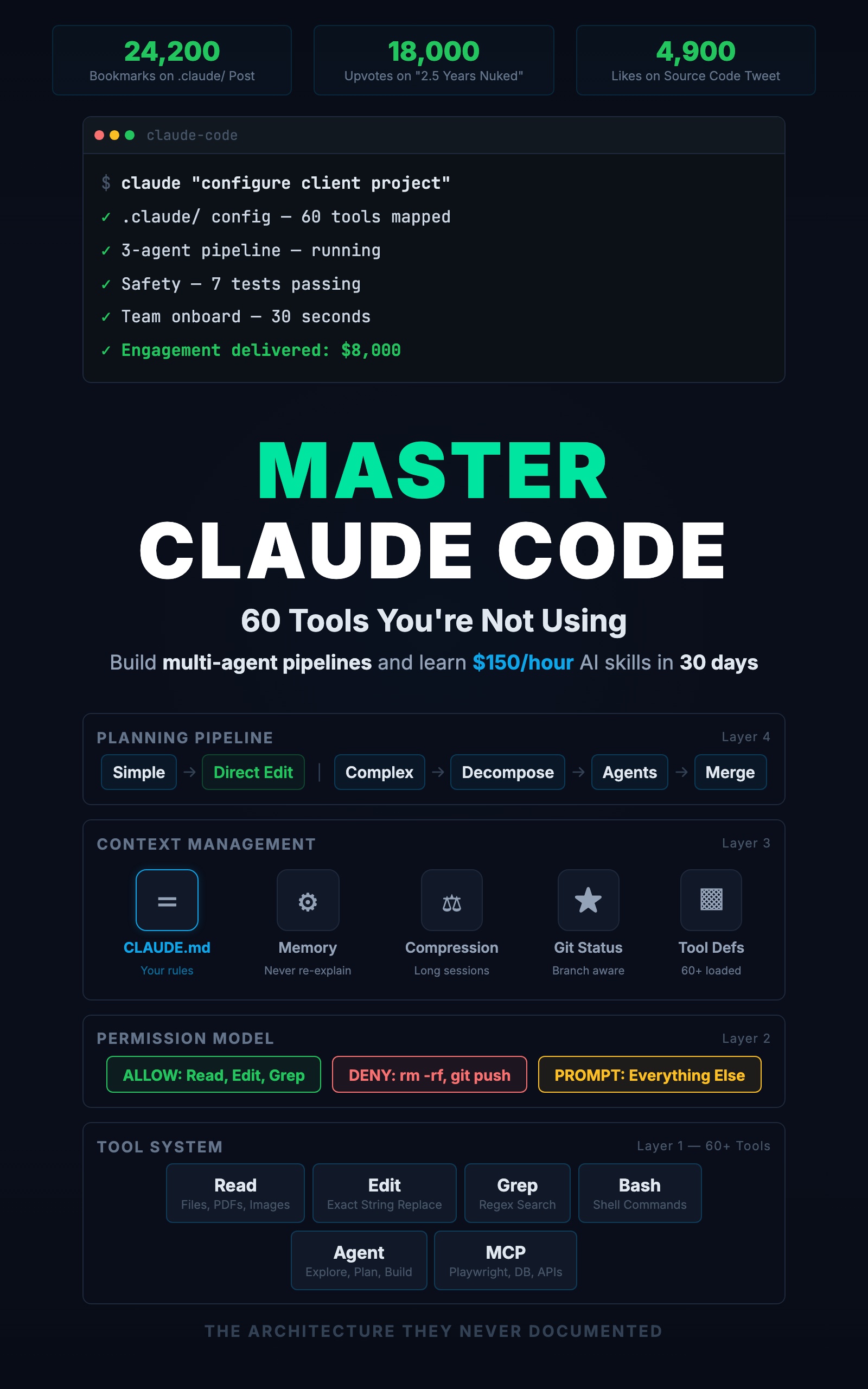
Master Claude Code: 60 Tools You're Not Using
Build Multi-Agent Pipelines and Learn $150/Hour AI Skills in 30 Days
Summary:
- Map every tool in Claude Code’s system by task type.
- Learn which tool fires for which request so you can direct it.
- Copy a task-type reference sheet you can use during sessions.
- Understand why some prompts produce great results and others waste tokens.
Somebody posted an analysis of Claude Code’s source and it got 34,700 likes. The number that stopped people scrolling: 60. That is how many internal tools the analysis found inside Claude Code. Not plugins. Not extensions. Built-in tools sitting in your installation right now.
Most developers use about six of them. Read a file. Edit a file. Run a command. Search. Write a file. Explain code. This reference maps the rest.
What tools does Claude Code actually have?
Claude Code is a tool-calling agent with 60+ tools organized into six categories. Here is the complete map:
| Category | Tools | What They Do |
|---|---|---|
| File Operations | Read, Edit, Write, Glob, Grep | Read files, make targeted edits, create files, find files by pattern, search contents |
| Execution | Bash | Run any shell command (tests, builds, git, curl) |
| Agents | Agent (Explore, Plan, General-purpose) | Spawn specialized subagents for research, design, or building |
| Web | WebFetch, WebSearch | Pull web pages, search the internet |
| Task Management | TaskCreate, TaskUpdate, TaskGet, TaskList | Track multi-step work progress |
| Extensions | MCP tools (Playwright, database, etc.) | Connect to any external service via Model Context Protocol |
Which tool fires for which task?
This is the reference table that changes how you prompt. Every common task maps to a tool sequence:
| Your Task | Tool Sequence | Prompt Tip |
|---|---|---|
| Rename a function across the codebase | Grep → Edit (each file) | Tell Claude Code where the function is called to skip the Grep |
| Debug a failing test | Bash (run test) → Read (error) → Read (source) → Edit (fix) → Bash (re-run) | Include the error message in your prompt |
| Add a feature to multiple files | Explore agent → Plan agent → Edit/Write (each file) → Bash (test) | Use the /project:feature command pattern |
| Check what changed recently | Bash (git diff, git log) | Specify the date range or number of commits |
| Find dead code | Grep (function name) → check zero results | ”Grep for any callers of functionName. If zero, it’s dead.” |
| Read API docs from the web | WebFetch (pull page) | Give the exact URL, not “find the docs” |
| Process a CSV or JSON file | Read (file) → Bash (run transform script) → Write (output) | For large files, tell Claude Code to write a script instead of processing inline |
From Latent Space’s analysis of the source code:
“Claude code has less than 20 tools default on (up to 60+ total): AgentTool, BashTool, FileReadTool, FileEditTool, FileWriteTool…”
The remaining tools are deferred. They exist but only load when Claude Code decides it needs them. MCP server tools, notebook editing, and specialized task tools all fall into this category.
How does Edit actually work?
Edit performs exact string replacement, not file rewriting. This is the most misunderstood tool. When you ask Claude Code to fix a function, it does not rewrite your file from scratch. It finds a specific string and replaces it:
Claude Code calls: Edit
  file_path: src/lib/errors.ts
  old_string: "Something went wrong"
  new_string: "Request failed"
The rest of the file is untouched. If that string appears in multiple places, the edit fails. Claude Code then includes more surrounding context to make the match unique:
Claude Code calls: Edit
  old_string: |
    if (!user) {
      throw new AppError("Something went wrong", 500)
    }
  new_string: |
    if (!user) {
      throw new AppError("Request failed", 500)
    }
That is why you sometimes see Claude Code targeting a 10-line block for a 1-line change. It is making the replacement unambiguous.
What to do differently: Instead of “fix the error handling” (Claude Code has to search for it), say “in the createUser function, change the error message from X to Y.” You have given it the context for a first-try edit.
How does the search system work?
Two tools, two jobs. Grep searches file contents. Glob finds files by name.
# When you ask "where is validateUser called?"
# Claude Code calls Grep:
pattern: "validateUser"
path: src/
# Returns: file:line for every match

# When you ask "find all test files"
# Claude Code calls Glob:
pattern: "**/*.test.ts"
# Returns: matching file paths
What to do differently: Help Claude Code narrow the search. “Find where validateUser is called in src/routes/” is faster and cheaper than “find where validateUser is called.” On a large codebase, this saves seconds and tokens.
After a refactoring, use Grep to verify: “Grep for any remaining references to the old function name.” Zero results means the refactoring is complete.
What are the three subagent types?
| Type | Can Read | Can Write | Best For |
|---|---|---|---|
| Explore | Yes | No | Fast codebase scanning, answering “what’s here?” |
| Plan | Yes | No | Architecture design, answering “what should we build?” |
| General-purpose | Yes | Yes | Full builds, debugging, multi-step tasks |
A typical feature build uses all three in sequence:
1. Explore agent: "Find all files related to authentication"
   → Returns structured list of 4 files with patterns

2. Plan agent: "Design how to add OAuth alongside existing JWT"
   → Returns implementation plan with specific files and endpoints

3. Main session: Builds the feature following the plan
   → Uses Read, Edit, Write, Bash to implement
Subagents inherit your CLAUDE.md but not your conversation history. If you discussed a specific approach earlier, include it in the agent prompt. “The user decided to use Passport.js. Plan accordingly.”
What to do differently: Try this right now: “Use an Explore agent to list all API endpoints in this project and their HTTP methods.” You will get a structured audit of your routes in 30 seconds. Then: “Use a Plan agent to design how to add rate limiting to the public endpoints.” You get an architecture proposal before writing a line of code.
How does the permission layer work?
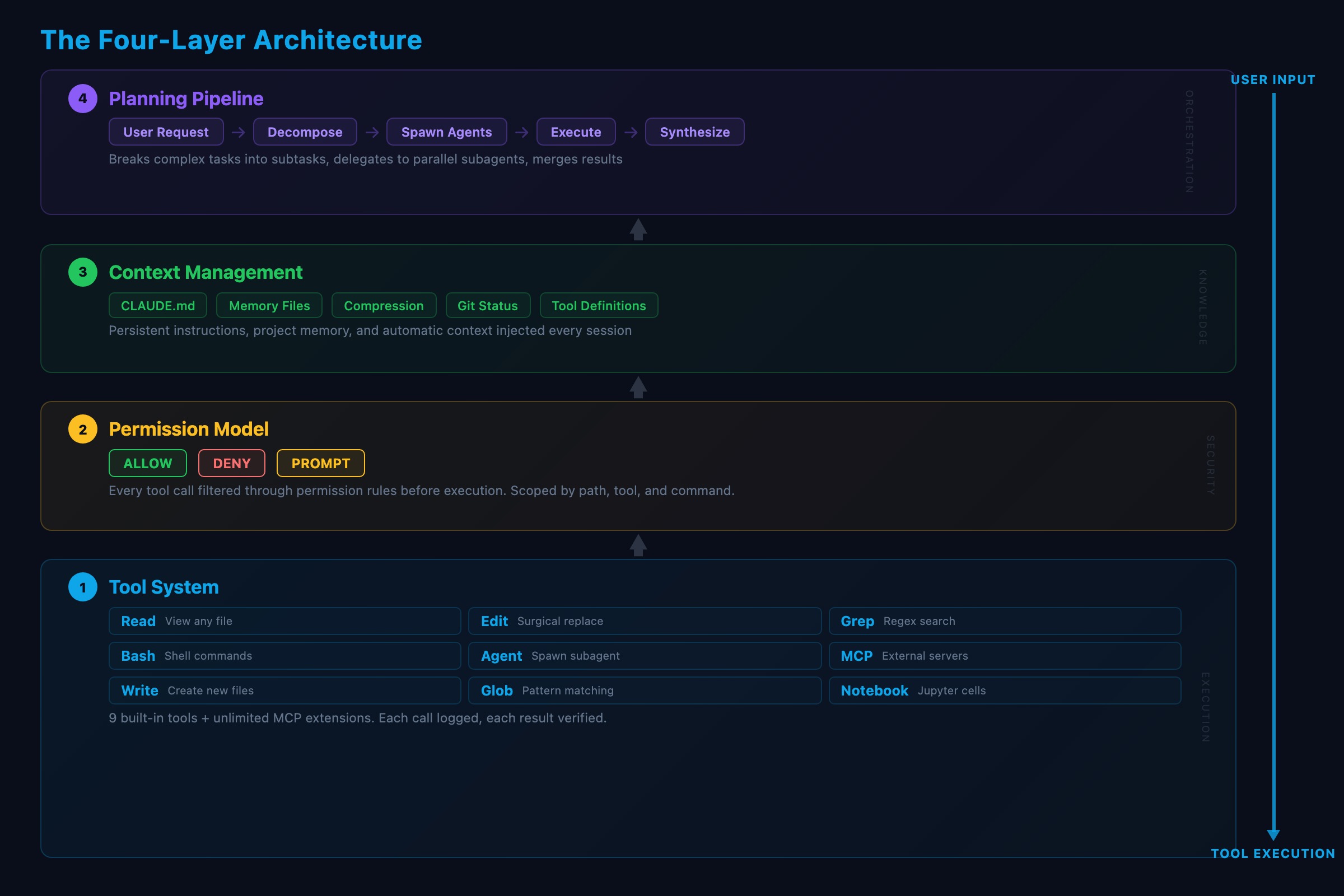
Every tool call passes through a three-layer permission check before executing.
Layer 1: .claude/settings.json (project, committed to git)
Layer 2: .claude/settings.local.json (personal, gitignored)
Layer 3: ~/.claude/settings.json (global defaults)
Allowed tools run silently. Denied tools are blocked completely. Everything else triggers an approval prompt. A deny in any layer overrides allows in other layers.
{
  "permissions": {
    "allow": ["Read", "Edit", "Grep", "Bash(npm test)"],
    "deny": ["Bash(rm -rf *)", "Bash(git push --force)"]
  }
}
What does the planning pipeline do?
When you type a request, Claude Code decides how to handle it. Simple requests go straight to Edit. Complex requests trigger planning: break the task into steps, spawn agents if needed, create a task list, then execute.
Specific prompts outperform vague ones because they give the planner better inputs:
Vague: "Build a REST API."
→ Claude Code guesses framework, auth, structure, validation, tests

Specific: "Build a REST API using Express, with JWT auth,
connecting to the PostgreSQL database in .env,
following the route structure in src/routes/.
Add Zod validation. Write tests using patterns in tests/."
→ 6 constraints eliminate 6 guesses
If Claude Code’s output requires more than one round of corrections, your prompt left too many decisions to the model.
How do MCP tools extend the system?
MCP (Model Context Protocol) servers are external processes that expose tools to Claude Code. From Claude Code’s perspective, an MCP tool works the same as a built-in tool. Configure it in settings:
{
  "mcpServers": {
    "playwright": {
      "command": "npx",
      "args": ["@anthropic-ai/mcp-playwright"]
    }
  }
}
Now Claude Code has browser automation tools: navigate, click, fill forms, take screenshots. A PostgreSQL MCP gives it database query tools. A GitHub MCP gives it issue and PR tools. MCP tools load lazily. Five servers configured but only one used? Only one starts.
What to do differently: If you find yourself copying data between a web tool and your terminal, there is probably an MCP server that bridges them. “Check the staging dashboard for error rates” becomes one command instead of opening a browser, logging in, and reading numbers. Start with Playwright MCP. It takes two minutes to configure and gives Claude Code eyes on any web page.
What should you actually do?
- If you are prompting and getting mediocre results: learn which tool fires for your request. Say “in the createUser function” instead of “fix the error.” Give Claude Code the context it needs for a first-try edit.
- If you are doing complex tasks in one long session: use subagents. Explore for research, Plan for design, then build. Three agents focused on their jobs beat one agent trying to do everything.
- If you want Claude Code to connect to external services: set up one MCP server. Playwright is the easiest start. Every MCP server you add expands what Claude Code can do without changing Claude Code itself.
bottom_line
- Claude Code is not a chatbot. It is a tool-calling agent. Every action is a named tool call that passes through permissions and operates within managed context.
- The diff between good and bad Claude Code output is usually prompt specificity. Each constraint you add eliminates a guess. Six constraints, six fewer guesses, dramatically better first-pass output.
- You do not need to memorize 60 tools. You need to understand the pattern: file operations for code, Bash for execution, agents for delegation, MCP for external services. Match the task to the tool type.
Frequently Asked Questions
How many tools does Claude Code have?+
Over 60 total. About 40 load on every request. The remaining 18+ are deferred tools that load on demand when Claude Code needs them, including MCP server tools.
What tool does Claude Code use to edit files?+
The Edit tool. It performs exact string replacements, not full file rewrites. It finds a specific string and replaces it. If the string is not unique, Edit includes more surrounding context to make the match unambiguous.
What are Claude Code subagents?+
Subagents are separate Claude Code instances spawned for specific tasks. Three types: Explore (read-only codebase scanning), Plan (architecture design), and General-purpose (full tool access for building features).
More from this Book
The CLAUDE.md Setup That 10x's Your Output
Build a production CLAUDE.md that makes Claude Code follow your conventions, enforce your rules, and remember your entire stack. Copy-paste config included.
from: Master Claude Code: 60 Tools You're Not Using
Build a Multi-Agent Pipeline That Runs Itself
Build a 3-agent research-plan-build pipeline in Claude Code with subagents. Includes cost breakdown, constraint patterns, and a copy-paste command file.
from: Master Claude Code: 60 Tools You're Not Using
Lock Down Claude Code Before It Costs You
The 7-point safety checklist for Claude Code production use. Copy-paste permission configs, credential scanning hooks, and the layered defense system.
from: Master Claude Code: 60 Tools You're Not Using