How to Stop Claude Code From Editing Your Important Files
Point an agent at a directory you cannot replace and know, because you watched a tool call get blocked, that it cannot touch the part that matters. A path rule written against Write is accepted at startup and ignored forever, and the fix is one word plus a hook that exits 2.
>This covers the write boundary and the hook that enforces it. Obsidian + Claude Code goes deeper on the three write modes, the staging gate you approve a diff through, and the scheduled job that runs behind both.
Obsidian + Claude Code Build the Dreaming Loop
Keep Your Second Brain Accurate While You Sleep
Hello builders,
Get this right and you can leave an agent alone overnight with files you cannot replace, which is the thing standing between most of us and actually automating anything. I did the responsible thing early and it bought me nothing: weeks later I found a source note with a paragraph in it I hadn’t written. Every “claude code deny write not working” thread I can find ends at “it’s a bug”, and it isn’t a bug. It’s one word.
Here was the rule. Read it and tell me what is wrong with it.
{
  "permissions": {
    "deny": ["Write(sources/**)"]
  }
}Write, the tool that writes files, denied on the folder I care about. I tested it the way most of us test a config file, which is by reading it again and nodding.
Three layers, one rule
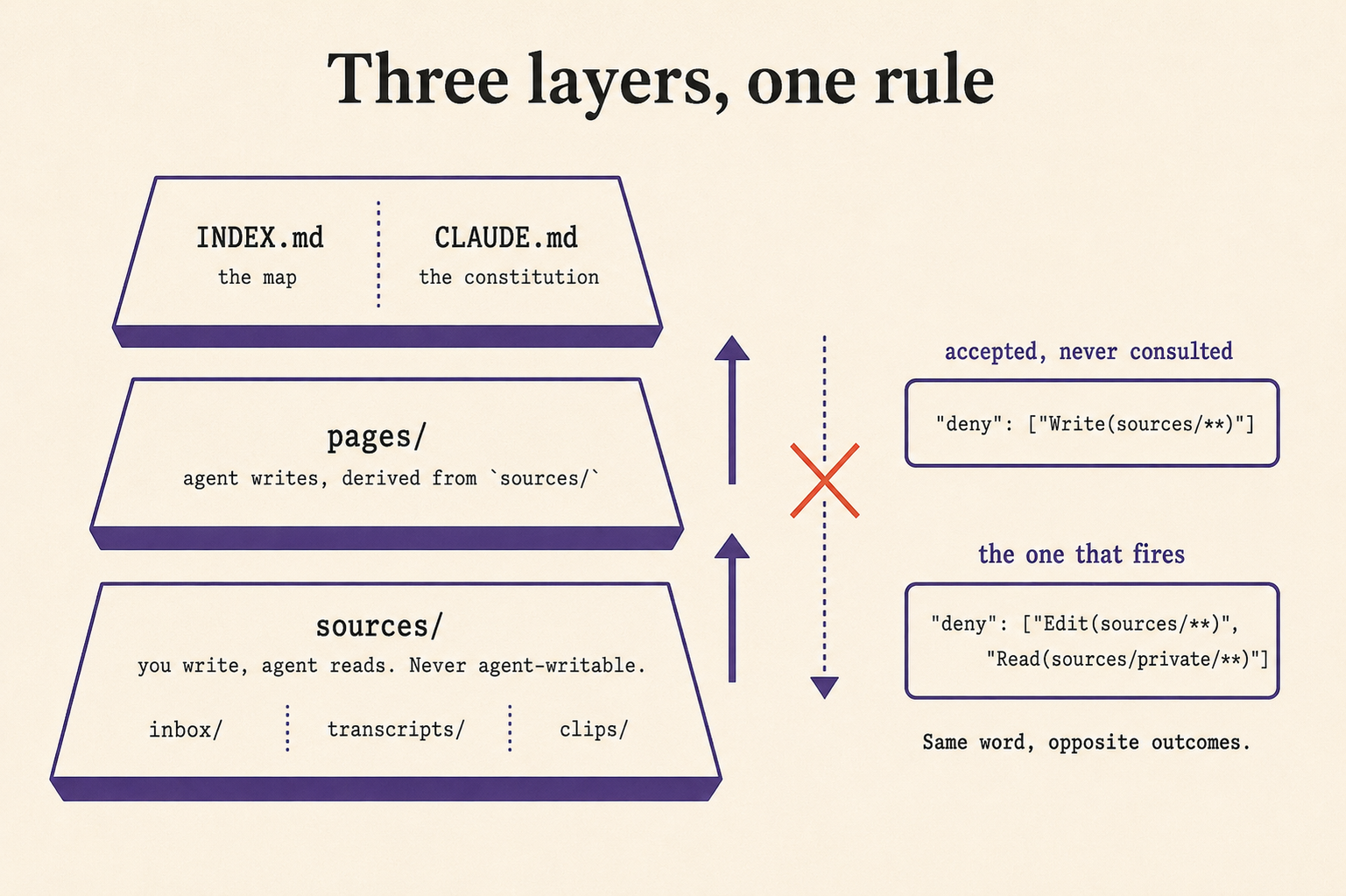
The diagram is the architecture the rule protects, and it fits in a sentence: source notes stay canonical, the agent only ever writes the layer above them. sources/ at the base holds inbox/, transcripts/ and clips/, and it is the layer you write and the agent only reads. pages/ above it is agent-written, derived from sources/. INDEX.md the map and CLAUDE.md the constitution sit on top. Writes flow strictly upward, and the downward arrow on that diagram is struck through because nothing the agent derives may ever rewrite the thing it was derived from.
Same word, opposite outcomes
The documentation says it plainly, and it is the single most useful paragraph in the whole permissions page:
Claude Code checks file permissions against Edit(path) and Read(path) rules only. If you write a path rule for Write, NotebookEdit, Glob, or the legacy MultiEdit tool instead, Claude Code accepts the rule but never consults it, and warns at startup, except for a Glob rule passed in —allowedTools. […] Claude Code doesn’t warn about a tool-name rule with no path, such as a deny rule for Write; it matches that rule at the tool level everywhere.
Read the last sentence twice. A bare "Write" deny, with no path, is real and total, and a "Write(sources/**)" deny does nothing at all. Same word, opposite outcomes, and the startup warning that would have told me only exists from v2.1.210, so on an older build we get silence.
So the rule that fires is the one on the right of the diagram above:
{
  "permissions": {
    "deny": ["Edit(sources/**)", "Read(sources/private/**)"]
  }
}
Two mechanics ride along with that, and both are in our favour. A Read deny also blocks Edit and Write on the same path, including creating a new file there, though NotebookEdit is not covered. And depth semantics differ by rule type: allow rules are literal, while deny and ask rules match a directory of that name at any depth, so one Edit(sources/**) deny covers every nested copy you make later without thinking about it.
The gate that actually fires
A settings rule stops the ordinary case. It doesn’t stop a shell command that writes the same path, and if the agent can run bash, it can write anywhere the shell can. So we reach for a PreToolUse hook, and the exit code is the entire mechanism:
For most hook events, exit code 2 is the only exit code that blocks through the code alone. Without valid JSON on stdout, Claude Code treats exit code 1 as a non-blocking error and proceeds with the action, even though 1 is the conventional Unix failure code. If your hook is meant to enforce a policy, use exit 2.
Exit 1 is the Unix habit and it’s wrong here. Your gate will look like it works, because you’ll see the error text, and the write lands anyway.
Save it at .claude/hooks/protect-sources.sh and make it executable:
#!/usr/bin/env bash
# .claude/hooks/protect-sources.sh
# Blocks WRITES to sources/, by tool or by shell. exit 2 blocks; exit 1 does NOT.
payload=$(cat)
case "$(jq -r '.tool_name // ""' <<< "$payload" 2>/dev/null)" in Read|Grep|Glob) exit 0 ;; esac
target=$(jq -r '[.tool_input.file_path, .tool_input.path, .tool_input.notebook_path,
                 .tool_input.command] | map(select(.)) | join(" ")' <<< "$payload" 2>/dev/null)
grep -qE '(^|[^A-Za-z0-9_])sources/' <<< "$target" || exit 0
echo "BLOCKED: sources/ is canonical and read-only. Write to pages/ instead." >&2
exit 2
Then register it, because a hook file nobody wired up is a file:
{
  "hooks": {
    "PreToolUse": [
      { "matcher": "*", "hooks": [{ "type": "command", "command": ".claude/hooks/protect-sources.sh" }] }
    ]
  }
}
Resist making it clever. It reads two things, which tool is asking and where that tool is writing, and it never reads what the tool is writing. Our reports cite sources/ paths constantly, so a hook that searched the body would block our own audit output, and we would lose an evening working out why.
The failure that fails open
One more, and it is the reason to watch the very first run. From the same page:
When you set up a policy hook, watch for this notice on its first run: a mistyped path in settings.json leaves the gate silently disabled.
A hook that can’t start lands in the non-blocking bucket. The shell exits 127, you get a notice, and the action proceeds. So the gate we installed to be certain is itself capable of being accepted and never consulted, which is the same shape one level up.
Test that it can disobey
Here’s the part almost everybody gets wrong. Ask the agent to fix a typo in a file under sources/ and four things must happen: the tool call is blocked rather than politely declined, our stderr message appears, git status is clean afterwards, and a plain read of that same file still succeeds, because a boundary that also blocks reads breaks every audit we run later.
Don’t accept a prose refusal as a pass. A compliant-sounding refusal is exactly what you get on a good day from a system with no enforcement at all. Run it twice, once with the hook installed and once with it renamed. The second run should get through. If both are blocked, your deny rule is doing the work; if neither is, you typed Write where you meant Edit.
One rule, three enforcements. CLAUDE.md explains it, the deny rule handles the ordinary case, and the hook is the one that can’t be talked out of it.
Now go build something this weekend!
John Cook