How to Build Your First AI Agent Workflow
Build a working AI agent workflow in under 10 minutes using a copy-paste YAML template. No code required. Includes trigger, steps, output walkthrough.
>This covers building your first agent. OpenClaw: Ship 30 AI Agents in 30 Days goes deeper on fleet architecture, income-generating templates, and a 30-day deployment plan.
OpenClaw: Ship 30 AI Agents in 30 Days
The No-Code AI Workflow Playbook
Summary:
- Build a working email summarizer agent with one YAML template.
- Understand the trigger-steps-output pattern that every agent workflow uses.
- Run a dry test before enabling any agent on real data.
- Get a copy-paste template, customization checklist, and cost breakdown.
A one-man consulting firm pasted the YAML template below, changed two fields, and had a working email summarizer running before his second cup of coffee. His admin time dropped from 11 hours a week to 90 minutes. Total monthly cost for three agents: $38. This is the same template, the same two fields, and the same 10-minute setup.
What does an AI agent workflow actually look like?
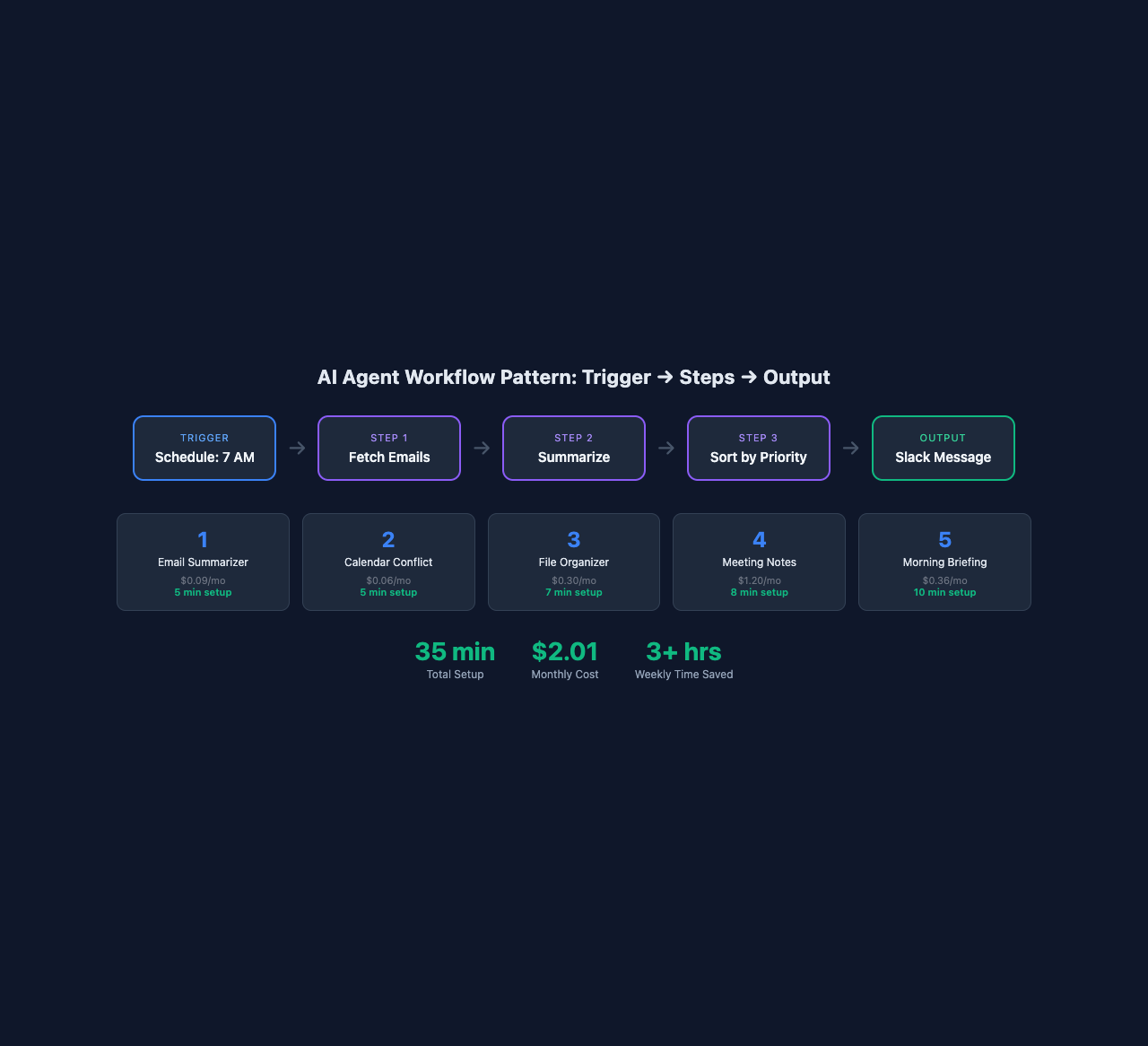
Every AI agent workflow follows the same three-part structure: a trigger (what starts it), steps (what it does), and an output (where the result goes).
name: "template-name"
trigger:
  type: schedule | email | file-change | manual
  config:
    # trigger-specific settings
steps:
  - name: "step-name"
    tool: "tool-name"
    action: "what to do"
    input: "instructions or data"
    provider: "which LLM to use"
output:
  destination: "where results go"
  format: "how to format them"
That’s the entire pattern. Learn it once, reuse it for every agent you build. A daily email summarizer uses the same structure as a competitor price tracker or an invoice processor. The complexity comes from what you chain together, not from how hard each piece is to configure.
On OpenClaw, the same email summarizer that takes 5 lines of workflow config takes 35 lines of YAML on OpenFang (a competing platform). Same result. Six times the configuration. The no-code template approach is why platforms like OpenClaw gained 230,000+ active instances.
For comparison, the largest open-source workflow automation platform, n8n, now has 183,000+ GitHub stars, 400+ integrations, and a community library of 9,100+ shared workflow templates. That template count tells you something: thousands of non-developers are building automation by copying and modifying existing workflows, not writing code from scratch. The copy-paste-customize pattern works at scale.
Where should you run this?
| Option | Best for | Cost |
|---|---|---|
| Your laptop | Testing and development | Free (hardware you own) |
| $5/month VPS (Hetzner, DigitalOcean) | Always-on agents, cron schedules | $5-10/month |
| Managed platform (n8n Cloud, Make) | Non-technical users, visual builders | $20-50/month |
Start on your laptop. Move to a VPS when you need 24/7 uptime.
How do you build a daily email summarizer agent?
You copy this YAML template, change two fields, and import it. Total time: 5 minutes.
name: "daily-email-summary"
trigger:
  type: schedule
  config:
    cron: "0 7 * * *"  # Every day at 7:00 AM
steps:
  - name: "fetch-emails"
    tool: "gmail"
    action: "get-unread"
    input: "Fetch all unread emails from the last 24 hours"
  - name: "summarize"
    tool: "llm"
    action: "process-each"
    input: |
      For each email:
      1. Write a one-sentence summary (max 15 words)
      2. Classify: URGENT, ROUTINE, or NOISE
      3. Format as: [PRIORITY] From: sender - summary
    provider: "tier-2"
  - name: "sort-and-format"
    tool: "llm"
    action: "process"
    input: |
      Sort by priority (URGENT first, then ROUTINE, then NOISE).
      Add a header: "X urgent, Y routine, Z noise"
    provider: "tier-1"
  - name: "deliver"
    tool: "slack"
    action: "send-message"
    input:
      channel: "#morning-brief"  # Change to YOUR channel
      message: "{{sort-and-format.output}}"
output:
  destination: "slack"
  format: "message"
Two fields to change: your Gmail account (if you have multiple) and the Slack channel name. That’s it.
To import and test:
# Import from clipboard after copying the YAML
openclaw workflow import --from-clipboard

# Dry run: reads real emails but takes no actions
openclaw workflow test daily-email-summary

# If the test looks right, enable it
openclaw workflow enable daily-email-summary
The test command is your safety net. It reads your actual emails and shows you exactly what the agent would do, but it doesn’t send messages or modify anything. Run it first. Always.
What does the output look like?
Here’s a real morning brief from a running agent:
Morning Brief - 3 urgent, 8 routine, 12 noise

URGENT:
- From: Jane (client) - Payment of $4,200 scheduled for Friday, needs account number
- From: AWS - Billing alert: monthly spend exceeded $50 threshold
- From: Mike (contractor) - Can't deliver mockups until Wednesday, needs approval

ROUTINE:
- From: Google Calendar - Meeting reminder: Team sync at 2pm
- From: Notion - Sarah commented on Q2 planning doc

NOISE:
- From: Substack - Newsletter: "10 AI Tools That Will Change Everything"
In 30 seconds, you know everything waiting in your inbox. No scrolling. No accidentally skipping something buried between newsletters.
A one-man consulting firm used this exact template to cut email processing from the first task of the day to a 30-second scan. His three OpenClaw agents (email, invoices, reports) run on a $15/month VPS. Total monthly cost including API calls: $38. His admin time dropped from 11 hours a week to about 90 minutes.
What fails on the first run?
Gmail authorization fails. The most common issue. Run openclaw tool config gmail --reauthorize and make sure you check the “Read email” permission during the OAuth flow. The default authorization sometimes skips it.
Summaries are too long or vague. Adjust the prompt. Change “max 15 words” to “max 10 words.” Add an example: “Example: [URGENT] From: Jane Chen - Requesting updated invoice for March deliverables.”
Newsletters classified as URGENT. Aggressive subject lines (“LAST CHANCE”) trick the classifier. Add this line to the summarize step: “Newsletters and marketing emails are always NOISE regardless of subject line language.”
Test safely: Use fake data for your first 10 runs. Create a test Gmail account, a test Slack channel, and dummy spreadsheets. Never connect your real inbox or production Slack to an untested agent. One bad loop can send 500 messages before you notice.
Cost assumptions: “$0.003 per 20 emails” assumes Claude Sonnet with ~500 token summaries per email. Longer emails or detailed analysis increase cost. Monitor your first week of runs before projecting monthly costs.
Cost per run: $0.003 for 20 emails. That’s $0.09/month running daily. The sort step uses the budget model (tier-1) because sorting is a simple task that doesn’t need premium intelligence.
How do you customize this for different output channels?
Replace Slack with any delivery method. Two options:
File output (no Slack needed):
  - name: "deliver"
    tool: "filesystem"
    action: "write"
    input:
      path: "~/Reports/email-brief-{{date}}.md"
      content: "{{sort-and-format.output}}"
Email to yourself:
  - name: "deliver"
    tool: "gmail"
    action: "send"
    input:
      to: "you@yourdomain.com"
      subject: "Morning Brief - {{date}}"
      body: "{{sort-and-format.output}}"
The pattern is always the same: swap the last step’s tool and destination. The rest of the workflow stays identical.
How do you scale from one agent to five?
The same template format works for everything. Here’s what five starter agents cost:
| Template | Setup Time | Cost/Month | Time Saved/Week |
|---|---|---|---|
| Email Summarizer | 5 min | $0.09 | 30-45 min |
| Calendar Conflict Detector | 5 min | $0.06 | 15-30 min |
| File Organizer | 7 min | $0.30 | 20-30 min |
| Meeting Notes Generator | 8 min | $1.20 | 45-60 min |
| Morning Briefing | 10 min | $0.36 | 30-45 min |
| Total | 35 min | $2.01/month | 2.5-3.5 hrs/week |
Two dollars a month. Thirty-five minutes of setup. Three hours a week reclaimed. The morning briefing agent ties the others together by pulling data from the email summarizer and calendar checker into a single daily message.
What should you actually do?
- If you want one quick win right now, paste the email summarizer template and run the test command. Five minutes to a working agent.
- If you want a full productivity stack, build all five starter templates over a week. Each one takes under 10 minutes.
- If you want agents that work together, read about fleet architecture where one agent’s output triggers the next. That’s where single agents become a system.
bottom_line
- AI agent workflows are three parts: trigger, steps, output. That pattern covers every use case from email to invoicing to price tracking.
- Start with one copy-paste template. Run the dry test. Enable it. You’ll have a working agent before lunch.
- Five agents cost $2/month and save 3+ hours/week. The math works for anyone with an inbox.
Frequently Asked Questions
Do I need to know how to code to build an AI agent workflow?+
No. OpenClaw workflows use YAML templates you copy, paste, and customize by changing 2-3 fields like your email address and Slack channel.
How much does it cost to run an AI agent daily?+
A daily email summarizer costs about $0.003 per run, or $0.09/month. Five starter agents together cost roughly $2/month in API fees.
What's the difference between an AI agent and a chatbot?+
A chatbot answers questions. An AI agent executes multi-step workflows autonomously: it reads your email, classifies priority, formats a summary, and delivers it to Slack without you touching anything.