How to Run 2 Claude Code Agents in One Repo Without Losing Work
Run two or more Claude Code agents in one repository and keep every agent's work. One table and one hook turn the second writer away before it touches the file, by name, and I built it after two agents reported the same file done and forty minutes of work was gone.
>This covers turning the second writer away. Claude Code Multiplayer goes further: releasing a claim when the work is verified, handing ownership over with the handoff, and what a worktree costs you once the session exits.
Claude Code Multiplayer
Build One Shared Workspace for Your Team and Agents in 30 Days
Hello builders,
Two Claude Code agents can work in the same repository all afternoon, and both sets of changes can still be there when they finish. On one of my runs both agents told me at 11:42 that the config loader was done, only one of those writes was on disk, and forty minutes of work had vanished with no merge conflict and no error. With two Claude Code agents editing the same file, what has held up for me is one small table of owners and one script on a hook that turns the second agent away before it writes.
Claude Code’s agent teams page says “Task claiming uses file locking to prevent race conditions when multiple teammates try to claim the same task simultaneously,” and I spent most of a morning believing that covered me before I noticed the lock it describes is on the task list. What does it offer for our source files? The same page gives this advice.
Two teammates editing the same file leads to overwrites. Break the work so each teammate owns a different set of files.
That advice is right, so we write the split down and hand it to a script that checks it before every edit.
One table, one script
The table lives at workspace/owners.md, one row per claimed path. The third column is the moment of the claim in plain epoch seconds, because that’s the one time format macOS and Linux agree on.
| path glob | owner | claimed | note |
|---|---|---|---|
| src/auth/** | sam | 1788969600 | token TTL migration |
| workspace/bin/** | jc | 1788966000 | the gates |
Those two timestamps are from my own table and they’re long expired, so don’t paste them. To claim a path we append a row stamped with the current time.
echo "| src/auth/** | sam | $(date +%s) | token TTL migration |" >> workspace/owners.mdThe script is workspace/bin/claim.sh. It reads the table top to bottom and stops at the first row that matches the path.
#!/usr/bin/env bash
# Grants or refuses a claim on one path. A refusal names the owner.
# Exit 2 blocks; every other exit code does not.
set -uo pipefail

OWNERS="${WORKSPACE_OWNERS:-workspace/owners.md}"
ME="${WORKSPACE_ME:-$(git config user.name)}"
TTL_MIN="${CLAIM_TTL_MIN:-120}"
target="${1:-}"
target="${target#$(git rev-parse --show-toplevel 2>/dev/null)/}"

[ -n "$target" ] || exit 0
now=$(date +%s)
trim() { local s="$1"; s="${s#"${s%%[![:space:]]*}"}"; printf '%s' "${s%"${s##*[![:space:]]}"}"; }

while IFS='|' read -r _ glob owner since _rest; do
  glob=$(trim "$glob"); owner=$(trim "$owner"); since=$(trim "$since")

  case "$glob" in ''|'path glob'|-*|'#'*) continue ;; esac
  case "$since" in ''|*[!0-9]*) continue ;; esac
  case "$target" in $glob) ;; *) continue ;; esac

  [ "$owner" = "$ME" ] && exit 0

  age=$(( (now - since) / 60 ))
  if [ "$age" -ge "$TTL_MIN" ]; then
    echo "claim: $glob was held by $owner for ${age}m, past the ${TTL_MIN}m expiry. Taking it." >&2
    exit 0
  fi

  echo "claim: REFUSED. $target matches $glob, held by $owner for ${age}m (expires at ${TTL_MIN}m)." >&2
  exit 2
done < "$OWNERS"

exit 0
Run chmod +x workspace/bin/claim.sh, check that jq is installed, then wire the script into .claude/settings.json so it fires before every edit.
{
  "hooks": {
    "PreToolUse": [
      { "matcher": "Edit|Write",
        "hooks": [ { "type": "command",
          "command": "./workspace/bin/claim.sh \"$(jq -r '.tool_input.file_path')\"" } ] }
    ]
  }
}
The script learns which agent is asking from WORKSPACE_ME, so we start each agent in the repository root with its own name, as in WORKSPACE_ME=sam claude. The fallback is git config user.name, and that’s identical for every agent you launch yourself, which would let both of them through. The hook fires on the Edit and Write tools only, so a shell command that rewrites a file goes around it.
One command, three answers
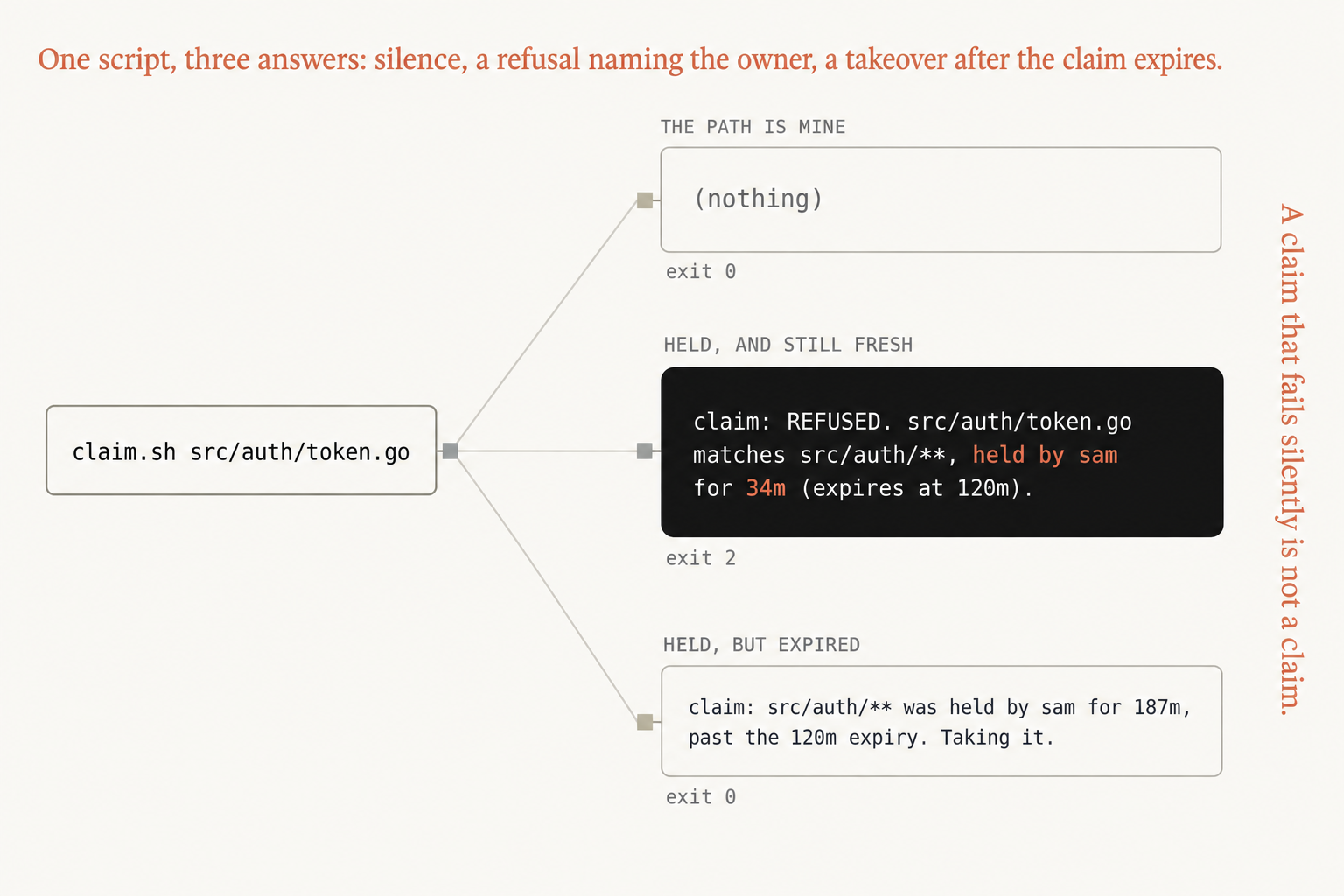
The picture is every case the script has, starting from one call, claim.sh src/auth/token.go.
- THE PATH IS MINE prints
(nothing)and exits 0 - HELD, AND STILL FRESH prints
claim: REFUSED. src/auth/token.go matches src/auth/**, held by sam for 34m (expires at 120m).and exits 2 - HELD, BUT EXPIRED prints
claim: src/auth/** was held by sam for 187m, past the 120m expiry. Taking it.and exits 0
I wired this into a scratch repository on Claude Code v2.1.292, with src/auth/** held by sam for 34 minutes, and asked an agent running as jc to edit src/auth/token.go. The edit was blocked, the agent quoted the refusal back word for word, and git status showed nothing had changed. The same agent then edited src/session/store.go, which no row matches, and that went through without a word. We need to see both, because a script that turns everything away looks the same as a working one until we watch it stay quiet.
The middle answer exits 2 because that’s the only exit code a PreToolUse hook can block with, and an exit 1 would print the refusal and let the edit happen anyway. The name and the age are there for the agent’s benefit. An agent that reads held by sam for 34m can work on something else, ask Sam or wait, and that’s the reason for the line running down the side of the picture: a claim that fails silently is not a claim.
A specific row goes above a general one, since the first match wins, and we give whole directories an owner, so a new file inside an owned folder already has one. The 120-minute expiry is only there for an agent that crashed while holding a path, and whoever takes over an expired claim replaces the old row with their own.
Worktrees are the other answer people reach for, and I use them too. They stop the overwrite, but the two agents can still do the same work twice and we find out at the merge, so I let the table decide who works on what and the worktree decide where.
Put two rows in the table this weekend, start two agents under two names and ask the second one for a file the first one holds.
Now go build something this weekend!
John Cook